How Can I Prevent OOM Errors on NVIDIA A40 48GB When Running Large Models?

Introduction
You've got your shiny new NVIDIA A4048GB GPU, ready to unleash the power of large language models (LLMs). But wait! You're hitting Out-Of-Memory (OOM) errors, and your dreams of text generation are turning into a nightmare. Fear not, fellow AI enthusiast! This guide will help you understand and overcome OOM errors when running LLMs on your A4048GB GPU. We'll dive into the depths of memory consumption, explore the intricacies of model quantization, and provide practical tips to keep your LLM running smoothly.
Understanding OOM Errors
OOM errors occur when your LLM tries to allocate more memory than your GPU has available. Imagine it like trying to cram too much luggage into your car - you'll end up with an overflowing trunk and a frustrated trip!
Factors Contributing to OOM
So what makes those LLMs so thirsty for memory? Here are the key players:
- Model Size: Larger models, like those with billions of parameters, require more memory to store their internal representations. Think of it as having a large library with millions of books; storing them all takes a lot of space.
- Batch Size: The number of samples processed simultaneously during training or inference. A larger batch size requires more memory to hold the data and model weights.
- Data Type: The precision of numbers used in calculations. Lower precision, like quantized models, can lead to smaller memory footprints. Imagine storing numbers with fewer decimal places; you need less space to store them.
- Hardware: Your GPU's memory capacity plays a crucial role. A40_48GB offers a generous 48 GB of memory, but even that can be insufficient for large models.
Strategies to Prevent OOM on A40_48GB
Now that we understand the culprits, let's arm ourselves with the tools to combat OOM errors!
Model Quantization
You can think of quantization as a diet for LLMs. By reducing the precision of numbers used, we can significantly decrease the model's memory footprint. Imagine swapping out high-definition pictures for their compressed versions – you get a similar quality with a much smaller file size.
Types of Quantization:
- Q4: Uses only 4 bits to represent each number, leading to massive memory savings. Perfect for memory-constrained situations, but it may sacrifice some accuracy.
- F16: Uses 16-bit floating-point numbers, offering a balance between accuracy and memory efficiency.
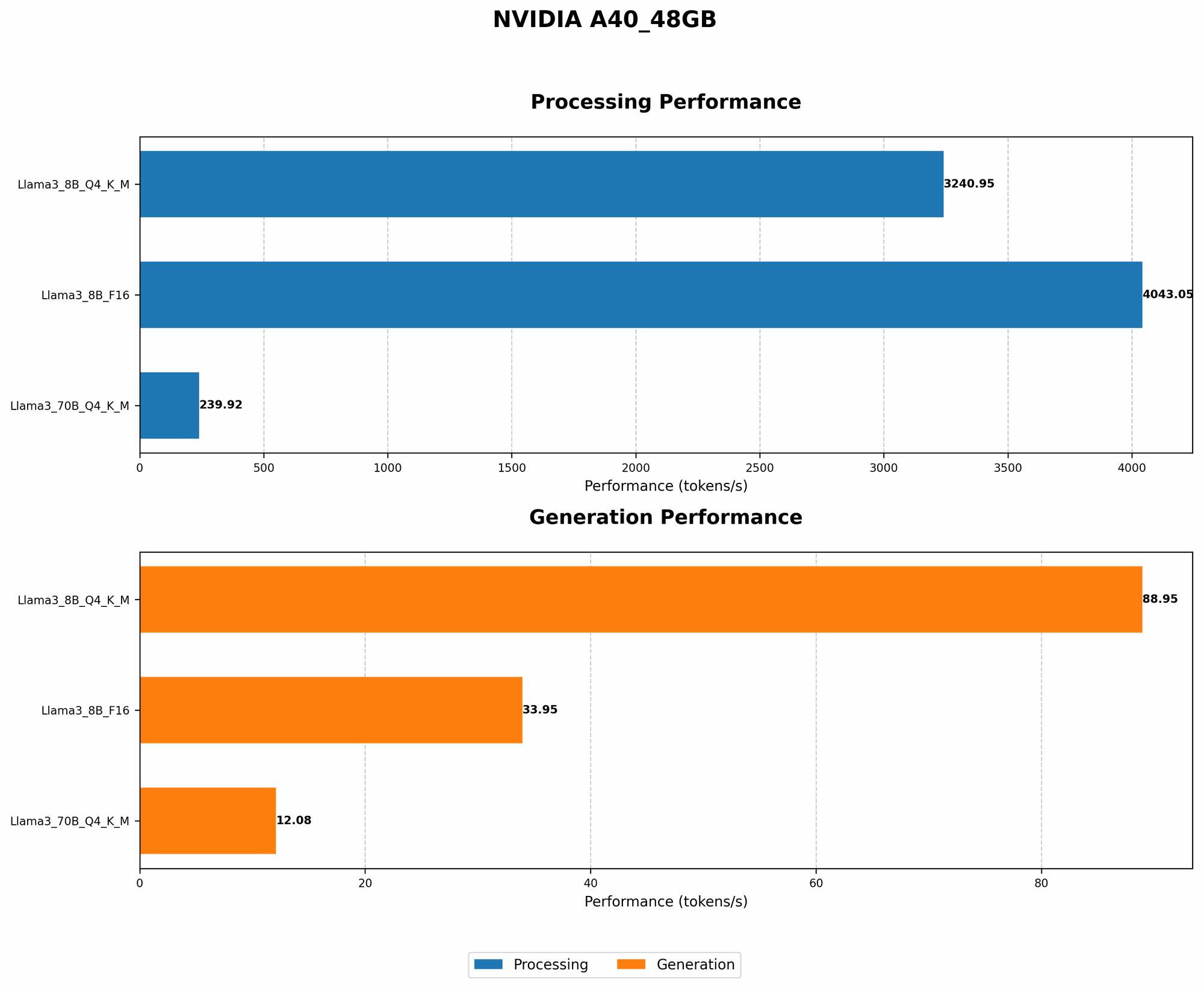
Let's analyze some real-world examples using the data:
| Model | Quantization | A40_48GB Token/Second | Notes |
|---|---|---|---|
| Llama 3 8B | Q4KM | 88.95 | Excellent performance for token generation with Q4 quantization |
| Llama 3 8B | F16 | 33.95 | F16 still achieves a good speed while being less memory-hungry |
| Llama 3 70B | Q4KM | 12.08 | A significant drop in speed with Q4 quantization, but still usable for inference |
| Llama 3 70B | F16 | N/A | Data not available for F16 quantization for 70B |
Key Takeaways:
- Q4 quantization offers significant memory savings, especially for smaller models like Llama 3 8B.
- Larger models like Llama 3 70B might see a performance drop with Q4 quantization, requiring careful consideration of accuracy vs. memory efficiency.
Optimizing Batch Size
Adjusting your batch size is another effective tactic. Think of it as dividing a large group of people into smaller teams to avoid overcrowding. Smaller batch sizes might slow down training or inference, but they can prevent OOM errors by reducing the memory demand.
Understanding Memory Usage:
To effectively manage memory usage, it's vital to monitor it. Tools like nvidia-smi or htop can provide real-time updates on your GPU's memory consumption. Using profiles can help you identify memory hotspots and pinpoint areas for optimization.
Addressing Common Concerns
Let's delve into some common concerns and their solutions:
"My Model Still Crashes!"
- Check Your Model's Memory Requirements: Make sure your GPU has enough memory to accommodate the model's weight parameters, activations, and other necessary buffers. Consult the model's documentation or use tools like
torch.cuda.memory_allocated()to get an estimate. - Review Your Code: Look for memory leaks or unnecessary memory allocations in your code. Tools like profilers can help identify potential issues.
- Consider Cloud-Based Solutions: If your model is truly massive, consider utilizing cloud-based platforms like Google Colab or Amazon SageMaker that offer more memory resources.
"Is There a Magic Number for Batch Size?"
No magic number exists - it depends on your model, data, and hardware. Start with smaller batch sizes and gradually increase them until you hit memory limitations. Monitor performance and model accuracy to find the optimal balance.
"What About Other GPU Models?"
While this guide focused on A40_48GB, the principles discussed are generally applicable to other GPUs. Keep in mind that memory capacities vary across models, so adjust your approach based on your specific GPU.
FAQs
Is it possible to run larger models on A40_48GB?
Yes, but it might require clever techniques. Consider:
- Model Quantization: Q4 quantization can significantly reduce memory usage, allowing you to fit larger models on the A40_48GB.
- Batch Size Optimization: Adjusting your batch size can help manage memory consumption.
- Hardware Upgrades: If you need even more memory, consider using multiple GPUs in parallel.
Are there any other techniques for preventing OOM errors?
Absolutely! Here are a few more tips:
- Caching Data: Store frequently used data in memory to reduce disk access.
- Gradients Accumulation: Accumulate gradients over multiple iterations before updating weights, reducing memory usage.
- Memory Pooling: Create dedicated memory pools for specific tasks to avoid memory fragmentation.
Are there any resources I can refer to for further information?
- Official CUDA Documentation: Provides in-depth information on CUDA and memory management.
- PyTorch Documentation: Covers techniques for memory management in PyTorch.
- TensorFlow Documentation: Offers guidance on memory optimization in TensorFlow.
Keywords
A40_48GB, OOM, GPU, LLM, Large Language Model, Memory, Quantization, Batch Size, Performance, Optimization, CUDA, PyTorch, TensorFlow.