How Can I Prevent OOM Errors on NVIDIA A100 SXM 80GB When Running Large Models?

Introduction
Running large language models (LLMs) locally can be a thrilling journey into the world of AI. Imagine having your own personal AI assistant, capable of generating creative text, translating languages, and answering your questions. But this thrilling ride can quickly turn into a bumpy experience if you encounter the dreaded "Out of Memory" (OOM) error. This error happens when your device's memory (RAM) is overwhelmed by the sheer size of the model you're trying to run.
Think of it like trying to cram an entire library's worth of books into a tiny backpack - it's just not going to work! This is where the mighty NVIDIA A100SXM80GB GPU comes into play, offering a vast expanse of memory. But even with this powerful warrior, there's a chance of encountering OOM errors if you're not careful.
Don't worry, this guide will equip you with the knowledge and strategies to tame those memory-hungry LLMs and prevent OOM errors on your A100SXM80GB GPU, ensuring smooth sailing for your AI adventures. Let's delve into the world of LLMs, memory management, and the secrets of conquering OOM errors!
Understanding the OOM Error: A Memory Mishap
An OOM error occurs when your device (your computer, GPU, etc.) runs out of memory while trying to run an application or program. Imagine trying to bake a cake with only a tiny mixing bowl. As you start adding ingredients, you eventually run out of space, and the batter overflows!
LLMs are like massive cakes – they require a significant amount of memory to load and run. To prevent OOM errors, you need to ensure that your device has enough memory, and you're using the model efficiently.
The A100SXM80GB: Your Memory Powerhouse
The NVIDIA A100SXM80GB is a high-end GPU that offers a whopping 80GB of HBM2e (High Bandwidth Memory) – that's the memory directly attached to the GPU. This massive memory capacity can handle large language models, allowing you to train and run models with incredible speed and efficiency.
A100SXM80GB vs. Other GPUs: A Memory Showdown
While the A100SXM80GB is a memory behemoth, It's not the only GPU in town. Let's compare it to some other popular GPUs:
| GPU | Memory (GB) | Memory Bandwidth (GB/s) |
|---|---|---|
| A100SXM80GB | 80 | 1520 |
| RTX 3090 | 24 | 936 |
| RTX 4090 | 24 | 1.000 |
| A100PCIe40GB | 40 | 1520 |
As you can see, the A100SXM80GB has the largest memory capacity and bandwidth compared to the other GPUs listed. This means that it can store and access data much faster, making it ideal for running large language models.
Techniques to Mitigate OOM Errors on A100SXM80GB
Now that we've identified the A100SXM80GB as our memory champion, let's dive into the practical strategies to prevent OOM errors and unlock the full potential of your GPU:
1. Model Quantization: Shrinking the Model Footprint
Think of quantization as a diet for your LLM. It involves converting the model's weights from high-precision floating-point numbers (like 32-bit floats) to lower-precision numbers (like 16-bit floats or even 8-bit integers). This process reduces the memory footprint of the model without significantly impacting its performance.
For example, a model with 32-bit weights might require double the memory compared to a model with 16-bit weights. Quantization is like putting your LLM on a healthy diet, shrinking its size and making it easier to fit in your GPU's memory.
Example:
Let's take the Llama 3 model as an example. Here's how its performance changes with different quantization levels on the A100SXM80GB:
| Model | Quantization | Token Speed (tokens/second) |
|---|---|---|
| Llama38BF16 | 16-bit | 53.18 |
| Llama38BQ4KM | 4-bit | 133.38 |
As you can see, using 4-bit quantization for the Llama 3 8B model significantly improves token speed while reducing memory consumption.
Note: Different models and tasks may have varying sensitivities to quantization. Experimenting with different levels of quantization is crucial to find the optimal balance between performance and memory efficiency.
2. Gradient Accumulation: Splitting the Workload
Gradient accumulation is like dividing a big project into smaller, manageable tasks. Instead of processing the entire dataset at once, you break it down into smaller batches. You then calculate the gradients for each batch and accumulate them over multiple batches before updating the model's weights.
This technique allows you to train larger models with limited memory by effectively reducing the memory required for each step.
For example:
Imagine you're training a model on a dataset with 1 million examples. Instead of processing all 1 million examples at once, you can divide them into batches of 10,000 examples each. You would then process one batch at a time, accumulating the gradients until you've processed all 100 batches. This way, you only need to store the gradients for one batch at a time, reducing memory requirements.
3. Model Parallelism: Sharing the Load
Model parallelism is like assigning different tasks to different workers on a team. Instead of running the entire model on a single GPU, you can split the model across multiple GPUs, allowing each GPU to handle a part of the computation.
This approach helps to distribute the memory workload and allows you to run larger models that would otherwise exceed the memory capacity of a single GPU.
For example:
Imagine you have two GPUs available. You can split the model into two parts, with each part running on a separate GPU. This way, you can handle twice the amount of data and perform computations faster.
4. Optimizing Memory Usage: Taming the Memory Hog
Even with quantization and parallelism, it's crucial to optimize memory usage for maximum efficiency.
Here are some tips:
- Avoid unnecessary data duplication: Make sure you're not unnecessarily storing the same data in multiple locations. Try to use shared memory whenever possible.
- Delete unused objects: After you've finished using an object, delete it to free up memory.
- Optimize data structures: Choose data structures that are memory-efficient and appropriate for the task.
- Use caching techniques: Store frequently accessed data in cache memory for faster retrieval and reduced memory consumption.
Benchmarking LLM Performance on A100SXM80GB: A Look at the Numbers
Let's dive into real-world performance data to see how the A100SXM80GB stacks up when running various LLM models.
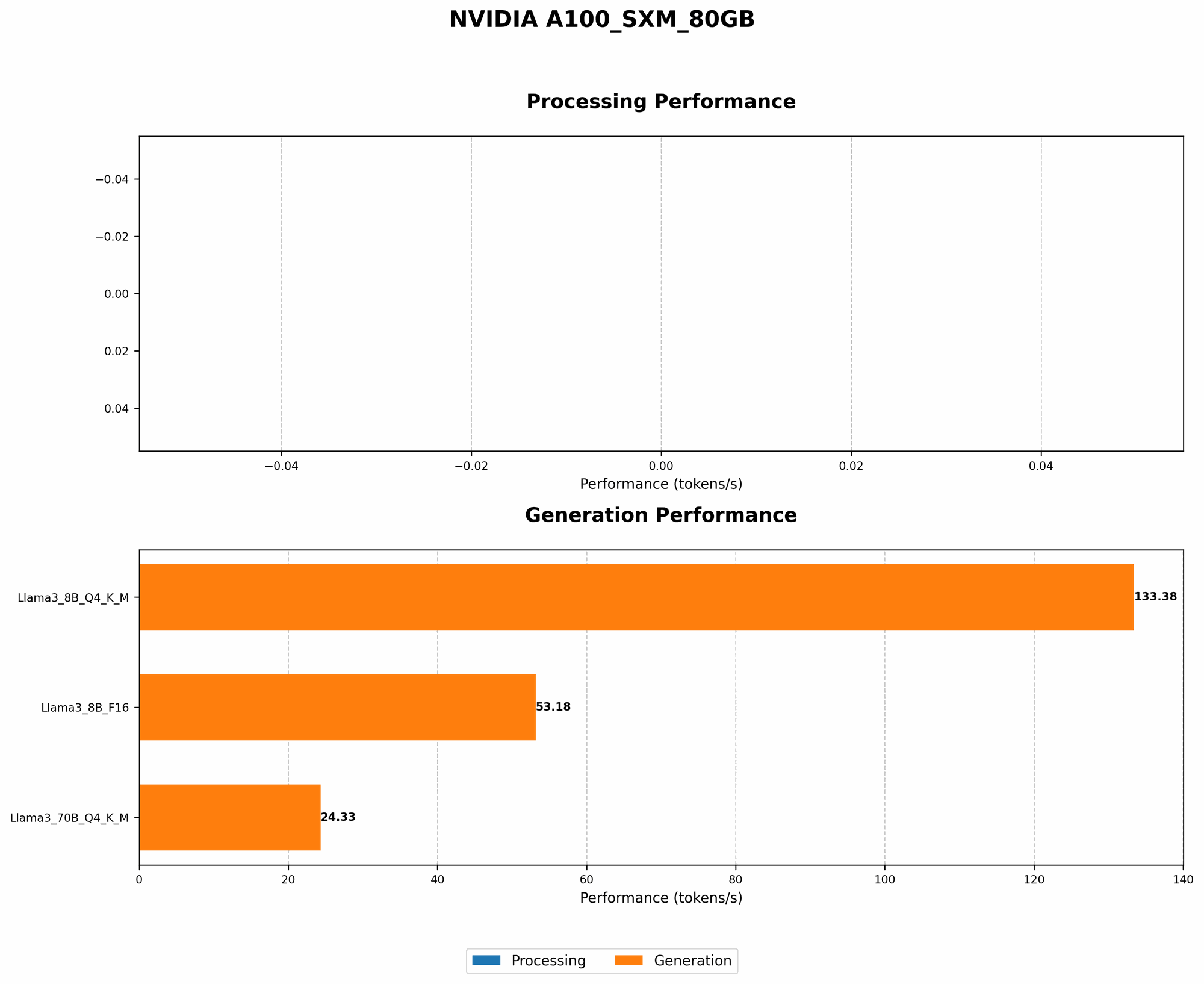
Here's a breakdown of token speeds for some popular LLMs using the A100SXM80GB:
| LLM Model | Quantization | Token Speed (tokens/second) |
|---|---|---|
| Llama38BF16 | 16-bit | 53.18 |
| Llama38BQ4KM | 4-bit | 133.38 |
| Llama370BQ4KM | 4-bit | 24.33 |
Key Observations:
- 4-bit quantization significantly improves token speed: The Llama 3 8B model achieves a remarkable token speed of 133.38 tokens/second using 4-bit quantization, compared to 53.18 tokens/second with 16-bit quantization.
- Larger models require more memory: The Llama 370B model, despite using 4-bit quantization, has a significantly lower token speed compared to the Llama 38B model. This is due to the larger size of the 70B parameter model, which demands more memory.
FAQ: Common Questions About LLMs and Memory Management
1. What are the best practices for choosing the right LLM for my A100SXM80GB?
Answer: Consider factors like model size, performance requirements, and available memory. Smaller models like Llama 3 8B are more memory-efficient and can be run on the A100SXM80GB with minimal optimization. Larger models like Llama 3 70B might require additional techniques like quantization and model parallelism to prevent OOM errors.
2. How can I optimize the performance of my LLM on the A100SXM80GB?
Answer: Quantization, gradient accumulation, model parallelism, and memory optimization techniques can significantly improve LLM performance. Experiment with different configurations to find the optimal balance between performance and memory efficiency.
3. What are the limitations of using a large model on the A100SXM80GB?
Answer: While the A100SXM80GB offers abundant memory, running extremely large models might still necessitate strategies like model parallelism and distributed training across multiple GPUs.
Keywords
A100SXM80GB, Out of Memory, OOM, LLM, Large Language Model, GPU, Memory Management, Quantization, Gradient Accumulation, Model Parallelism, Memory Optimization, Token Speed, Performance, Llama 3, NVIDIA, Deep Learning, AI, Machine Learning, Inference, Training, Benchmarking, Performance Comparison.