How Can I Prevent OOM Errors on NVIDIA 4090 24GB When Running Large Models?
Introduction
Running large language models (LLMs) locally can be a thrilling experience, but sometimes it can lead to a frustrating roadblock: the dreaded Out Of Memory (OOM) error. This happens when your GPU, even a powerful one like the NVIDIA 4090 24GB, runs out of memory to handle the massive calculations required by LLMs. Imagine trying to squeeze a giant, fluffy cloud into a tiny box—that's kind of what happens when you try to run a 70B parameter LLM on just 24GB of VRAM.
In this article, we'll explore how to prevent OOM errors when running LLMs on the NVIDIA 4090 24GB. This guide will help you avoid the frustrating OOM errors and unleash the full potential of your GPU.
Understanding OOM Errors
OOM errors happen because LLMs are big, like really, really big. Think of them as having billions of neurons, all connected and firing simultaneously, and each neuron needs its own little memory space. A 70B parameter model is like having 70 billion of these neurons, which translate to a lot of memory needed.
When you try to run an LLM that's too big for your GPU's memory, it's like trying to fit a 10-foot tall person into a 5-foot tall closet. It just doesn't work, and the program crashes with the dreaded "Out Of Memory" message.
Strategies to Prevent OOM Errors

Here are some strategies to prevent OOM errors on your NVIDIA 4090 24GB:
1. Choose the Right Model Size
The most obvious solution is to choose a smaller LLM. If your GPU can't handle a 70B model, try a 7B or 8B model instead. Think of it like choosing a smaller house if your family is growing. You might not get all the bells and whistles, but it'll fit comfortably.
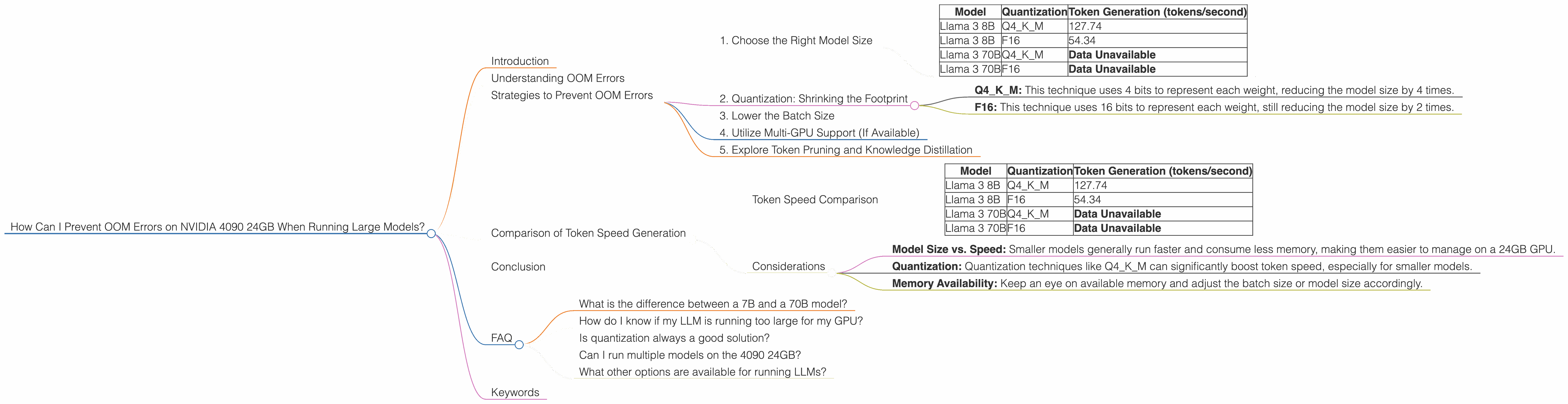
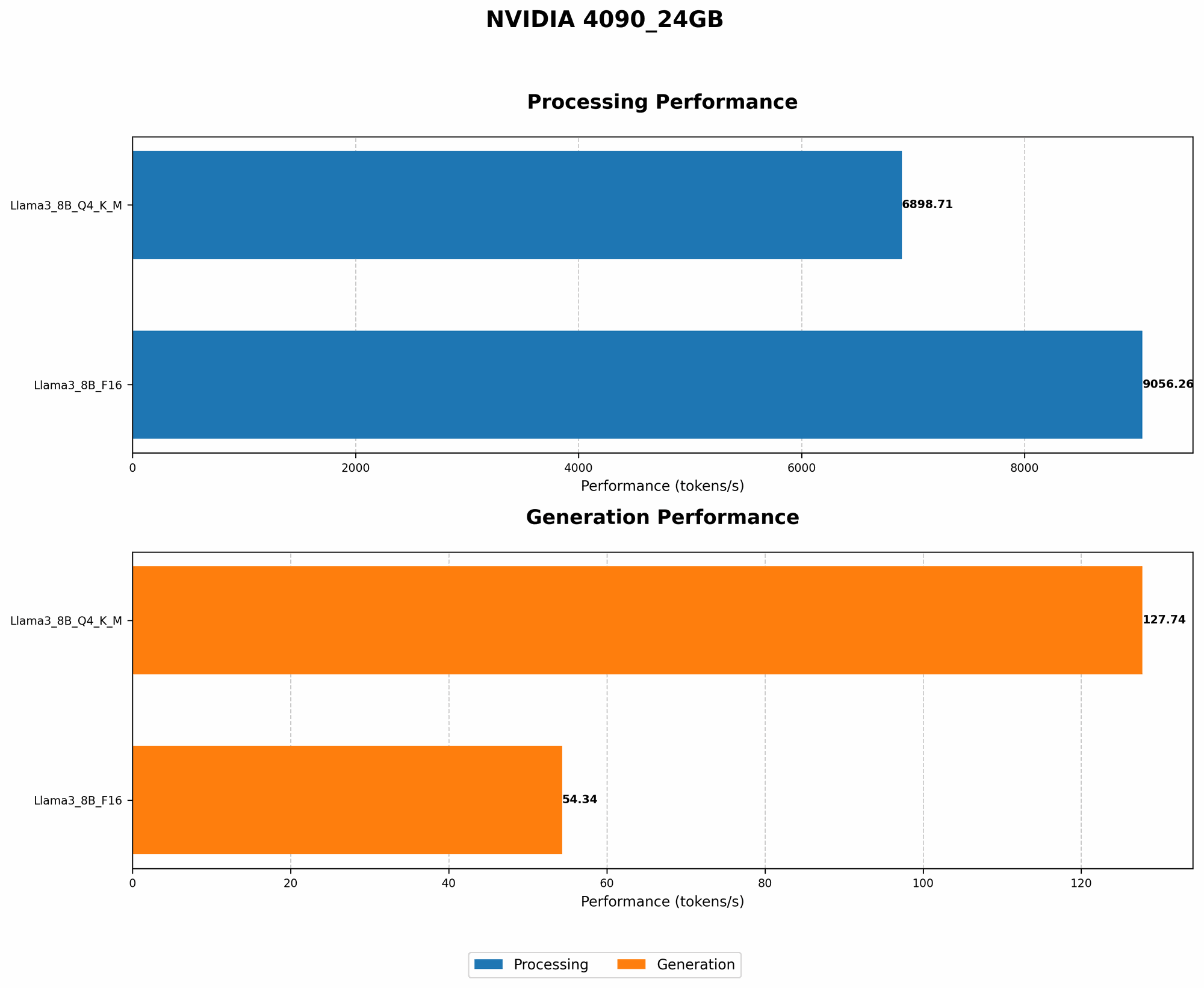
Here's a table showing the token generation speeds for different LLM model sizes on the NVIDIA 4090 24GB:
| Model | Quantization | Token Generation (tokens/second) |
|---|---|---|
| Llama 3 8B | Q4KM | 127.74 |
| Llama 3 8B | F16 | 54.34 |
| Llama 3 70B | Q4KM | Data Unavailable |
| Llama 3 70B | F16 | Data Unavailable |
Note: Data for the larger Llama 3 70B model is unavailable. This indicates that running the 70B model might be challenging on the 4090 24GB, even using the Q4KM quantization technique.
2. Quantization: Shrinking the Footprint
Imagine shrinking the memory footprint of the LLM without sacrificing too much accuracy—that's what quantization does. It's like using a smaller, more efficient data format for representing the model's weights. The smaller the data format, the less memory it takes up.
Two common quantization techniques are:
- Q4KM: This technique uses 4 bits to represent each weight, reducing the model size by 4 times.
- F16: This technique uses 16 bits to represent each weight, still reducing the model size by 2 times.
The table above shows that using Q4KM quantization significantly improves the token generation speed of the Llama 3 8B model, reaching 127.74 tokens per second. F16 quantization, while still effective, provides a faster speed of 54.34 tokens per second.
Recommendation: If you need to run a large model, consider using quantization to reduce its memory footprint and prevent OOM errors.
3. Lower the Batch Size
Think of a batch size as the number of sentences or words you process simultaneously. A larger batch size means your GPU has to handle more data at once, requiring more memory. Lowering the batch size can help keep your GPU happy.
Here's an analogy: Imagine you're trying to carry 10 bags of groceries at once. You might struggle and drop some, or even worse, get overwhelmed and drop all of them! Lowering the batch size would be like carrying only 5 bags at a time—more manageable and less likely to result in a messy situation.
4. Utilize Multi-GPU Support (If Available)
If you have multiple GPUs, you can use them collaboratively to distribute the LLM's workload. Imagine having multiple workers helping you move furniture—it's much easier and faster.
Note: For this strategy, you'll need to ensure your LLM framework and libraries support multi-GPU training.
5. Explore Token Pruning and Knowledge Distillation
Token Pruning is a technique that removes less important tokens from the LLM's vocabulary, effectively shrinking the model size. Knowledge Distillation is a technique that condenses a large, complex model into a smaller, more efficient one.
These methods require more advanced knowledge of LLMs and are often applied to pre-trained models. However, they offer significant potential for reducing memory usage.
Comparison of Token Speed Generation
The NVIDIA 4090 24GB demonstrates impressive token generation speed for the Llama 3 8B model, especially when using Q4KM quantization. However, running larger models like Llama 3 70B might be a challenge due to the lack of available data on its performance with this setup.
Token Speed Comparison
| Model | Quantization | Token Generation (tokens/second) |
|---|---|---|
| Llama 3 8B | Q4KM | 127.74 |
| Llama 3 8B | F16 | 54.34 |
| Llama 3 70B | Q4KM | Data Unavailable |
| Llama 3 70B | F16 | Data Unavailable |
Considerations
- Model Size vs. Speed: Smaller models generally run faster and consume less memory, making them easier to manage on a 24GB GPU.
- Quantization: Quantization techniques like Q4KM can significantly boost token speed, especially for smaller models.
- Memory Availability: Keep an eye on available memory and adjust the batch size or model size accordingly.
Conclusion
Preventing OOM errors on your NVIDIA 4090 24GB requires a combination of strategies. Choosing the right model size, implementing quantization techniques, and understanding the role of batch size are crucial steps. While running large models on this GPU might be challenging, utilizing these tips can unlock the potential of your hardware for an impressive LLM experience.
FAQ
What is the difference between a 7B and a 70B model?
A 7B model has 7 billion parameters, while a 70B model has 70 billion parameters. Parameters are essentially the model's "neurons" that learn from data. Larger models have more neurons and can process information more complexly, but require a lot more memory.
How do I know if my LLM is running too large for my GPU?
You'll likely get an OOM error if the model is too large for your GPU’s memory. You can also monitor your GPU usage to see how close it is to its memory limit.
Is quantization always a good solution?
Quantization generally improves memory efficiency but can slightly reduce accuracy. Finding the right balance between efficiency and accuracy depends on your specific use case.
Can I run multiple models on the 4090 24GB?
You can run multiple models, but you'll need to consider the memory footprint of each model and ensure sufficient memory is available for all of them.
What other options are available for running LLMs?
Besides local GPUs, you can explore cloud computing platforms like Google Colab or Amazon SageMaker, which offer high-performance GPUs and flexible memory management.
Keywords
LLM, Large Language Model, NVIDIA 4090, GPU, OOM, Out of Memory, Quantization, Q4KM, F16, Token Generation, Batch Size, Memory Usage, Model Size, Token Pruning, Knowledge Distillation, Llama, GPU Benchmarks, Token Speed, Inference, Local LLM, GPU Performance.