How Can I Prevent OOM Errors on NVIDIA 4080 16GB When Running Large Models?
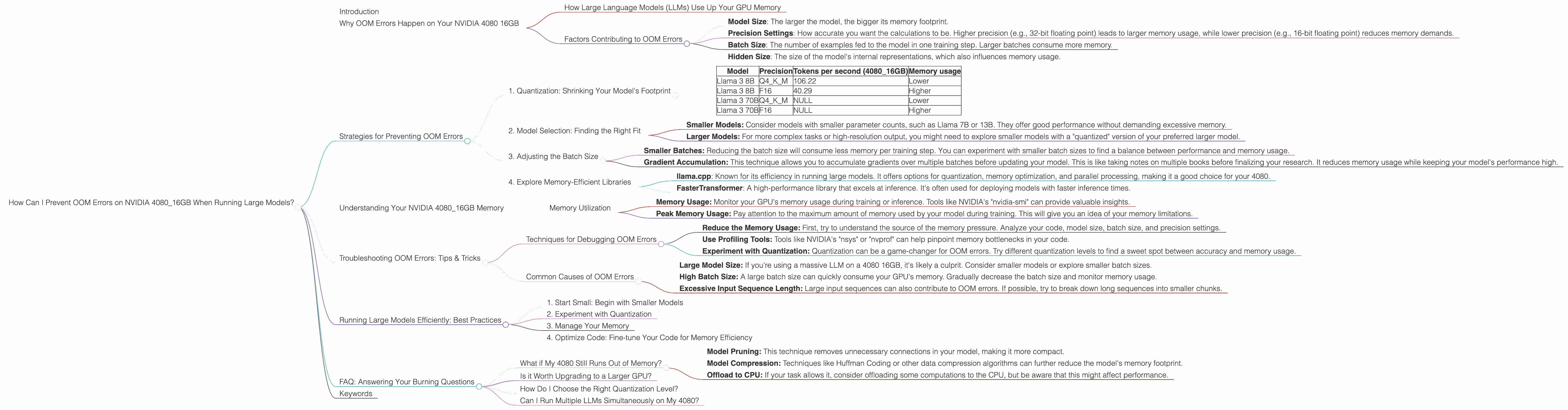
Introduction
Imagine you're building a powerful AI assistant. You want it to be smart, fast, and capable of understanding complex language. But when you try to run your model on your powerful NVIDIA 4080 16GB graphics card, you hit a wall: dreaded "Out of Memory" (OOM) errors. This is a common issue faced by developers working with large language models (LLMs) - models trained on vast amounts of text data to generate human-like text.
This guide dives into the reasons behind these OOM errors, explores techniques to optimize your setup, and provides practical solutions for running LLMs smoothly on your NVIDIA 4080 16GB. We'll explore the world of quantization, a clever trick to compress models, and understand how different model sizes and precision settings affect memory usage. Get ready to unlock the full potential of your 4080 and make your LLM dreams a reality!
## Why OOM Errors Happen on Your NVIDIA 4080 16GB
Think of your NVIDIA 4080 16GB as a large, highly efficient library. It's designed to hold vast amounts of information, in this case, the weights and biases of your LLM. Just like a real library, your GPU has limited shelf space, and trying to cram too many books (model parameters) in will lead to a chaotic mess, which translates to dreaded OOM errors.
How Large Language Models (LLMs) Use Up Your GPU Memory
LLMs are known for their massive size - think of them as libraries containing millions (or even billions) of books. These books represent the connections or relationships between words in the model. When you run an LLM, it needs to load all of these "books" into the GPU's memory to perform calculations. The bigger your model, the more "books" you'll need to load, and this can easily overwhelm your 4080's 16GB memory.
Factors Contributing to OOM Errors
Here are some crucial factors that contribute to OOM errors:
- Model Size: The larger the model, the bigger its memory footprint.
- Precision Settings: How accurate you want the calculations to be. Higher precision (e.g., 32-bit floating point) leads to larger memory usage, while lower precision (e.g., 16-bit floating point) reduces memory demands.
- Batch Size: The number of examples fed to the model in one training step. Larger batches consume more memory.
- Hidden Size: The size of the model's internal representations, which also influences memory usage.
Strategies for Preventing OOM Errors
Now let's equip ourselves with strategies to tame those OOM errors. We'll focus on techniques that leverage the capabilities of your NVIDIA 4080 16GB.
1. Quantization: Shrinking Your Model's Footprint
Imagine compressing a huge library of books into a compact, digital format - that's what quantization does for LLMs. It cleverly reduces the size of the model's parameters, making it more memory-efficient. Here's a breakdown:
What is Quantization?
Quantization is a technique that reduces the precision of the numbers used to represent the model's parameters (those "books" we discussed earlier). Instead of using 32 bits for each number (like in high-fidelity audio), it uses fewer bits, say, 8 or even 4. Think of it like switching from a detailed, high-resolution image to a smaller compressed image.
How it Helps:
- Reduced Memory Usage: With less precision, you need less memory to store the model's parameters, leading to lower memory consumption.
Faster Inference: Quantized models often perform calculations faster than their full-precision counterparts, leading to quicker responses.
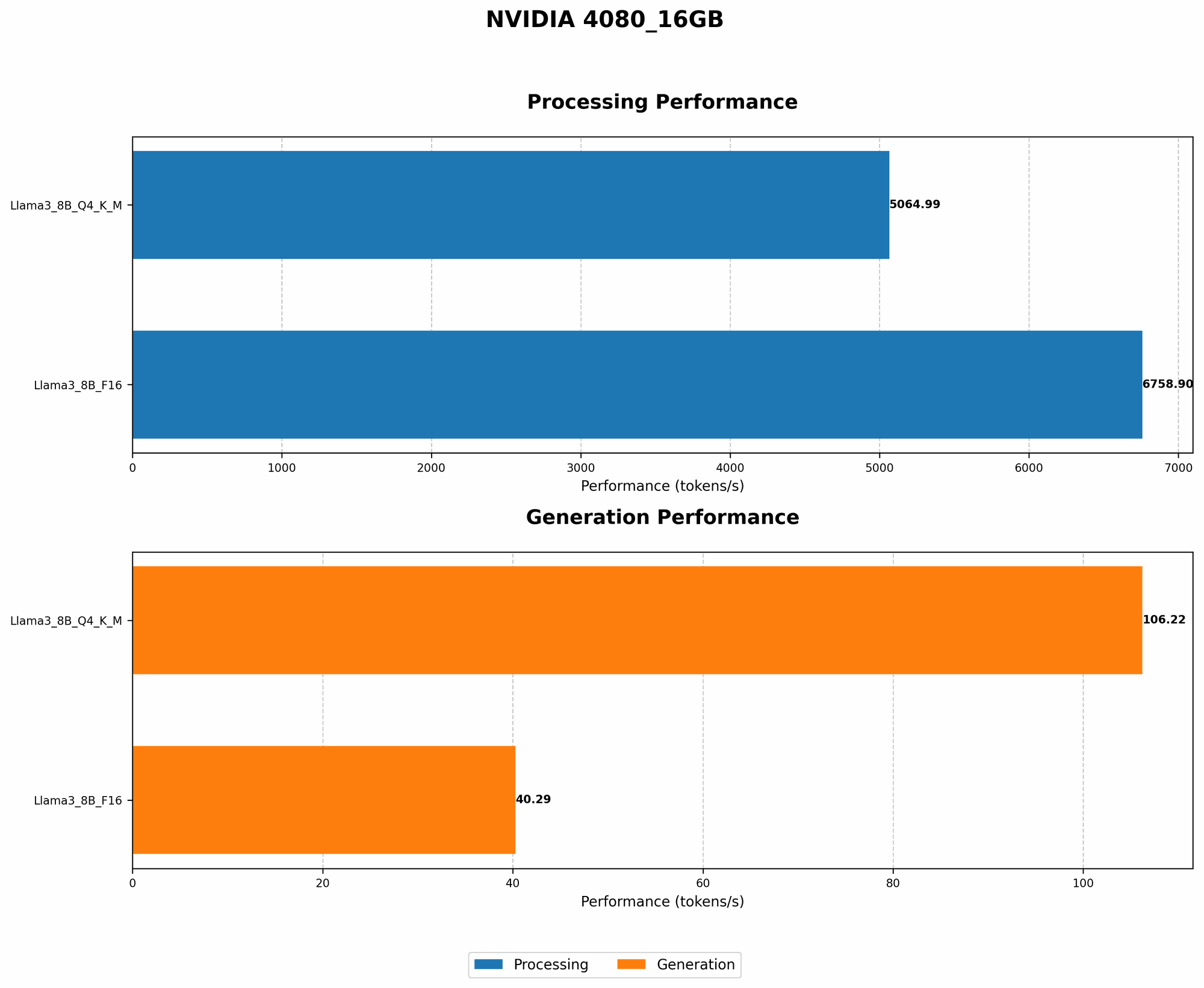
Let's look at some real-world data:
Model Precision Tokens per second (4080_16GB) Memory usage Llama 3 8B Q4KM 106.22 Lower Llama 3 8B F16 40.29 Higher Llama 3 70B Q4KM NULL Lower Llama 3 70B F16 NULL Higher Note: The data above clearly shows the difference between quantization and full precision for Llama 3 8B, but we didn't have data for the 70B version for the 4080_16GB. It's reasonable to expect similar trends with larger models.
2. Model Selection: Finding the Right Fit
Choosing the right model size is crucial. It's like selecting the right book for a particular journey. While bigger models offer greater potential, they might not be feasible on your 4080, especially with limited memory.
Here's a thought:
You'd be less likely to carry a complete encyclopedia on a hike than a pocket guidebook. Similarly, choosing a smaller LLM for your tasks might be a wise move, especially if you have memory constraints.
- Smaller Models: Consider models with smaller parameter counts, such as Llama 7B or 13B. They offer good performance without demanding excessive memory.
- Larger Models: For more complex tasks or high-resolution output, you might need to explore smaller models with a "quantized" version of your preferred larger model.
3. Adjusting the Batch Size
The batch size is like the number of people you bring to a library to borrow books. Smaller groups mean less chaos and more efficiency.
Smaller Batches: Reducing the batch size will consume less memory per training step. You can experiment with smaller batch sizes to find a balance between performance and memory usage.
Gradient Accumulation: This technique allows you to accumulate gradients over multiple batches before updating your model. This is like taking notes on multiple books before finalizing your research. It reduces memory usage while keeping your model's performance high.
4. Explore Memory-Efficient Libraries
Some libraries are designed to handle large models with more finesse. Use these libraries to optimize your setup:
- llama.cpp: Known for its efficiency in running large models. It offers options for quantization, memory optimization, and parallel processing, making it a good choice for your 4080.
- FasterTransformer: A high-performance library that excels at inference. It's often used for deploying models with faster inference times.
Understanding Your NVIDIA 4080_16GB Memory
Knowing your GPU's capabilities is key. It's like understanding how much luggage you can fit in your car before it starts to wobble.
Memory Utilization
- Memory Usage: Monitor your GPU's memory usage during training or inference. Tools like NVIDIA's "nvidia-smi" can provide valuable insights.
- Peak Memory Usage: Pay attention to the maximum amount of memory used by your model during training. This will give you an idea of your memory limitations.
Troubleshooting OOM Errors: Tips & Tricks
OOM errors are like stubborn stains - they might require a few different cleaning techniques. Let's dive into some common troubleshooting strategies.
Techniques for Debugging OOM Errors
- Reduce the Memory Usage: First, try to understand the source of the memory pressure. Analyze your code, model size, batch size, and precision settings.
- Use Profiling Tools: Tools like NVIDIA's "nsys" or "nvprof" can help pinpoint memory bottlenecks in your code.
- Experiment with Quantization: Quantization can be a game-changer for OOM errors. Try different quantization levels to find a sweet spot between accuracy and memory usage.
Common Causes of OOM Errors
- Large Model Size: If you're using a massive LLM on a 4080 16GB, it's likely a culprit. Consider smaller models or explore smaller batch sizes.
- High Batch Size: A large batch size can quickly consume your GPU's memory. Gradually decrease the batch size and monitor memory usage.
- Excessive Input Sequence Length: Large input sequences can also contribute to OOM errors. If possible, try to break down long sequences into smaller chunks.
Running Large Models Efficiently: Best Practices
Here's a compilation of tips and tricks for running large models with minimal OOM errors. Think of it as a manual for your LLM adventure.
1. Start Small: Begin with Smaller Models
It's like starting with a short hike before attempting a challenging mountain climb. Start with smaller models to get a feel for your GPU's capabilities and refine your code.
2. Experiment with Quantization
Quantization is a powerful tool for memory optimization, but it might require some experimentation to find the right settings for your model and task.
3. Manage Your Memory
Watch your GPU's memory usage closely. Use tools like "nvidia-smi" to track your model's memory footprint.
4. Optimize Code: Fine-tune Your Code for Memory Efficiency
Small tweaks in your code can greatly impact memory usage. Look for areas where you can reduce redundant memory allocations or optimize data structures.
FAQ: Answering Your Burning Questions
What if My 4080 Still Runs Out of Memory?
If your 4080 is still struggling with OOM errors, even after trying these strategies, consider these options:
- Model Pruning: This technique removes unnecessary connections in your model, making it more compact.
- Model Compression: Techniques like Huffman Coding or other data compression algorithms can further reduce the model's memory footprint.
- Offload to CPU: If your task allows it, consider offloading some computations to the CPU, but be aware that this might affect performance.
Is it Worth Upgrading to a Larger GPU?
Upgrading to a GPU with more memory (like a 4090 with 24GB or a 4080 with 24GB) is a viable option if you're working with extremely large models that consistently hit memory limits. However, remember that upgrading might not be a silver bullet, and you'll still need to optimize your code and consider techniques like quantization.
How Do I Choose the Right Quantization Level?
The ideal quantization level depends on your specific model and task. Start with Q4KM if your model is large and you are concerned about memory. However, for very high-quality tasks you may be okay with full precision (F16) as it offers the best performance.
Can I Run Multiple LLMs Simultaneously on My 4080?
It's possible to run multiple LLMs on your 4080 using techniques like model parallelism. However, make sure your GPU has enough memory to handle the combined memory footprint of all models. You can also explore the use of multiple GPUs via techniques like model parallelism to distribute the workload.
Keywords
LLM, large language model, OOM, Out of Memory error, NVIDIA 4080 16GB, GPU, memory, quantization, precision, batch size, model size, memory-efficient libraries, llama.cpp, FasterTransformer, troubleshooting, best practices, memory optimization, model pruning, model compression, gradient accumulation, memory utilization