How Can I Prevent OOM Errors on NVIDIA 3090 24GB When Running Large Models?

Introduction
You've got your hands on a powerful NVIDIA 3090_24GB graphics card, ready to unleash the power of large language models (LLMs) right on your local machine. But then it hits you: "Out of Memory" (OOM) errors. The dream of running those massive models locally turns into a frustrating reality.
Fear not, fellow LLM enthusiast! This guide will walk you through the common concerns of running LLMs on your 3090_24GB, focusing on preventing those dreaded OOM errors. We'll explore different strategies, including quantization, and model optimizations, and analyze their impact on performance. We'll also delve into practical tips and tricks to maximize your hardware's potential while keeping your sanity intact.
Understanding the Memory Challenge
Large language models, like the ones developed by Meta (Llama) or Google (PaLM), are hungry beasts! They require massive amounts of memory to store their parameters and process information. Think of it like this: if a traditional language model is a small car, an LLM is a giant freight train.
The NVIDIA 3090_24GB offers ample VRAM (Video Random Access Memory), but even that can be insufficient for the largest models. The problem arises when the model's memory requirements exceed the available VRAM, leading to the dreaded OOM error.
Comparing Strategies for Memory Management

Let's break down the different approaches to managing memory and preventing OOM errors on your 3090_24GB. We'll focus on strategies that have proven effective for users running LLMs locally:
1. Quantization: Shrinking Models Without Losing Too Much Power
Imagine this: You're about to move from a city apartment to a tiny studio. To fit everything, you need to downsize your belongings. Quantization does the same for LLMs.
Instead of storing each parameter as a 32-bit floating-point number (F32), we can use lower precision formats like 16-bit (F16) or even 4-bit (Q4KM). This reduces the model's memory footprint significantly, letting you squeeze more into your 3090_24GB.
While quantization can slightly compromise accuracy, the performance gains often outweigh the trade-offs. Think of it as trading a little bit of detail for a much bigger picture.
Quantization Results: A Peek into the Numbers
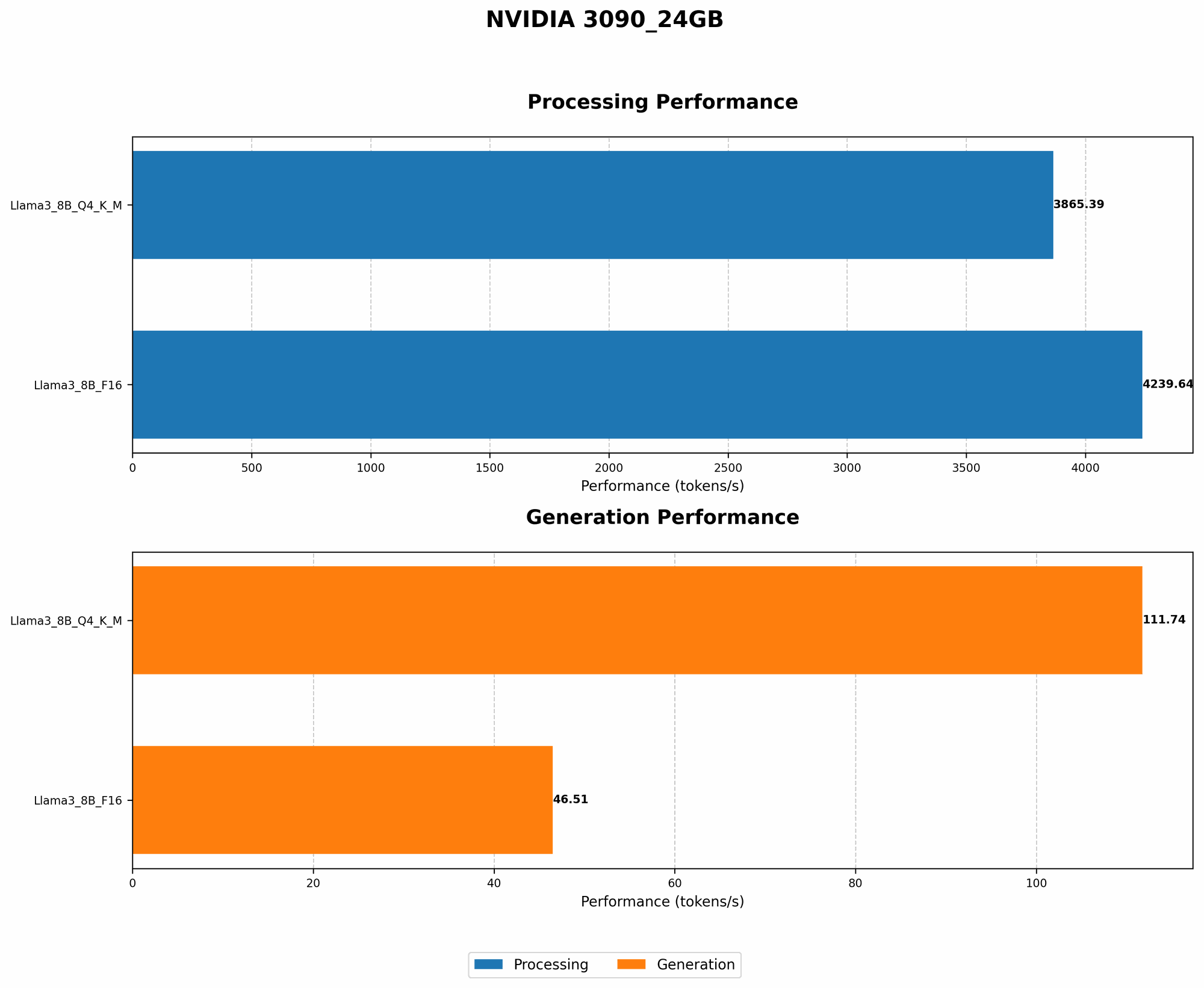
The impact of quantization on the processing speed and memory usage of LLMs is substantial. Here's a glimpse into the numbers, focusing on Llama models running on the NVIDIA 3090_24GB:
| Model | Token Generation Speed (Tokens/second) | Token Processing Speed (Tokens/second) |
|---|---|---|
| Llama3 8B (Q4KM) | 111.74 | 3865.39 |
| Llama3 8B (F16) | 46.51 | 4239.64 |
| Llama3 70B (Q4KM) | N/A | N/A |
| Llama3 70B (F16) | N/A | N/A |
As you can see, quantizing the Llama 8B model to Q4KM significantly improves token generation speed compared to F16, while offering competitive token processing speed.
Important: For this particular device (NVIDIA 309024GB), data for the Llama3 70B model in both Q4K_M and F16 formats is unavailable.
2. Model Pruning: Removing Unnecessary Connections
Imagine a network of roads connecting cities, but some roads are rarely used. Model pruning is like removing those unnecessary roads, making the network more efficient and reducing your memory footprint.
This technique eliminates connections in the neural network that contribute little to the overall performance.
The Trade-offs: Smaller Footprint, Possible Accuracy Loss
While pruning can significantly reduce memory usage, it might slightly affect accuracy. Think of it like removing a few details from a photograph, but keeping the overall image recognizable.
To illustrate, imagine a complex network of roads connecting cities. Removing unnecessary roads (pruning) might slightly increase travel time (decrease accuracy) but improve overall network efficiency (reduce memory usage).
3. Gradient Accumulation: Training Models in Batches
This technique is particularly useful for training LLMs. It allows you to train on larger batches by accumulating gradients over multiple mini-batches. This helps reduce memory consumption during training, similar to consolidating your shopping into fewer trips to the supermarket.
Gradient Accumulation's Impact on Memory and Training Time
Gradient accumulation reduces memory usage during training, but it increases the time required for each training step. Think of it as saving space on your grocery cart but needing to make fewer trips to the supermarket. The trade-off is between memory efficiency and training speed.
4. Low-Precision Training: Experimenting with Reduced Accuracy
Training LLMs with lower precision (F16 or even lower) can significantly reduce memory consumption, similar to using a lower-resolution camera to save space on your memory card. However, this can impact accuracy, so it's crucial to experiment and find the right balance.
Low-Precision Training: Striking a Balance Between Memory and Accuracy
While low-precision training can reduce memory footprint, it's essential to consider its impact on accuracy. Imagine using a lower-resolution camera – you'll capture fewer details, but you'll save space. Experimenting with different precision levels is key to finding the right balance.
Putting It All Together: Choosing Your Strategy
Now that you're armed with knowledge of these different memory management strategies, how do you choose the best approach for your 3090_24GB and your specific LLM?
Here's a simplified decision-making process:
- If you're running a smaller model (like Llama 8B) and prioritizing speed, quantization to Q4KM is often the best choice.
- If you're working with larger models (like Llama 70B) or need high accuracy, consider a combination of techniques like quantization to F16, pruning, and gradient accumulation.
- If you're training LLMs, explore the benefits of gradient accumulation and low-precision training.
Optimizing Performance Beyond Memory Management
Beyond memory management, you can further optimize the performance of your 3090_24GB for running LLMs. Here are some additional tips:
- Use Fast Libraries: Consider using libraries specifically designed for high-performance LLM inference, such as
llama.cpp,transformers, orHugging Facefor faster processing and smoother performance. - Utilize CPU Resources: Offloading some tasks to your CPU can offload pressure from your GPU, leading to improved overall performance.
- Enable Multithreading: If your CPU has multiple cores, leverage them for parallelization to accelerate processing.
- Fine-tuning: Train your LLM on a specific dataset related to your task for improved accuracy and performance.
FAQ
Q: What are the most common OOM errors I might encounter?
A: You might experience OOM errors due to excessive memory consumption, exceeding the available VRAM on your 3090_24GB. This can happen when running large models, especially when using high-precision configurations.
Q: How do I know if my model will fit on my 3090_24GB?
A: Use the provided numbers and information for your specific model and desired configuration to estimate memory usage. Start with a smaller model and experiment with different configurations before tackling larger models.
Q: Can I run Llama 70B on this device?
A: While the NVIDIA 3090_24GB offers ample VRAM, running Llama 70B might still be challenging due to its memory demands. Consider using quantization and other strategies to optimize memory usage and might still face issues.
Q: What if I'm still getting OOM errors after trying these strategies?
A: If you're still encountering OOM errors despite implementing these strategies, consider:
- Reduce batch size: Experiment with smaller batch sizes during training or inference.
- Lower precision: Explore even lower precision formats like 8-bit or 4-bit, although this might come with accuracy trade-offs.
- Explore cloud computing: For truly massive models, consider using cloud-based services that offer powerful hardware and ample resources.
Keywords: NVIDIA 309024GB, Large Language Models, LLMs, OOM, Out of Memory, Quantization, Model Pruning, Gradient Accumulation, Low-Precision Training, Llama, Llama3, Memory Management, Token Generation Speed, Token Processing Speed, GPU, VRAM, F16, Q4K_M, Inference, Training, Performance, Optimization, Memory Footprint, Accuracy, Speed, CPU, Multithreading, Fine-tuning, Cloud Computing, GPU Benchmark, Llama.cpp, Transformers, Hugging Face.