How Can I Prevent OOM Errors on NVIDIA 3080 10GB When Running Large Models?

Introduction
You've got a shiny new NVIDIA 3080 10GB GPU, ready to unleash the power of large language models (LLMs) on your local machine. But wait, you're getting OOM errors - Out Of Memory! It's like trying to fit a whale into a bathtub: your GPU just can't handle the sheer size of these models.
This article will dive deep into common concerns faced by users who run LLMs on NVIDIA 3080 10GB GPUs, focusing on preventing those dreaded OOM errors. We'll explore different techniques, from using smaller models to leveraging quantization and efficient memory management. Let's get down to business!
Understanding the Problem: LLMs and GPU Memory
LLMs are like the brain of artificial intelligence, capable of understanding and generating text, summarizing information, and even creating original content. But these powerful tools come with a hefty memory appetite. Think of it like this:
- LLMs are like massive libraries: filled with knowledge and information.
- Your GPU's memory is like a bookshelf: it can hold only a certain amount of books.
Trying to cram more "books" (LLMs) into the bookshelf (GPU memory) than it can handle leads to the infamous OOM error.
The 3080 10GB: A Great GPU, but...
The NVIDIA 3080 10GB is a fantastic GPU for gaming and general computing, but its 10GB of memory can become a bottleneck when working with large LLMs. Let's break down why:
- Model Size Matters: Larger LLMs, like the 70B or even 137B parameter models, simply require more memory than your 3080 10GB GPU can provide.
- Context Windows: The amount of text an LLM can process at once is called its context window. Larger context windows require more memory.
- Precision: The way data is stored in the model (like using 32-bit floating-point or 16-bit half-precision) affects the memory footprint.
How to Prevent OOM Errors on NVIDIA 3080 10GB
1. Choosing the Right LLM: Size Matters
Smaller Models, Smaller Footprints:
The simplest way to avoid OOM errors is to use smaller LLMs.
| Model | Size (Parameters) | GPU Memory (Estimated) |
|---|---|---|
| Llama 7B | 7 Billion | 7 GB |
| Llama 13B | 13 Billion | 13 GB |
| Llama 30B | 30 Billion | 30 GB |
| Llama 70B (NOT RECOMMENDED) | 70 Billion | 70 GB |
Don't try to squeeze a 70B model into a 10GB GPU! It's like trying to fit a rhinoceros in a hamster cage. You'll get a memory error, and you'll probably upset the rhino (or your LLM).
2. Quantization: Compressing the Model
Quantization is like putting your model on a diet. It reduces the memory footprint by representing numbers with fewer bits. Think of it as using a smaller "dictionary" to describe the model's parameters.
Types of Quantization:
- 4-bit Quantization (Q4): The most aggressive form of quantization, using only 4 bits per value. This can significantly shrink memory requirements but might slightly degrade performance. Imagine using 4-bit numbers instead of 32-bit numbers to represent the parameters of your LLM.
- 16-bit Quantization (F16): Uses half-precision floating-point numbers, reducing the memory footprint by half compared to 32-bit (F32). This is a good balance between performance and efficiency.
Performance Impact:
Quantization can affect the model's speed and accuracy.
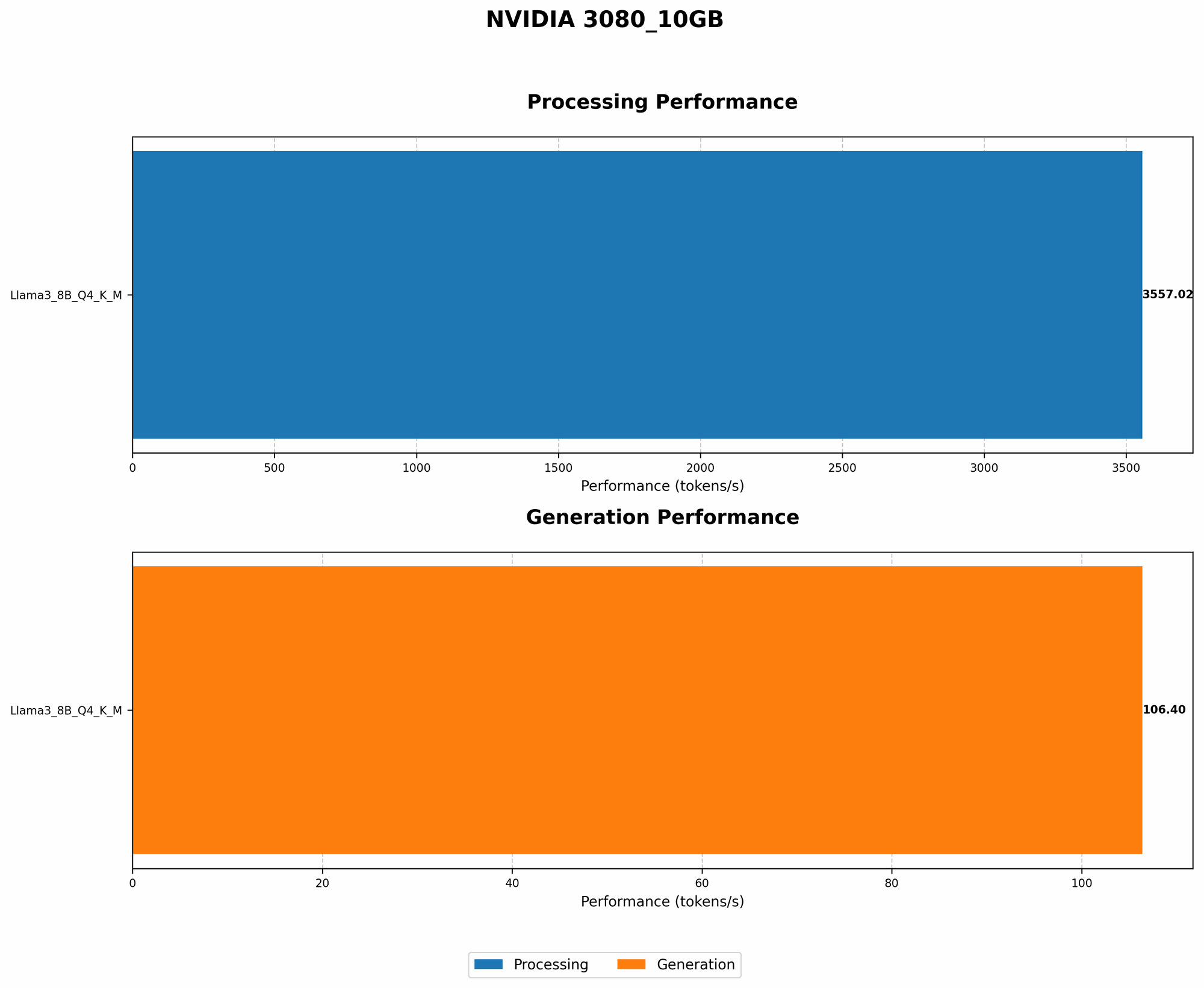
Here's a look at how Llama 3 models perform on a 3080 10GB GPU using different quantization levels:
| Model | Quantization | Tokens/Second (Generation) | GPU Memory (Estimated) |
|---|---|---|---|
| Llama 3 8B (Q4, K_M) | Q4 | 106.4 | 2 GB |
| Llama 3 8B (F16) | F16 | (Data not available) | (Data not available) |
| Llama 3 70B (Q4, K_M) | Q4 | (Data not available) | (Data not available) |
| Llama 3 70B (F16) | F16 | (Data not available) | (Data not available) |
Note: Data for Llama 3 8B F16 and Llama 3 70B (both Q4 and F16) generation is not available for the 3080 10GB GPU. This is because the models are too large for the GPU's memory, even with these quantization techniques. Therefore, it is not feasible to run them on this device.
3. Efficient Memory Management: Minimizing Waste
3.1 Context Window Optimization
The context window, which determines how much text the model can process at once, can have a significant impact on memory consumption.
- Reduce the Window Size: Use the smallest context window possible for your task. If you're only generating a few sentences at a time, you don't need a massive context window.
3.2 Batching: Smart Grouping for Efficiency
Batching is a way to process multiple inputs simultaneously, leading to more efficient memory usage. It's like processing a batch of cookies in the oven, which is more efficient than baking them individually.
- Optimize Batch Size: Find the right batch size that allows you to maximize efficiency without overwhelming your GPU's memory.
4. Beyond the GPU: CPU Offloading
For some tasks, you can leverage your CPU's memory alongside the GPU.
- Offloading Tasks: Consider offloading certain operations, like tokenization (breaking text into individual words or tokens), to the CPU, freeing up GPU memory for more critical tasks.
Conclusion
While running LLMs on a 3080 10GB GPU might seem appealing, it's crucial to understand the limitations of its memory capacity. By strategically choosing models, leveraging quantization, and implementing efficient memory management techniques, you can optimize your workflow and avoid frustrating OOM errors. Remember, a well-chosen model and smart optimization can make all the difference in your LLM journey!
FAQ
1. What are some good alternatives to the 3080 10GB for running larger LLMs?
Consider GPUs with more memory, like the 3090, 3090 Ti, or even the RTX 40 series cards, which offer more VRAM and memory bandwidth, crucial for handling large LLMs.
2. Is it possible to run a 70B model on a 3080 10GB with quantization?
While quantization helps reduce memory footprint, even with Q4, the 70B model is still too large for a 3080 10GB GPU. You will likely encounter OOM errors.
3. How can I determine the ideal batch size for my model?
Experiment! Start with small batches and gradually increase them until you observe a significant increase in memory usage or performance degradation.
4. What are some popular LLM libraries that support quantization?
Several libraries like Hugging Face Transformers, DeepSpeed, and llama.cpp support quantization. Check their documentation for instructions on enabling quantization.
Keywords
LLM, Large Language Model, OOM, Out of Memory, GPU, NVIDIA 3080, 10GB, memory, quantization, Q4, F16, batching, context window, tokenization, CPU offloading, Hugging Face Transformers, DeepSpeed, llama.cpp.