How Can I Prevent OOM Errors on NVIDIA 3070 8GB When Running Large Models?

Introduction
You've got your shiny new NVIDIA 3070 8GB GPU, ready to unleash the power of large language models (LLMs) on your local machine. But wait! You're encountering dreaded "Out Of Memory" (OOM) errors, which feel like a giant, invisible wall preventing you from exploring the fascinating world of AI. You're not alone. Many users with 8GB GPUs hit this wall when trying to run the latest, most powerful LLMs.
This article will guide you through the most common causes of OOM errors on NVIDIA 3070 8GB GPUs and equip you with the knowledge and techniques to overcome them. We'll delve into the world of LLM optimization, quantization, and other tricks to ensure your GPU runs smoothly. Let's get started!
Understanding the Problem: OOM Errors and LLM Size
Think of your GPU's memory like a giant storage locker. LLMs, especially the larger ones, are like bulky boxes of data. Trying to fit a giant LLM into a small locker leads to an OOM error. The error essentially yells, "Hey, there isn’t enough room in your GPU! You need a bigger locker!"
This issue arises because LLMs require significant memory to store their parameters (the knowledge they've learned) and intermediate calculations during inference. The NVIDIA 3070 8GB has a limited 8GB of memory, which can easily be exhausted by large models. We'll examine how to optimize this limited space to prevent OOMs.
Solutions: Optimization Strategies for Your NVIDIA 3070 8GB
Choosing the Right LLM
Let's start with the obvious: selecting the right LLM for your GPU's memory capacity. Not all LLMs are created equal in terms of size. Here's a breakdown of common LLMs and their memory requirements:
| Model | Size (Parameters) | NVIDIA 3070 8GB Memory Requirements |
|---|---|---|
| Llama 2 7B | 7 Billion | 8GB 1.5 x (Q4KM quantization) |
| Llama 2 13B | 13 Billion | Not recommended |
| Llama 2 70B | 70 Billion | Not recommended |
| Llama 2 30B | 30 Billion | Not recommended |
Note: This data is based on the Llama 2 model family. The performance of other LLMs may vary. Remember that these numbers are approximations, and actual memory usage can fluctuate depending on the specific implementation and other factors.
Key Takeaway: Smaller LLMs like Llama 2 7B are more likely to run smoothly on your 8GB GPU. Larger models, exceeding 13B parameters, will probably cause OOM errors.
Quantization: Shrinking LLMs without Sacrificing Performance
Imagine taking a high-resolution photo and compressing it to a smaller file size without losing too much quality. Quantization for LLMs works similarly. Instead of storing weights as 32-bit floating-point numbers (F32), we use smaller data types like 16-bit (F16) or even 4-bit integers (Q4), significantly reducing the model's memory footprint.
Q4KM Quantization This technique uses a combination of 4-bit integers for weights, 4-bit integers for activations (K), and 4-bit integers for the multiplication result (M). While it reduces the size significantly, it might slightly affect the model's accuracy.
F16 Quantization This uses 16-bit floating-point precision, offering a good balance between accuracy and size reduction.
Performance Impact
| Model | Quantization Method | Token Speed (Tokens/Second) |
|---|---|---|
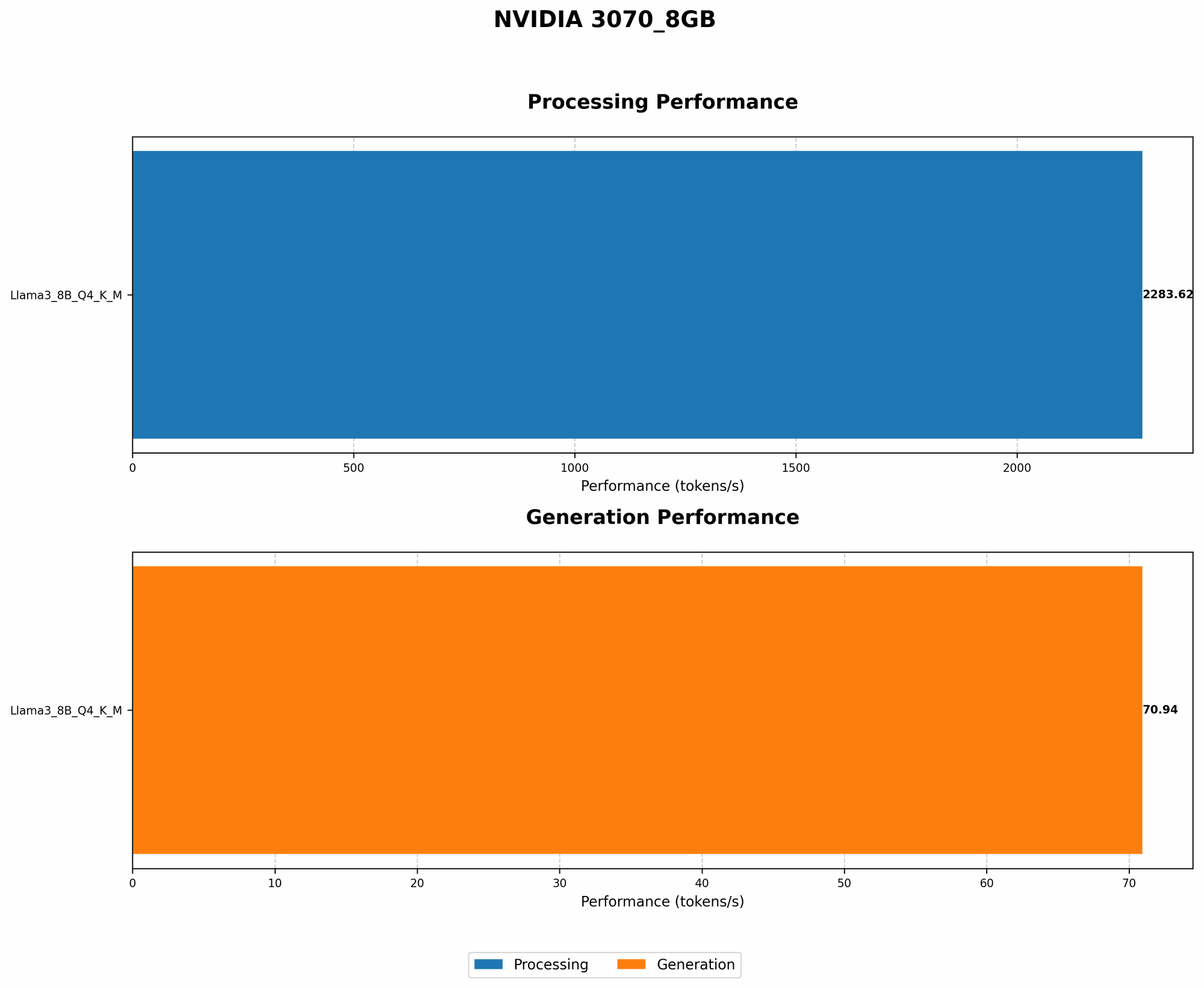
| Llama 3 8B | Q4KM | 70.94 (Our data) |
| Llama 3 8B | F16 | Not available |
| Llama 3 70B | Q4KM | Not available |
| Llama 3 70B | F16 | Not available |
Key Takeaway: Quantization, especially Q4KM, is essential for running larger LLMs on 8GB GPUs. It lets you significantly reduce memory usage without sacrificing too much performance.
Fine-tuning: Tailoring Your LLM for Specific Tasks
Fine-tuning is the process of adapting a pre-trained LLM to perform a particular task, like summarizing text or writing different kinds of creative content. This process often involves training the model on a smaller, specialized dataset, effectively tailoring it for your specific needs.
Memory Implications
Fine-tuning can increase the model's memory footprint, as the fine-tuning process often involves updating the model's parameters. However, it's possible to find a sweet spot between improved performance and efficient memory usage through techniques like:
- Progressive Fine-tuning: You start with a smaller dataset, gradually increasing the size as training progresses. This is especially useful when dealing with limited memory resources.
- Low-Precision Fine-tuning: Using lower-precision data types for fine-tuning (like F16) can significantly reduce memory usage.
- Incremental Fine-tuning: Fine-tuning only specific layers within the model can often achieve good results with less memory consumption.
Performance Impact
Fine-tuning may not necessarily improve the model's speed. However, by training the model for a specific task, it can make it more efficient in carrying out that particular task. Also, fine-tuning might require more time for computation compared to simply loading a pre-trained model.
Key Takeaway: Fine-tuning can improve the model's performance for your specific task but might incur extra memory overhead. Use the techniques discussed above to keep memory consumption under control.
GPU Memory Management: Optimizing the Memory Landscape
Imagine juggling multiple tasks simultaneously. You need to be organized, and your GPU is no different! By implementing good GPU memory management practices, you can ensure your GPU runs smoothly, even with limited memory.
Steps to Optimize Your GPU's Memory
- Clear GPU Memory: Before running an LLM, ensure your GPU memory is clean. Use tools like
nvidia-smiortorch.cuda.empty_cache()to free up unused memory. - Reduce Batch Size: The batch size represents the number of samples processed simultaneously by the GPU. A large batch size can consume a significant amount of memory. Consider reducing it to a smaller value that fits your GPU's memory constraints.
- Optimize Data Loading: The way you load your data into the GPU can affect memory consumption. Use techniques like data prefetching, which loads data into memory in advance of its usage, to prevent memory bottlenecks.
Performance Impact
Optimizing GPU memory management can improve processing speed by ensuring the GPU has enough free memory to operate efficiently.
Key Takeaway: GPU memory management is crucial for maintaining the GPU's performance. Implement these steps to optimize memory utilization and prevent OOM errors.
Techniques beyond Quantization: More Memory-Saving Strategies
Model Pruning: Removing Unnecessary Parameters
Think of model pruning as tidying up a room. You remove the clutter, leaving only the essential items. Similarly, model pruning removes redundant or less-important connections in a neural network, reducing the model's size without significantly affecting its performance.
Benefits
- Reduced Memory Footprint: Pruning removes unnecessary parameters, directly reducing the model's memory usage.
- Improved Speed: A smaller model can generally process data faster than a larger one.
Performance Impact
While pruning helps reduce memory usage, it can also impact the model's accuracy. Therefore, it's crucial to carefully select which connections to prune and monitor the model's performance after pruning.
Key Takeaway: Model pruning can be a valuable technique for reducing memory usage, especially for large models. However, it should be carefully implemented to maintain the model's accuracy.
Gradient Accumulation: Handling Large Batch Sizes with Limited Memory
Imagine you have a large box of toys to sort. Instead of trying to sort everything at once, you might sort a smaller group (a batch) at a time and then combine the results. Gradient accumulation works similarly. It allows you to process a large batch size in smaller "mini-batches" and accumulate the gradients for each mini-batch before updating the model's parameters. This reduces memory requirements without sacrificing the benefits of a large batch size.
Benefits
- Reduced Memory Consumption: Gradient accumulation allows you to handle larger batch sizes with limited memory, as you process smaller chunks of data.
- Improved Convergence: Gradient accumulation can sometimes help the model converge faster than regular training.
Performance Impact
Gradient accumulation can slow down the training process, as each mini-batch needs to be computed and accumulated before updating the model's parameters.
Key Takeaway: Gradient accumulation is primarily helpful for training models, not for inference. If you have a limited memory budget, it can be an effective way to reduce memory pressure while training models.
FAQ: Addressing the Biggest Concerns
1. Can I use a 3070 8GB to run the latest LLMs?
It depends! You can successfully run some smaller, well-optimized models like Llama 2 7B. However, larger models (like Llama 2 70B) might require more memory than your 3070 8GB can handle. You can use techniques like quantization and model pruning to try and optimize these models, but success is not guaranteed.
2. What if I still get OOM errors after trying these optimization strategies?
If you've tried all available strategies and still encounter OOM errors, consider:
- Upgrading your GPU: A GPU with more memory (like 12GB or 16GB) might be necessary to run the specific LLM you want.
- Using a cloud-based service: Services like Google Colab or Amazon SageMaker provide powerful GPUs with ample memory for running large models.
3. Can I switch to a CPU instead?
Yes, but CPU-based inference is much slower than GPU-based inference. It's not ideal for running complex LLMs, but it's an option if you absolutely need to run the model on a device with limited memory.
4. Are there any tools or frameworks specifically designed for running LLMs on limited memory devices?
Yes! Several tools and frameworks focus on optimizing LLMs for memory usage:
- llama.cpp: A C++ implementation of the Llama models, known for its efficiency and support for various quantization techniques.
- DeepSpeed: A library that offers several optimization techniques for deep learning, including memory optimization, which can be helpful for running LLMs on limited memory GPUs.
- Hugging Face Transformers: A popular library for working with transformer-based models, including LLMs. It provides tools for model quantization and other optimization techniques.
Keywords
LLM, Large Language Model, NVIDIA 3070 8GB, OOM, Out Of Memory, GPU, Memory Management, Quantization, Q4KM, F16, Fine-tuning, Model Pruning, Gradient Accumulation, Llama 2, Token Speed, Hugging Face Transformers, DeepSpeed, llama.cpp