From Installation to Inference: Running Llama3 8B on NVIDIA RTX 6000 Ada 48GB

Introduction
The world of large language models (LLMs) is buzzing with excitement, and rightfully so! These powerful AI systems can generate text, translate languages, write different kinds of creative content, and answer your questions in an informative way, all with remarkable fluency. But getting these LLMs running efficiently on your own hardware can be a bit of a challenge, especially if you're working with models like Llama3 8B, which is quite a beast!
This article will guide you through the process of running Llama3 8B on an NVIDIA RTX6000Ada_48GB GPU. We'll delve into key performance metrics, compare different model configurations, and offer practical tips for optimizing your setup. So, let's dive right in and unleash the power of Llama3 on your local machine!
Performance Analysis: Token Generation Speed Benchmarks
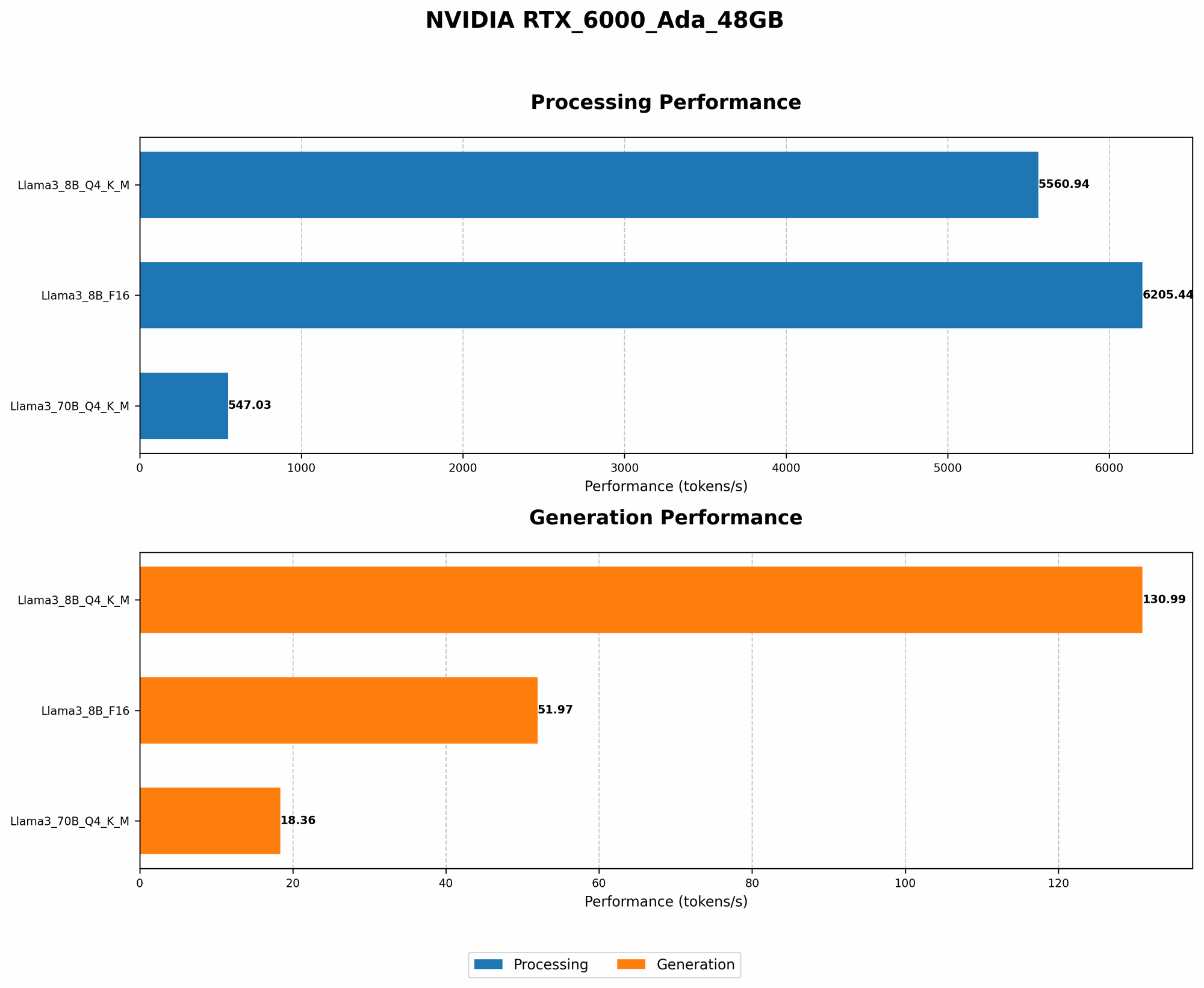
Imagine you're having a conversation with an AI assistant - every word you type, every thought you express, is translated into tokens, tiny bits of data that the LLM processes to generate a response. The faster your model can process these tokens, the quicker your AI assistant can respond. This is where token generation speed comes into play, and it varies significantly depending on the LLM model and your hardware setup.
Token Generation Speed Benchmarks: NVIDIA RTX6000Ada_48GB and Llama3 8B
Let's take a look at the token generation speed achieved by Llama3 8B on the NVIDIA RTX6000Ada_48GB, measured in tokens per second (TPS).
| Model Configuration | Token Generation Speed (TPS) |
|---|---|
| Llama3 8B (Q4KM) | 130.99 |
| Llama3 8B (F16) | 51.97 |
As you can see, the Q4KM configuration, which uses quantization to reduce the model's size and memory footprint, achieves considerably higher token generation speeds compared to the F16 configuration, which uses half-precision floating-point numbers for storage. This is because the Q4KM configuration allows the GPU to process more tokens simultaneously, resulting in faster inference times.
Think of it this way: Imagine you have a team of translators working on a document. If you give each translator a smaller section of text (like quantization does), they can work faster and finish the translation quicker. However, if you give them the whole document (like F16), they'll take longer to complete the task even with the most powerful translation team!
Performance Analysis: Model and Device Comparison
Now let's compare the performance of Llama3 8B against other models and devices. While we're focusing on the RTX6000Ada_48GB, it's good to have a broader perspective! We'll also examine the impact of model size on token generation speed.
Token Generation Speed Benchmarks: Comparing Llama3 8B and Llama3 70B
| Model Configuration | Token Generation Speed (TPS) |
|---|---|
| Llama3 8B (Q4KM) | 130.99 |
| Llama3 70B (Q4KM) | 18.36 |
| Llama3 8B (F16) | 51.97 |
| Llama3 70B (F16) | Not available |
It's clear that the smaller Llama3 8B model offers significantly faster token generation speeds than the larger Llama3 70B model, even with the same quantization technique. This is because larger models require more computation and memory resources.
Here's a simple analogy: Imagine trying to build a sandcastle. If you only have a small bucket, you can build a castle quickly. But if you have a big, heavy bucket, it will take longer to transport sand and build your masterpiece.
The same principle applies to LLMs—smaller models are faster, and larger models can be more powerful but require more time to process.
Practical Recommendations: Use Cases and Workarounds
Choosing the Right Model Configuration: Q4KM vs. F16
The Q4KM configuration offers a sweet spot between performance and memory usage. While it may slightly sacrifice accuracy compared to the F16 configuration, the speed gains are substantial, making it ideal for applications that prioritize fast response times.
If you require the highest accuracy and are willing to trade off speed for precision, you can consider using the F16 configuration.
Utilizing Smaller Models for Faster Inference
For applications that need to generate responses swiftly, using smaller models like Llama3 8B (Q4KM) can be incredibly beneficial. This is especially true for tasks like chatbots or real-time text generation, where rapid response times are crucial.
Optimizing Inference with Quantization
Quantization is a valuable technique that greatly improves inference speed while minimizing memory consumption. If you're working with larger models like Llama3 70B, quantization can be critical for achieving acceptable performance on a device like the RTX6000Ada_48GB. It allows you to run these models on less powerful hardware without sacrificing performance.
Exploring Workarounds for Limited Memory
If you encounter memory limitations with larger models like Llama3 70B, consider exploring techniques like model parallelization or gradient accumulation. These techniques allow you to train or run larger models on devices with limited memory by splitting the model across multiple GPUs or processing data in batches.
Performance Analysis: Model Processing Speed Benchmarks
While token generation speed is important, it's not the only metric to consider. Model processing speed is another crucial measure that indicates how quickly your model can execute its operations.
Model Processing Speed Benchmarks: NVIDIA RTX6000Ada_48GB and Llama3 8B
Let's take a look at the processing speed achieved by Llama3 8B on the NVIDIA RTX6000Ada_48GB, measured in tokens per second.
| Model Configuration | Model Processing Speed (TPS) |
|---|---|
| Llama3 8B (Q4KM) | 5560.94 |
| Llama3 8B (F16) | 6205.44 |
| Llama3 70B (Q4KM) | 547.03 |
| Llama3 70B (F16) | Not available |
As you can see, the F16 configuration of Llama3 8B achieves the highest processing speed, followed by the Q4KM configuration. Interestingly, Llama3 8B (F16) is slightly faster than Llama3 8B (Q4KM) when it comes to model processing speed, despite having slower token generation speed.
This is because the F16 configuration, using half-precision floating-point numbers, performs certain operations more efficiently than the Q4KM configuration, which uses quantized weights. However, this advantage in processing speed is overshadowed by the significant difference in token generation speed.
FAQ:
What is quantization?
Imagine you have a big, complex photo that you want to share with friends. But sending the original photo might take a lot of time and data. So, you can use a technique called quantization to compress the photo by reducing the number of colors used. This makes the photo smaller and easier to share without losing too much detail.
Similarly, quantization in LLMs reduces the number of bits used to represent the model's weights, making the model smaller and more efficient to run on devices with limited memory.
What are F16 and Q4KM configurations?
These are different ways to store the model's weights. The F16 configuration uses half-precision floating-point numbers, which require less memory but might lead to slightly reduced accuracy. The Q4KM configuration uses quantized weights, which are even smaller and more memory-efficient but can slightly affect accuracy.
What's the recommended setup for running Llama3 8B?
For most scenarios, using the Llama3 8B (Q4KM) configuration on an NVIDIA RTX6000Ada_48GB is a good starting point. This setup offers a great balance between performance and memory usage.
Keywords:
Llama3 8B, NVIDIA RTX6000Ada48GB, LLM, Token Generation Speed, Model Processing Speed, Quantization, F16, Q4K_M, Performance Benchmarks, Inference, GPU, Deep Dive, Local LLMs, AI, Machine Learning, Natural Language Processing