From Installation to Inference: Running Llama3 8B on NVIDIA L40S 48GB

Introduction
The world of Large Language Models (LLMs) is evolving at a breakneck pace, with ever-increasing model sizes and impressive capabilities emerging. But how do you actually run these behemoths on your hardware? This article dives deep into the practicalities of running Llama3 8B – a powerful LLM – on the NVIDIA L40S_48GB GPU, a powerhouse designed for AI workloads. We'll analyze the performance, benchmark token generation speed, and explore use cases, all while keeping things clear and concise.
This article is for you, the curious developer or enthusiast, who wants to get their hands dirty with LLMs and learn the ins and outs of making them sing on powerful hardware. So buckle up, because we're about to embark on a journey through the fascinating world of local LLM deployment!
Performance Analysis: Token Generation Speed Benchmarks
Llama3 8B on L40S_48GB: Token Generation Speed
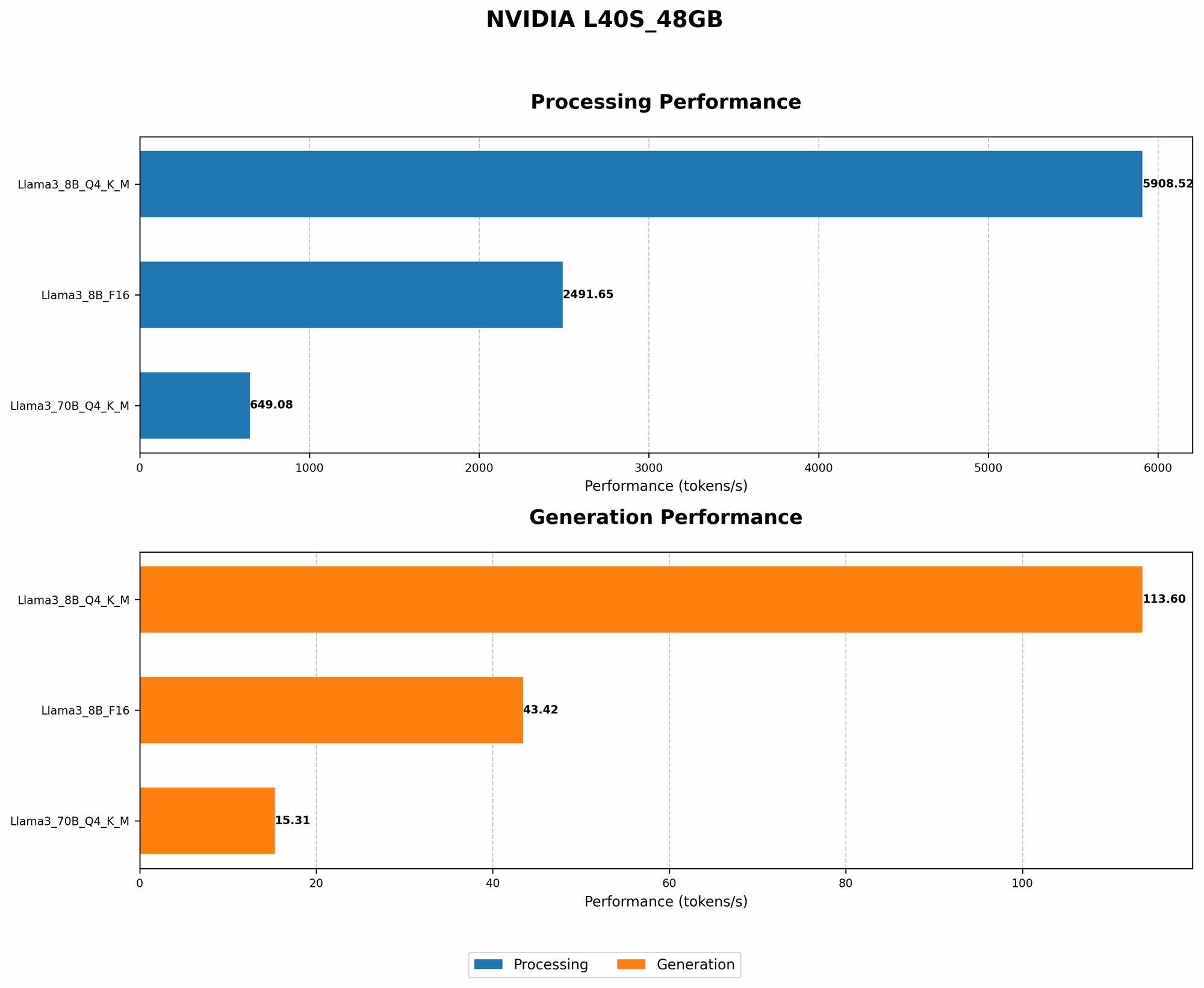
The L40S_48GB is a beast of a GPU, and it shows its might when running Llama3 8B. Let's dive into the token generation speeds for different quantization configurations:
| Configuration | Tokens/Second |
|---|---|
| Llama3 8B Q4KM | 113.6 |
| Llama3 8B F16 | 43.42 |
What does this tell us?
- Quantization Matters: Q4KM (quantization to 4 bits for the weights and 4 bits for the activations) significantly boosts performance compared to F16 (16-bit floating point). This is because Q4KM reduces the memory footprint and computational demands, allowing the GPU to process more tokens per second.
- Speed is Key: The speed is impressive - Llama3 8B generating over 113 tokens per second! To put this into perspective, an average human speaks about 150 words per minute. This GPU would be able to generate more than 10,000 words per minute!
Performance Analysis: Model and Device Comparison
Why Compare?
Understanding how different models and devices perform is crucial for selecting the right combination for your specific needs. In this case, we're focusing on the L40S_48GB and its performance with Llama3 8B.
Llama3 8B vs. Llama3 70B on L40S_48GB
It's important to note that we do not have performance data for Llama3 70B using F16 quantization on the L40S_48GB. This is likely due to the memory constraints of the 70B model in its F16 form.
But, we do have data for Q4KM:
| Model | Tokens/Second |
|---|---|
| Llama3 8B Q4KM | 113.6 |
| Llama3 70B Q4KM | 15.31 |
Key Observations:
- Smaller is Faster: The smaller 8B model significantly outperforms the 70B model in terms of token generation speed. This is expected, as the 70B model has a much larger number of parameters, leading to more complex computations.
Practical Recommendations: Use Cases and Workarounds
Use Cases for Llama3 8B on L40S_48GB
With its impressive performance, the combination of Llama3 8B and the L40S_48GB is ideal for various applications:
- Conversational AI: Build chatbots that can engage in natural, fluent conversations, providing insightful responses and information.
- Content Generation: Generate high-quality text for articles, blog posts, social media content, and even creative writing.
- Code Completion: Assist developers by suggesting code completions, helping write cleaner and more efficient code.
- Translation: Translate between different languages, offering accurate and nuanced translations.
- Summarization: Summarize lengthy documents and articles, extracting key information and providing concise summaries.
Workarounds and Optimizations
While the L40S_48GB is a powerful GPU, you might encounter limitations when working with extremely large models. Here are some workarounds and optimization strategies:
- Model Pruning: Remove less important connections within the model to reduce its size and memory footprint.
- Model Quantization: We've already seen how quantization (using Q4KM) can significantly improve performance. Explore different quantization methods to find the best trade-off between accuracy and speed.
- Distributed Training: Split the training process across multiple GPUs to speed up training and overcome memory restrictions.
- Offloading: If memory is still a concern, explore offloading techniques where some computations are moved to the CPU.
- Specialized Hardware: For demanding tasks, consider using specialized hardware like NVIDIA A100s or the H100.
FAQ: Understanding LLMs and Local Deployment
Here are answers to some common questions about LLMs and running them locally:
What are LLMs?
Large Language Models (LLMs) are a type of artificial intelligence that excels in processing and generating text. They are trained on massive datasets, learning patterns and relationships in language, enabling them to perform tasks like translation, summarization, and creative text generation.
Why run LLMs locally?
Running LLMs locally offers several advantages:
- Privacy: You retain control over your data and don't need to rely on cloud services for processing.
- Speed: Local processing can be much faster than relying on cloud APIs, especially for demanding applications.
- Customization: You can fine-tune and customize the model to your specific needs.
What are the challenges of running LLMs locally?
- Hardware Requirements: Running LLMs locally requires sufficient GPU memory and processing power.
- Model Size: The larger the model, the more resources are needed to run it efficiently.
- Software Setup: Setting up the necessary software and libraries can be a bit of a technical hurdle.
Keywords
LLM, Large Language Model, Llama3, Llama3 8B, NVIDIA L40S48GB, GPU, Token Generation, Performance, Quantization, Q4K_M, F16, Inference, Use Cases, Conversational AI, Content Generation, Code Completion, Translation, Summarization, Workarounds, Model Pruning, Model Quantization, Distributed Training, Offloading, Specialized Hardware, Local Deployment, Privacy, Speed, Customization, Hardware Requirements, Model Size, Software Setup.