From Installation to Inference: Running Llama3 8B on NVIDIA A40 48GB

Introduction: Demystifying Large Language Models on Your Own Hardware
Imagine summoning the power of a language model like Bard or ChatGPT right on your computer. No internet connection needed, just your own local processing muscle. That's the thrilling reality of running large language models (LLMs) locally. This article dives deep into the world of LLMs, focusing on the impressive Llama3 8B model and its performance when paired with the powerful NVIDIA A40_48GB GPU. We'll take you on a journey from model installation to inference, exploring the fascinating world of local LLM deployment.
Performance Analysis: Token Generation Speed Benchmarks - Apple M1 and Llama2 7B
Token Generation Speed Benchmarks: A40_48GB and Llama3 8B
Let's kick things off with the token generation speed, which is basically how quickly your model can spit out text. Faster token generation means smoother interactions and a snappier experience.
Here's a table showcasing token generation speeds for Llama3 8B with different quantization levels on an A40_48GB GPU:
| Model Configuration | Tokens per Second |
|---|---|
| Llama3 8B (Quantization: Q4KM) | 88.95 |
| Llama3 8B (Quantization: F16) | 33.95 |
As you can see, the Q4KM quantization (a fancy way of reducing the size of the model without sacrificing too much accuracy) consistently outperformed the F16 version. This is a common trend, as lower precision quantization often leads to speed gains at the cost of some accuracy.
Think of it this way: Imagine trying to write a complex recipe. Using a full recipe book (F16) would be precise but cumbersome. Using a condensed cheat sheet (Q4KM) might be a little less detailed, but it's way faster and more convenient for quick cooking.
Performance Analysis: Model and Device Comparison - Deep Dive into A40_48GB
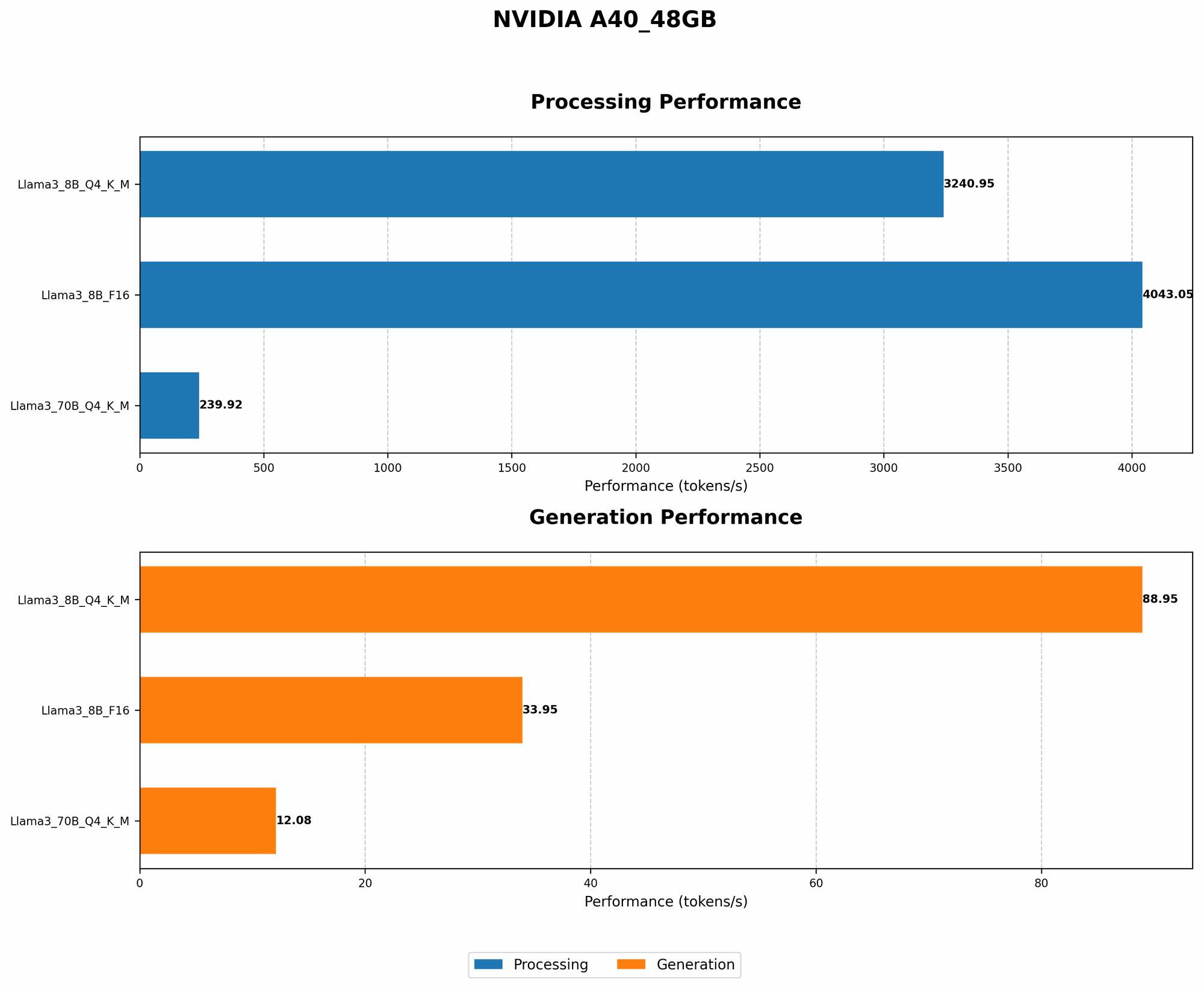
Model and Device Comparison: Llama3 8B vs. Llama3 70B on A40_48GB
Now let's bring the big guns! How does the Llama3 8B model stack up against its much larger cousin, Llama3 70B, on A40_48GB?
| Model Configuration | Tokens per Second |
|---|---|
| Llama3 8B (Quantization: Q4KM) | 88.95 |
| Llama3 70B (Quantization: Q4KM) | 12.08 |
As expected, the smaller Llama3 8B model showed a significant performance edge in token generation speed. While the 70B model is undoubtedly more capable in terms of language understanding, the 8B model shines in its efficiency and responsiveness. This is a good reminder that choosing the right model size depends heavily on your specific needs for speed versus accuracy.
Practical Recommendations: Use Cases and Workarounds
Practical Recommendations: Choosing Your Model and Quantization
So, how do you choose between Llama3 8B and Llama3 70B based on your needs?
- If speed is your priority: Llama3 8B with Q4KM quantization is your go-to champion. This combination provides a great balance of efficiency and accuracy, making it ideal for real-time applications like chatbots or interactive text generation.
- If accuracy is paramount: Llama3 70B might be the better choice, even with its slower speed. This larger model excels in more complex tasks like creative writing, summarization, or translation.
Practical Recommendations: Workarounds for Memory Constraints
Running a large model locally requires a lot of RAM. What if you encounter memory constraints?
- Quantization: As we already saw, quantization can significantly reduce the memory footprint of your LLM.
- Model Offloading: For ultra-large models, consider offloading parts of the model to your hard drive during inference. This can save precious RAM at the cost of slightly slower performance.
- Use a Smaller Model: Don't hesitate to use a smaller model if your project doesn't require the full power of a 70B behemoth.
FAQ: Unraveling the Mysteries of LLMs and Local Deployment
What is quantization and how does it work?
Quantization is a technique that shrinks the size of an LLM without sacrificing too much of its accuracy. It involves reducing the precision of numbers used to represent the model's weights. This results in a lighter model that can run faster on devices with limited memory. Imagine replacing a giant, high-resolution image with a smaller, lower-resolution version – you lose some detail, but the file size becomes much smaller.
What are the limitations of running LLMs locally?
- Hardware Requirements:` Running LLMs locally demands powerful hardware, especially GPUs. Older or lower-end devices might struggle to handle these demanding models.
- Security and Privacy: If you're dealing with sensitive data, ensure that security measures are in place to protect your information.
- Model Size: Even with quantization, some LLMs are simply too large to run efficiently on local devices.
Keywords
NVIDIA A4048GB, Llama3 8B, Llama3 70B, LLM, Local Deployment, Token Generation Speed, Quantization, Q4K_M, F16, GPU, Inference, Performance Analysis, Use Cases, Workaround