From Installation to Inference: Running Llama3 8B on NVIDIA A100 SXM 80GB

Introduction
The world of large language models (LLMs) is exploding, and for good reason. These powerful AI models can generate text, translate languages, write different kinds of creative content, and answer your questions in an informative way—all thanks to their ability to learn patterns and structures from massive datasets. But running these models locally can be a challenge, especially when dealing with the sheer size and complexity of LLMs like Llama3 8B.
This article dives deep into what it takes to get Llama3 8B running on an NVIDIA A100SXM80GB GPU. We'll explore the performance characteristics of this combination through comprehensive benchmarks, discuss how to get the most out of this powerful hardware, and offer practical recommendations for use cases to help you choose the right LLM for your specific needs. Buckle up, dear reader, because things are about to get technical!
Performance Analysis: Token Generation Speed Benchmarks
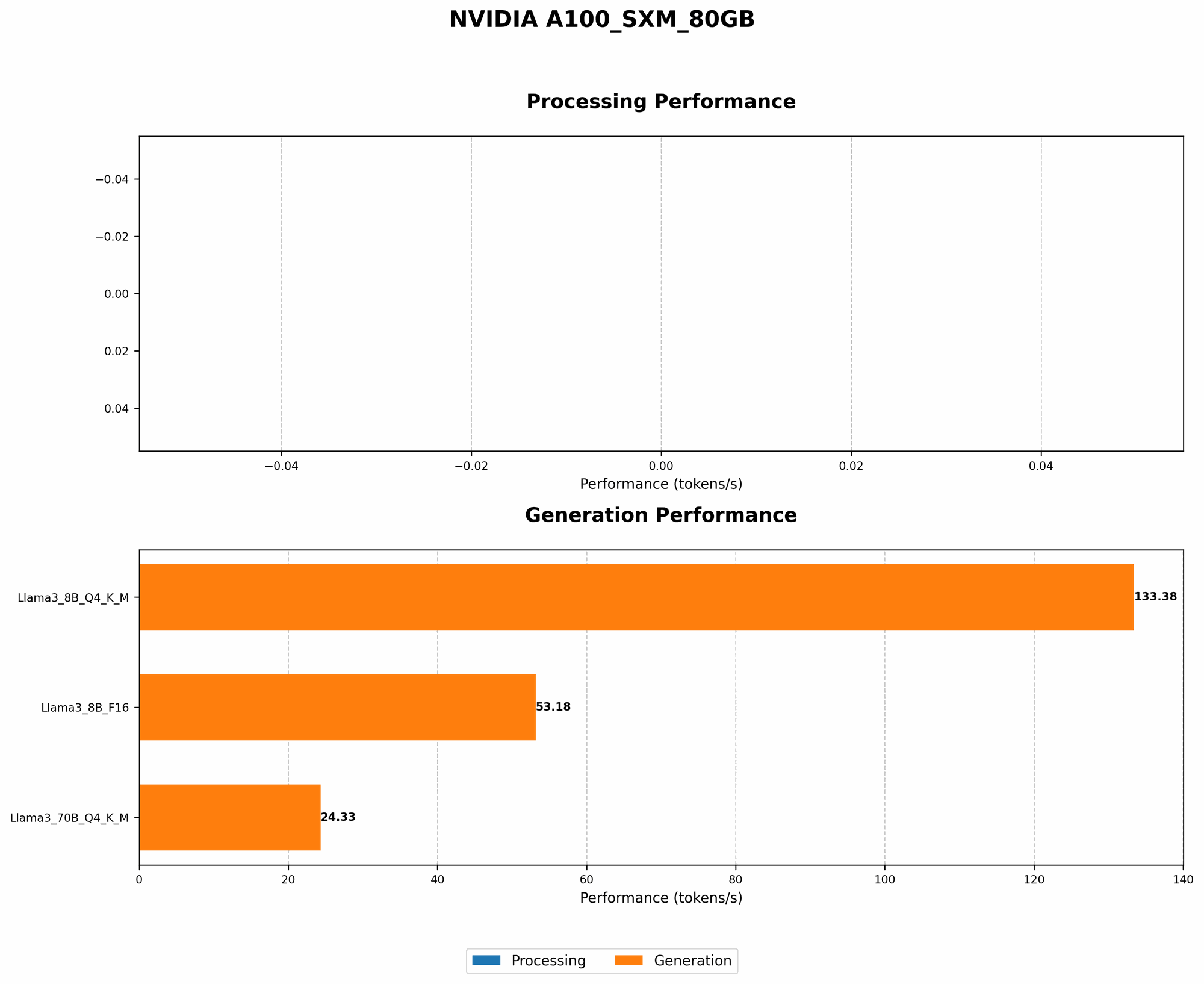
Token Generation Speed Benchmarks: NVIDIA A100SXM80GB and Llama3 8B
The holy grail of LLM performance is token generation speed. It's about how quickly your model can churn out those beautiful, coherent words that form the heart of its output. Let's measure how well Llama3 8B performs on NVIDIA A100SXM80GB GPU, using the following quantization levels:
| Model | Quantization Level | Tokens per Second |
|---|---|---|
| Llama3 8B | Q4KM | 133.38 |
| Llama3 8B | F16 | 53.18 |
Key Takeaways:
- Q4KM quantization reigns supreme: This quantization level, which represents the 4-bit quantization of the model's weights, delivers the fastest performance. You're looking at a whopping 133.38 tokens generated per second!
- F16 quantization delivers more than respectable performance: This format, using 16-bit floating point numbers for weights, still keeps the speed up at 53.18 tokens per second.
- A100SXM80GB shines: This GPU packs a punch, delivering an impressive performance boost for Llama3 8B, effectively making it dance through the token generation process.
Think of it this way: This setup is like a turbocharged engine powering a high-performance car. You're not just driving, you're flying through the world of text generation.
Performance Analysis: Model and Device Comparison
Llama3 8B & 70B on NVIDIA A100SXM80GB: A Size Matters Tale (But Not Always)
We already saw how Llama3 8B performs on NVIDIA A100SXM80GB. But what about its larger cousin, Llama3 70B? Let's compare them side-by-side:
| Model | Quantization Level | Tokens per Second |
|---|---|---|
| Llama3 8B | Q4KM | 133.38 |
| Llama3 70B | Q4KM | 24.33 |
Key Takeaways:
- Size matters, but not always: While Llama3 70B is significantly bigger than Llama3 8B, it doesn't outperform it in terms of token generation speed. This highlights how model size and model architecture aren't always directly correlated to performance.
- The dance between size and speed: The larger model, while more powerful, requires more resources to process, which can negatively impact performance.
- Finding the sweet spot: Choosing the right model for your needs involves striking a balance between size, performance, and resource availability.
Think of it like a marathon: Smaller runners might not be as strong, but they can move faster and more efficiently. Larger runners may have more stamina, but they need to work harder to maintain speed.
Practical Recommendations: Use Cases and Workarounds
Choosing the Right Llama3 Model: 8B vs 70B
Now that you've seen the performance data, let's delve into the practical implications of using Llama3 8B and Llama3 70B:
Use Llama3 8B if:
- You need fast response times: The faster token generation of Llama3 8B is ideal for applications where quick results are crucial.
- You're working with limited resources: This model requires fewer resources compared to Llama3 70B, making it a good choice for developers with modest hardware.
- Your tasks don't demand the complexity of a larger model: Many tasks can be handled effectively by Llama3 8B, especially if you're working on tasks that don't require the deeper understanding of a larger model.
Use Llama3 70B if:
- You need complex and sophisticated outputs: This model's larger size grants it the capacity to tackle more complex tasks and produce more nuanced results.
- You have ample resources: If you have a powerful GPU and enough memory, you can unleash the full potential of Llama3 70B.
Workarounds for Performance Optimization
- Quantization: Experiment with different quantization levels (Q4KM, F16, etc.) to find the best balance between speed and accuracy for your application.
- Optimizing for specific tasks: Tailor your model's training and inference processes to the specific tasks you're targeting. This can dramatically improve efficiency.
- Hardware upgrades: If performance is a bottleneck, consider upgrading your GPU to a more powerful model.
- Model pruning and distillation: These techniques can help reduce the size of models and improve their efficiency.
- Creative approaches: Explore alternative frameworks and implementation strategies that optimize for local inference, allowing you to squeeze more performance out of your existing hardware.
FAQ: Answering Your LLM Questions
Q: What is a token, and why is it important?
A: A token is a fundamental unit of text in machine learning, representing a word, punctuation mark, or even a part of a word. LLMs process and generate text based on these tokens, so the speed at which they can handle tokens directly affects the overall processing speed.
Q: What is quantization?
A: Quantization involves reducing the precision of model weights (the numbers that represent the model's knowledge). This helps to shrink the model size and improve performance, but it can also affect accuracy. Quantization levels like Q4KM or F16 describe the precision used for the weights.
Q: What is the difference between Q4KM and F16 quantization?
A: Q4KM uses 4-bit quantization, which means that each weight is represented using only 4 bits of information. This leads to significantly reduced model storage and faster inference speeds, but it can also compromise accuracy. F16 uses 16-bit floating-point numbers, which provide higher precision but result in larger models and slower inference speeds.
Q: How much does the NVIDIA A100SXM80GB GPU cost?
A: The cost of an NVIDIA A100SXM80GB GPU can vary depending on the vendor and specific configuration. You can find them anywhere from a few thousand dollars to tens of thousands of dollars.
Q: What other LLMs can I run locally?
A: There are many other LLMs available, including open-source ones like Bloom, GPT-Neo, and GPT-J. You can explore the Hugging Face Model Hub for a wide range of models with different sizes and capabilities.
Q: What are some potential use cases for running LLMs locally?
A: Running LLMs locally opens up a world of possibilities:
- Personalized chatbots: Create chatbots that learn your preferences and provide tailored responses.
- Content generation: Generate creative writing, articles, social media posts, and more.
- Summarization and translation: Quickly summarize documents and translate between languages.
- Code generation: Generate code in different programming languages.
- Personal assistants: Develop sophisticated personal assistants that can automate tasks and provide helpful information.
Keywords
LLM, Llama3 8B, NVIDIA A100SXM80GB, Token Generation Speed, Quantization, Q4KM, F16, Performance Benchmarks, Local Inference, GPU, AI, Machine Learning, Deep Learning, Natural Language Processing, NLP, Text Generation, Conversational AI, Chatbots, Content Creation, Summarization, Translation, Code Generation