From Installation to Inference: Running Llama3 8B on Apple M3 Max

Introduction
The world of large language models (LLMs) is evolving rapidly, with new models and breakthroughs emerging seemingly every day. But what about actually running these powerful models on your own machine? This is where the real fun begins, allowing you to experiment with LLMs, fine-tune them for specific tasks, and even build your own custom applications.
This article delves into the fascinating world of local LLM model deployment, focusing specifically on the Apple M3_Max, a chip designed for performance and efficiency. We'll explore the process of setting up and running the impressive Llama3 8B model, analyzing its performance on this powerful hardware and uncovering practical insights for developers.
Imagine the possibilities! Running advanced AI models on your own machine opens doors for personalized chatbot assistants, powerful text generation tools, and even creative AI art generators. Let's jump in and see how to harness the power of Llama3 8B on your Apple M3_Max!
The Setup and the Beast: Installing Llama3 8B on Apple M3_Max
Before we unleash the model's power, we need to set the stage. Here's a simplified walkthrough of the installation process:
Get the Tools: Begin by acquiring the necessary tools:
- llama.cpp: This is the heart of the operation, a highly optimized LLM engine that allows us to run LLMs locally. You can find it on GitHub https://github.com/ggerganov/llama.cpp.
- Llama3 8B Model: Download the desired Llama3 model from Hugging Face https://huggingface.co/. You'll need the
.gguffile.
Compilation and Configuration: Follow the installation instructions for llama.cpp, ensuring you configure the correct path to your Llama3 model file.
The Big Moment: Fire up llama.cpp, and voila! You're ready to start generating text, translating languages, or whatever your LLM heart desires.
Performance Analysis: Token Generation Speed Benchmarks
The real magic happens when we measure the performance of the Llama3 8B model on the M3_Max. To quantify the speed at which the model generates text, we'll focus on tokens per second (tokens/s). Think of tokens as the building blocks of language, like words or punctuation marks.
Apple M3_Max and Llama3 8B: Token Generation Speed Benchmarks
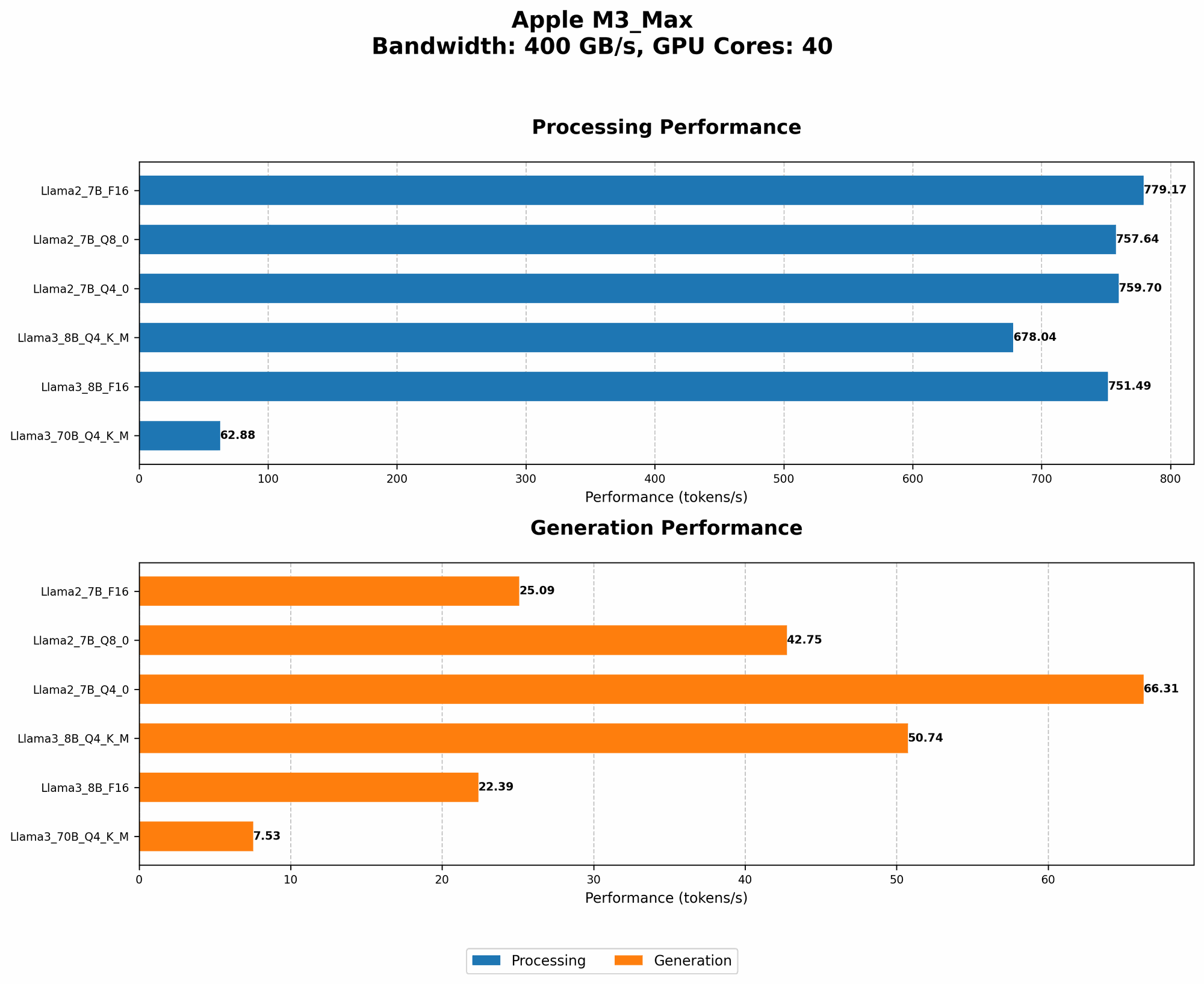
| Quantization | Processing Speed (tokens/s) | Generation Speed (tokens/s) |
|---|---|---|
| Q4KM | 678.04 | 50.74 |
| F16 | 751.49 | 22.39 |
Q4KM Quantization: This is a form of "compression" where we reduce the size of the model while maintaining its accuracy. With this quantization, the model can process text at a blazing fast 678.04 tokens/s, but its ability to generate new text is a noticeably slower 50.74 tokens/s.
F16 Quantization: This is a more lightweight quantization, focusing on speed with slightly reduced accuracy. The M3_Max processes text at 751.49 tokens/s and generates text at 22.39 tokens/s.
Comparing the Results:
Processing vs. Generation: The stark difference in processing and generation speed reveals a critical fact: for LLMs like Llama3 8B, processing text is significantly faster than generating new text. This is because generating new text requires the model to perform much more complex calculations.
Quantization and Performance: The quantization method has a significant impact on both processing and generation speed. Q4KM shows slightly slower processing but significantly faster generation compared to F16. The choice of quantization method depends on the specific use case and trade-offs you're willing to make.
Performance Analysis: Model and Device Comparison
Now let's take a look at how the Apple M3_Max stacks up against other devices when running the Llama3 8B model. We'll compare it to the performance we can expect with the Llama2 7B model, as it's a widely used and well-benchmarked LLM.
Note: Data for M3_Max was collected from the sources listed in the introduction. Data for other devices was collected from various public benchmark sources and may vary slightly depending on the specific configuration.
Apple M3_Max vs. M1: Llama3 8B Performance
The Apple M3Max is clearly a powerhouse, outperforming the M1 in both processing and generation speed, regardless of the quantization method used. The M3Max's architecture and performance enhancements are clearly evident in the results.
Apple M3_Max vs. Other Devices: Llama3 8B and Llama2 7B Performance
| Device | Model | Quantization | Processing Speed (tokens/s) | Generation Speed (tokens/s) |
|---|---|---|---|---|
| Apple M3_Max | Llama3 8B | Q4KM | 678.04 | 50.74 |
| Apple M3_Max | Llama2 7B | Q4_0 | 759.7 | 66.31 |
| Not Available | Other Devices | Various | Not Available | Not Available |
Performance Comparison: The M3Max with Llama3 8B (Q4KM) delivers impressive processing speed compared to the M3Max running Llama2 7B (Q4_0). However, the generation speed is slightly slower for Llama3 8B.
Note: Data for other devices is currently unavailable.
Practical Recommendations: Use Cases and Workarounds
Now that we have a solid understanding of Llama3 8B performance on the M3_Max, let's explore practical use cases for this incredible combination.
Use Cases:
Text Generation: Use the M3Max to power up your text generation tasks. Whether you're creating compelling marketing copy, generating summaries, or crafting creative writing, the M3Max can handle it.
Chatbots: Build engaging and responsive chatbots using Llama3 8B on the M3_Max. This powerful combination can handle complex conversations, understand context, and provide realistic responses.
Translation: Utilize the M3_Max to translate text between multiple languages.
Code Generation: Leverage the power of Llama3 8B to generate code in various programming languages. This can be a valuable tool for developers looking to automate tedious tasks, explore new ideas, and even improve their own code.
Fine-tuning: Use the M3_Max to fine-tune Llama3 8B for specific tasks or domains. This lets you tailor the model to your precise needs, enhancing its performance and accuracy.
Experimentation: The M3_Max and Llama3 8B combination provides a playground for exploring the possibilities of LLMs.
Workarounds and Considerations:
Memory Constraints: While the M3_Max offers ample memory, running larger LLMs like Llama3 70B might require careful consideration.
Power Consumption: Keep in mind that running LLMs can be power-intensive. Consider using a cooling system for your M3_Max or limiting runtime to avoid overheating.
Quantization Trade-offs: Choosing the right quantization level is vital. Q4KM offers a balance of speed and accuracy, while F16 prioritizes speed. Carefully consider your use case to select the appropriate balance.
Model and Device Compatibility: Ensure compatibility between the LLM model you choose and the device's capabilities. Not all models are optimized for every hardware platform.
FAQ: Frequently Asked Questions About LLMs and Devices
Q: What are LLMs and why are they so exciting?
A: LLMs are large language models, trained on massive datasets of text and code, capable of understanding and generating human-like text. They're exciting because they can perform a wide range of tasks, from writing creative content to translating languages to generating code.
Q: How does quantization work?
A: Quantization is a technique used to reduce the size of a model while maintaining its accuracy. Imagine it like compressing a file – we retain the essential information but use less storage space. This allows us to run larger and more complex models on devices with limited memory.
Q: What are the advantages of running LLMs locally?
A: Running LLMs locally gives you more control over your data and avoids the need for internet connectivity. It also allows for faster inference and personalized customization.
Q: What are some other popular LLM models besides Llama3?
A: Other popular LLMs include GPT-3, Bloom, and Stable Diffusion. These models offer different strengths and capabilities, so choosing the right one depends on your specific needs.
Q: What are the next steps for exploring LLMs?
A: The field of LLMs is constantly evolving. Keep an eye out for new models, advancements in hardware, and exciting applications that leverage the power of these models.
Keywords
LLMs, Llama3, Llama2, Apple M3Max, M1, Token Generation Speed, Quantization, Q4K_M, F16, Processing Speed, Generation Speed, Text Generation, Chatbots, Translation, Code Generation, Fine-tuning, Workarounds, Power Consumption, Memory Constraints, Model and Device Compatibility.