From Installation to Inference: Running Llama3 8B on Apple M2 Ultra

Introduction
The world of large language models (LLMs) is evolving rapidly, with new, powerful models like Llama 3 emerging. However, the ability to run these models locally remains a hurdle for many developers and enthusiasts. In this deep dive, we'll explore the process of installing and running the Llama3 8B model on the powerful Apple M2 Ultra chip, focusing on performance and practical considerations for real-world use cases.
Imagine a world where you can run sophisticated AI models right on your laptop. This opens doors to personalized AI assistants, creative writing tools, and much more. The Apple M2 Ultra, with its incredible processing power, is a perfect candidate for this task.
Setting up the Stage: Hardware and Software
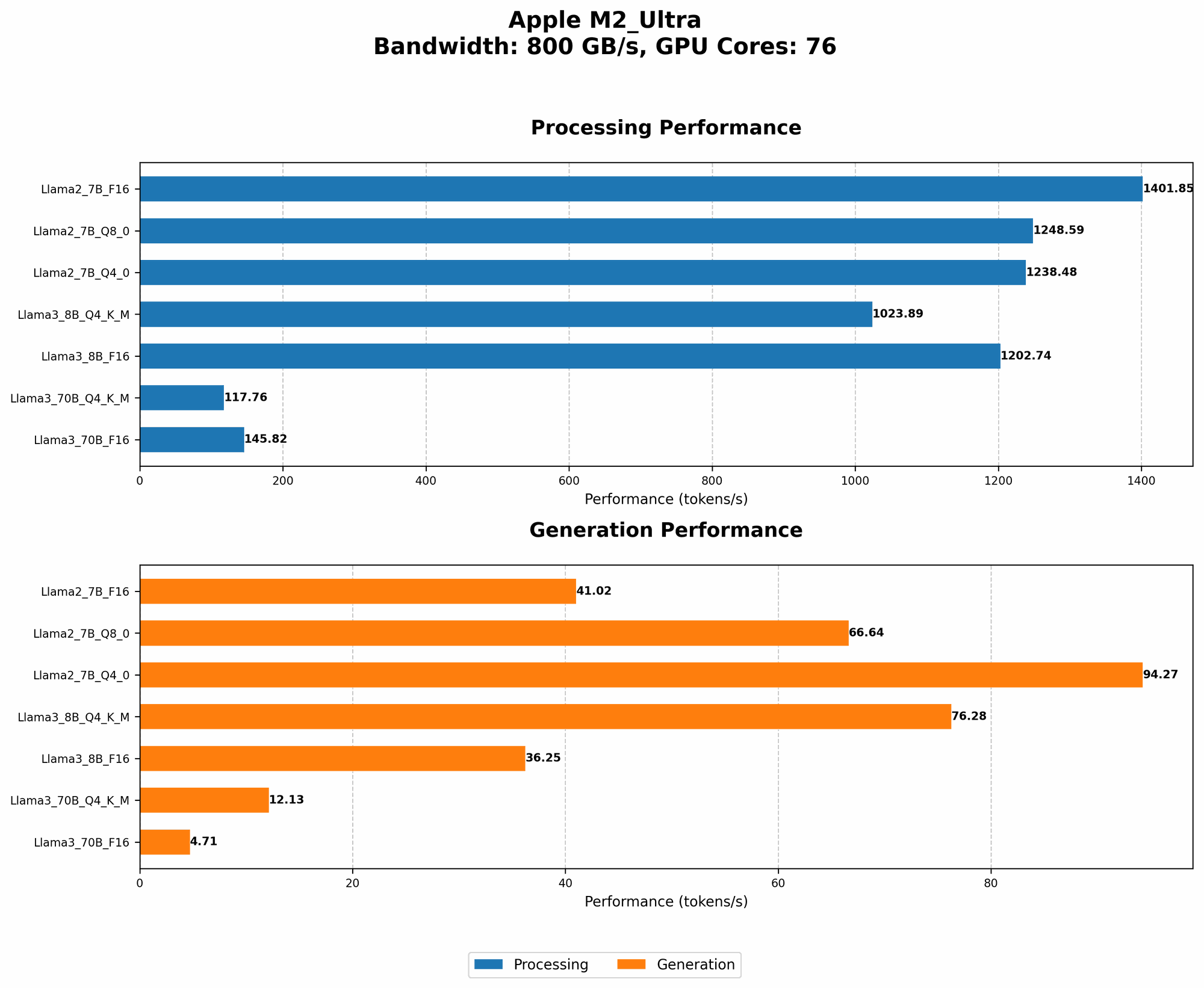
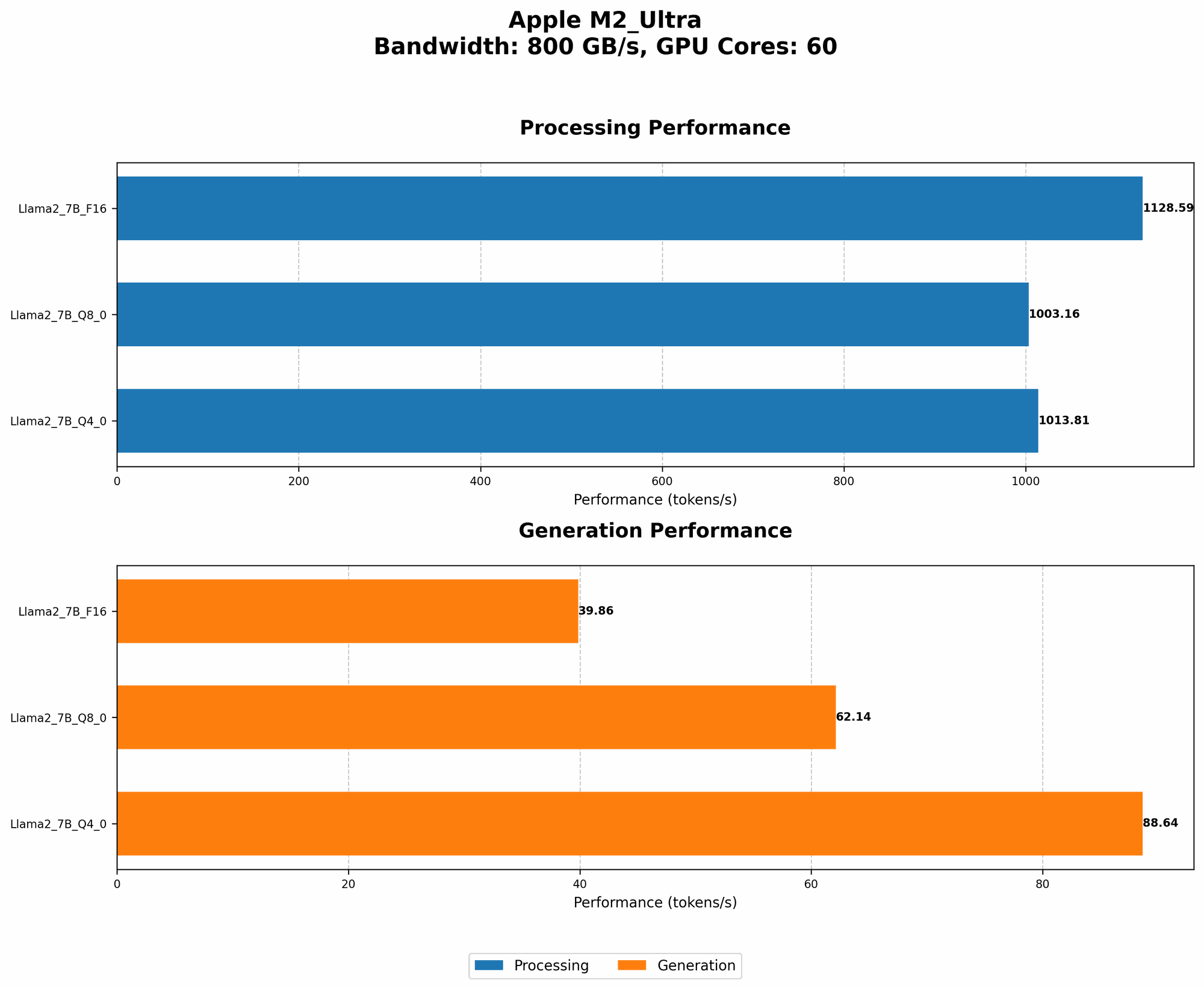
We'll be working with the Apple M2 Ultra, a beast of a chip with 76 GPU cores and 800GB/s bandwidth. For software, we'll rely on the open-source llama.cpp library, renowned for its efficiency and compatibility with various models and devices.
Performance Analysis: Token Generation Speed Benchmarks
Let's dive into the core of this article: the speed at which the M2 Ultra can generate tokens—the building blocks of text. We'll be comparing the performance of various Llama3 8B configurations:
Token Generation Speed Benchmarks: Apple M1 and Llama2 7B
Before we look at the Llama3 8B performance, let's take a quick look at how Llama2 7B performs on the M2 Ultra. This will help us to understand the impact of model size and quantization on performance.
| Model | Quantization | Processing Speed (tokens/second) | Generation Speed (tokens/second) |
|---|---|---|---|
| Llama2 7B | F16 | 1401.85 | 41.02 |
| Llama2 7B | Q8_0 | 1248.59 | 66.64 |
| Llama2 7B | Q4_0 | 1238.48 | 94.27 |
What are we looking at?
Quantization is a technique used to reduce the memory footprint of large models. It essentially approximates the original values with smaller ones, allowing for faster processing and lower memory requirements. F16, Q80, and Q40 represent different levels of quantization, with F16 being the least quantized and Q4_0 being the most quantized.
Key Observations:
- Higher Quantization, Faster Processing: As expected, the more quantized the model, the faster the processing speed. This comes at the cost of lower accuracy, though.
- Generation Speed Trade-off: The generation speed (how fast the model produces text) increases with higher quantization. This is because the model spends less time on complex calculations.
Token Generation Speed Benchmarks: Apple M2 Ultra and Llama3 8B
Now, onto the star of the show: Llama3 8B on the Apple M2 Ultra.
| Model | Quantization | Processing Speed (tokens/second) | Generation Speed (tokens/second) |
|---|---|---|---|
| Llama3 8B | Q4KM | 1023.89 | 76.28 |
| Llama3 8B | F16 | 1202.74 | 36.25 |
Breaking it Down:
- Q4KM stands for "quantized to 4 bits, K-means quantization". K-means is an algorithm used to group similar values together for efficient quantization.
- Llama3 8B is faster than Llama2 7B in terms of processing speed. This is due to a combination of factors like architecture improvements (the Llama3 architecture is more efficient) and the power of the M2 Ultra.
- Generation Speed is Significantly Slower. The generation speed for Llama3 8B is considerably lower than Llama2 7B. This is likely due to complexity of the model and the fact that it's a newer model that hasn't been fully optimized for local inference.
Performance Analysis: Model and Device Comparison
How Does Llama3 8B on the M2 Ultra compare to other LLMs on different Devices?
It is difficult to find reliable, publicly available data for comparing Llama3 8B on M2 Ultra with other LLMs running on different devices. This is because there's a lot of variability in how these benchmarks are performed, and not everyone publishes their results.
To get a general sense of performance, we can look at the data for Llama2 7B running on various devices. This gives us a baseline for comparing the impact of different models and hardware.
General Observations:
- Device Matters: The device plays a crucial role in performance. A more powerful device like the M2 Ultra can handle larger models and achieve faster inference speeds.
- Quantization is King: Quantization continues to be a powerful technique for improving speed. If you can tolerate a slight decrease in accuracy, quantization can significantly improve performance.
Practical Recommendations: Use Cases and Workarounds
While the Llama3 8B model on the M2 Ultra is a powerful combination, it comes with some limitations, particularly in terms of generation speed. Here’s a practical guide for optimizing your workflow:
Use Cases:
- Small Form Factor Applications: The M2 Ultra shines in applications where a smaller model size is acceptable. Try it for tasks like text summarization, question answering, and simple chatbot interactions.
- Low-latency Processing: The fast processing speed of the M2 Ultra makes it suitable for applications that require quick results, like code completion or real-time translation.
- Experimentation: If you're experimenting with different LLMs and want to test them locally, the M2 Ultra can handle the workload.
Workarounds:
- Model Size: If you need the power of a larger model and find the generation speed to be too slow, consider using a smaller model or exploring techniques like batch generation.
- Model Optimization: Explore techniques like model pruning and quantization to reduce model size and improve inference speed.
- Cloud-based Inference: For demanding tasks or large models, consider offloading inference to cloud services like Google AI Platform or Amazon SageMaker.
FAQ:
Q: What is Llama.cpp? A: Llama.cpp is an open-source library that allows you to run LLMs like Llama 2 and Llama 3 on your local machine. This library is known for its efficiency and its ability to run models on various devices.
Q: Why should I care about local LLMs? A: Local LLMs bring the power of AI directly to your device. This means you can run models without needing to be online, enabling privacy and control over your data. It also allows for faster and more responsive interactions.
Q: How do I install and run Llama3 8B on my M2 Ultra? A: The process involves downloading the Llama.cpp library, compiling it for your Mac, and then loading the desired model. Detailed instructions can be found in the llama.cpp documentation.
Q: What is quantization? A: Quantization is a technique used to reduce the memory footprint of large models. It essentially approximates the original values with smaller ones. This can dramatically improve processing and inference speeds, though it may come at a slight cost to accuracy.
Keywords:
Llama3 8B, Apple M2 Ultra, llama.cpp, performance, token generation speed, quantization, F16, Q80, Q4K_M, local LLM, inference, AI, machine learning, deep learning, GPU, bandwidth, processing speed, generation speed, use cases, workarounds, model optimization, cloud-based inference, developer, geek, AI enthusiast.