From Installation to Inference: Running Llama3 8B on Apple M1 Max

Introduction
The world of Large Language Models (LLMs) is exploding, offering remarkable capabilities for natural language processing. From generating creative text to translating languages, these models are revolutionizing how we interact with computers. However, running these powerful models locally can be a challenge, especially for resource-constrained devices.
This article dives deep into the performance of Llama3 8B on the Apple M1Max chip, exploring the intricacies of running this model locally with varying quantization techniques. We'll uncover the speed of token generation, compare different model configurations, and provide practical recommendations for using LLMs efficiently on your M1Max.
Imagine having your own AI assistant humming along on your MacBook, generating text, translating languages, and answering your questions in real-time. We're not just talking about the cool factor – we're talking about the potential for increased productivity, personalized learning, and even creative exploration.
Buckle up, fellow AI enthusiasts – we're about to embark on a journey into the fascinating world of LLMs on Apple Silicon!
Performance Analysis: Token Generation Speed Benchmarks: Apple M1 and Llama2 7B
Before diving into Llama3 8B, let's set the stage with some context on the capabilities of the M1_Max. This powerful chip, featuring a 24-core GPU and a 400 GB/s memory bandwidth, is a formidable player in the local LLM inference landscape.
To understand the impact of quantization and model size on the M1_Max, we first examine performance benchmarks for Llama2 7B. Here's how token generation speeds vary across different quantization methods:
| Quantization | Processing (Tokens/Second) | Generation (Tokens/Second) |
|---|---|---|
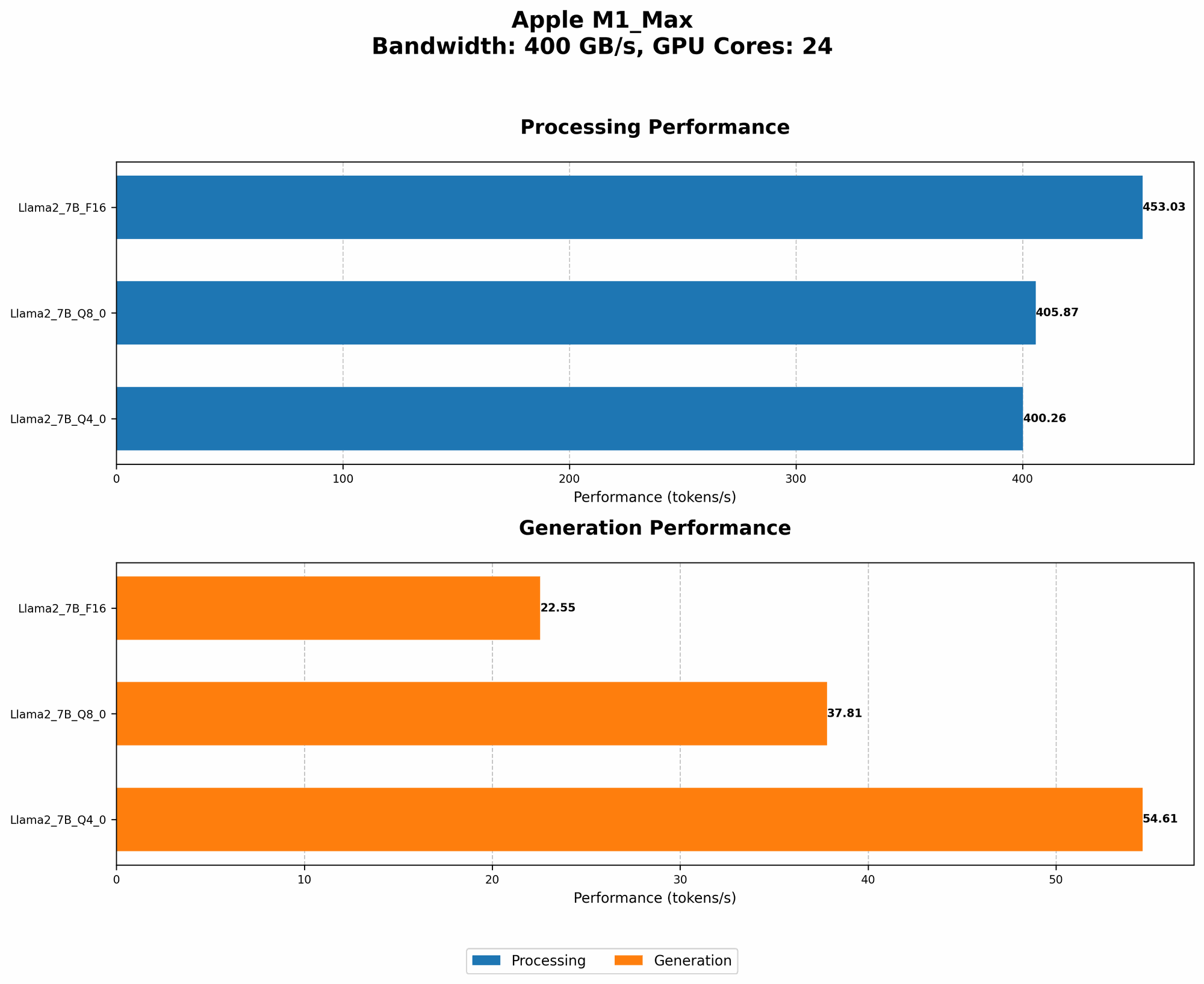
| F16 | 453.03 | 22.55 |
| Q8_0 | 405.87 | 37.81 |
| Q4_0 | 400.26 | 54.61 |
Key Observations:
- F16 (Half-Precision Float): This format delivers the highest processing speed (453.03 tokens/second) but struggles with generation speed (22.55 tokens/second), indicating a potential bottleneck in the model's output stage.
- Q8_0 (8-bit Quantization): This quantization method provides a balanced approach, delivering respectable processing speed (405.87 tokens/second) while improving generation speed compared to F16 (37.81 tokens/second).
- Q4_0 (4-bit Quantization): While offering the highest generation speed (54.61 tokens/second), processing performance drops slightly (400.26 tokens/second).
Quantization - A Simplified Explanation:
Think of quantization like compressing a digital photo. You reduce the number of colors (bits) to make the file smaller, but you might lose some detail. With LLMs, quantization reduces the model's size and resource requirements, making it easier to run on devices like the M1_Max.
Performance Analysis: Token Generation Speed Benchmarks: Apple M1 and Llama3 8B
Now, let's shift our attention to the star of the show: Llama3 8B. This model, with its advanced architecture and larger size (8 billion parameters!), pushes the boundaries of what's possible on the M1_Max.
Here's a breakdown of token generation speeds across various quantizations:
| Quantization | Processing (Tokens/Second) | Generation (Tokens/Second) |
|---|---|---|
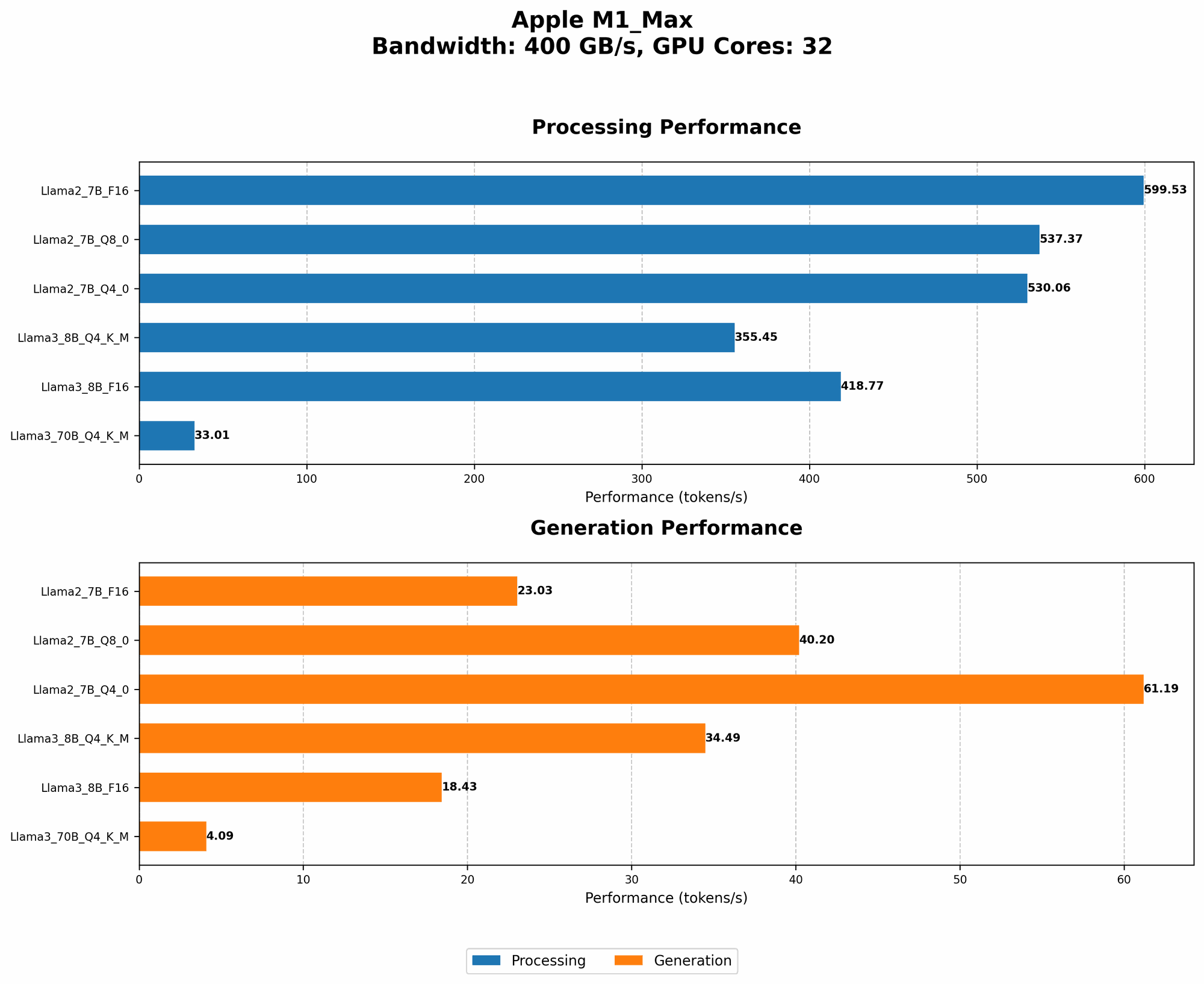
| Q4KM (4-bit Quantization with Kernel and Matrix Multiplication) | 355.45 | 34.49 |
| F16 (Half-Precision Float) | 418.77 | 18.43 |
Key Observations:
- Q4KM: This method offers a balanced approach, with a respectable processing speed (355.45 tokens/second) and fairly strong generation speed (34.49 tokens/second) – a promising option for practical use cases.
- F16: While offering faster processing (418.77 tokens/second), the generation speed (18.43 tokens/second) is notably lower. For tasks involving frequent text output, this may not be the ideal choice.
What's with the Kernel and Matrix Multiplication?
Kernel and matrix multiplication are fundamental operations in deep learning. Q4KM uses a special kind of 4-bit quantization that focuses on optimizing these core calculations, resulting in better efficiency.
Performance Analysis: Model and Device Comparison: Llama3 70B on Apple M1_Max
Although the focus is on Llama3 8B, it's worth exploring the performance of Llama3 70B on the M1_Max to understand the scalability aspect.
The data indicates that Llama3 70B is indeed feasible on the M1_Max, but with significantly lower speeds.
| Quantization | Processing (Tokens/Second) | Generation (Tokens/Second) |
|---|---|---|
| Q4KM | 33.01 | 4.09 |
Key Observations:
- Q4KM: Even with the optimized quantization method, Llama3 70B shows considerably lower speeds compared to Llama3 8B, highlighting the resource demands of larger models.
Can I run Llama3 70B on my M1_Max?
Yes, you can! But be prepared for longer inference times.
Practical Recommendations: Use Cases and Workarounds
Let's translate these benchmarks into tangible recommendations.
Ideal Use Cases for Llama3 8B on Apple M1_Max:
- Text Generation: Llama3 8B, especially with Q4KM quantization, is well-suited for tasks like creating blog posts, writing creative content, or generating summaries.
- Translation: The model's language prowess enables it to handle translation tasks, translating between different languages with reasonable efficiency.
- Question Answering: Llama3 8B can be leveraged for answering questions based on given context, making it valuable for research or information retrieval.
Workarounds for Longer Inference Times:
- Streamlined Processing: For scenarios requiring faster output, prioritize tasks with fewer text inputs.
- Lowering Expectations: Be prepared for slightly slower responses when using a larger model like Llama3 70B.
- Optimized Hardware: Consider upgrading to a device with a more powerful GPU for handling larger models.
Analogies to Understand Performance Differences:
Think of it like this:
- Running Llama3 8B (Q4KM) is like driving a mid-sized car on a highway. Smooth and efficient, with good performance for most scenarios.
- Running Llama3 70B is like driving a large truck on the same highway. You'll need a lot more fuel (compute power) and it might be slower, but you can still get there.
FAQ
Q: Can I run other LLMs on the M1_Max?
A: Absolutely! There's a growing ecosystem of LLMs that can run on the M1_Max.
Q: How do I install and configure my own local LLM?
A: There are numerous resources and libraries available for deploying LLMs locally. Check out Hugging Face Transformers and llama.cpp as starting points.
Q: What are the limitations of running LLMs locally?
A: Local LLMs are generally smaller and less complex than cloud-based models. Larger models might require more powerful hardware or may not be realistically feasible for local execution.
Q: What's the future of running LLMs locally?
A: The landscape is rapidly evolving, with ongoing research and innovation driving more efficient and powerful LLMs that are increasingly accessible for local use.
Keywords
LLMs, Llama3, Llama3 8B, Llama2, Apple M1_Max, Apple Silicon, Quantization, F16, Q8, Q4, Token/Second, Inference, Performance, GPU, Model Size, Local AI, Text Generation, Translation, Question Answering, Practical Recommendations, Use Cases, Workarounds, Future of LLMs.