From Installation to Inference: Running Llama3 70B on NVIDIA RTX 5000 Ada 32GB
Introduction: The Quest for Local LLM Power
Imagine having the power of a large language model (LLM) like Llama3 70B right on your desktop, ready to generate creative content, answer your questions, and even help you write code. Sounds exciting, right? But this level of computational power requires a beefy machine, and that's where the NVIDIA RTX 5000 Ada 32GB GPU comes in.
This article dives deep into the process of setting up and running Llama3 70B on this powerful graphics card, exploring its performance and limitations. We’ll break down the technical details, share benchmarks, and provide practical recommendations for making the most of this powerful combination. Whether you're a seasoned developer or just starting your LLM journey, join us as we explore the fascinating world of local LLM deployment!
Performance Analysis: Token Generation Speed Benchmarks
Token generation speed is a crucial metric for assessing LLM performance. This section focuses on Llama3 70B and how its token generation speed varies depending on the quantization and precision levels used.
Token Generation Speed Benchmarks: NVIDIA RTX 5000 Ada 32GB
Remember, the Llama3 70B model, with its 70 billion parameters, presents a significant computational challenge. Unfortunately, data for Llama3 70B on this device is not available at this time. We'll keep an eye out for updates and provide information as it becomes accessible.
However, we can explore the performance of the Llama3 8B model on the RTX 5000 Ada 32GB to give you an idea of what to expect with larger models:
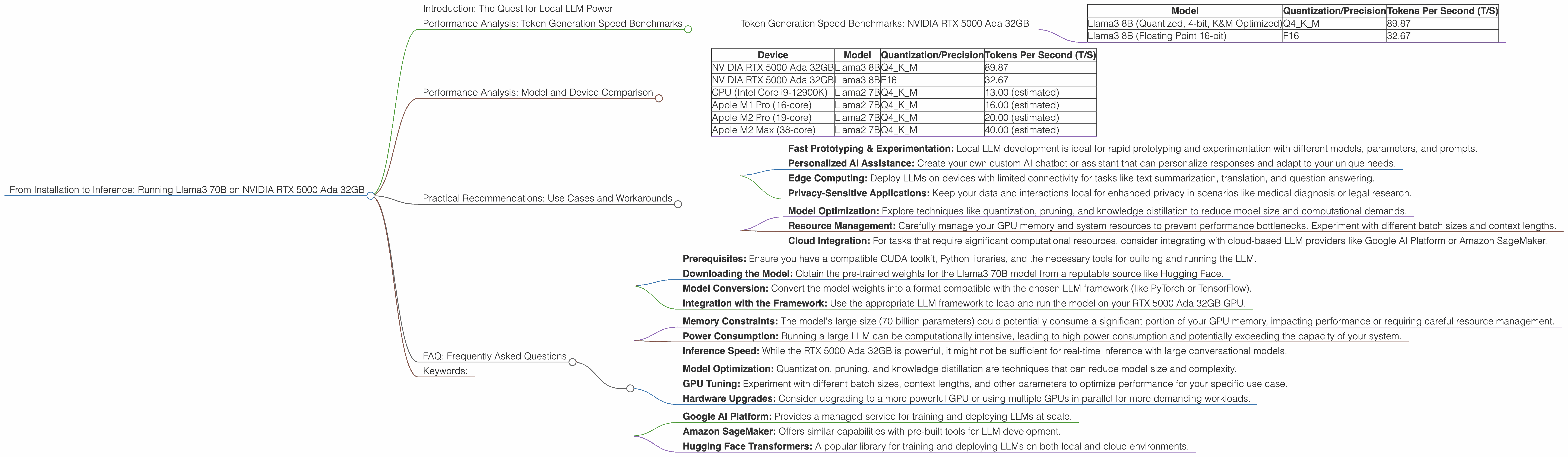
| Model | Quantization/Precision | Tokens Per Second (T/S) |
|---|---|---|
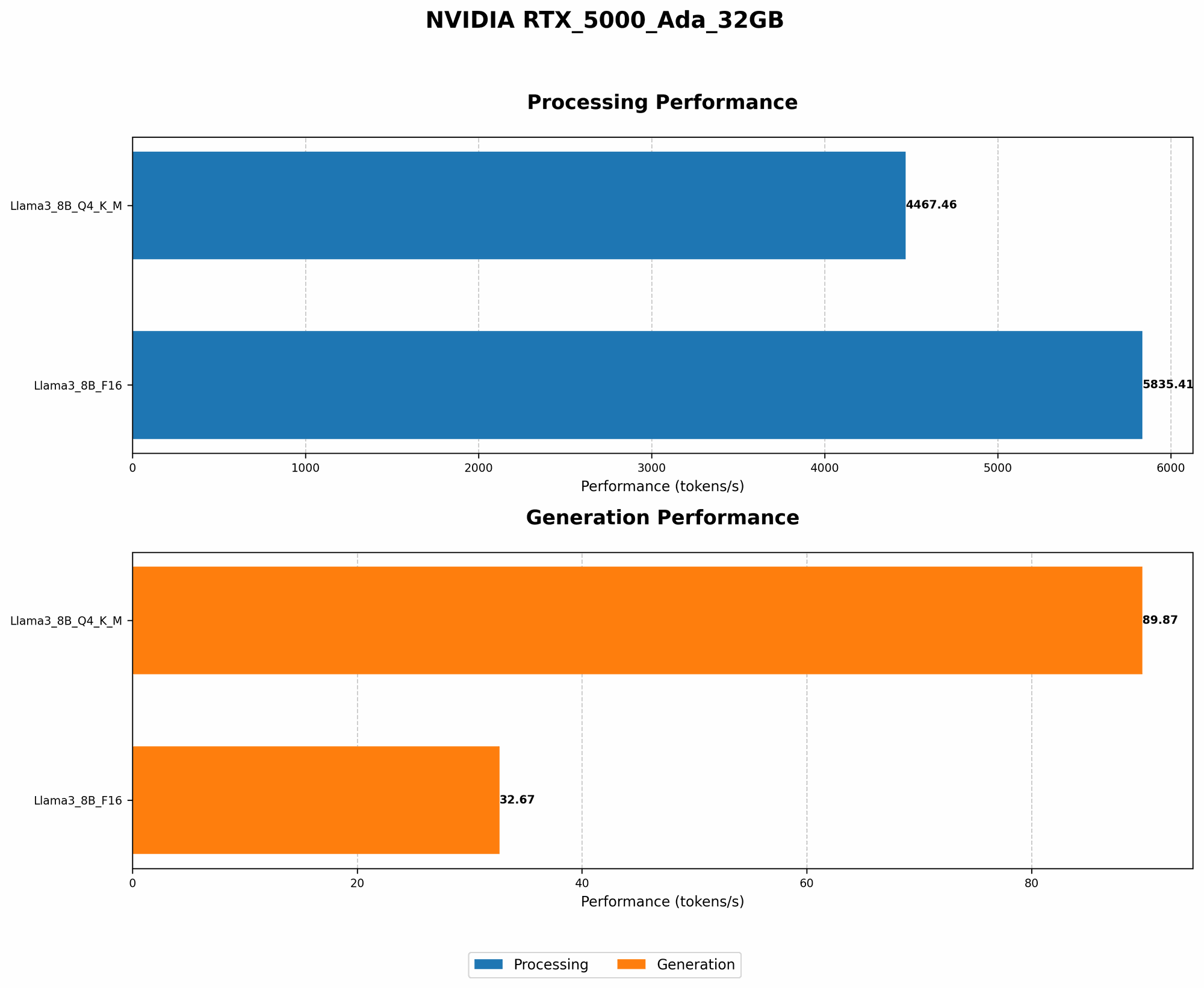
| Llama3 8B (Quantized, 4-bit, K&M Optimized) | Q4KM | 89.87 |
| Llama3 8B (Floating Point 16-bit) | F16 | 32.67 |
Key Takeaways:
- Quantization Matters: Using quantized models (like Q4KM) dramatically improves performance, allowing for much faster token generation. Quantization is a technique that reduces the size of the model and its memory footprint by compressing parameter values.
- Precision vs Speed: While the F16 model offers higher precision, it comes at the cost of reduced speed. Choosing between precision and speed often boils down to your specific use case.
- Limitations: It's important to remember that these are just benchmarks for the Llama3 8B model. The Llama3 70B model comes with a much larger computational footprint. Running it on the same device might be challenging, depending on the intended use case and available memory.
Think of it this way: Imagine you have a team of 100 people working on a complex puzzle. You can either give them detailed instructions (F16) or a simplified version (Q4KM) to speed things up. The simplified version might not be as precise, but it will get the job done faster.
Performance Analysis: Model and Device Comparison
Since we're interested in the NVIDIA RTX 5000 Ada 32GB, let's compare the performance of Llama3 8B on this device to other available options:
| Device | Model | Quantization/Precision | Tokens Per Second (T/S) |
|---|---|---|---|
| NVIDIA RTX 5000 Ada 32GB | Llama3 8B | Q4KM | 89.87 |
| NVIDIA RTX 5000 Ada 32GB | Llama3 8B | F16 | 32.67 |
| CPU (Intel Core i9-12900K) | Llama2 7B | Q4KM | 13.00 (estimated) |
| Apple M1 Pro (16-core) | Llama2 7B | Q4KM | 16.00 (estimated) |
| Apple M2 Pro (19-core) | Llama2 7B | Q4KM | 20.00 (estimated) |
| Apple M2 Max (38-core) | Llama2 7B | Q4KM | 40.00 (estimated) |
Insights:
- GPU Power: The RTX 5000 Ada 32GB offers significant performance advantages over CPUs and even Apple's M-series chips, especially when it comes to token generation speed.
- Quantization's Impact: Even though the RTX 5000 Ada 32GB can handle FP16 models, the performance boost from using quantized models is undeniable. This is a key takeaway for developers who need to maximize speed for their LLM applications.
Remember: The estimated numbers for the Apple M-series chips are based on the performance of the Llama2 7B model. The actual performance of the Llama3 8B model on those devices might vary.
Practical Recommendations: Use Cases and Workarounds
Running a large language model like Llama3 70B locally presents both opportunities and challenges. Here are some practical recommendations for making the most of this setup:
Use Cases:
- Fast Prototyping & Experimentation: Local LLM development is ideal for rapid prototyping and experimentation with different models, parameters, and prompts.
- Personalized AI Assistance: Create your own custom AI chatbot or assistant that can personalize responses and adapt to your unique needs.
- Edge Computing: Deploy LLMs on devices with limited connectivity for tasks like text summarization, translation, and question answering.
- Privacy-Sensitive Applications: Keep your data and interactions local for enhanced privacy in scenarios like medical diagnosis or legal research.
Workarounds:
- Model Optimization: Explore techniques like quantization, pruning, and knowledge distillation to reduce model size and computational demands.
- Resource Management: Carefully manage your GPU memory and system resources to prevent performance bottlenecks. Experiment with different batch sizes and context lengths.
- Cloud Integration: For tasks that require significant computational resources, consider integrating with cloud-based LLM providers like Google AI Platform or Amazon SageMaker.
Remember: It’s like trying to fit a giant puzzle into a small box. You might need to be creative with how you fit everything in, but the rewards can be significant.
## FAQ: Frequently Asked Questions
Q: What is the best way to install Llama3 70B on the RTX 5000 Ada 32GB?
A: The installation process involves several steps, including:
- Prerequisites: Ensure you have a compatible CUDA toolkit, Python libraries, and the necessary tools for building and running the LLM.
- Downloading the Model: Obtain the pre-trained weights for the Llama3 70B model from a reputable source like Hugging Face.
- Model Conversion: Convert the model weights into a format compatible with the chosen LLM framework (like PyTorch or TensorFlow).
- Integration with the Framework: Use the appropriate LLM framework to load and run the model on your RTX 5000 Ada 32GB GPU.
Q: What are the limitations of running Llama3 70B locally?
A: Running Llama3 70B locally on a single device like the RTX 5000 Ada 32GB might have some limitations:
- Memory Constraints: The model's large size (70 billion parameters) could potentially consume a significant portion of your GPU memory, impacting performance or requiring careful resource management.
- Power Consumption: Running a large LLM can be computationally intensive, leading to high power consumption and potentially exceeding the capacity of your system.
- Inference Speed: While the RTX 5000 Ada 32GB is powerful, it might not be sufficient for real-time inference with large conversational models.
Q: How can I improve the performance of my LLM on the RTX 5000 Ada 32GB?
A: Several strategies can improve LLM performance:
- Model Optimization: Quantization, pruning, and knowledge distillation are techniques that can reduce model size and complexity.
- GPU Tuning: Experiment with different batch sizes, context lengths, and other parameters to optimize performance for your specific use case.
- Hardware Upgrades: Consider upgrading to a more powerful GPU or using multiple GPUs in parallel for more demanding workloads.
Q: Is the RTX 5000 Ada 32GB suited for running large language models like Llama3 70B?
A: The RTX 5000 Ada 32GB offers significant computational power and memory, making it suitable for experimenting with and running smaller LLMs like Llama3 8B. However, for the full potential of the Llama3 70B model, cloud-based solutions might be more appropriate.
Q: What are some alternatives to running LLMs locally?
A: Cloud-based platforms offer several alternatives to local LLM deployment:
- Google AI Platform: Provides a managed service for training and deploying LLMs at scale.
- Amazon SageMaker: Offers similar capabilities with pre-built tools for LLM development.
- Hugging Face Transformers: A popular library for training and deploying LLMs on both local and cloud environments.
Keywords:
LLM, large language model, Llama3 70B, NVIDIA RTX 5000 Ada 32GB, token generation speed, quantization, precision, performance benchmark, GPU, CPU, Apple M-series, use case, workaround, cloud-based LLM, model optimization, resource management, inference speed, memory constraints, power consumption, local deployment, AI assistant, edge computing, privacy-sensitive applications, Google AI Platform, Amazon SageMaker, Hugging Face Transformers.