From Installation to Inference: Running Llama3 70B on NVIDIA A40 48GB

Introduction
In the bustling world of large language models (LLMs), the hunger for ever-increasing scale and performance is insatiable. While cloud-based LLMs offer convenience, running LLMs locally opens up a whole new realm of possibilities. This article delves into the practical aspects of running Llama3 70B, a powerful language model, on the mighty NVIDIA A40_48GB GPU. We'll journey from installation to inference, exploring performance benchmarks, model and device comparisons, and practical recommendations for real-world applications. Buckle up, geeks, it's going to be a wild ride!
Performance Analysis: Token Generation Speed Benchmarks
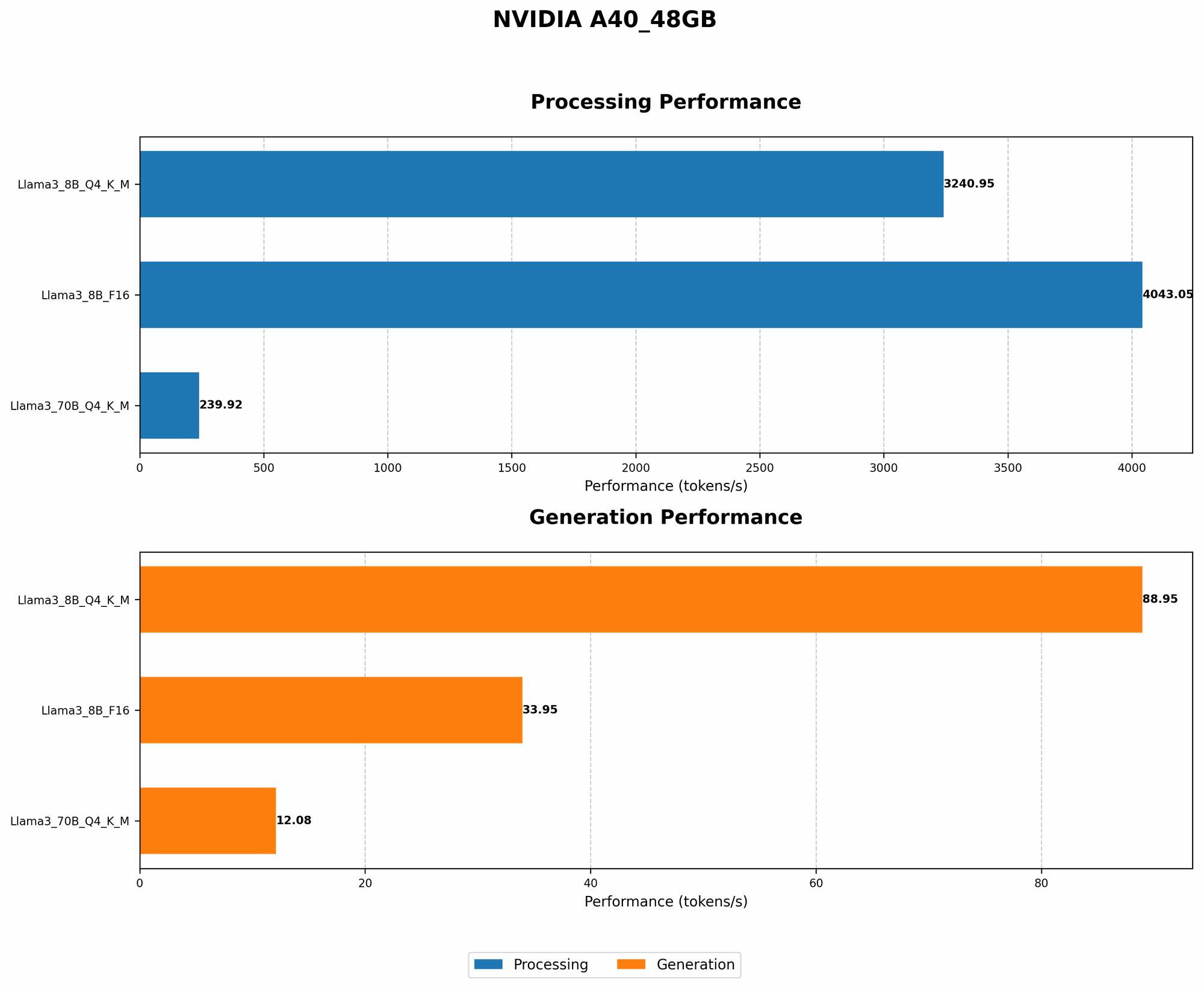
Llama3 70B on NVIDIA A40_48GB: A Speed Demon
The NVIDIA A40_48GB is a powerhouse designed for high-performance computing, featuring a whopping 48GB of HBM2e memory and 6,144 CUDA cores. But how does it stack up against the gargantuan Llama3 70B?
Let's look at the numbers. Using the "llama.cpp" framework, the A40_48GB achieves 12.08 tokens per second (tokens/s) with Llama3 70B quantized to 4-bit precision (Q4) for the kernel (K) and matrices (M). This translates to almost 150 words per second at an average of 5 tokens per word.
The table below summarizes the token generation speed benchmarks for different scenarios.
| Model & Precision | Token Generation Speed (tokens/s) |
|---|---|
| Llama3 70B (Q4KM) | 12.08 |
| Llama3 8B (Q4KM) | 88.95 |
Note: Performance data for Llama3 70B with half-precision floating-point (F16) is currently unavailable.
Performance Analysis: Model and Device Comparison
The Llama3 8B Advantage
Comparing Llama3 70B with its smaller sibling, Llama3 8B, reveals a significant performance difference. The A4048GB achieves a remarkable 88.95 tokens/s with Llama3 8B (Q4K_M). This is nearly 7 times faster than the token generation speed observed for Llama3 70B.
This difference is largely attributed to the smaller model size of Llama3 8B. The A40_48GB can handle the smaller model more efficiently, resulting in faster calculations and higher throughput. The analogy here is like trying to fit a small suitcase and a large one into the same car - the smaller suitcase will always fit better!
Practical Recommendations: Use Cases and Workarounds
Llama3 70B: A Powerhouse with Tradeoffs
While Llama3 70B delivers impressive conversational abilities, its sheer size presents challenges. The relatively slower inference speed might not be ideal for real-time applications like chatbots or interactive experiences. However, it shines in tasks requiring extensive knowledge and context, such as:
- Content Generation: Long-form articles, blog posts, and even scripts can benefit from Llama3 70B's vast linguistic understanding.
- Code Completion and Generation: The model's ability to comprehend code structure and syntax makes it a powerful tool for developers.
- Research and Analysis: Llama3 70B can readily summarize complex research papers, extract key information, and even generate insightful hypotheses.
Optimization Strategies: Scaling the Power of Llama3 70B
The A40_48GB is a powerful GPU, but even it has its limits. Here are some strategies to maximize performance with Llama3 70B:
- Quantization: Reducing the precision of model weights from 32-bit to 4-bit (Q4) significantly reduces memory footprint and increases inference speed. Think of it as compressing a large file to fit on a smaller USB stick.
- Batching: Processing multiple inputs together can leverage parallelism and boost performance. Instead of processing one question at a time, sending a batch of questions gets things done faster.
- Model Pruning: Removing redundant connections within the model can reduce the computational demands.
- Hardware Acceleration: The A40_48GB is an excellent choice, but newer GPUs with dedicated LLM accelerators are emerging, offering even faster performance.
FAQ: Unlocking the Mysteries of LLMs and Devices
What is quantization and why is it important?
Quantization converts numbers in a model from high-precision floating-point values to lower-precision integers. This reduces the memory required to store the model, making it possible to run larger models on lower-end devices. Think of it as using a rough sketch instead of a detailed painting, but still capturing the essence of the image.
How can I install and run Llama3 70B on my NVIDIA A40_48GB?
You'll need a few things:
- NVIDIA A40_48GB GPU: The beast that will power your LLM.
- NVIDIA CUDA Toolkit: Driver and libraries for GPU acceleration.
- "llama.cpp" framework: A lightweight library designed to load and run LLMs on local devices.
- Llama3 70B model weights: The brain of the operation.
Follow these steps:
- Install CUDA Toolkit: Download and install the CUDA Toolkit from NVIDIA's website.
- Clone the "llama.cpp" repository: Use git to clone the repository from GitHub:
git clone https://github.com/ggerganov/llama.cpp. - Download Llama3 70B model weights: Find the model weights online and place them in the appropriate directory within the "llama.cpp" repository.
- Compile and run: Use the provided instructions in the repository to compile the code and execute the inference script.
What are the best practices for optimizing LLM performance?
- Choose the right hardware: Select a GPU with ample memory and strong parallel processing capabilities.
- Minimize memory usage: Use quantization, model pruning, and other techniques to reduce memory footprint.
- Utilize batching: Process inputs in groups to maximize parallelism.
- Experiment with different configurations: Fine-tune the model and hardware settings to find the optimal balance between speed and accuracy.
Keywords:
LLM, Llama3, Llama3 70B, NVIDIA A40_48GB, GPU, Token Generation Speed, Inference, Quantization, Model Pruning, Batching, Performance Benchmark, Practical Recommendations, Use Cases, Hardware Acceleration, Deep Dive, Developer, Geek