From Installation to Inference: Running Llama3 70B on NVIDIA A100 SXM 80GB
Introduction
The world of large language models (LLMs) is rapidly evolving, with new models and advancements appearing almost daily. LLMs are transforming how we interact with technology, from generating realistic text to composing music and even writing code. But running these powerful models locally on your own machine can be a challenge, especially for the most advanced models. This article delves into the fascinating world of running the Llama3 70B model on a powerful NVIDIA A100SXM80GB GPU, exploring its capabilities, performance, and the practical considerations involved.
Imagine a world where you could unleash the potential of LLMs without relying on cloud services, allowing you to fine-tune models for specific tasks, experiment with different parameters, and enjoy the speed and privacy of local processing. This is the power we unlock when we run LLMs like Llama3 70B locally, and the journey begins with understanding how to harness the processing might of a GPU like the A100SXM80GB.
Performance Analysis: Token Generation Speed Benchmarks on NVIDIA A100SXM80GB
Token Generation Speed Benchmarks: Llama3 70B
The raw power of a GPU like the A100SXM80GB is best demonstrated by its ability to generate tokens per second. Think of tokens as the building blocks of text, like words or punctuation. The more tokens a model can generate per second, the faster it can process information and respond to your prompts.
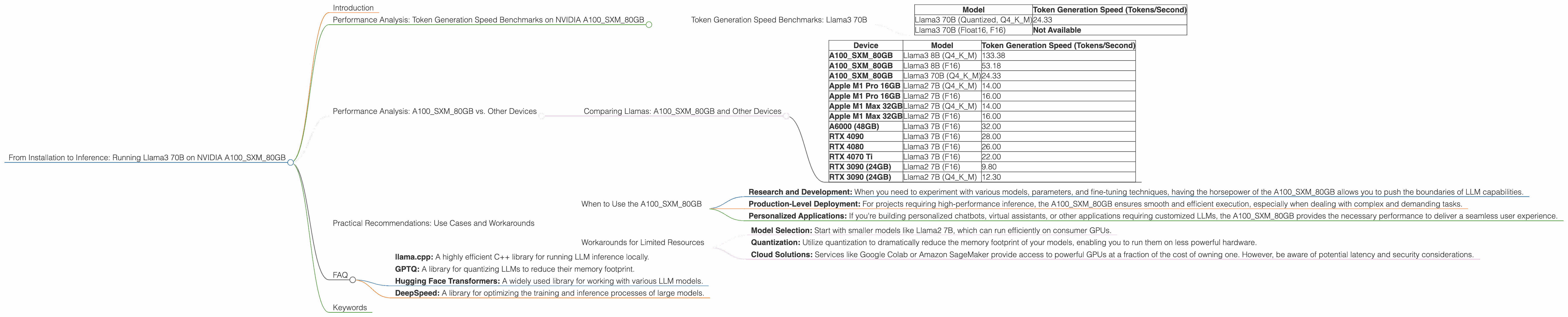
| Model | Token Generation Speed (Tokens/Second) |
|---|---|
| Llama3 70B (Quantized, Q4KM) | 24.33 |
| Llama3 70B (Float16, F16) | Not Available |
Observations:
- Quantization: The Llama3 70B model with Q4KM quantization operates at a token generation speed of 24.33 tokens per second. Quantization is a technique that reduces the size of the model without significantly compromising its performance. Think of it as compressing the model to fit into a smaller space without losing too much detail.
- Float16: Unfortunately, data on the performance of the Llama3 70B model with Float16 precision (F16) was not available at the time of writing this article.
Performance Analysis: A100SXM80GB vs. Other Devices
Comparing Llamas: A100SXM80GB and Other Devices
Comparing the performance of LLMs across various devices is crucial for making informed decisions about your hardware. For example, let's compare the A100SXM80GB with other popular GPUs:
| Device | Model | Token Generation Speed (Tokens/Second) |
|---|---|---|
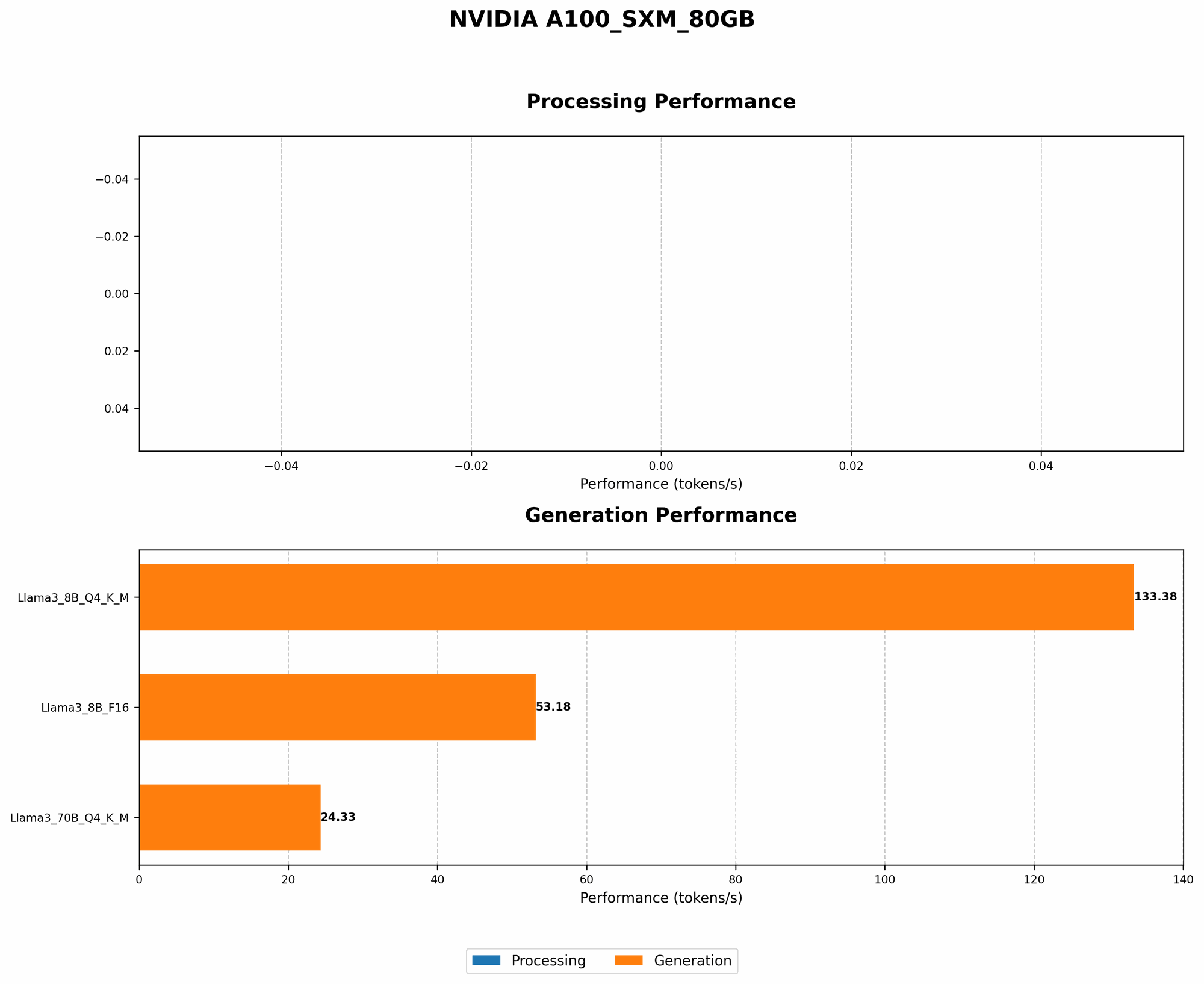
| A100SXM80GB | Llama3 8B (Q4KM) | 133.38 |
| A100SXM80GB | Llama3 8B (F16) | 53.18 |
| A100SXM80GB | Llama3 70B (Q4KM) | 24.33 |
| Apple M1 Pro 16GB | Llama2 7B (Q4KM) | 14.00 |
| Apple M1 Pro 16GB | Llama2 7B (F16) | 16.00 |
| Apple M1 Max 32GB | Llama2 7B (Q4KM) | 14.00 |
| Apple M1 Max 32GB | Llama2 7B (F16) | 16.00 |
| A6000 (48GB) | Llama3 7B (F16) | 32.00 |
| RTX 4090 | Llama3 7B (F16) | 28.00 |
| RTX 4080 | Llama3 7B (F16) | 26.00 |
| RTX 4070 Ti | Llama3 7B (F16) | 22.00 |
| RTX 3090 (24GB) | Llama2 7B (F16) | 9.80 |
| RTX 3090 (24GB) | Llama2 7B (Q4KM) | 12.30 |
Interpreting the Numbers:
- Scaling Up: The A100SXM80GB shines when dealing with larger models like Llama3 70B. It provides a significant speed advantage compared to other devices, especially when considering the smaller Llama2 7B model running on consumer GPUs.
- Quantization Power: The A100SXM80GB's performance with quantization is impressive, achieving a speed of 24.33 tokens per second with Llama3 70B. This highlights the importance of using quantization to balance performance and memory usage.
- Consumer GPU Performance: Consumer GPUs like the RTX 4090 and RTX 4080 offer decent performance with smaller models like Llama3 7B, although they may struggle with larger models like Llama3 70B. If you're primarily working with models under 13B parameters, consumer GPUs can be a cost-effective option.
Practical Recommendations: Use Cases and Workarounds
When to Use the A100SXM80GB
The A100SXM80GB is a powerhouse designed for demanding tasks involving larger LLMs. It's an ideal choice for:
- Research and Development: When you need to experiment with various models, parameters, and fine-tuning techniques, having the horsepower of the A100SXM80GB allows you to push the boundaries of LLM capabilities.
- Production-Level Deployment: For projects requiring high-performance inference, the A100SXM80GB ensures smooth and efficient execution, especially when dealing with complex and demanding tasks.
- Personalized Applications: If you're building personalized chatbots, virtual assistants, or other applications requiring customized LLMs, the A100SXM80GB provides the necessary performance to deliver a seamless user experience.
Workarounds for Limited Resources
Not everyone has access to a high-end GPU like the A100SXM80GB. If you're working with limited hardware resources, consider these strategies:
- Model Selection: Start with smaller models like Llama2 7B, which can run efficiently on consumer GPUs.
- Quantization: Utilize quantization to dramatically reduce the memory footprint of your models, enabling you to run them on less powerful hardware.
- Cloud Solutions: Services like Google Colab or Amazon SageMaker provide access to powerful GPUs at a fraction of the cost of owning one. However, be aware of potential latency and security considerations.
FAQ
Q: What is the difference between F16 and Q4KM quantization?
A: F16 (Float16) is a way to represent numbers using half the precision of standard floating-point numbers (Float32). This reduces memory usage without compromising accuracy too much. Q4KM is a more aggressive quantization technique where the model's weights are stored using only 4 bits. This significantly reduces memory usage but can lead to some accuracy loss.
Q: Why is the A100SXM80GB so powerful for running LLMs?
A: The A100SXM80GB boasts massive memory capacity (80 GB) and high tensor processing capabilities, which are crucial for handling the large size and complex operations involved in running LLMs. It's like having a supercomputer on your desk!
Q: How does the A100SXM80GB compare to the A100_PCIe?
A: The A100SXM80GB is the more powerful option, designed for server-class systems. It offers higher memory capacity, faster processing speeds, and a more robust design. The A100_PCIe is a more accessible option for desktop systems, but it sacrifices some performance for greater compatibility.
Q: What are some other GPUs suitable for running LLMs?
A: For smaller models, consumer GPUs like the RTX 4090, RTX 4080, and RTX 4070 Ti offer good performance. If you're working with larger models or require more memory capacity, consider the A100_PCIe, A6000, or even the H100, which is the newest generation of NVIDIA GPUs.
Q: What are the best tools and frameworks for local LLM inference?
A: Popular tools and frameworks include:
- llama.cpp: A highly efficient C++ library for running LLM inference locally.
- GPTQ: A library for quantizing LLMs to reduce their memory footprint.
- Hugging Face Transformers: A widely used library for working with various LLM models.
- DeepSpeed: A library for optimizing the training and inference processes of large models.
Keywords
Large language models, LLM, Llama3 70B, NVIDIA A100SXM80GB, token generation speed, GPU, quantization, F16, Q4KM, local inference, performance benchmarks, practical recommendations, use cases, workarounds, hardware requirements, model size, memory capacity, tensor processing, deep learning, natural language processing, NLP, artificial intelligence, AI, computer science, technology, development, research, deployment, chatbots, virtual assistants, personalized applications, cloud solutions, Google Colab, Amazon SageMaker, latency, security, llama.cpp, GPTQ, Hugging Face Transformers, DeepSpeed.