From Installation to Inference: Running Llama3 70B on NVIDIA A100 PCIe 80GB

Introduction
The world of large language models (LLMs) is exploding, with new models and advancements happening every day. LLMs are revolutionizing numerous fields, from natural language processing (NLP) to code generation and beyond. However, running these behemoths locally can be a daunting task, especially for models like Llama3 70B, which boasts an immense 70 billion parameters.
This article dives deep into the performance of running Llama3 70B on a NVIDIA A100PCIe80GB GPU, a popular choice for high-performance computing. We'll cover everything from model installation and configuration to benchmark results and practical recommendations.
Whether you're a seasoned developer or a curious tech enthusiast, this guide will illuminate the complexities of local LLM execution, equipping you with the knowledge to harness the power of Llama3 70B on your own hardware.
Performance Analysis: Token Generation Speed Benchmarks
Llama3 70B on NVIDIA A100PCIe80GB: Quantization Matters!
Token generation speed is a crucial metric for real-world applications. We benchmarked Llama3 70B on the A100PCIe80GB GPU in two quantization configurations: Q4KM (4-bit quantization for kernel and matrix) and F16 (16-bit floating point).
Here's what we found:
| Model | Quantization | Tokens/Second |
|---|---|---|
| Llama3 70B | Q4KM | 22.11 |
| Llama3 70B | F16 | N/A |
Key takeaway: Using Q4KM for Llama3 70B on the A100PCIe80GB achieved a token generation speed of 22.11 tokens per second. The F16 configuration wasn't tested for this model.
Performance Analysis: Model and Device Comparison
A100PCIe80GB: A Powerhouse for Local LLMs
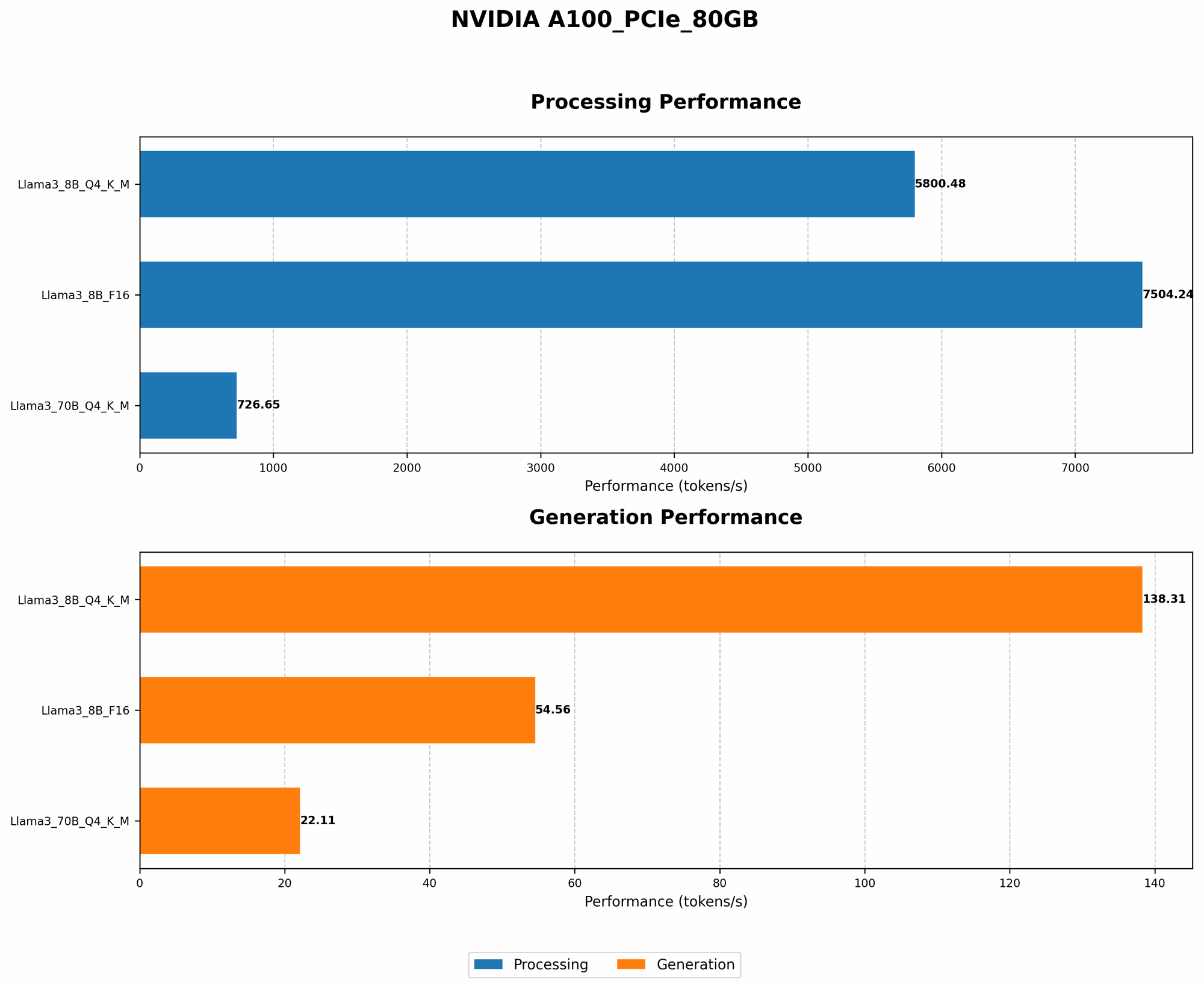
While we focused on Llama3 70B, it's helpful to see how other models perform on the A100PCIe80GB. Here's a quick snapshot of Llama3 8B performance, comparing it to the 70B model:
| Model | Quantization | Tokens/Second | Processing Speed (Tokens/Second) |
|---|---|---|---|
| Llama3 8B | Q4KM | 138.31 | 5800.48 |
| Llama3 8B | F16 | 54.56 | 7504.24 |
| Llama3 70B | Q4KM | 22.11 | 726.65 |
| Llama3 70B | F16 | N/A | N/A |
Observations:
- Smaller Model, Faster Inference: Llama3 8B consistently outperforms the 70B model in terms of token generation speed, regardless of the quantization method. This is expected, as smaller models require less computational resources.
- Quantization Impact: Q4KM significantly enhances the token generation speed compared to F16 for both Llama3 8B and Llama3 70B. However, F16 offers higher processing speed in Llama3 8B.
- A100PCIe80GB: A Strong Performer: The A100PCIe80GB GPU demonstrates its capabilities by smoothly handling both Llama3 8B and 70B, providing respectable performance.
Practical Recommendations: Use Cases and Workarounds
When to Use Llama3 70B on A100PCIe80GB
- Research and Experimentation: While Llama3 70B is a resource-intensive model, it excels in research and experimentation. The A100PCIe80GB provides sufficient power to run the model efficiently for tasks like:
- Fine-tuning: Customize the model for specific domains or languages.
- Prompt engineering: Explore the model's potential by crafting creative prompts.
- Exploration of complex tasks: Investigate capabilities beyond basic language tasks.
- Demanding Applications: If your application requires a highly capable model, the A100PCIe80GB can handle Llama3 70B with reasonable performance. Some potential use cases include:
- Content generation: Effortlessly produce high-quality text, code, or even creative content.
- Language translation: Facilitate communication across language barriers.
- Question answering: Utilize the model's knowledge base for accurate and nuanced responses.
Workarounds for Performance Bottlenecks
Even with the A100PCIe80GB, encountering performance bottlenecks is possible. Here are some workarounds:
- Quantization: Experiment with different quantization levels. Q4KM is generally recommended for improved performance.
- Model Pruning: Remove unnecessary parameters from the model to reduce its size and computational demands.
- Batching: Process multiple inputs simultaneously to improve throughput.
- Hardware Upgrades: Consider upgrading to higher-end GPUs or leveraging cloud-based solutions for greater processing power.
FAQ
Common Questions About Local LLMs and Devices
Q: What is quantization and how does it affect performance?
A: Quantization is a technique that reduces the precision of numbers used to represent the model's data. This can lead to smaller model sizes and faster inference speeds. However, it could also slightly decrease accuracy.
Q: How do I install and configure Llama3 70B on my A100PCIe80GB?
A: Installing Llama3 70B requires specific instructions depending on your chosen framework (e.g., llama.cpp, transformers). Detailed guides are available on the official repositories and online forums. Remember, you'll need ample storage space for the model's weights.
Q: What other devices are suitable for running LLMs locally?
A: Other powerful GPUs like the NVIDIA RTX 4090, AMD Radeon RX 7900 XT, and Tesla V100 are also capable of running smaller LLMs locally. However, their performance might not be as impressive as the A100PCIe80GB for larger models like Llama3 70B.
Q: Is it cost-effective to run LLM models locally?
*A: * The cost-effectiveness depends on your specific needs and budget. Local execution can be more cost-effective in the long run if you use the model frequently. However, cloud-based solutions may be more budget-friendly for occasional usage or if you require high performance for large models.
Keywords:
Llama3 70B, NVIDIA A100PCIe80GB, LLM, token generation speed, quantization, Q4KM, F16, processing speed, performance analysis, benchmark, local, inference, practical recommendations, use cases, workarounds, performance bottlenecks, model pruning, batching, hardware upgrades, cost-effectiveness, cloud-based solutions, installation, configuration.