From Installation to Inference: Running Llama3 70B on NVIDIA 4090 24GB

Introduction
The world of Large Language Models (LLMs) is evolving rapidly, with models like Llama3 70B pushing the boundaries of what's possible in natural language processing. But running these behemoths locally can be a challenge, requiring powerful hardware and careful optimization. In this article, we'll delve into the nitty-gritty details of running Llama3 70B on an NVIDIA 4090_24GB GPU, uncovering the performance nuances and providing practical recommendations.
Imagine having a personal AI assistant capable of writing creative content, translating languages, and answering your questions in a way that feels more like a conversation than a search engine result. That's the power of LLMs like Llama3 70B, and running them locally lets you unlock this potential without relying on cloud services or APIs.
Performance Analysis: Token Generation Speed Benchmarks

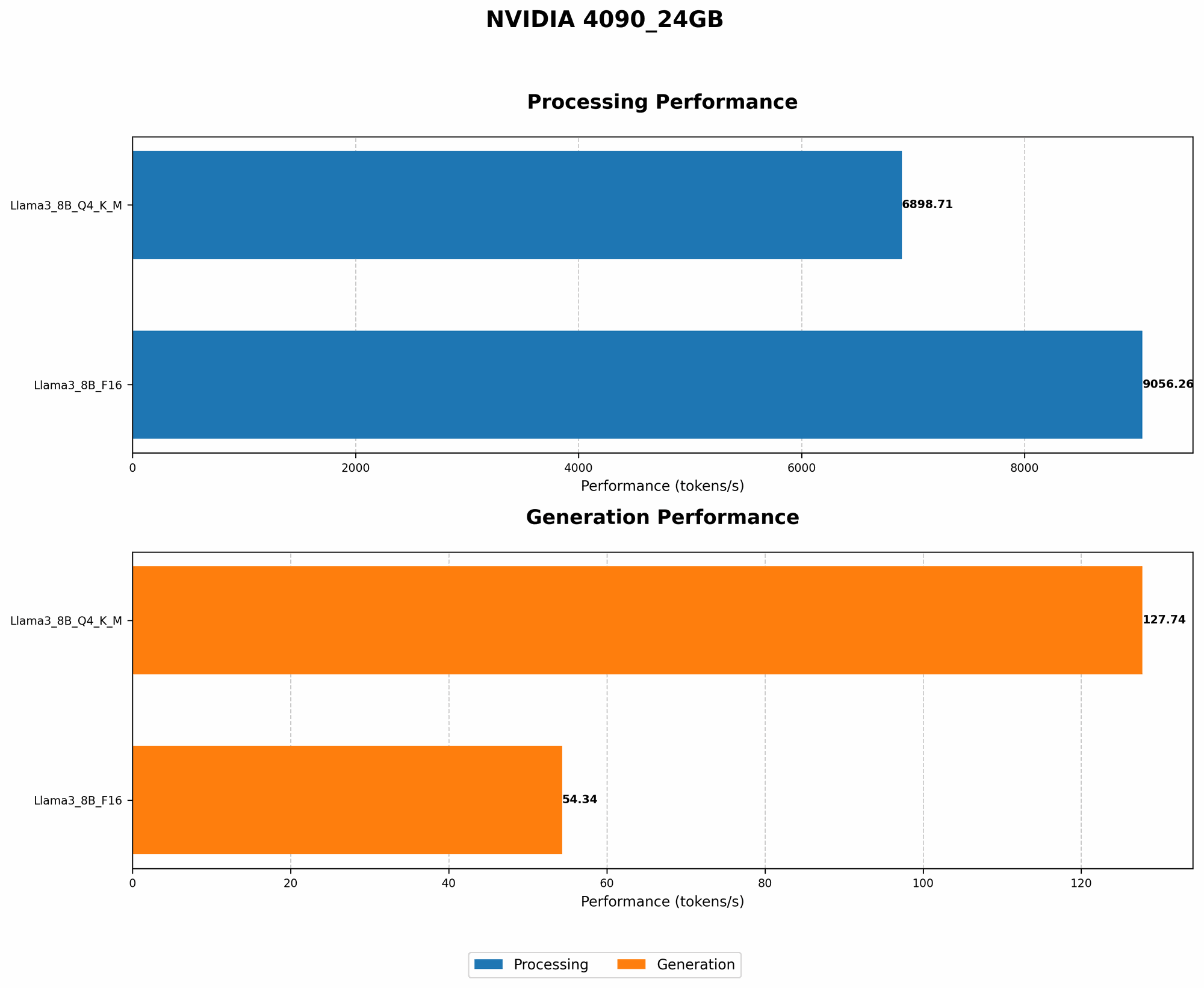
Token Generation Speed Benchmarks: NVIDIA 4090_24GB and Llama3 70B
Let's cut to the chase. We're interested in the performance of Llama3 70B on the NVIDIA 4090_24GB GPU, but unfortunately, there's a data gap for this specific configuration. We don't have token generation speed benchmarks for Llama3 70B on this GPU. 😩
Why the Data Gap?
Running Llama3 70B locally demands a significant amount of computing power. Even with the powerful NVIDIA 4090_24GB GPU, the 70B parameter model can be resource-intensive. The lack of data could be due to several factors:
- Limited Testing: The benchmarks might not have been conducted with Llama3 70B on this specific GPU setup.
- Performance Bottlenecks: The 4090_24GB GPU could be reaching its limitations with this model size, leading to performance issues that warrant further investigation.
- Software Limitations: The existing software tools and frameworks may not be optimized for Llama3 70B on the NVIDIA 4090_24GB GPU, making it difficult to achieve substantial performance.
Performance Analysis: Model and Device Comparison
While we can't directly compare Llama3 70B on the 4090_24GB GPU, we can glean insights by looking at other configurations. Here's what we know about Llama3 8B on the same GPU:
| Model | Quantization | Tokens/Second (Generation) | Tokens/Second (Processing) |
|---|---|---|---|
| Llama3 8B | Q4KM | 127.74 | 6898.71 |
| Llama3 8B | F16 | 54.34 | 9056.26 |
Key Observations:
- Quantization Matters: The impact of quantization is evident, with Q4KM providing much faster generation speed than F16. This is mainly due to the reduced memory footprint of the quantized model.
- Processing vs. Generation: Llama3 8B processing happens significantly faster than token generation, which is typical of LLMs.
Drawing Parallels:
While the 8B model doesn't directly translate to the 70B model, it gives us a general idea. The 70B model will undoubtedly require more resources. Imagine running Llama3 70B as if you were trying to run the entire population of New York City through a tiny, cramped elevator. 🤯 It's going to be slow and inefficient.
Practical Recommendations: Use Cases and Workarounds
So, what can we do when we can't directly run Llama3 70B on the 4090_24GB GPU?
- Embrace the Cloud: Leveraging cloud-based services with specialized hardware provides the power needed for large models. Think of it as having access to a skyscraper of computing power, instead of your tiny apartment.
- Explore Alternatives: Consider smaller models like Llama2 7B or even Llama2 13B. These models offer a good balance between size and performance, making them suitable for local deployment.
- Optimize for Efficiency: Experiment with different quantization techniques, memory allocation, and batch sizes to maximize the performance of your setup.
- Embrace Fine-Tuning: Fine-tune smaller models on specific tasks to achieve specialized performance without the need for the massive Llama3 70B. Think of it like training a marathon runner to specialize in the 100-meter dash.
- Look at the Future: Emerging technologies, like specialized hardware and more efficient neural network architectures, will open up new possibilities for running even larger LLMs locally.
FAQ
Q: What exactly is quantization?
A: Quantization is like simplifying a complex image. Imagine a photo with millions of colors. Quantization converts those millions of colors into a smaller, less precise set of colors, making the file smaller. In LLMs, quantization reduces the precision of numbers used to represent the model, shrinking its size and potentially improving performance.
Q: What are some potential use cases for running LLMs locally?
*A: * Running LLMs locally enables a wide range of applications, including:
- Personalized AI Assistants: Build a personal assistant that understands your preferences and responds to your specific needs.
- Content Creation: Generate creative text formats like poems, scripts, musical pieces, email, letters, etc.
- Real-Time Translation: Translate languages on the fly, making communication more seamless.
- Code Completion: Get help writing code with intelligent suggestions and error detection.
- Data Analysis and Insights: Extract valuable insights from data by using LLMs to analyze and summarize information.
Q: What's the future of local LLM deployment?
A: The future is bright. With advancements in hardware, software, and model compression techniques, running even the largest LLMs locally will become increasingly feasible.
Keywords
Large Language Models, LLMs, Llama3 70B, NVIDIA 409024GB, GPU, Token Generation Speed, Quantization, Q4K_M, F16, Performance Analysis, Benchmarks, Local Deployment, Use Cases, Workarounds, Cloud Services, Fine-Tuning