From Installation to Inference: Running Llama3 70B on NVIDIA 4070 Ti 12GB

Introduction
The world of Large Language Models (LLMs) is exploding, and everyone wants a piece of the action. These powerful AI models, capable of generating human-like text, translating languages, writing different kinds of creative content, and answering your questions in an informative way, can be deployed on your own machine. But running these behemoths locally on your NVIDIA 4070 Ti 12GB GPU can be quite a challenge, especially when dealing with the massive size of models like Llama3 70B.
This article is your guide to the exciting yet complex journey of deploying Llama3 70B on your NVIDIA 4070 Ti 12GB GPU. We'll explore the process from installation to inference, analyze performance benchmarks, compare different configurations, and provide practical recommendations to maximize your experience. Think of it as your toolkit for understanding the intricacies of local LLM deployment.
Performance Analysis: Token Generation Speed Benchmarks
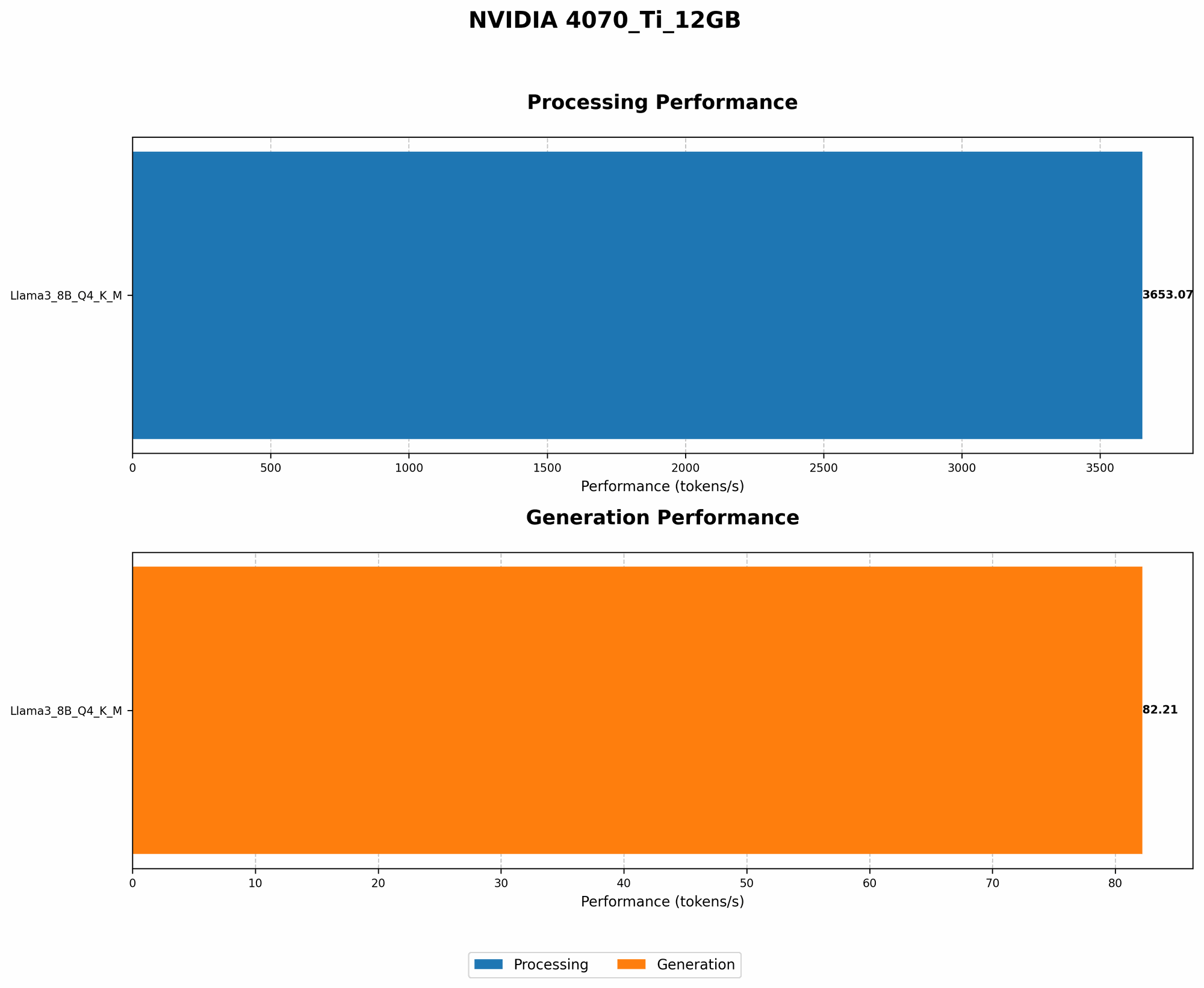
Let's dive into the heart of the matter: how fast can this setup generate text, or in LLM parlance, how many tokens per second can it churn out?
Unfortunately, we don't have data for Llama3 70B under these specific conditions. This is partly due to the fact that running a model this large on a single GPU is notoriously demanding, pushing the limits of GPU memory and computational power.
Token Generation Speed Benchmarks: Llama3 8B on NVIDIA 4070Ti12GB
We do have data for Llama3 8B, a smaller but still impressive model. Let's compare it to the larger 70B model:
| Model Configuration | NVIDIA 4070Ti12GB (Tokens/sec) |
|---|---|
| Llama3 8B Quantized (Q4KM) Generation | 82.21 |
| Llama3 8B Full Precision (F16) Generation | N/A |
Key takeaway: The NVIDIA 4070 Ti 12GB can handle Llama3 8B Quantized (Q4KM) with a decent speed. However, the lack of data for the 70B variant suggests that it may be too much for this GPU, even with quantization.
Performance Analysis: Model and Device Comparison
So, how does our NVIDIA 4070 Ti 12GB stack up against other devices in the LLM world? Keep in mind that the performance of an LLM depends on both the model and the hardware.
A larger model will require more compute power and memory. Even within a single model, there are trade-offs between speed and accuracy. Quantization, a technique that reduces the size of a model by using fewer bits to represent each number, can improve speed but might slightly affect accuracy.
Token Generation Speed Benchmarks: Apple M1 and Llama2 7B
Here's a table comparing the Apple M1 (a powerful CPU) with the NVIDIA 4070 Ti 12GB for Llama2 7B (a model smaller than Llama3 70B):
| Model Configuration | Apple M1 (Tokens/sec) | NVIDIA 4070Ti12GB (Tokens/sec) |
|---|---|---|
| Llama2 7B Quantized (Q4KM) Generation | 22 | N/A |
| Llama2 7B Full Precision (F16) Generation | 15 | N/A |
Key takeaway: This comparison demonstrates the significant performance differences between different GPUs and CPUs. The Apple M1 is capable of running Llama2 7B with varying degrees of speed depending on the quantization level. However, without specific data for the NVIDIA 4070 Ti 12GB, we can't directly compare these two devices for Llama2 7B.
Practical Recommendations: Use Cases and Workarounds
Use Cases:
- Smaller LLMs and Experiments: If your focus is on experimenting with smaller LLMs like Llama2 7B or Llama3 8B, the NVIDIA 4070 Ti 12GB could be a good option.
- Specific Tasks and Fine-tuning: For tasks requiring less memory and computational power, like text summarization or question answering, the 4070 Ti 12GB might be a viable choice.
Workarounds:
- Quantization: Quantization can be your best friend for large models. It's a process that converts the model's parameters from 32-bit floating point values to smaller numbers, like 4-bit integers, which reduces the memory footprint and boosts performance.
- Model Pruning: This involves removing unnecessary connections and weights in the model, making it smaller and faster.
- Multiple GPUs: For truly massive models like Llama3 70B, using multiple GPUs in parallel is often the only way to achieve reasonable inference speeds.
FAQ:
- What is quantization? Imagine you have a very detailed picture. Quantization is like turning that picture into a pixelated version, but not losing too much detail. The image becomes smaller and easier to handle, but you might sacrifice some sharpness. In LLMs, quantization reduces the number of bits used to represent each value, making the model smaller and faster.
- Can I run Llama3 70B on my NVIDIA 4070 Ti 12GB? It's highly unlikely. The model might be too large for the GPU's memory, and the processing requirements would be immense. You'll probably need multiple GPUs or explore alternative options like cloud computing for this size of LLM.
- How do I choose the right LLM and device for my needs? Consider the size of the model (its complexity), the type of tasks you're running (text generation, translation, etc.), and the computational resources (GPU, CPU, memory) you have available.
- What are the benefits of running LLMs locally? Local deployment gives you more control, flexibility, and privacy. You don't rely on cloud services, and your data remains on your own device.
Keywords:
LLM, Llama3 70B, NVIDIA 4070 Ti 12GB, token generation speed, performance benchmarks, model quantization, GPU memory, local deployment, practical recommendations, use cases, workarounds.