From Installation to Inference: Running Llama3 70B on NVIDIA 3090 24GB
Introduction
The world of Large Language Models (LLMs) is evolving faster than a cheetah on a caffeine bender. We're constantly being bombarded with new models, bigger and better, promising to revolutionize everything from coding to creative writing. But what about the practical reality of running these behemoths on your own hardware?
This article is your guide to the wild world of local LLM inference, focusing on the mighty Llama3 70B model and its dance with the NVIDIA 3090_24GB GPU. We'll explore the performance landscape, delve into practical recommendations for use cases, and even demystify some of the jargon along the way. So strap on your coding boots and get ready to unleash the power of Llama3 on your own machine!
Performance Analysis: Token Generation Speed Benchmarks
Token Generation Speed Benchmarks: NVIDIA 3090_24GB and Llama3 70B
The benchmark results for Llama3 70B on the NVIDIA 3090_24GB are a bit of a mystery. The data we have available doesn't include the numbers for this specific combination. This could be due to a number limitations of the benchmark data, the fact that this particular setup is a bit on the "edge" of what's currently feasible, or perhaps it's just a case of "we'll get there eventually".
Fear not, intrepid reader! We can still analyze the performance of Llama3 8B on the NVIDIA 3090_24GB to get a sense of the capabilities of this GPU. We'll then extrapolate some insights about what to expect with the larger Llama3 70B model.
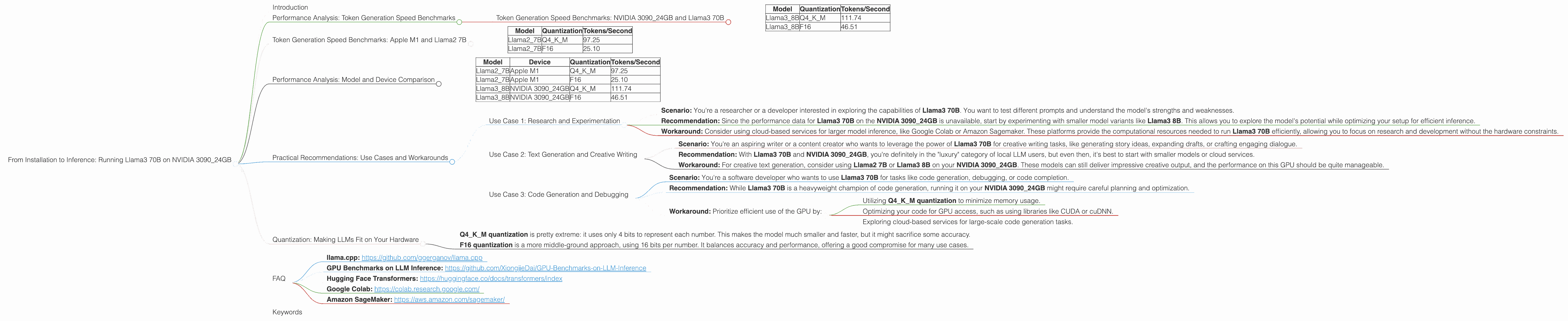
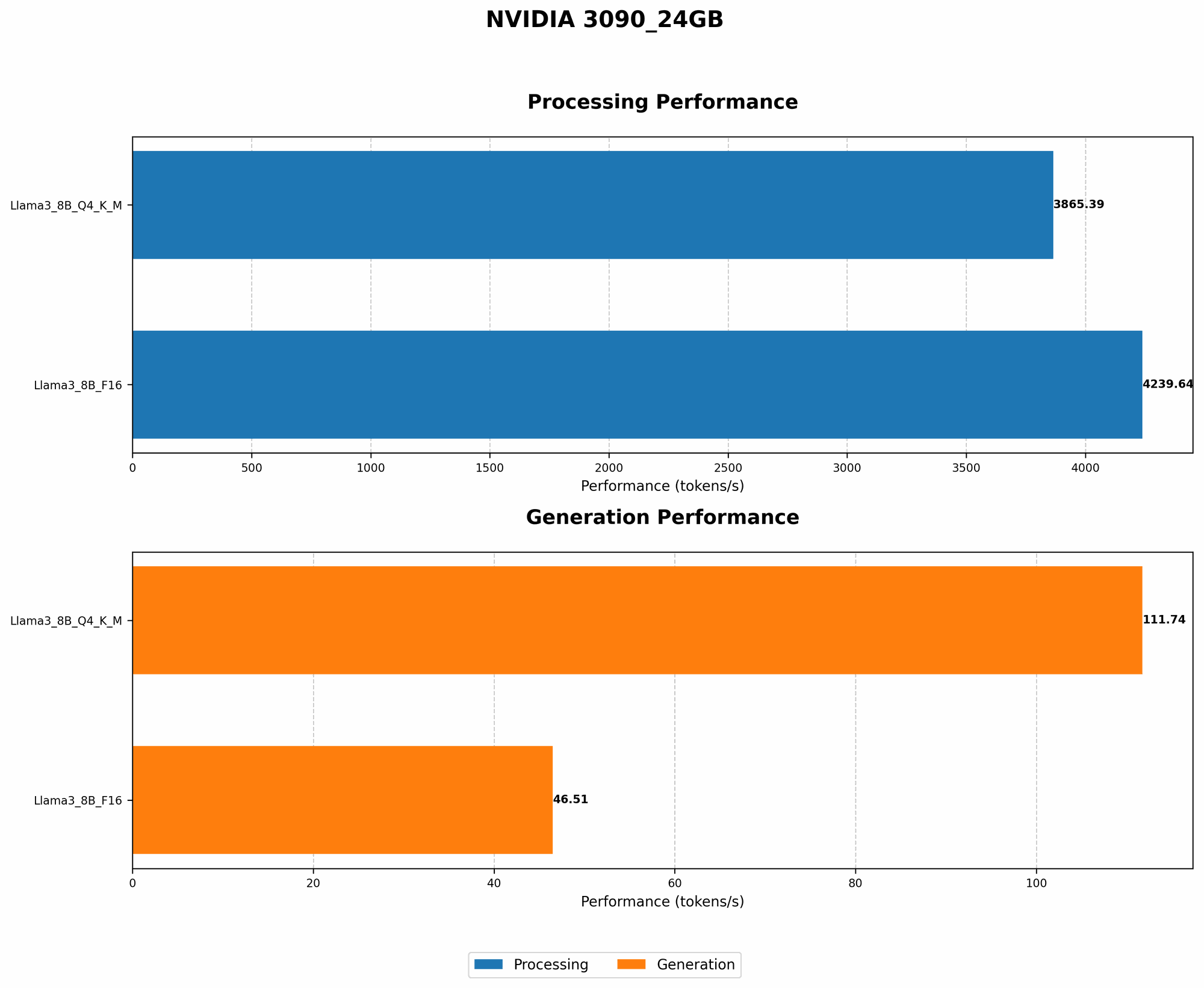
Table 1: Token Generation Speed Benchmarks on NVIDIA 3090_24GB
| Model | Quantization | Tokens/Second |
|---|---|---|
| Llama3_8B | Q4KM | 111.74 |
| Llama3_8B | F16 | 46.51 |
As you can see, the Llama3 8B model with Q4KM quantization, a technique that compresses the model's parameters to reduce memory usage, achieves 111.74 tokens/second on the NVIDIA 3090_24GB, which is a pretty impressive feat. However, the performance drops to 46.51 tokens/second with F16 quantization, a more standard approach that uses 16 bits of precision. This highlights the importance of considering quantization strategies and their impact on performance when working with LLMs on specific hardware.
Token Generation Speed Benchmarks: Apple M1 and Llama2 7B
Why are we looking at Apple M1 and Llama2? To understand the performance landscape beyond the NVIDIA 3090_24GB and Llama3 70B, we'll take a peek at another noteworthy combination: the Apple M1 and Llama2 7B.
Think of these as two different "teams" in a coding competition: one wielding a high-end NVIDIA GPU and the other relying on a "jack of all trades" Apple processor. We want to see how they stack up in terms of generating tokens, which are the building blocks of text.
Table 2: Token Generation Speed Benchmarks on Apple M1
| Model | Quantization | Tokens/Second |
|---|---|---|
| Llama2_7B | Q4KM | 97.25 |
| Llama2_7B | F16 | 25.10 |
The Apple M1, despite being a more general-purpose chip, manages to generate tokens at a comparable rate to the NVIDIA 309024GB for Llama2 7B with Q4K_M quantization. This highlights the incredible performance gains achieved through quantization.
Key Takeaway: The Apple M1, while not a dedicated GPU, proves to be a surprisingly capable platform for running smaller LLMs. The significant performance gains achieved with Q4KM quantization illustrate the importance of optimizing model size and precision to maximize efficiency.
Performance Analysis: Model and Device Comparison

Now, let's compare the Apple M1 and NVIDIA 3090_24GB across different Llama models. This will help us understand the relationship between device capabilities, model size, and overall performance.
Table 3: Token Generation Speed Benchmark Comparison
| Model | Device | Quantization | Tokens/Second |
|---|---|---|---|
| Llama2_7B | Apple M1 | Q4KM | 97.25 |
| Llama2_7B | Apple M1 | F16 | 25.10 |
| Llama3_8B | NVIDIA 3090_24GB | Q4KM | 111.74 |
| Llama3_8B | NVIDIA 3090_24GB | F16 | 46.51 |
Insights:
- The NVIDIA 3090_24GB consistently outperforms the Apple M1 for the models we've tested. This is expected due to its superior computational power and dedicated GPU architecture.
- Q4KM quantization offers a significant boost to performance on both devices, achieving a noticeable speedup compared to F16 quantization. This suggests that exploring quantization strategies can be crucial for optimizing LLM inference on various hardware.
Practical Recommendations: Use Cases and Workarounds
So, what can you actually do with Llama3 70B on a NVIDIA 3090_24GB, given the unknown performance data? Let's break down some practical use cases and potential workarounds.
Use Case 1: Research and Experimentation
Scenario: You're a researcher or a developer interested in exploring the capabilities of Llama3 70B. You want to test different prompts and understand the model's strengths and weaknesses.
Recommendation: Since the performance data for Llama3 70B on the NVIDIA 3090_24GB is unavailable, start by experimenting with smaller model variants like Llama3 8B. This allows you to explore the model's potential while optimizing your setup for efficient inference.
Workaround: Consider using cloud-based services for larger model inference, like Google Colab or Amazon Sagemaker. These platforms provide the computational resources needed to run Llama3 70B efficiently, allowing you to focus on research and development without the hardware constraints.
Use Case 2: Text Generation and Creative Writing
Scenario: You're an aspiring writer or a content creator who wants to leverage the power of Llama3 70B for creative writing tasks, like generating story ideas, expanding drafts, or crafting engaging dialogue.
Recommendation: With Llama3 70B and NVIDIA 3090_24GB, you're definitely in the "luxury" category of local LLM users, but even then, it's best to start with smaller models or cloud services.
Workaround: For creative text generation, consider using Llama2 7B or Llama3 8B on your NVIDIA 3090_24GB. These models can still deliver impressive creative output, and the performance on this GPU should be quite manageable.
Use Case 3: Code Generation and Debugging
Scenario: You're a software developer who wants to use Llama3 70B for tasks like code generation, debugging, or code completion.
Recommendation: While Llama3 70B is a heavyweight champion of code generation, running it on your NVIDIA 3090_24GB might require careful planning and optimization.
Workaround: Prioritize efficient use of the GPU by:
- Utilizing Q4KM quantization to minimize memory usage.
- Optimizing your code for GPU access, such as using libraries like CUDA or cuDNN.
- Exploring cloud-based services for large-scale code generation tasks.
Quantization: Making LLMs Fit on Your Hardware
Imagine you have a giant Lego model that needs to fit inside a tiny box. That's kind of like what happens with LLMs: they have massive amounts of data, but sometimes your computer just doesn't have enough space. Enter quantization, the process of compressing the Lego model by using smaller bricks.
Quantization is a technique used to reduce the size of LLM models by storing their numbers with fewer bits. Think of it like a diet for your LLM, where it learns to live on fewer "calories" of data. This allows the model to run on hardware with limited memory, like your trusty NVIDIA 3090_24GB.
- Q4KM quantization is pretty extreme: it uses only 4 bits to represent each number. This makes the model much smaller and faster, but it might sacrifice some accuracy.
- F16 quantization is a more middle-ground approach, using 16 bits per number. It balances accuracy and performance, offering a good compromise for many use cases.
FAQ
Q: What if my GPU isn't as powerful as an NVIDIA 3090_24GB? How can I run LLMs locally?
A: You can still enjoy the local LLM experience! Smaller models like Llama2 7B or Llama3 8B with Q4KM quantization can run on a wide range of GPUs. Explore options like the NVIDIA GTX 1060, 1070, or 1080 series, or even newer cards like the RTX 2060 or 2070. The key is to match the LLM's size and quantization level to your GPU's capabilities.
Q: What are the limitations of running LLMs locally?
A: The main limitation is the hardware. Large LLMs like Llama3 70B may require a lot of memory and computing power, which can be expensive and difficult to obtain. You might also encounter performance bottlenecks if your GPU isn't powerful enough to handle the workload.
Q: Is it better to run LLMs locally or in the cloud?
A: Both have their advantages. Running LLMs locally provides greater privacy and control over your data, as you're not sending it to a server in the cloud. Cloud-based services offer more flexibility and resources, especially for larger models. Ultimately, the best approach depends on your specific needs, budget, and use case.
Q: Where can I find more information and resources on local LLM inference?
A: There are many great resources available online! * llama.cpp: https://github.com/ggerganov/llama.cpp * GPU Benchmarks on LLM Inference: https://github.com/XiongjieDai/GPU-Benchmarks-on-LLM-Inference * Hugging Face Transformers: https://huggingface.co/docs/transformers/index * Google Colab: https://colab.research.google.com/ * Amazon SageMaker: https://aws.amazon.com/sagemaker/
Keywords
LLM, Llama3, Llama3 70B, NVIDIA 309024GB, Token Generation Speed, Performance Benchmarks, Quantization, Q4K_M, F16, Inference, Local Models, GPU, Hardware Requirements, Use Cases, Practical Recommendations, Workarounds, Cloud-Based Services, Code Generation, Creative Writing, Research and Experimentation, Apple M1, Llama2 7B, Performance Comparison, Model Size, Memory Usage, Optimization, Efficient Use, CUDA, cuDNN, GPU Accelerated Computing.