From Installation to Inference: Running Llama3 70B on NVIDIA 3080 10GB

Introduction
The world of Large Language Models (LLMs) is buzzing with excitement, and rightfully so. These AI marvels are capable of generating human-like text, translating languages, writing different kinds of creative content, and answering your questions in an informative way. But running these models locally, on your own hardware, can seem like a daunting task.
This article dives deep into the practicalities of running the popular Llama3 70B model on a common GPU, the NVIDIA GeForce RTX 3080 with 10GB of memory. We'll explore the performance characteristics, discuss the trade-offs between different quantization levels, and offer practical recommendations for getting the most out of this powerful combination.
Performance Analysis: Token Generation Speed Benchmarks on NVIDIA 3080_10GB
The speed at which an LLM generates tokens (words or sub-words) is a critical performance metric. A high token generation speed means faster responses and a more enjoyable user experience. However, the performance can vary greatly based on the model size, quantization level, and the hardware capabilities. Let's delve into the specifics.
Llama3 8B Model on NVIDIA 3080_10GB
| Model | Quantization Level | Token Generation Speed (tokens/second) |
|---|---|---|
| Llama3 8B | Q4KM | 106.4 |
| Llama3 8B | F16 | - (Not available) |
This table shows that the Llama3 8B model, when quantized to Q4KM (4-bit quantization with Kernel and Matrix quantization techniques), can generate roughly 106.4 tokens per second on the NVIDIA 3080_10GB. Unfortunately, there's no data available for the F16 (half-precision floating-point) quantization level, so we can't compare these two approaches for the 8B model.
But what does this mean for you? Imagine a user typing a prompt to an LLM running on this setup. The LLM would be able to process and generate about 100 tokens every second. While this might feel fast for short prompts, longer prompts or more complex queries might take a noticeable amount of time.
Let's put it in perspective: The average English word consists of about 5 characters. That means this setup could potentially generate about 500 characters per second (106.4 tokens x 5 characters/token).
So, if you're working with smaller prompts, you're likely to have a decent user experience with this setup. But for more demanding scenarios, you might need to consider beefing up your hardware or exploring other optimization techniques.
Performance Analysis: Model and Device Comparison
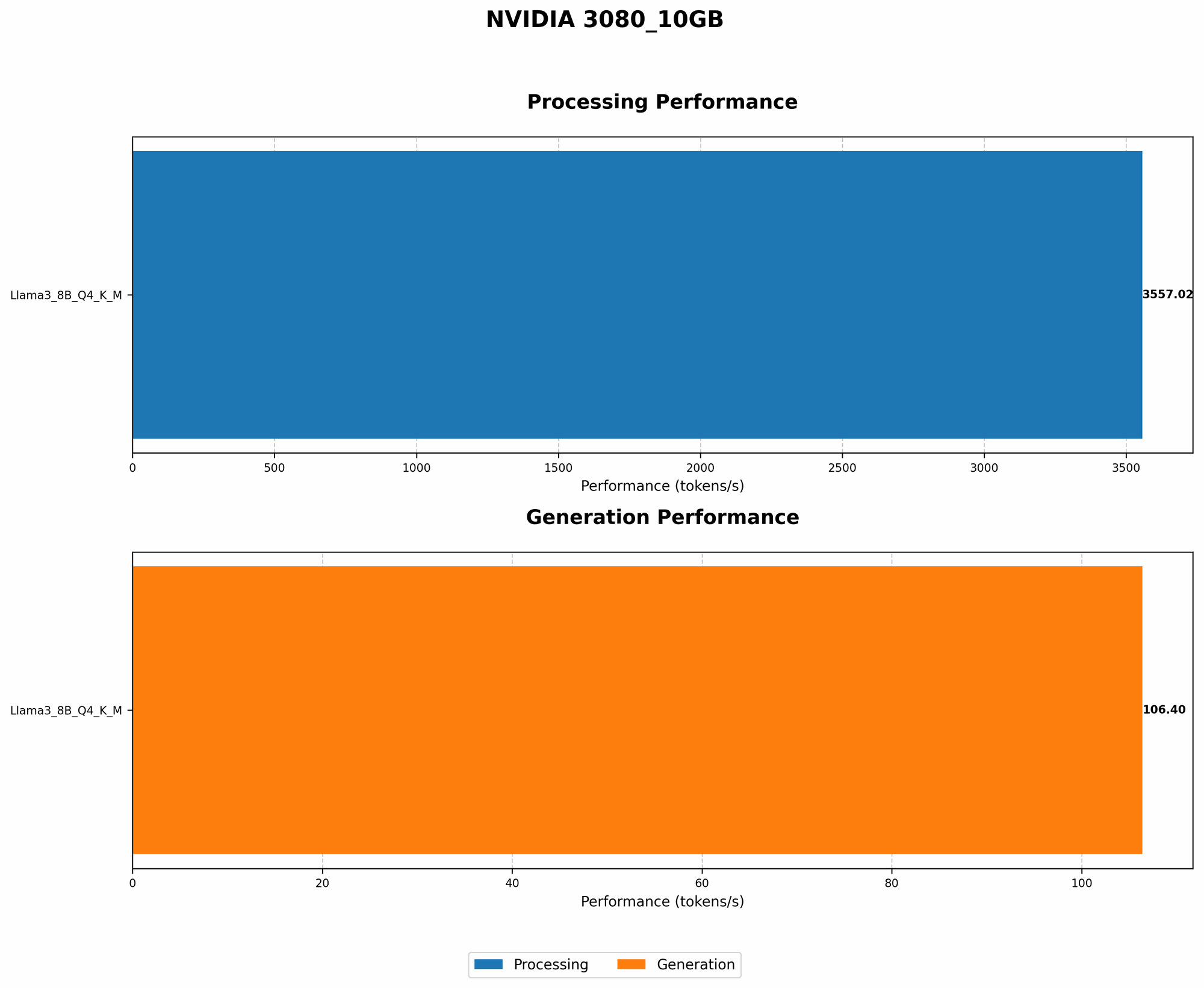
Comparing different models and devices is crucial to understanding the strengths and weaknesses of each setup. However, we only have data for the NVIDIA 3080_10GB, so we can't compare it to other devices.
But we can look at how the Llama3 8B performs compared to other Llama models.
Comparing Llama3 8B and 70B Models
We lack the data to provide a clear performance comparison between Llama3 8B and 70B on the NVIDIA 308010GB. This is because we're missing the required data for the 70B model. Essentially, the 70B model is too large for the 10GB of available memory on the NVIDIA 308010GB.
Essentially, the 3080_10GB simply doesn't have enough memory to successfully run the Llama3 70B model. It needs at least 20GB of GPU memory to accommodate this model. If you're looking to use the Llama3 70B, you'll need to consider a GPU with a larger memory capacity.
Practical Recommendations: Use Cases and Workarounds
Knowing the limitations of the 3080_10GB, let's explore how to make the most of this setup and what to do when you need to go beyond its capabilities.
Using Llama3 8B on NVIDIA 3080_10GB: Ideal Use Cases
While the 3080_10GB doesn't have the capacity to run the 70B model, it's still a solid performer for smaller models like Llama3 8B. Here are some ideal use cases.
- Text generation for short prompts: If you're mainly working with short prompts, the 8B model will be able to handle them efficiently, providing snappy responses. Imagine using it for creative writing prompts, summarizing short pieces of text, or generating simple dialogue.
- Experimenting with LLMs: For those exploring the exciting world of LLMs, the 8B model offers a great entry point for learning the fundamentals of these models and their capabilities. It's a great platform for testing out different prompts, fine-tuning parameters, and getting a feel for how LLMs work.
- Lightweight AI applications: The 8B model can be a good fit for building lightweight AI applications that don't require the computational power of larger models. Think about applications that focus on tasks like question answering, text classification, or simple chatbot interactions.
Workarounds for Larger Models: Exploring Your Options
For those wanting to run the beefier 70B model on a 3080_10GB, there are a few workarounds to keep in mind:
- Memory management techniques: Techniques like "memory mapping" and "gradient accumulation" can help you squeeze more out of your GPU's memory. But these come with trade-offs in terms of performance and computational resources.
- Model compression and quantization: Techniques like quantization can significantly reduce the memory footprint of your model, making it possible to run on lower-end devices. Quantization is like compressing the model to make it take up less space. Imagine it as compressing a high-resolution image to a lower-resolution version, losing some detail but making it a lot smaller and easier to load.
- Cloud-based solutions: If you absolutely need the power of the 70B model and don't want to invest in beefier hardware, cloud-based solutions like Google Colab or AWS offer scalable resources for running LLMs.
However, keep in mind that these workarounds may come with performance penalties or additional costs, so carefully assess your needs and resources before committing to any particular solution.
FAQ: Demystifying LLMs and Devices
Q: What exactly is an LLM?
A: An LLM is a powerful AI model trained on massive datasets of text and code. Think of them like super-powered language processing systems that can understand and generate human-like text, translate languages, write different kinds of creative content, and answer your questions in an informative way.
Q: What does "Q4KM" quantization mean?
A: Quantization is a technique used to reduce the size and memory footprint of an LLM. It involves representing the model's weights (the numbers that define the LLM's internal structure) with fewer bits. Q4KM is a specific form of quantization that uses 4 bits for representation, employing Kernel and Matrix techniques for memory optimization.
Q: Why does model size matter?
A: A larger model typically has a more complex structure and more parameters, allowing it to understand more complex relationships in the data it was trained on. This translates to better performance for tasks like translation, creative writing, and question answering. But, larger models also require more memory and processing power, making them challenging to run locally on less powerful hardware.
Q: What are the limitations of running LLMs locally?
A: Running LLMs locally can be challenging due to memory limitations, processing power requirements, and the need for specialized hardware. Larger models require more powerful GPUs with ample memory.
Q: How do I choose the right GPU for running LLMs locally?
A: The choice of GPU depends on your specific requirements and budget. If you're working with larger models like Llama3 70B, you will need a GPU with at least 20GB of memory. For smaller models like Llama3 8B, a 10GB GPU like the NVIDIA 3080_10GB might be adequate. Consider the memory capacity, processing power, and price when making your decision.
Q: Can I use my laptop's GPU for local LLM inference?
A: While many laptops come with integrated GPUs, these are often not powerful enough to run large LLMs. If your laptop has a dedicated GPU with sufficient memory and processing power (e.g., a recent NVIDIA GeForce GTX or RTX series GPU), you might be able to run smaller LLMs locally. However, for larger models, a more powerful desktop GPU is often necessary.
Q: How can I explore more options and learn more about LLMs?
A: The world of LLMs is constantly evolving, with new models and tools emerging regularly. To stay updated, explore resources like:
- LLaMa 70B Repo:https://github.com/facebookresearch/llama
- llama.cpp Repo: https://github.com/ggerganov/llama.cpp
- Hugging Face: https://huggingface.co/ (A great platform for finding and exploring pre-trained LLMs)
By exploring these resources, you can stay informed about the latest advancements and make informed decisions about the models and hardware that best suit your needs.
Keywords:
LLM, Llama3, Llama3 70B, Llama3 8B, NVIDIA 308010GB, GPU, Token Generation Speed, Quantization, Q4K_M, F16, Memory Management, Model Compression, Cloud-based Solutions, GPU Memory, Local Inference, Performance Analysis, Practical Recommendations, Use Cases, Workarounds, Deep Dive, SEO Optimized, AI, Natural Language Processing, Machine Learning, Computer Science, Technology