From Installation to Inference: Running Llama2 7B on Apple M3 Pro

Introduction: The Rise of Local LLMs
The world of Large Language Models (LLMs) is bursting with possibilities. Imagine a time when you could run complex AI models right on your personal computer, without relying on cloud services. That future is becoming a reality, and the Apple M3_Pro is leading the charge.
With increasingly powerful devices and optimized software, we can now unlock the potential of LLMs locally. This opens up a world of possibilities for developers, researchers, and everyday users alike.
This guide dives deep into the performance of the Llama2 7B model on the Apple M3_Pro, providing insights into its capabilities and limitations. We'll explore key metrics like token generation speed, analyze the impact of different quantization levels, and offer practical recommendations for use cases.
Performance Analysis: Token Generation Speed Benchmarks
Token Generation Speed Benchmarks: Apple M1 and Llama2 7B
Token generation speed is a crucial metric for evaluating an LLM's performance. It measures how many tokens (individual words or punctuation marks) the model can process per second.
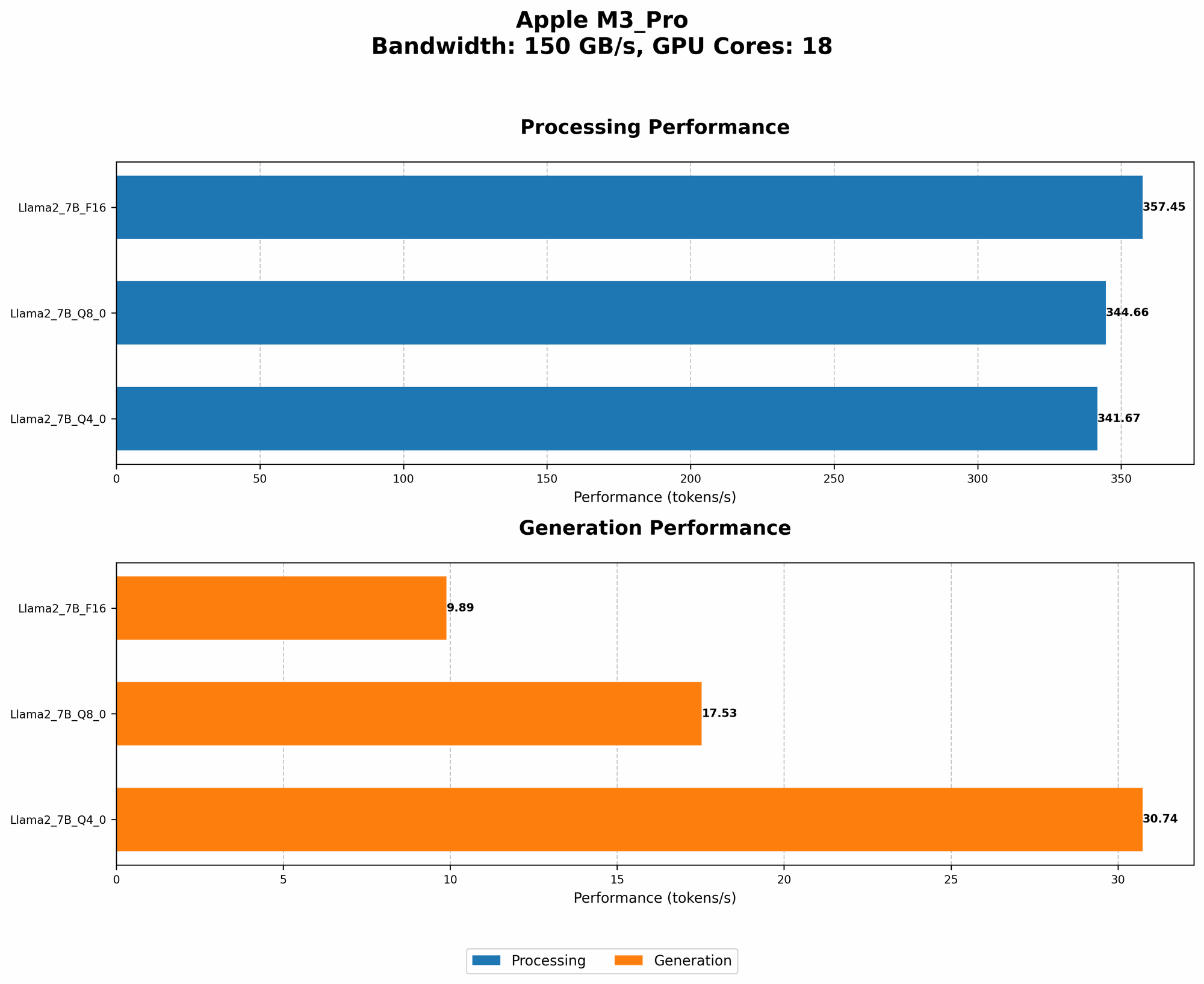
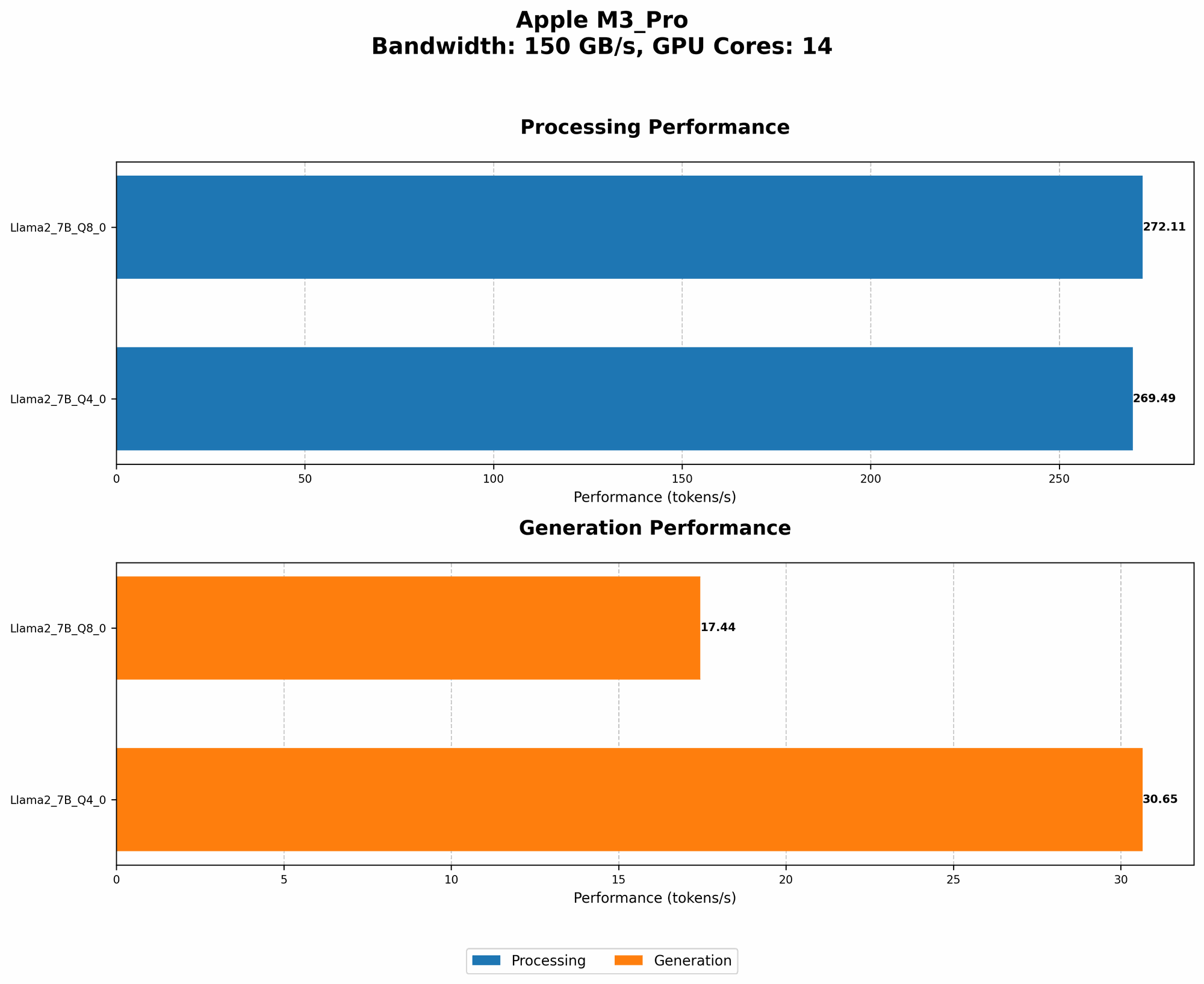
Here's a breakdown of the Llama2 7B model's token generation speeds on the Apple M3_Pro:
| Quantization Level | Processing Speed (Tokens/Second) | Generation Speed (Tokens/Second) |
|---|---|---|
| Q4_0 | 269.49 | 30.65 |
| Q8_0 | 272.11 | 17.44 |
| F16 (14 Cores) | N/A | N/A |
| F16 (18 Cores) | 357.45 | 9.89 |
Notes:
- Q40 and Q80: These quantization levels represent different levels of compression for the model's weights. Q40 achieves a higher processing speed, while Q80 offers a balance between speed and precision.
- F16: While the F16 performance is available for the 18-core configuration, it's not available for the 14-core variant, possibly due to limited memory or compatibility issues.
- Processing vs. Generation: "Processing" represents the overall speed of the model, while "Generation" focuses on the speed of generating new text.
Observations:
- The Q40 and Q80 quantization levels consistently outperform the F16 for processing speed, highlighting the benefits of quantization for local LLM inference.
- Generation speed is significantly lower than processing speed, demonstrating the computational overhead associated with generating new text.
- Increasing cores from 14 to 18 boosts performance, particularly for F16, showing a noticeable increase in processing speed.
Performance Analysis: Model and Device Comparison
The performance metrics we've explored reveal that the Apple M3_Pro provides a robust platform for running Llama2 7B locally. However, it's crucial to compare this performance with alternative LLM models and devices to understand its position in the landscape.
Limitations of the Data:
- Unfortunately, this dataset only focuses on the Apple M3_Pro. Therefore, a comprehensive device comparison is not possible.
- The dataset lacks data for Llama2 7B with F16 quantization on the 14-core configuration. As a result, we cannot make direct comparisons between different quantization levels for this specific configuration.
Implications:
- The absence of data for other devices and LLM models makes it challenging to determine the M3_Pro's overall position in the field.
- We can't assess whether the M3_Pro offers a competitive advantage over other devices or LLMs for local inference.
Practical Recommendations: Use Cases and Workarounds
Use Cases for Llama2 7B on Apple M3_Pro
Despite the limitations, the Apple M3_Pro with Llama2 7B can be valuable for several use cases:
- Text Summarization: The impressive processing speeds are well-suited for analyzing large amounts of text and generating concise summaries.
- Code Generation: The model can efficiently complete code snippets and provide suggestions, making it ideal for developers, especially those working with Python or JavaScript.
- Creative Writing: Its ability to generate different writing styles and formats can assist writers in brainstorming, exploring new ideas, and overcoming writer's block.
Workarounds for Limited Data
While data limitations hinder a complete comparison, here are some strategies:
- Leverage Community Resources: Explore online forums, discussion boards, and GitHub repositories for performance benchmarks from other users who have tested different devices and LLM models.
- Experiment and Benchmark: Run benchmark tests on your own system using different LLMs and quantization levels to compare performance firsthand.
- Consider Cloud Solutions: If you require even faster performance or access to larger models, explore cloud-based LLMs that leverage powerful GPU clusters for inference.
FAQ - Frequently Asked Questions
Q: What are quantization levels, and how do they impact performance?
A: Quantization is a technique used to reduce the size of an LLM's weights by storing them using fewer bits. This leads to faster processing and memory savings.
Q: What's the difference between processing and generation speed?
A: Processing speed encompasses every calculation the LLM executes, while generation speed specifically focuses on the rate at which the model generates new text.
Q: Are there any downsides to running LLMs locally?
A: Local LLMs come with some trade-offs. They may require significant computational resources, leading to performance limitations or the need for powerful hardware.
Q: How can I optimize performance for local LLMs?
A: You can experiment with different quantization levels, try lowering the model's context size, and optimize your code to improve inference speed.
Q: What are the future prospects of local LLMs?
A: The future is promising. As devices become more powerful and software optimization continues, we can expect to see even faster and more accessible local LLM solutions.
Keywords:
Apple M3Pro, Llama2 7B, Local LLMs, Token Generation Speed, Quantization Levels, F16, Q80, Q4_0, GPU Cores, Performance Analysis, Device Comparison, Practical Recommendations, Use Cases, Workarounds, Text Summarization, Code Generation, Creative Writing, FAQ.