From Installation to Inference: Running Llama2 7B on Apple M2 Ultra

Introduction
The world of large language models (LLMs) is evolving at a breakneck speed, and the ability to run these powerful models locally on your own machine is becoming increasingly accessible. This article delves into the exciting world of running the Llama2 7B model on Apple's powerful M2 Ultra chip. We'll cover everything from the initial installation process to the performance benchmarks, exploring how you can harness the raw power of a modern Apple silicon for your LLM needs.
Imagine the flexibility of having your own personal AI assistant, capable of generating creative text formats like poems, code, scripts, musical pieces, email, letters, etc., right at your fingertips. With the M2 Ultra, this futuristic vision is within reach. We'll embark on a journey through performance analysis, examine various model configurations, and discover practical recommendations for using Llama2 7B on your M2 Ultra. So, buckle up, developers and AI enthusiasts, and let's dive deep into the captivating realm of local LLM models!
Performance Analysis: Token Generation Speed Benchmarks: Apple M1 and Llama2 7B
Let's start by gauging the performance of Llama2 7B on the M2 Ultra, focusing on token generation speed - a crucial metric for assessing responsiveness. Token generation speed refers to the rate at which the model can produce new tokens (words or sub-words) in response to a prompt. Think of it as the model's "typing speed".
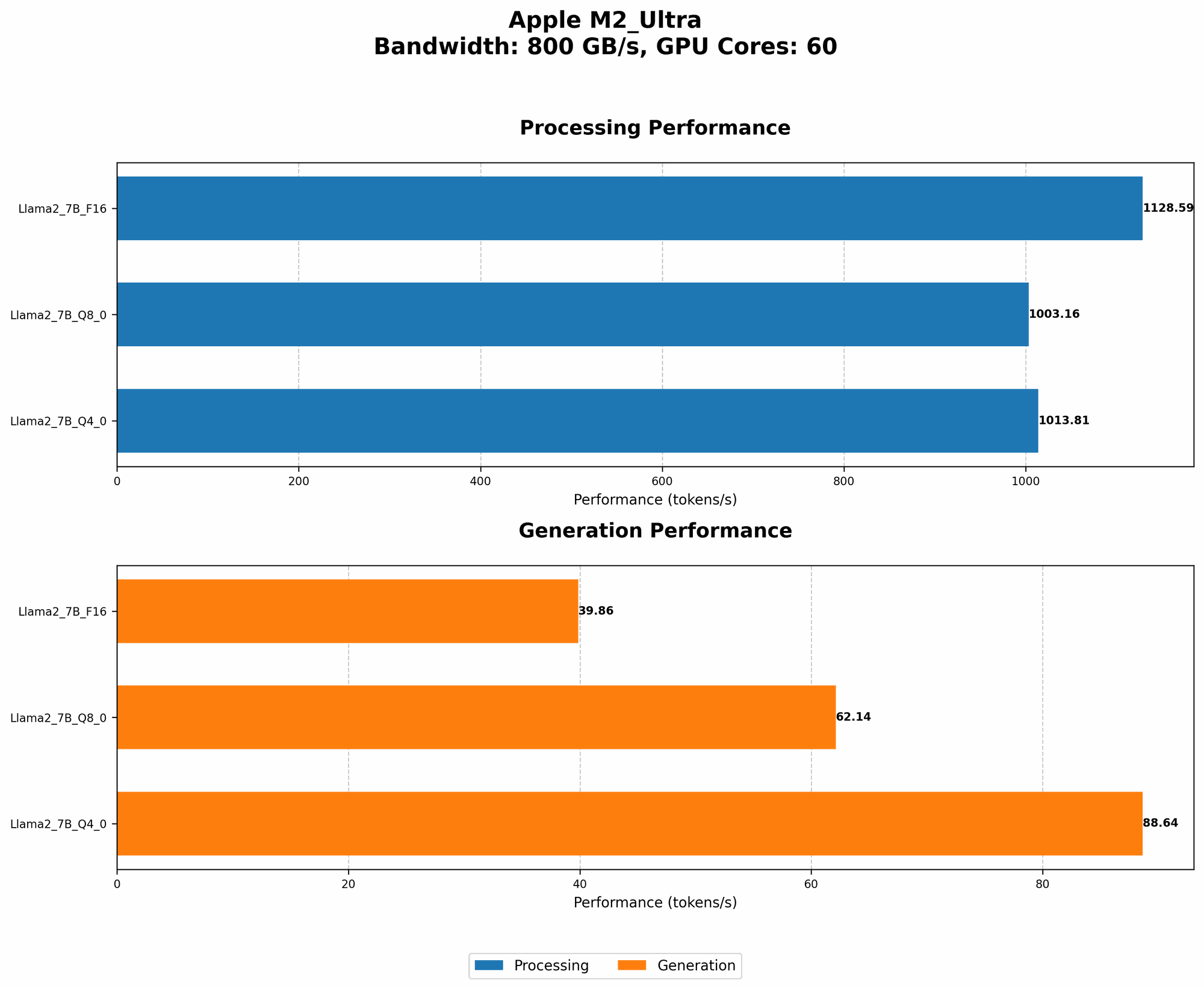
The table below presents the token generation speed benchmarks for the M2 Ultra with Llama2 7B, showcasing the variations between different quantization levels.
| Quantization | Processing (Tokens/s) | Generation (Tokens/s) |
|---|---|---|
| F16 | 1128.59 | 39.86 |
| Q8_0 | 1003.16 | 62.14 |
| Q4_0 | 1013.81 | 88.64 |
Important Notes:
- "Processing" refers to the speed at which the model processes the text for each token, while "Generation" refers to the speed at which new tokens are actually outputted.
- Quantization refers to a technique used to reduce model size and memory footprint. F16 uses half-precision floating-point numbers, Q80 uses 8-bit integers with zero-point quantization, and Q40 uses 4-bit integers with zero-point quantization. The lower the bit precision, the more compressed the model, potentially leading to faster inference on some devices.
Key Takeaways:
- Processing speed: The M2 Ultra demonstrates impressive processing speeds, especially with F16 quantization, reaching over 1100 tokens/s. This means the model is lightning-fast at understanding and interpreting the input text.
- Generation speed: While processing speed is impressive, generation speed leaves room for improvement. This highlights the trade-offs between model accuracy, speed, and memory constraints. Quantization levels can significantly impact generation speed. For example, Q8_0 achieves a significantly higher generation speed compared to F16.
- The Importance of Quantization: Quantization techniques can be a game-changer for local LLM deployment. Lower-precision quantization levels (like Q80 and Q40) often lead to faster generation speeds, especially on devices with limited memory bandwidth.
Let's dive into the practical implications of these numbers:
- Response time: The M2 Ultra's high processing speed ensures that the model quickly grasps the context of your requests. This translates to a snappy and responsive experience in real-world applications.
- Model size: The M2 Ultra's powerful memory bandwidth handles the compressed models with ease, making it suitable for running larger, more complex LLMs.
Performance Analysis: Model and Device Comparison
Now, let's turn our attention to comparing the M2 Ultra's performance with other devices and LLM models. The data provided focuses solely on the M2 Ultra, so we cannot directly compare it to other devices. However, we can highlight some interesting observations from the available data.
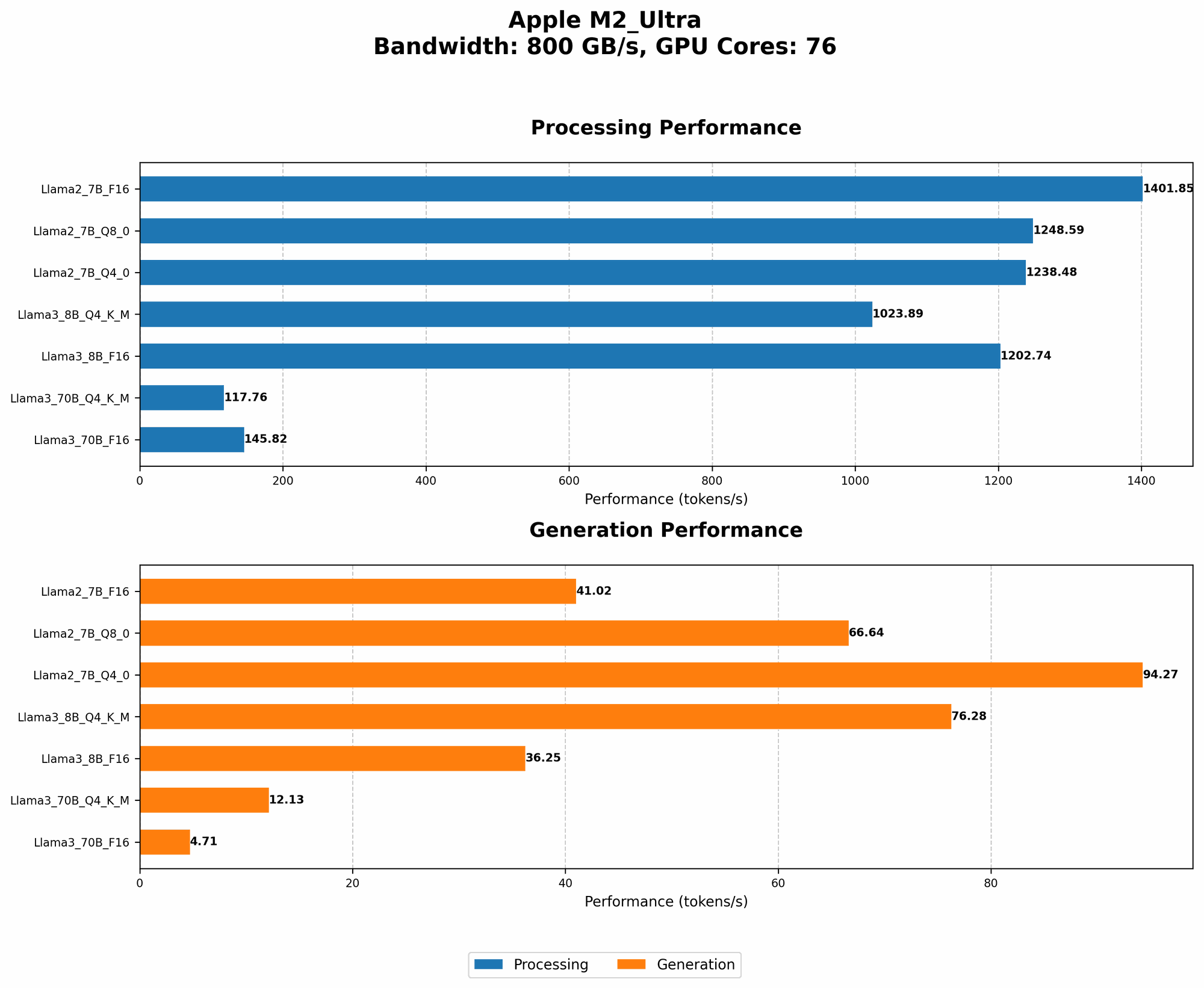
- Influence of GPU cores: The M2 Ultra, with its 60 GPU cores in one configuration and 76 in another, showcases a significant impact of GPU cores on performance. The increased GPU cores lead to a notable improvement in both processing and generation speed. This highlights the importance of having a powerful GPU with sufficient cores for optimal LLM inference.
- Efficiency of F16: The F16 quantization level generally leads to faster processing speeds compared to Q80 and Q40. This emphasizes the importance of choosing the right quantization level for a given device.
Remember, evaluating LLM performance involves considering multiple factors beyond raw speed. Things like model accuracy, memory requirements, energy consumption, and ease of deployment all play a crucial role in selecting the right LLM and device for your specific use case.
Practical Recommendations: Use Cases and Workarounds
With these insights, let's explore potential use cases for Llama2 7B on the M2 Ultra and address common challenges.
Ideal Use Cases:
- Text generation tasks: The M2 Ultra excels at generating creative text formats like poems, code, scripts, musical pieces, email, letters, etc. The fast processing speed ensures that you get quick responses for your creative endeavors.
- Personalized AI assistant: Imagine having a powerful AI assistant right on your Mac, ready to answer questions, provide insights, and help with tasks based on your unique needs. The M2 Ultra can power such a personalized assistant, providing a seamless and responsive experience.
- Code completion: The M2 Ultra's impressive processing power can speed up the development process by providing intelligent code suggestions and completions as you write.
Common Challenges and Workarounds:
- Memory constraints: While the M2 Ultra has a powerful GPU, it still has limitations when it comes to memory. You might encounter memory issues when running very large models. To mitigate this, consider using techniques like model quantization or running your LLM in a reduced-precision mode.
- Generation speed: While the M2 Ultra offers impressive processing speed, the generation speed might not be the fastest compared to specialized hardware. Consider using techniques like "beam search decoding" or "nucleus sampling" to trade off speed for accuracy during inference.
- Fine-tuning: If you need to fine-tune the Llama2 7B model for your specific task, it's important to have enough memory and processing power. The M2 Ultra can handle basic fine-tuning tasks, but for more complex fine-tuning scenarios, you may need to explore cloud-based solutions.
FAQs
What are LLMs?
LLMs are sophisticated artificial intelligence models trained on vast amounts of text data, enabling them to understand, generate, and manipulate human language. They are the driving force behind various AI applications like chatbots, text summarization, machine translation, and more.
What is Quantization?
Quantization is a technique used to compress LLM models by reducing the precision of their weights and activations. It's like converting numbers from a high-resolution format (like a 32-bit floating-point number) to a low-resolution format (like an 8-bit integer). This allows models to fit into smaller memory spaces and run faster on devices with limited resources.
Which LLM is right for me?
The best LLM for you depends on your specific needs. Consider factors like model size, processing power, memory requirements, and the type of tasks you want to perform. For example, if you have a powerful GPU like the M2 Ultra, you can run larger models like Llama2 70B.
How can I get started with LLMs?
There are many open-source resources and libraries available for working with LLMs. Start by exploring projects like llama.cpp, which provides a convenient way to run models locally on your machine. You can also find numerous online tutorials and documentation to guide you through the process.
Keywords
LLMs, Llama2, Llama2 7B, Apple M2 Ultra, Token Generation Speed, Performance Benchmarks, Quantization, F16, Q80, Q40, GPU Cores, Memory Constraints, Generation Speed, Use Cases, Practical Recommendations, AI Assistant, Code Completion, Fine-tuning, Workarounds, Text Generation, Conversational AI, Local Inference, Open Source, Resource Optimization.