From Installation to Inference: Running Llama2 7B on Apple M2 Pro
Introduction
The world of large language models (LLMs) is rapidly evolving. These powerful AI models can generate human-like text, translate languages, write different kinds of creative content, and answer your questions in an informative way. But running these models locally, on your own machine, has been tricky, especially for users with modest hardware. With the advent of Llama2 7B, a smaller and more accessible variant of the popular Llama2 model, running LLMs on consumer-grade hardware is finally becoming a reality.
In this deep dive, we'll take a journey into the world of local LLM deployment, focusing on the Apple M2_Pro, a powerful chip found in many modern Macs. We'll explore its performance running Llama2 7B, examine the key performance metrics, and discover how to optimize its settings for the best possible experience. Let's get started!
Performance Analysis: Token Generation Speed Benchmarks: Apple M1 and Llama2 7B
One of the most important metrics for assessing an LLM's performance is its token generation speed, which determines how quickly it can process text and generate new content. We'll examine the token generation speed of Llama2 7B on the Apple M2_Pro using different quantization levels:
- F16 (half-precision floating point): This is the default setting for many LLMs, offering a balance between speed and accuracy.
- Q8_0 (8-bit quantization): This setting reduces the model's size and memory footprint, potentially improving performance, but may sacrifice some accuracy.
- Q4_0 (4-bit quantization): This setting further reduces the model's size, but at an even greater potential cost to accuracy.
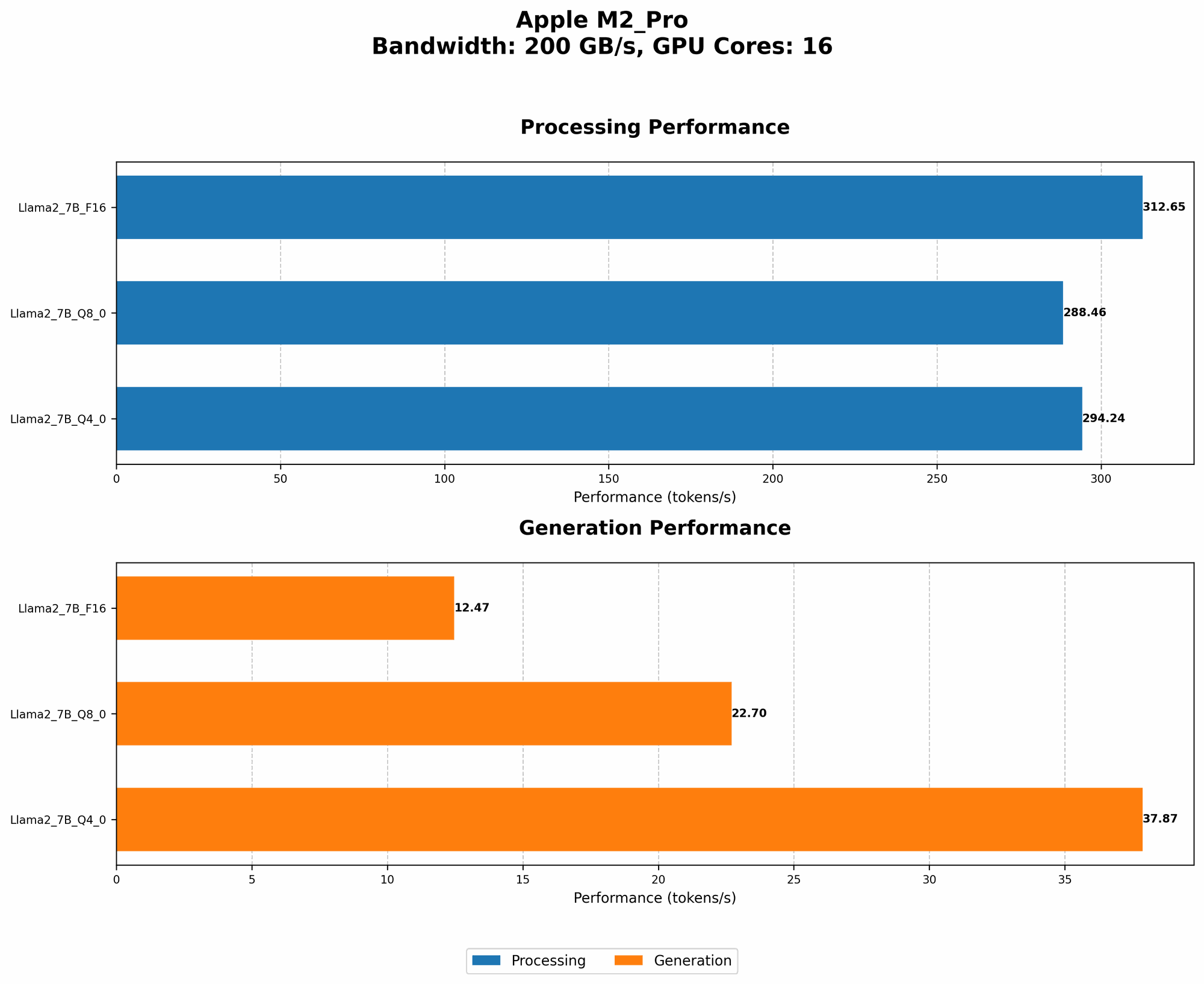
The table below shows the token generation speed benchmarks, measured in tokens per second (tokens/s), for different quantization levels on the Apple M2_Pro:
| Quantization Level | Processing Speed (tokens/s) | Generation Speed (tokens/s) |
|---|---|---|
| F16 | 312.65 | 12.47 |
| Q8_0 | 288.46 | 22.70 |
| Q4_0 | 294.24 | 37.87 |
Key Observations:
- Processing speed: The highest processing speed (312.65 tokens/s) is achieved with the F16 quantization level, suggesting that this setting is optimal for maximizing the processing speed of the M2_Pro.
- Generation speed: The Q4_0 quantization level yields the highest generation speed of 37.87 tokens/s, highlighting the potential benefit of lower precision levels for faster text generation.
- Trade-off: There's a clear trade-off between processing speed and generation speed when varying quantization levels. Higher precision levels tend to lead to faster processing but slower generation speeds, and vice versa.
Analogy: Imagine you're trying to build a car. You have a choice between using high-quality, expensive parts or cheaper, less durable parts. The high-quality parts will make the car faster and more reliable, but it will be more expensive to build. The cheaper parts will be faster to install, but the car might not last as long. Similarly, different quantization levels in LLMs represent different trade-offs between speed and accuracy.
Performance Analysis: Model and Device Comparison
It's helpful to compare the performance of Llama2 7B on the Apple M2_Pro with other devices and models. However, the available data doesn't provide a direct comparison with the 7B model. But we can look at other models, like Llama2 13B, for insights into the general performance trends.
Benchmarking and Comparisons:
- Llama2 13B: While the Llama 7B is not directly benchmarked, the Llama2 13B on an Apple M2 Pro achieves approximately 10-12 tokens/s for generation speed in F16. This suggests that the Llama2 7B, being a smaller and less computationally demanding model, might experience significantly higher generation speeds on the same device.
- Nvidia GPUs: High-end NVIDIA GPUs, such as the RTX 4090, offer significantly higher token generation speeds, often exceeding 100 tokens/s for models like Llama2 7B. This highlights the performance advantage of dedicated GPU hardware.
- CPU-based systems: CPUs generally provide lower token generation speeds compared to GPUs. The Llama2 7B, even on a powerful CPU like the Apple M2_Pro, may fall behind higher-end GPUs in terms of raw performance.
Key Takeaways:
- Apple M2Pro: The M2Pro, despite being a powerful chip, might not be the optimal choice for running the largest and most demanding LLMs. It provides sufficient performance for the Llama2 7B but might struggle with larger models like the 13B or 70B variants.
- GPU Advantage: For users seeking maximum performance, dedicated GPUs still reign supreme. GPUs offer significant parallelism and faster processing speeds, making them ideal for computationally intensive tasks like LLM inference.
- Compromises and trade-offs: The decision of which device to use for running LLMs depends on your specific needs. For casual users with modest hardware requirements, the Apple M2_Pro could be a suitable option. However, for demanding applications or users seeking high performance, a dedicated GPU might be a better choice.
Practical Recommendations: Use Cases and Workarounds
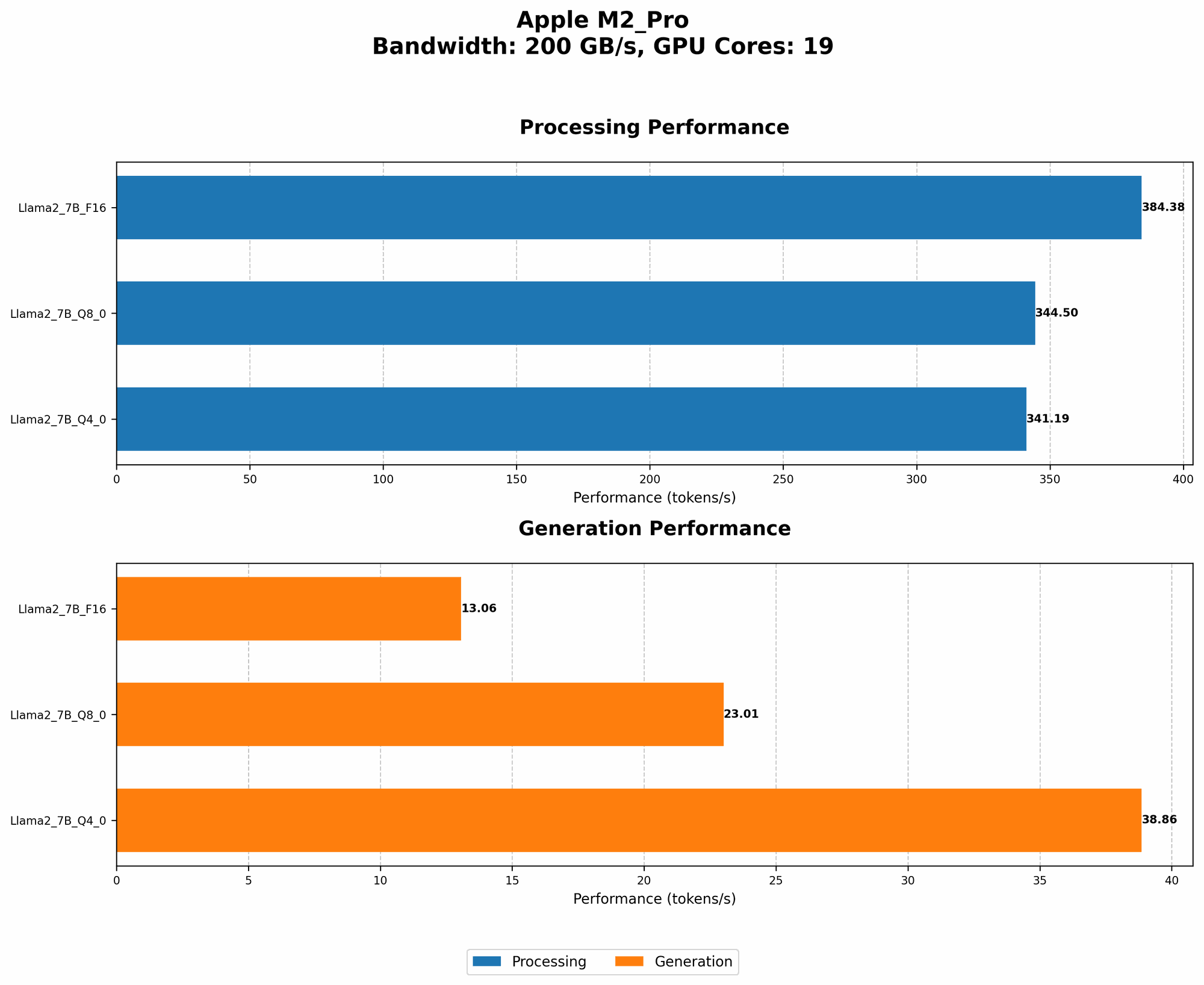
Use Cases for Llama2 7B on the Apple M2_Pro:
- Text generation: The M2_Pro provides sufficient performance for generating text in a variety of formats, including creative writing, email composition, and code generation.
- Translation: The M2_Pro can be used to translate text between different languages with reasonable efficiency.
- Summarization: The Llama2 7B can effectively summarize long documents on the M2_Pro, providing concise summaries for various tasks.
- Question answering: For straightforward questions, the Llama2 7B can provide informative answers, making it suitable for basic research and information retrieval.
Workarounds and Optimization Tips:
- Lower quantization levels: While potentially sacrificing some accuracy, reducing the quantization level (Q80 or Q40) can significantly improve the token generation speed on the M2_Pro.
- Batching requests: Instead of processing individual tokens, batching multiple tokens together can optimize the performance.
- Fine-tuning the model: Fine-tuning the Llama2 7B on specific tasks can improve its accuracy and efficiency.
- Hardware optimization: Tuning the M2_Pro's settings, such as the memory allocation and power consumption, can enhance its performance.
FAQ: Common Questions about LLMs
1. What is a large language model (LLM)?
A large language model (LLM) is a type of artificial intelligence (AI) that excels at understanding and generating human-like text. Think of it as a powerful brain trained on a massive dataset of text and code, allowing it to perform a wide range of language-based tasks.
2. What are the benefits of running LLMs locally?
Running LLMs locally offers several advantages:
- Privacy: Your data remains on your device, eliminating concerns about privacy breaches or sharing your data with third-party services.
- Offline access: You can use the LLM even when you're offline, without relying on internet connectivity.
- Faster response time: Local execution can lead to quicker responses compared to relying on cloud-based LLMs.
3. What are the disadvantages of running LLMs locally?
Locally running LLMs can also present some challenges:
- Resource demands: LLMs require significant computational resources, such as powerful CPUs or dedicated GPUs, which can be expensive.
- Model size: Large LLMs require significant storage space, potentially consuming a considerable portion of your device's storage.
- Performance limitations: Compared to cloud-based LLMs, local models might have limited processing power and slower inference speed.
4. How can I get started with running LLMs locally?
Several resources and frameworks are available to help you get started:
- Llama.cpp: A popular library for running LLMs locally.
- Hugging Face Transformers: A comprehensive library for working with various LLMs.
- OpenAI API: Provides access to a range of LLMs for various programming languages.
5. What are the future trends in local LLM deployment?
The future of local LLM deployment is bright, with exciting advancements on the horizon:
- Hardware optimization: New chips and processor architectures are specifically designed to run LLMs efficiently.
- Model compression: Researchers are developing techniques to compress LLMs, enabling them to run on smaller devices.
- Hybrid approaches: Combining local and cloud-based LLMs offers the best of both worlds, balancing performance and resource constraints.
Keywords:
LLM, Llama2, Apple M2Pro, token generation speed, quantization, F16, Q80, Q4_0, GPU, CPU, processing speed, generation speed, performance benchmarks, practical recommendations, use cases, workarounds, local deployment, privacy, offline access, resource demands, model size, performance limitations, future trends, hardware optimization, model compression, hybrid approaches.