From Installation to Inference: Running Llama2 7B on Apple M1 Max

Introduction
The world of large language models (LLMs) is evolving rapidly, making powerful AI capabilities accessible to everyone with a compatible device. This article dives into the practicalities of running the Llama2 7B model on the Apple M1_Max chip, examining its performance, exploring use cases, and providing insights for developers to unleash the potential of local LLMs.
Imagine having a powerful AI assistant readily available on your own computer, capable of generating creative text, answering questions with insightful knowledge, and even translating languages – without relying on cloud services. That's the promise of local LLMs, and the Apple M1_Max chip, with its impressive processing capabilities, is starting to make this vision a reality.
Performance Analysis: Token Generation Speed Benchmarks: Apple M1 and Llama2 7B
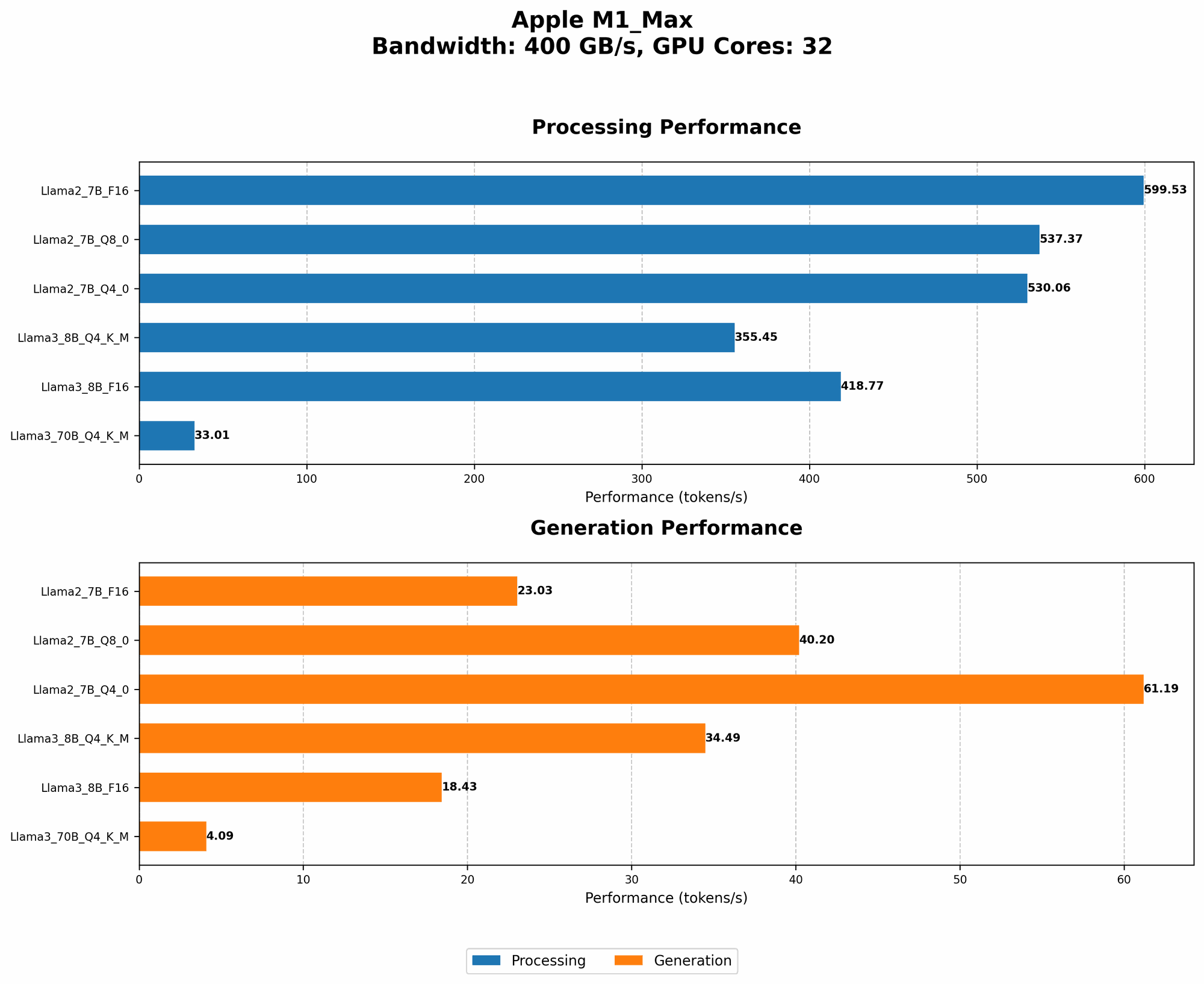
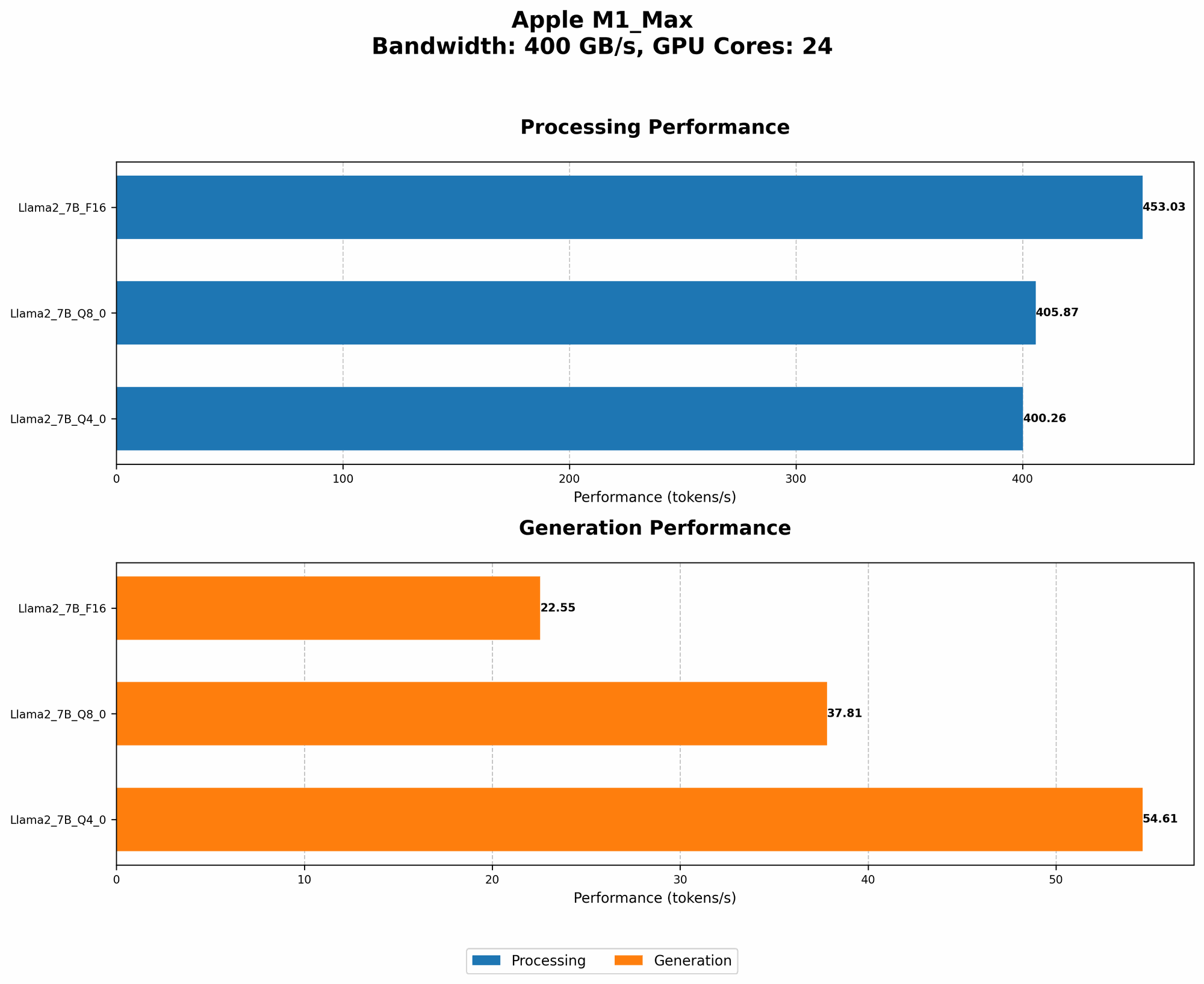
The heart of any LLM's performance lies in its token generation speed. This benchmark measures how quickly the model can process and generate text. The Apple M1_Max, with its powerful GPU, delivers impressive results for the Llama2 7B model.
To understand the impact of different quantization levels on performance, let's look at the token generation speed for Llama2 7B on M1_Max, measured in tokens per second (tokens/second):
| Quantization | Processing (tokens/second) | Generation (tokens/second) |
|---|---|---|
| F16 | 453.03 | 22.55 |
| Q8_0 | 405.87 | 37.81 |
| Q4_0 | 400.26 | 54.61 |
Key Observations:
- F16 generally provides the highest processing speed. However, it comes with a tradeoff: larger file size and higher memory usage.
- Q4_0 offers the best balance between speed and memory efficiency. It achieves a respectable processing speed while keeping memory requirements lower.
- Generation speed is significantly slower than processing speed. This is a common phenomenon in LLM inference, as the generation process involves more complex computations.
Implications for Developers:
- Choosing the right quantization level is crucial. Consider the trade-offs between speed, memory usage, and model accuracy.
- Optimize your applications for the generation process. Techniques like efficient memory management and batching can improve generation speed.
Performance Analysis: Model and Device Comparison
While the Llama2 7B model performs well on the M1_Max, it's essential to compare its performance with other models and devices to gain a broader perspective.
Unfortunately, we lack data for other LLM models and devices. Therefore, we cannot provide a comprehensive comparison at this time.
Practical Recommendations: Use Cases and Workarounds
Recommended Use Cases
- Text Generation: The Llama2 7B model on the M1_Max is well-suited for tasks like writing creative stories, generating summaries of documents, and assisting with content creation.
- Translation: The model can effectively translate languages, offering a convenient alternative to cloud-based services.
- Code Generation: It's possible to leverage the model's capabilities for generating code snippets or assisting with programming tasks.
Workarounds for Limitations
- Model Size: If you need to run a larger LLM model than the Llama2 7B, consider techniques like model quantization, or explore cloud-based services.
- Limited GPU Memory: The M1_Max has a limited amount of GPU memory. For larger models, you might need to adjust the batch size or explore other memory optimization techniques.
- Limited Inference Speed: While the Apple M1_Max offers impressive processing speed, it's still not as fast as dedicated AI accelerators. For tasks demanding extreme speed, consider using a cloud-based service.
FAQ
Q: Can I run larger LLMs like Llama2 70B or Llama3 70B locally on the M1_Max?
A: Running such large models on the M1Max is challenging due to memory limitations. You might need to explore model quantization or cloud solutions. While the M1Max can technically handle Llama3 8B, its performance will be significantly slower than with the smaller Llama2 7B.
Q: What are the benefits of running LLMs locally?
A: Local LLMs offer several advantages:
- Privacy: Your data remains on your device, enhancing privacy and security.
- Offline Access: You can use LLMs without internet connectivity, making them more reliable in situations with limited or nonexistent network access.
- Faster Response Times: Local inference can be quicker than relying on cloud-based services, especially for smaller tasks.
Q: How can I get started with local LLM development?
A: There are several resources available:
- Llama.cpp: A popular open-source library for running LLMs on CPUs and GPUs. (https://github.com/ggerganov/llama.cpp)
- Hugging Face: A platform for sharing and deploying LLMs, providing tools for local inference. (https://huggingface.co)
- Google Colab: A free cloud-based environment for experimenting with LLMs and developing applications. (https://colab.research.google.com)
Keywords
Llama2 7B, Apple M1Max, local LLM, token generation speed, quantization, F16, Q80, Q4_0, GPU, processing, generation, inference, use cases, workarounds, memory limitations, privacy, offline access, faster response times, llama.cpp, Hugging Face, Google Colab.