Cloud vs. Local: When to Choose NVIDIA RTX 6000 Ada 48GB for Your AI Infrastructure
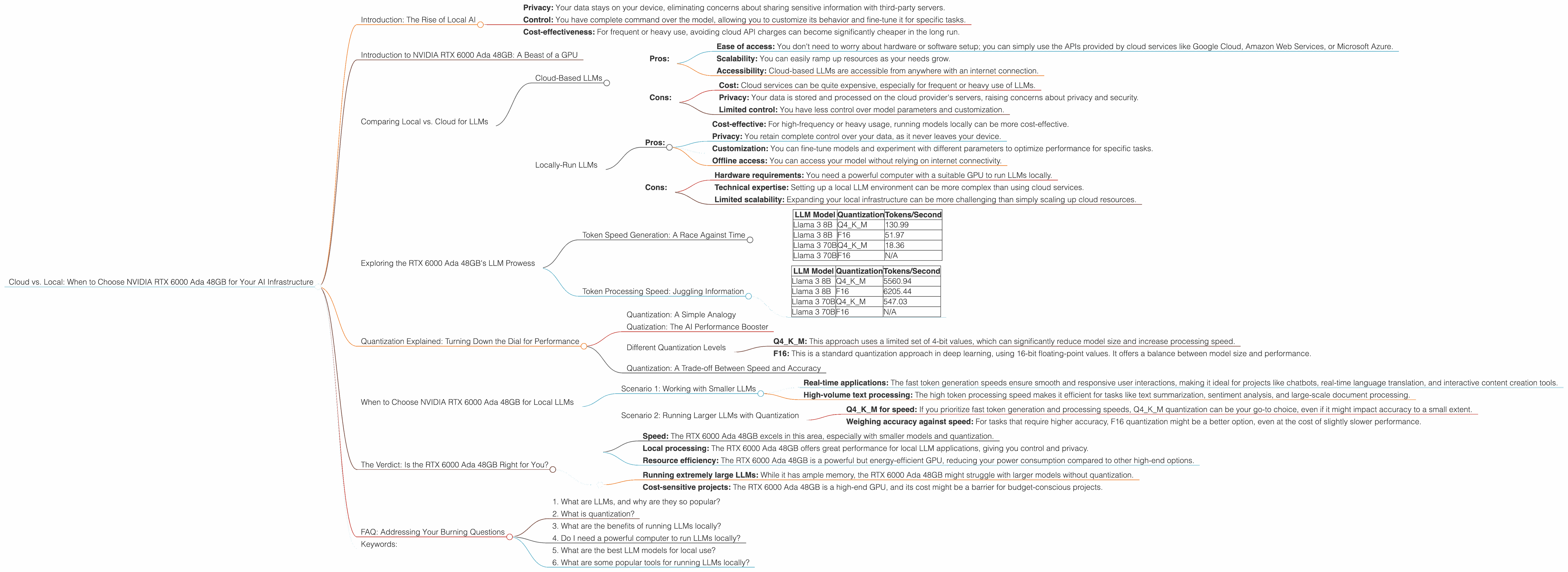
Introduction: The Rise of Local AI
The AI world is buzzing with excitement over large language models (LLMs). These powerful algorithms can generate human-like text, translate languages, write different kinds of creative content, and answer your questions in an informative way.
While cloud-based LLMs like ChatGPT have captured the public imagination, there's a growing movement towards running LLMs locally on your own hardware. This offers significant advantages:
- Privacy: Your data stays on your device, eliminating concerns about sharing sensitive information with third-party servers.
- Control: You have complete command over the model, allowing you to customize its behavior and fine-tune it for specific tasks.
- Cost-effectiveness: For frequent or heavy use, avoiding cloud API charges can become significantly cheaper in the long run.
But choosing the right equipment for your local AI setup can be a complex decision. This article dives deep into the capabilities of the NVIDIA RTX 6000 Ada 48GB GPU, a popular choice for AI enthusiasts, and explores whether it's the right fit for your specific needs.
Introduction to NVIDIA RTX 6000 Ada 48GB: A Beast of a GPU
The NVIDIA RTX 6000 Ada 48GB is a top-of-the-line graphics card specifically designed for demanding workloads like AI training and inference. It packs a punch with its powerful Ada Lovelace architecture and a whopping 48GB of high-bandwidth GDDR6 memory.
This beastly GPU is capable of crunching through complex AI models with impressive speed, making it a favorite among professionals and enthusiasts alike. But let's break down its performance with a specific focus on running LLMs locally.
Comparing Local vs. Cloud for LLMs
Before we dive into the RTX 6000 Ada 48GB's LLM performance, let's understand the different approaches to running LLMs:
Cloud-Based LLMs
Pros:
- Ease of access: You don't need to worry about hardware or software setup; you can simply use the APIs provided by cloud services like Google Cloud, Amazon Web Services, or Microsoft Azure.
- Scalability: You can easily ramp up resources as your needs grow.
- Accessibility: Cloud-based LLMs are accessible from anywhere with an internet connection.
Cons:
- Cost: Cloud services can be quite expensive, especially for frequent or heavy use of LLMs.
- Privacy: Your data is stored and processed on the cloud provider's servers, raising concerns about privacy and security.
- Limited control: You have less control over model parameters and customization.
Locally-Run LLMs
Pros:
- Cost-effective: For high-frequency or heavy usage, running models locally can be more cost-effective.
- Privacy: You retain complete control over your data, as it never leaves your device.
- Customization: You can fine-tune models and experiment with different parameters to optimize performance for specific tasks.
- Offline access: You can access your model without relying on internet connectivity.
Cons:
- Hardware requirements: You need a powerful computer with a suitable GPU to run LLMs locally.
- Technical expertise: Setting up a local LLM environment can be more complex than using cloud services.
- Limited scalability: Expanding your local infrastructure can be more challenging than simply scaling up cloud resources.
Exploring the RTX 6000 Ada 48GB's LLM Prowess
Now, let's see how the RTX 6000 Ada 48GB performs for running LLMs locally. Keep in mind that the following data focuses solely on this NVIDIA model and doesn't involve comparing it to other devices or cloud services.
We'll be looking at two key aspects of LLM performance:
- Token generation speed: This measures how quickly the model can produce new text, which directly impacts the quality of the generated content and the responsiveness of the application.
- Token processing speed: This refers to how efficiently the model can process existing text, which is crucial for tasks like translation, summarization, and question answering.
Token Speed Generation: A Race Against Time
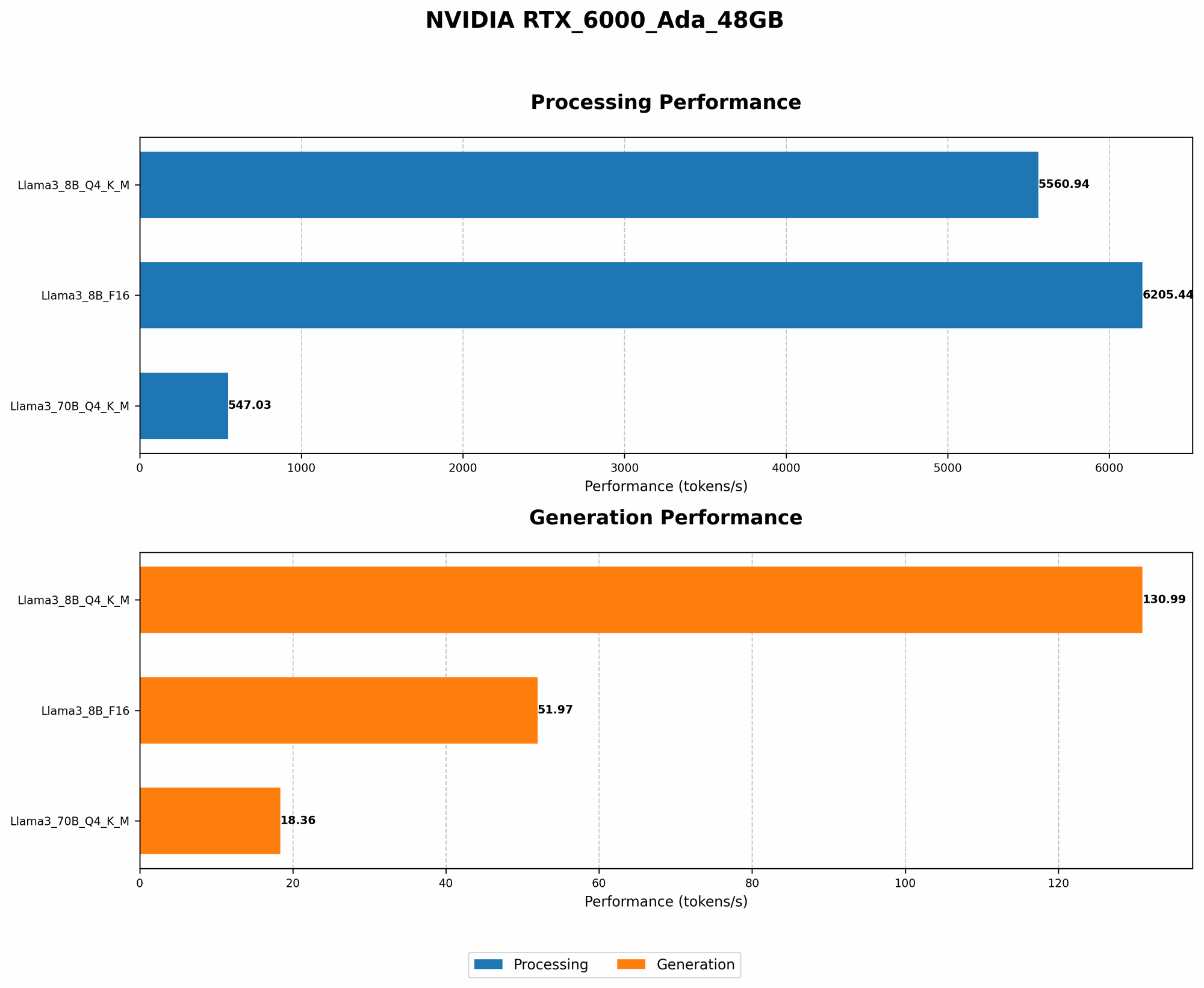
Here's a glimpse into the RTX 6000 Ada 48GB's token generation performance for various LLM models, with numbers representing the tokens generated per second:
| LLM Model | Quantization | Tokens/Second |
|---|---|---|
| Llama 3 8B | Q4KM | 130.99 |
| Llama 3 8B | F16 | 51.97 |
| Llama 3 70B | Q4KM | 18.36 |
| Llama 3 70B | F16 | N/A |
What the Numbers Tell Us
- Quantization matters: The performance difference between the Q4KM quantization and the F16 quantization is significant, with Q4KM offering much faster token generation. This highlights how quantization can significantly impact performance.
- Model size and speed: As expected, the smaller Llama 3 8B model generates tokens much faster than the larger Llama 3 70B model. This is because a larger model demands more processing power.
Token Processing Speed: Juggling Information
Here's how the RTX 6000 Ada 48GB performs in processing tokens, again measured in tokens per second:
| LLM Model | Quantization | Tokens/Second |
|---|---|---|
| Llama 3 8B | Q4KM | 5560.94 |
| Llama 3 8B | F16 | 6205.44 |
| Llama 3 70B | Q4KM | 547.03 |
| Llama 3 70B | F16 | N/A |
What the Numbers Tell Us
- Faster processing, even with quantization: While the Q4KM quantization is generally associated with faster token generation, it's interesting to note that the F16 quantization offers faster token processing speeds for the Llama 3 8B model.
- Model size impact on processing: Similar to token generation, the larger Llama 3 70B model experiences significantly slower token processing compared to the Llama 3 8B model. This highlights how larger models demand greater processing power.
Quantization Explained: Turning Down the Dial for Performance
Quantization: A Simple Analogy
Imagine you're trying to describe a color to someone using only a limited set of words like "light," "medium," or "dark." This is similar to quantization, where we simplify the information contained in a model using a smaller range of values.
Quatization: The AI Performance Booster
Quantization helps to reduce the memory footprint of LLM models, enabling them to run faster on resource-constrained devices like GPUs. By using a smaller range of values, quantization can even improve performance on GPUs like the RTX 6000 Ada 48GB.
Different Quantization Levels
There are different quantization levels:
- Q4KM: This approach uses a limited set of 4-bit values, which can significantly reduce model size and increase processing speed.
- F16: This is a standard quantization approach in deep learning, using 16-bit floating-point values. It offers a balance between model size and performance.
Quantization: A Trade-off Between Speed and Accuracy
While quantization can improve speed and efficiency, it can also slightly impact accuracy. With AI models, it's always a trade-off between achieving the optimal balance of speed, accuracy, and resource consumption.
When to Choose NVIDIA RTX 6000 Ada 48GB for Local LLMs
Based on the data presented, the NVIDIA RTX 6000 Ada 48GB is a powerful option for running LLMs locally, particularly for smaller models like Llama 3 8B. Let's explore some specific scenarios:
Scenario 1: Working with Smaller LLMs
If your AI workload primarily involves using smaller LLM models like Llama 3 8B, the RTX 6000 Ada 48GB can provide exceptional performance for:
- Real-time applications: The fast token generation speeds ensure smooth and responsive user interactions, making it ideal for projects like chatbots, real-time language translation, and interactive content creation tools.
- High-volume text processing: The high token processing speed makes it efficient for tasks like text summarization, sentiment analysis, and large-scale document processing.
Scenario 2: Running Larger LLMs with Quantization
While the RTX 6000 Ada 48GB can handle larger models like Llama 3 70B thanks to its vast memory capacity, it might require quantization to maintain reasonable performance.
- Q4KM for speed: If you prioritize fast token generation and processing speeds, Q4KM quantization can be your go-to choice, even if it might impact accuracy to a small extent.
- Weighing accuracy against speed: For tasks that require higher accuracy, F16 quantization might be a better option, even at the cost of slightly slower performance.
The Verdict: Is the RTX 6000 Ada 48GB Right for You?
The RTX 6000 Ada 48GB is a robust GPU that provides excellent performance for running LLMs locally, especially for smaller models. If your workload prioritizes:
- Speed: The RTX 6000 Ada 48GB excels in this area, especially with smaller models and quantization.
- Local processing: The RTX 6000 Ada 48GB offers great performance for local LLM applications, giving you control and privacy.
- Resource efficiency: The RTX 6000 Ada 48GB is a powerful but energy-efficient GPU, reducing your power consumption compared to other high-end options.
However, this GPU might not be the best fit for:
- Running extremely large LLMs: While it has ample memory, the RTX 6000 Ada 48GB might struggle with larger models without quantization.
- Cost-sensitive projects: The RTX 6000 Ada 48GB is a high-end GPU, and its cost might be a barrier for budget-conscious projects.
FAQ: Addressing Your Burning Questions
1. What are LLMs, and why are they so popular?
LLMs are a type of AI model that can generate text, translate languages, write different kinds of creative content, and answer your questions in an informative way. They are popular because they can perform a wide range of tasks with high accuracy and are constantly being improved.
2. What is quantization?
Quantization is a technique used to reduce the size of AI models by representing the information in them using a smaller range of values. You can think of it like simplifying a map by using fewer shades of color, making it easier to understand and faster to load.
3. What are the benefits of running LLMs locally?
Running LLMs locally offers several benefits, including increased privacy, enhanced control over models, and potential cost savings.
4. Do I need a powerful computer to run LLMs locally?
Yes, you'll need a powerful computer with a suitable GPU to run LLMs locally, especially large models. The RTX 6000 Ada 48GB is a good example, but you can choose a GPU based on your budget and needs.
5. What are the best LLM models for local use?
Some popular LLM models that are well-suited for local use include Llama 3 (8B, 7B, and 13B), StableLM, and GPT-Neo.
6. What are some popular tools for running LLMs locally?
Popular tools for running LLMs locally include llama.cpp, Textual, and LangChain.
Keywords:
NVIDIA RTX 6000 Ada 48GB, LLM, Large Language Model, Cloud vs. Local, AI Infrastructure, Token Generation Speed, Token Processing Speed, Quantization, Q4KM, F16, Llama 3, Local AI, Inference, GPU, AI Performance, Cost-effectiveness, Privacy, Control, Scalability, LLM Models, AI Models, Textual, LangChain, llama.cpp.