Cloud vs. Local: When to Choose NVIDIA RTX 4000 Ada 20GB x4 for Your AI Infrastructure
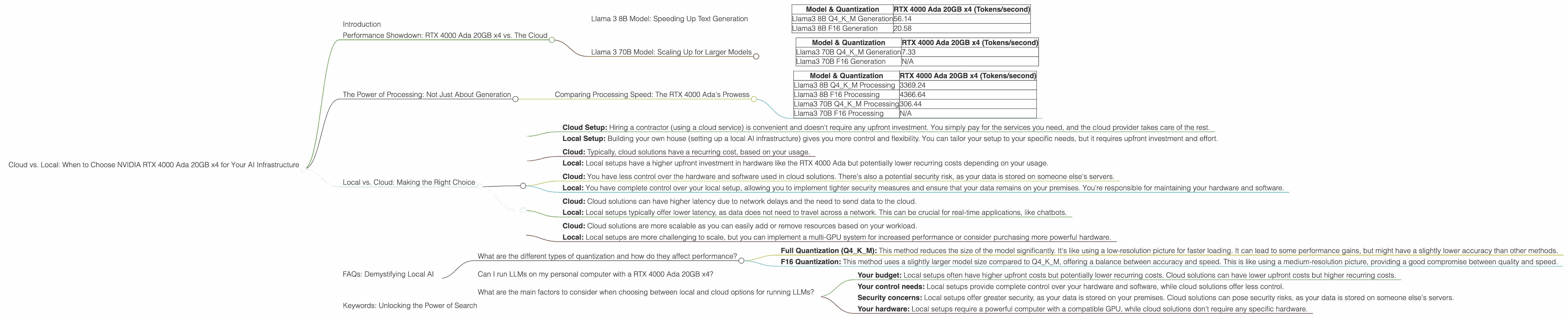
Introduction
In the world of AI, large language models (LLMs) are changing the game. These powerful models can generate realistic text, translate languages, write different kinds of creative content, and answer your questions in an informative way. But running LLMs can be computationally expensive, leading many to rely on cloud services for their AI needs.
However, for those who want more control over their AI infrastructure and are willing to invest in hardware, running LLMs locally can offer significant benefits, including cost savings, increased security, and reduced latency.
This article will explore the advantages and disadvantages of running LLMs locally on a powerful NVIDIA RTX 4000 Ada 20GB x4 GPU configuration, specifically comparing it to using cloud solutions. We'll dive deep into performance metrics for various LLM models and explore crucial considerations when choosing between local and cloud-based infrastructure.
Performance Showdown: RTX 4000 Ada 20GB x4 vs. The Cloud
The NVIDIA RTX 4000 Ada 20GB x4 is a powerful GPU designed for professionals who demand high performance for their AI applications. Let's see how it performs against cloud options for different LLM models.
Llama 3 8B Model: Speeding Up Text Generation
Remember, the numbers below represent tokens per second, meaning the faster the number the better.
| Model & Quantization | RTX 4000 Ada 20GB x4 (Tokens/second) |
|---|---|
| Llama3 8B Q4KM Generation | 56.14 |
| Llama3 8B F16 Generation | 20.58 |
What does this mean?
- Q4KM Quantization: This is a technique called quantization, which reduces the size of the LLM model without significant loss of accuracy. It's like compressing a large video file to save space. This method allows the RTX 4000 Ada to process the model more efficiently. With Q4KM quantization you get over 56 tokens generated every second.
- F16 Quantization: This technique uses a slightly larger model size compared to Q4KM, but it offers a compromise between model size and speed. Still, the RTX 4000 Ada delivers a respectable 20.58 tokens per second with F16 quantization.
Verdict: The RTX 4000 Ada 20GB x4 is a powerful contender for running the Llama 3 8B model locally. It delivers speeds that are likely sufficient for many developers and researchers.
Llama 3 70B Model: Scaling Up for Larger Models
| Model & Quantization | RTX 4000 Ada 20GB x4 (Tokens/second) |
|---|---|
| Llama3 70B Q4KM Generation | 7.33 |
| Llama3 70B F16 Generation | N/A |
What does this mean?
- Q4KM Quantization: With the larger 70B model, the RTX 4000 Ada generates around 7 tokens every second, which is still impressive given the model's size.
- F16 Quantization: There's no available data for this configuration, which means it might not be possible to run the Llama 3 70B model with F16 quantization on the RTX 4000 Ada 20GB x4.
Verdict: While the RTX 4000 Ada can handle the Llama 3 70B model with Q4KM quantization, it might not be the ideal solution for F16 quantization or for those wanting to run even larger models. This is where cloud options might become more attractive.
The Power of Processing: Not Just About Generation
We've looked at token generation, but how do the devices perform on other crucial aspects like model processing?
Comparing Processing Speed: The RTX 4000 Ada's Prowess
| Model & Quantization | RTX 4000 Ada 20GB x4 (Tokens/second) |
|---|---|
| Llama3 8B Q4KM Processing | 3369.24 |
| Llama3 8B F16 Processing | 4366.64 |
| Llama3 70B Q4KM Processing | 306.44 |
| Llama3 70B F16 Processing | N/A |
What does this mean?
- Processing Advantage: The RTX 4000 Ada shines in terms of processing speed, achieving impressive results. This is especially evident with the Llama 3 8B model where the GPU can process close to 4000 tokens per second. This high-speed processing is essential for efficient and fast model execution.
- Larger Model Considerations: For the Llama 3 70B model, the RTX 4000 Ada still delivers strong processing speeds, but you can see the impact of the larger model, leading to a decrease in performance versus the smaller 8B model.
Verdict: The RTX 4000 Ada 20GB x4 demonstrates its power by delivering incredibly fast processing speeds. It's a compelling option for those who value high-performance processing alongside token generation.
Local vs. Cloud: Making the Right Choice

Think of it like this: Imagine you want to build a house. You can either hire a contractor and let them handle everything, or you can buy the materials and build it yourself. Both options have pros and cons.
- Cloud Setup: Hiring a contractor (using a cloud service) is convenient and doesn't require any upfront investment. You simply pay for the services you need, and the cloud provider takes care of the rest.
- Local Setup: Building your own house (setting up a local AI infrastructure) gives you more control and flexibility. You can tailor your setup to your specific needs, but it requires upfront investment and effort.
Here's a breakdown of the key considerations to help you decide between local (using the RTX 4000 Ada) and cloud solutions:
Cost:
- Cloud: Typically, cloud solutions have a recurring cost, based on your usage.
- Local: Local setups have a higher upfront investment in hardware like the RTX 4000 Ada but potentially lower recurring costs depending on your usage.
Control and Security:
- Cloud: You have less control over the hardware and software used in cloud solutions. There's also a potential security risk, as your data is stored on someone else's servers.
- Local: You have complete control over your local setup, allowing you to implement tighter security measures and ensure that your data remains on your premises. You're responsible for maintaining your hardware and software.
Latency:
- Cloud: Cloud solutions can have higher latency due to network delays and the need to send data to the cloud.
- Local: Local setups typically offer lower latency, as data does not need to travel across a network. This can be crucial for real-time applications, like chatbots.
Scalability:
- Cloud: Cloud solutions are more scalable as you can easily add or remove resources based on your workload.
- Local: Local setups are more challenging to scale, but you can implement a multi-GPU system for increased performance or consider purchasing more powerful hardware.
Ultimately, the best choice depends on your specific needs and budget.
FAQs: Demystifying Local AI
What are the different types of quantization and how do they affect performance?
Quantization is a technique that reduces the size of LLM models without significant loss of accuracy. There are different quantization techniques, each with its own trade-offs:
- Full Quantization (Q4KM): This method reduces the size of the model significantly. It's like using a low-resolution picture for faster loading. It can lead to some performance gains, but might have a slightly lower accuracy than other methods.
- F16 Quantization: This method uses a slightly larger model size compared to Q4KM, offering a balance between accuracy and speed. This is like using a medium-resolution picture, providing a good compromise between quality and speed.
Can I run LLMs on my personal computer with a RTX 4000 Ada 20GB x4?
Yes, you can, but remember the RTX 4000 Ada is a high-end professional GPU. Your personal computer needs a powerful enough processor, significant RAM, and a compatible motherboard to support this GPU. But running LLMs on a personal computer with an RTX 4000 Ada can be a great option for experimentation and learning.
What are the main factors to consider when choosing between local and cloud options for running LLMs?
The main factors to consider are:
- Your budget: Local setups often have higher upfront costs but potentially lower recurring costs. Cloud solutions can have lower upfront costs but higher recurring costs.
- Your control needs: Local setups provide complete control over your hardware and software, while cloud solutions offer less control.
- Security concerns: Local setups offer greater security, as your data is stored on your premises. Cloud solutions can pose security risks, as your data is stored on someone else's servers.
- Your hardware: Local setups require a powerful computer with a compatible GPU, while cloud solutions don't require any specific hardware.
Keywords: Unlocking the Power of Search
NVIDIA RTX 4000 Ada, LLM, Llama 3, Local AI, Cloud AI, Cloud Computing, Token Generation, Quantization, Q4KM, F16, Processing Speed, Latency, Scalability, Cost, Control, Security, AI Infrastructure, GPU, Hardware, Software, Deep Learning, Machine Learning, Natural Language Processing, Text Generation, AI Research, AI Development, Text Processing, Language Models, Computer Vision, Data Science, Big Data, AI Ethics, Data Privacy, AI Applications, AI Trends, AI Future.