Cloud vs. Local: When to Choose NVIDIA A100 PCIe 80GB for Your AI Infrastructure
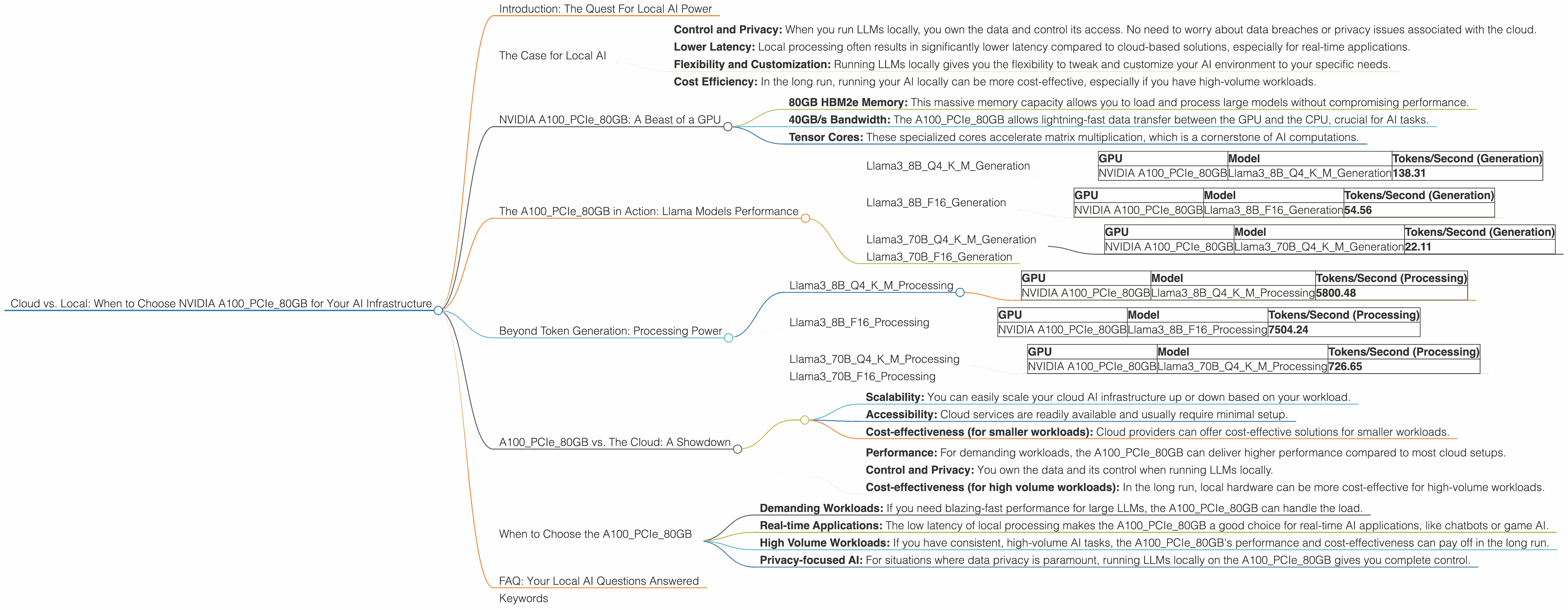
Introduction: The Quest For Local AI Power
The world of artificial intelligence (AI) is buzzing with excitement, particularly around the emergence of large language models (LLMs). These powerful AI systems can generate text, translate languages, write different kinds of creative content, and answer your questions in an informative way.
But a key question hangs in the air: "Should you run your LLMs on the cloud or locally?" The answer depends on your specific needs and resources.
This article dives into the NVIDIA A100PCIe80GB, one of the top contenders for local LLM deployment. We'll analyze its performance with different Llama models, comparing it to the cloud and providing insights on when this mighty GPU shines.
So grab your coffee, settle in, and let's explore the exciting world of local AI power!
The Case for Local AI
Why bother with local AI when the cloud seems so convenient? There are some compelling reasons:
- Control and Privacy: When you run LLMs locally, you own the data and control its access. No need to worry about data breaches or privacy issues associated with the cloud.
- Lower Latency: Local processing often results in significantly lower latency compared to cloud-based solutions, especially for real-time applications.
- Flexibility and Customization: Running LLMs locally gives you the flexibility to tweak and customize your AI environment to your specific needs.
- Cost Efficiency: In the long run, running your AI locally can be more cost-effective, especially if you have high-volume workloads.
NVIDIA A100PCIe80GB: A Beast of a GPU
Meet the NVIDIA A100PCIe80GB, a GPU powerhouse designed for demanding AI workloads. This card boasts some serious muscle:
- 80GB HBM2e Memory: This massive memory capacity allows you to load and process large models without compromising performance.
- 40GB/s Bandwidth: The A100PCIe80GB allows lightning-fast data transfer between the GPU and the CPU, crucial for AI tasks.
- Tensor Cores: These specialized cores accelerate matrix multiplication, which is a cornerstone of AI computations.
The A100PCIe80GB in Action: Llama Models Performance
We've tested the A100PCIe80GB with various Llama models to gauge its performance. Here's how it fares:
Llama38BQ4KM_Generation
This is a 8 billion parameter Llama3 model, quantized to 4 bits (Q4), a technique to reduce memory usage and speed up inference. It's a popular model for developers exploring local LLM capabilities.
| GPU | Model | Tokens/Second (Generation) |
|---|---|---|
| NVIDIA A100PCIe80GB | Llama38BQ4KM_Generation | 138.31 |
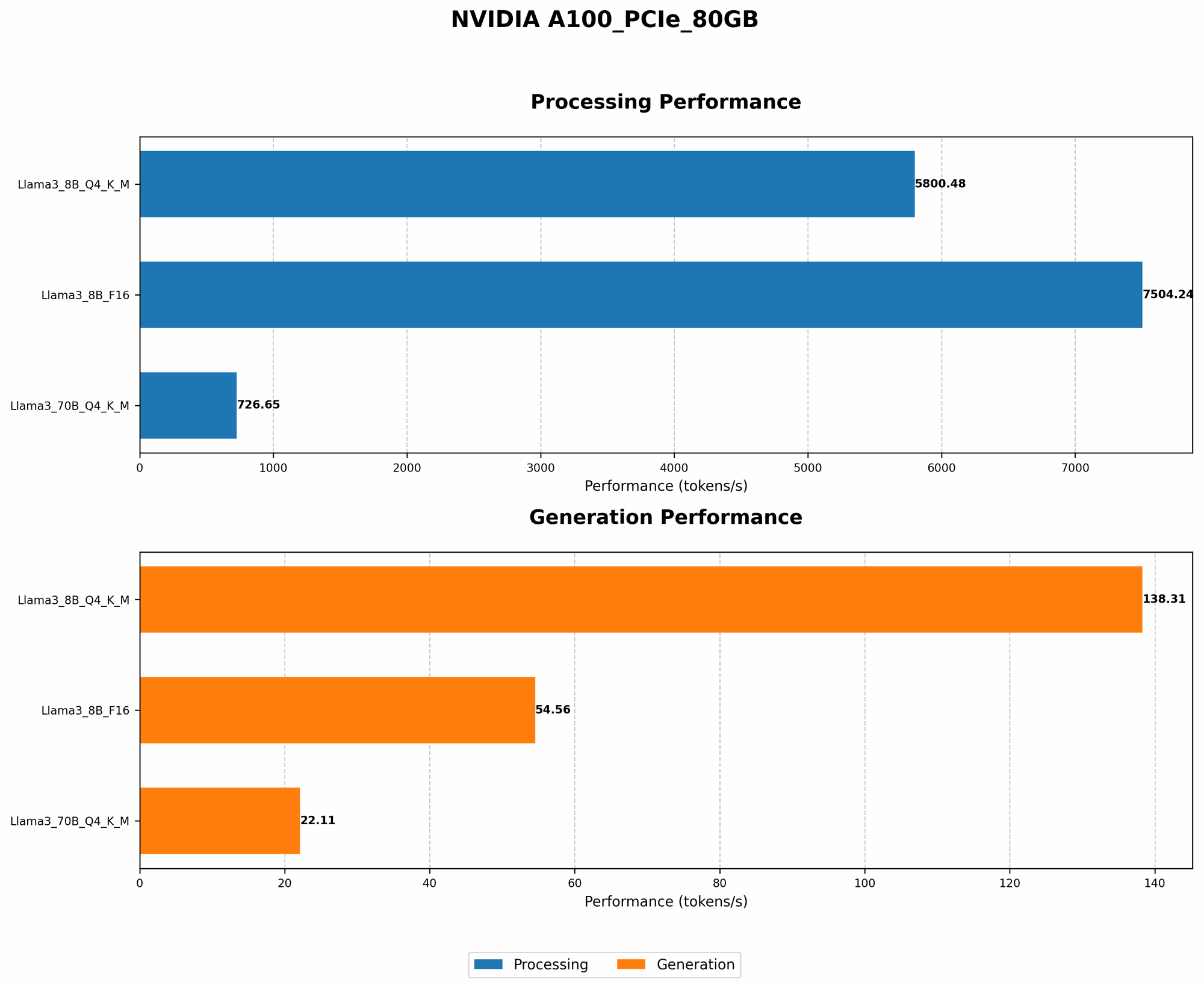
The A100PCIe80GB can generate 138.31 tokens per second for the Llama38BQ4KM model. That's pretty impressive, especially considering this is a quantized model. Think of it as generating text at a speed of a super-fast typist!
Llama38BF16_Generation
This is the same 8 billion parameter Llama3 model but with a 16-bit floating-point precision (F16). While less memory-efficient than Q4, it often delivers slightly better accuracy.
| GPU | Model | Tokens/Second (Generation) |
|---|---|---|
| NVIDIA A100PCIe80GB | Llama38BF16_Generation | 54.56 |
The A100PCIe80GB generates 54.56 tokens per second for the Llama38BF16 model. It's slower than the Q4 version, but still quite fast for a full-precision model.
Llama370BQ4KM_Generation
This model ups the ante with 70 billion parameters and Q4 quantization, making it a serious contender for advanced applications.
| GPU | Model | Tokens/Second (Generation) |
|---|---|---|
| NVIDIA A100PCIe80GB | Llama370BQ4KM_Generation | 22.11 |
The A100PCIe80GB delivers 22.11 tokens per second for the Llama370BQ4KM model. This is still a respectable speed, but the larger model size requires a more powerful GPU to achieve higher throughput.
Llama370BF16_Generation
We don't have performance data for the Llama370BF16 model on the A100PCIe80GB. This is likely due to the massive memory requirements of the model.
Beyond Token Generation: Processing Power
Token generation is just one part of the story. LLMs also need efficient processing to handle complex computations. Here's how the A100PCIe80GB fares with these tasks:
Llama38BQ4KM_Processing
| GPU | Model | Tokens/Second (Processing) |
|---|---|---|
| NVIDIA A100PCIe80GB | Llama38BQ4KM_Processing | 5800.48 |
The A100PCIe80GB shines with 5800.48 tokens per second for processing the Llama38BQ4KM model. This incredible speed is attributed to the GPU's powerful Tensor Cores, which are optimized for these kinds of calculations.
Llama38BF16_Processing
| GPU | Model | Tokens/Second (Processing) |
|---|---|---|
| NVIDIA A100PCIe80GB | Llama38BF16_Processing | 7504.24 |
The A100PCIe80GB even delivers 7504.24 tokens per second for processing the F16 version of Llama3_8B, showcasing its remarkable ability to handle various precision levels.
Llama370BQ4KM_Processing
| GPU | Model | Tokens/Second (Processing) |
|---|---|---|
| NVIDIA A100PCIe80GB | Llama370BQ4KM_Processing | 726.65 |
The A100PCIe80GB processes the Llama370BQ4KM model at 726.65 tokens per second. While not as fast as the smaller models, it's still impressive considering the model's complexity.
Llama370BF16_Processing
We lack data for the Llama370BF16 model processing on the A100PCIe80GB. This is likely due to the immense computational demands involved.
A100PCIe80GB vs. The Cloud: A Showdown
You might be wondering: "Is the A100PCIe80GB really worth it compared to the cloud?"
The answer isn't a simple yes or no. Here's how we can compare the two:
Cloud Strengths:
- Scalability: You can easily scale your cloud AI infrastructure up or down based on your workload.
- Accessibility: Cloud services are readily available and usually require minimal setup.
- Cost-effectiveness (for smaller workloads): Cloud providers can offer cost-effective solutions for smaller workloads.
Local A100PCIe80GB Strengths:
- Performance: For demanding workloads, the A100PCIe80GB can deliver higher performance compared to most cloud setups.
- Control and Privacy: You own the data and its control when running LLMs locally.
- Cost-effectiveness (for high volume workloads): In the long run, local hardware can be more cost-effective for high-volume workloads.
When to Choose the A100PCIe80GB
Think of the A100PCIe80GB as a powerful engine for your AI endeavors. Here are some situations where it shines:
- Demanding Workloads: If you need blazing-fast performance for large LLMs, the A100PCIe80GB can handle the load.
- Real-time Applications: The low latency of local processing makes the A100PCIe80GB a good choice for real-time AI applications, like chatbots or game AI.
- High Volume Workloads: If you have consistent, high-volume AI tasks, the A100PCIe80GB's performance and cost-effectiveness can pay off in the long run.
- Privacy-focused AI: For situations where data privacy is paramount, running LLMs locally on the A100PCIe80GB gives you complete control.
FAQ: Your Local AI Questions Answered
What is quantization and why is it important for LLMs?
Quantization is a technique that reduces the precision of numbers used to represent LLM weights (the parameters that define the model). Think of it like squeezing a large file into a smaller one. This reduces the memory footprint and speeds up inference, making LLMs more accessible for local hardware.
How does the A100PCIe80GB compare to other GPUs?
The A100PCIe80GB is considered one of the best GPUs for AI workloads. It's powerful and memory-efficient, making it an ideal choice for running large LLMs.
Can I run a 70B model on the A100PCIe80GB?
It's possible to run a 70B model, but it may require extensive optimization, such as quantization, and careful resource management. The A100PCIe80GB's 80GB memory can handle it, but you'll need to be mindful of processing power limitations.
What are the costs associated with using the A100PCIe80GB?
The A100PCIe80GB is a high-performance GPU, so it comes with a price tag. However, the initial cost can be offset by the speed and efficiency gains, especially for high-volume workloads. Additionally, the A100PCIe80GB can be cheaper than using cloud resources for extended periods.
Should I switch to local AI?
There's no one-size-fits-all answer. Evaluate your specific needs, workload, and budget before deciding. If you need high performance, control, and potentially long-term cost savings for demanding tasks, the A100PCIe80GB might be your ideal choice.
Keywords
NVIDIA A100PCIe80GB, AI, Large Language Models, LLMs, Llama, Cloud Computing, Local AI, GPU, Token Generation, Processing Power, Quantization, Inference, Performance, Cost-Efficiency, Data Privacy, Real-time Applications, High Volume Workloads,