Cloud vs. Local: When to Choose NVIDIA 4090 24GB x2 for Your AI Infrastructure
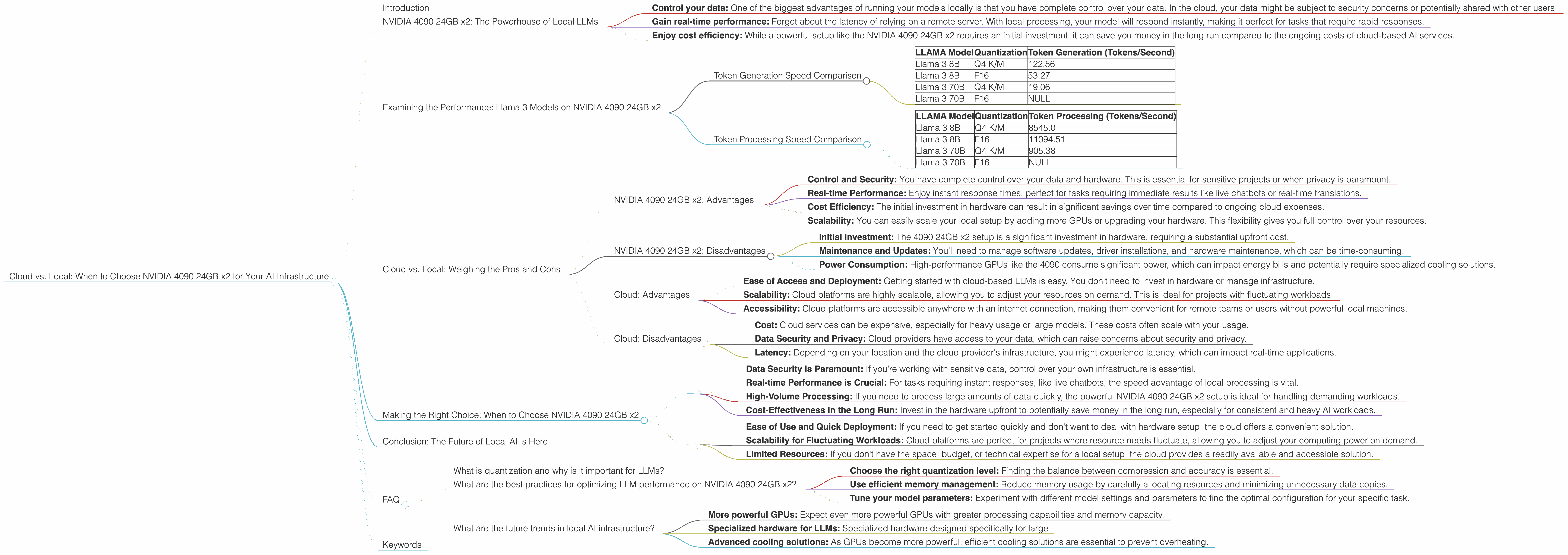
Introduction
The world of Large Language Models (LLMs) is exploding, and with it comes a wave of technological advancements. From the power of GPT-4 to the efficiency of Llama 2, these AI models are pushing the boundaries of what's possible. But a big question remains: where do you run these models? The cloud? Your local machine?
In this article, we're diving deep into the world of local LLMs, specifically exploring the power of the NVIDIA 4090 24GB x2 setup. Think of it as the ultimate AI muscle car – powerful, fast, and ready to handle demanding workloads. We'll compare the performance of this setup against its cloud counterparts, examining the pros and cons of each option. We'll also break down the technical jargon and make it simple to understand, even if you're not a seasoned developer. Buckle up, because this is a journey into the exciting future of AI!
NVIDIA 4090 24GB x2: The Powerhouse of Local LLMs
So, what's the big deal with this NVIDIA 4090 24GB x2 setup? Imagine two of the most powerful GPUs on the planet working in tandem, like a synchronized dance of AI processing. This setup is ideal for running large language models locally, allowing you to:
- Control your data: One of the biggest advantages of running your models locally is that you have complete control over your data. In the cloud, your data might be subject to security concerns or potentially shared with other users.
- Gain real-time performance: Forget about the latency of relying on a remote server. With local processing, your model will respond instantly, making it perfect for tasks that require rapid responses.
- Enjoy cost efficiency: While a powerful setup like the NVIDIA 4090 24GB x2 requires an initial investment, it can save you money in the long run compared to the ongoing costs of cloud-based AI services.
Examining the Performance: Llama 3 Models on NVIDIA 4090 24GB x2

Let's get into the numbers! We'll be looking at the performance of the NVIDIA 4090 24GB x2 setup for different Llama 3 models, focusing on two key metrics:
- Token Generation Speed: This measures how many tokens per second your model can generate, which directly impacts the speed of text outputs.
- Token Processing Speed: This measures how many tokens your model can process per second, reflecting its overall computational prowess.
Token Generation Speed Comparison
| LLAMA Model | Quantization | Token Generation (Tokens/Second) |
|---|---|---|
| Llama 3 8B | Q4 K/M | 122.56 |
| Llama 3 8B | F16 | 53.27 |
| Llama 3 70B | Q4 K/M | 19.06 |
| Llama 3 70B | F16 | NULL |
Understanding Quantization:
Think of quantization like compressing a video file. It reduces the size of your model without sacrificing too much accuracy. You can choose between different levels of quantization, like Q4 K/M or F16. Q4 K/M offers greater compression, while F16 provides a balance between compression and accuracy. It's a trade-off between performance and memory size.
Analysis:
The NVIDIA 4090 24GB x2 setup shines when working with Llama 3 8B. It generates tokens incredibly fast, reaching 122.56 tokens per second with Q4 K/M quantization. This is a significant speed boost compared to the cloud, where you might get only a fraction of that number. For F16, the speed drops to 53.27 tokens per second, but it's still a solid performance.
However, when you jump to the larger 70B model, the performance takes a hit. The token generation speed drops to 19.06 tokens per second, likely because of the increased size of the model. We don't have data for the F16 quantization for the 70B model, but it's safe to assume it would be even slower given the already slower speed of the Q4 K/M variant.
Token Processing Speed Comparison
| LLAMA Model | Quantization | Token Processing (Tokens/Second) |
|---|---|---|
| Llama 3 8B | Q4 K/M | 8545.0 |
| Llama 3 8B | F16 | 11094.51 |
| Llama 3 70B | Q4 K/M | 905.38 |
| Llama 3 70B | F16 | NULL |
Analysis:
The NVIDIA 4090 24GB x2 setup demonstrates its processing power with the 8B models. Even with Q4 K/M quantization, it manages to process tokens at a remarkable speed of 8545 tokens per second. For F16, the processing speed jumps even higher to 11094.51 tokens per second. This shows that the setup can handle a large volume of tokens efficiently, ideal for tasks requiring a lot of processing power.
With the 70B model, the processing speed drops to 905.38 tokens per second for Q4 K/M. This is still a respectable figure but it's a significant decrease from the 8B models. The lack of data for F16 means it's unclear if the performance would be better or worse.
Cloud vs. Local: Weighing the Pros and Cons
So, how does the powerful NVIDIA 4090 24GB x2 setup stack up against the cloud? There's no one-size-fits-all answer, as the best choice depends on your specific needs and priorities.
NVIDIA 4090 24GB x2: Advantages
- Control and Security: You have complete control over your data and hardware. This is essential for sensitive projects or when privacy is paramount.
- Real-time Performance: Enjoy instant response times, perfect for tasks requiring immediate results like live chatbots or real-time translations.
- Cost Efficiency: The initial investment in hardware can result in significant savings over time compared to ongoing cloud expenses.
- Scalability: You can easily scale your local setup by adding more GPUs or upgrading your hardware. This flexibility gives you full control over your resources.
NVIDIA 4090 24GB x2: Disadvantages
- Initial Investment: The 4090 24GB x2 setup is a significant investment in hardware, requiring a substantial upfront cost.
- Maintenance and Updates: You'll need to manage software updates, driver installations, and hardware maintenance, which can be time-consuming.
- Power Consumption: High-performance GPUs like the 4090 consume significant power, which can impact energy bills and potentially require specialized cooling solutions.
Cloud: Advantages
- Ease of Access and Deployment: Getting started with cloud-based LLMs is easy. You don't need to invest in hardware or manage infrastructure.
- Scalability: Cloud platforms are highly scalable, allowing you to adjust your resources on demand. This is ideal for projects with fluctuating workloads.
- Accessibility: Cloud platforms are accessible anywhere with an internet connection, making them convenient for remote teams or users without powerful local machines.
Cloud: Disadvantages
- Cost: Cloud services can be expensive, especially for heavy usage or large models. These costs often scale with your usage.
- Data Security and Privacy: Cloud providers have access to your data, which can raise concerns about security and privacy.
- Latency: Depending on your location and the cloud provider's infrastructure, you might experience latency, which can impact real-time applications.
Making the Right Choice: When to Choose NVIDIA 4090 24GB x2
Here's a breakdown of situations where the local NVIDIA 4090 24GB x2 setup might be the best choice:
- Data Security is Paramount: If you're working with sensitive data, control over your own infrastructure is essential.
- Real-time Performance is Crucial: For tasks requiring instant responses, like live chatbots, the speed advantage of local processing is vital.
- High-Volume Processing: If you need to process large amounts of data quickly, the powerful NVIDIA 4090 24GB x2 setup is ideal for handling demanding workloads.
- Cost-Effectiveness in the Long Run: Invest in the hardware upfront to potentially save money in the long run, especially for consistent and heavy AI workloads.
When to Choose the Cloud:
- Ease of Use and Quick Deployment: If you need to get started quickly and don't want to deal with hardware setup, the cloud offers a convenient solution.
- Scalability for Fluctuating Workloads: Cloud platforms are perfect for projects where resource needs fluctuate, allowing you to adjust your computing power on demand.
- Limited Resources: If you don't have the space, budget, or technical expertise for a local setup, the cloud provides a readily available and accessible solution.
Conclusion: The Future of Local AI is Here
The NVIDIA 4090 24GB x2 setup represents a powerful era of local AI. It grants developers and researchers the power to harness the full capabilities of large language models without relying on the cloud. This brings control, speed, and cost efficiency to the forefront, empowering users to explore new possibilities in the world of AI.
However, remember that the cloud still holds its own advantages for certain situations. The key is to carefully assess your needs, weigh the pros and cons, and choose the solution that best fits your project and budget. Ultimately, the future of AI is about flexibility and power, and the NVIDIA 4090 24GB x2 setup is a powerful tool that can help you forge that future.
FAQ
What is quantization and why is it important for LLMs?
Think of quantization like compressing a video file. It reduces the size of your model without sacrificing too much accuracy. This is important because it allows your model to run faster and use less memory. For example, Q4 K/M quantization offers greater compression, while F16 provides a balance between compression and accuracy.
What are the best practices for optimizing LLM performance on NVIDIA 4090 24GB x2?
Optimizing LLM performance is crucial for getting the best results. Here are some tips:
- Choose the right quantization level: Finding the balance between compression and accuracy is essential.
- Use efficient memory management: Reduce memory usage by carefully allocating resources and minimizing unnecessary data copies.
- Tune your model parameters: Experiment with different model settings and parameters to find the optimal configuration for your specific task.
What are the future trends in local AI infrastructure?
The future of local AI infrastructure is bright, with exciting advancements on the horizon. Here are a few trends to keep an eye on:
- More powerful GPUs: Expect even more powerful GPUs with greater processing capabilities and memory capacity.
- Specialized hardware for LLMs: Specialized hardware designed specifically for large
- Advanced cooling solutions: As GPUs become more powerful, efficient cooling solutions are essential to prevent overheating.
Keywords
NVIDIA 4090, 24GB x2, Local AI, Large Language Models, LLM, Cloud vs. Local, Token Generation, Token Processing, Quantization, Performance Comparison, Llama 3, 8B, 70B, AI Infrastructure, Data Security, Cost Efficiency, Performance Optimization