Cloud vs. Local: When to Choose NVIDIA 4090 24GB for Your AI Infrastructure

Introduction
The world of AI is exploding, and Large Language Models (LLMs) are at the heart of this revolution. These powerful models, capable of generating human-like text, translating languages, and even writing code, are being deployed in various applications, from chatbots to creative writing tools. Whether you're a developer tinkering with AI or a company building a next-generation AI product, you'll need to decide if you'll deploy your model in the cloud or locally. This choice often hinges on factors like cost, performance, and control.
This article delves into the specific case of the NVIDIA 4090_24GB GPU, a powerhouse capable of handling demanding AI workloads. We'll explore if it's the right choice for you, depending on your specific AI needs and preferences.
NVIDIA 4090_24GB: A Beast of a GPU

The NVIDIA 4090_24GB is no ordinary graphics card; it's a monster built for demanding tasks like AI model training and inference. Think of it as a high-performance sports car – it's fast, powerful, and ready to handle anything you throw at it. This GPU boasts 24GB of GDDR6X memory, giving it enough horsepower to tackle even the largest LLMs.
Choosing the Right LLM for Your Needs
Before we dive into the technical details, let's discuss the specific models we'll be comparing: Llama 3. We'll be exploring the performance of the 4090_24GB on both the 8B and 70B variants. The choice between these two depends on your desired functionality:
Llama 3 8B (8 Billion Parameters):
- Pros: Smaller size, less demanding on hardware, faster inference speeds, good for initial experiments or tasks that don't require extreme complexity.
- Cons: Limited capabilities compared to larger models.
Llama 3 70B (70 Billion Parameters):
- Pros: More powerful, can handle more complex tasks, better at understanding and generating text.
- Cons: Requires more powerful hardware, slower inference speeds.
Quantization: Making LLMs Smaller and Faster
Think of quantization as a way to "diet" your LLM. This process reduces the size of the model by lowering the precision of its weights (numbers that represent the model's knowledge). Instead of using 32-bit floating-point numbers, we can use 16-bit or even 4-bit numbers for the model weights. This results in a smaller, lighter model that can be run on less powerful hardware.
Think of it like this: Imagine you're cooking a recipe. You could use the whole ingredients (32-bit precision), or you could use a smaller portion of each ingredient (16-bit or 4-bit precision). The final dish might not be exactly the same, but it will still be delicious and much easier to cook (and less expensive).
Performance Comparison: NVIDIA 4090_24GB vs. Cloud
Llama 3 8B on the 4090_24GB: Making the Most of Local Processing
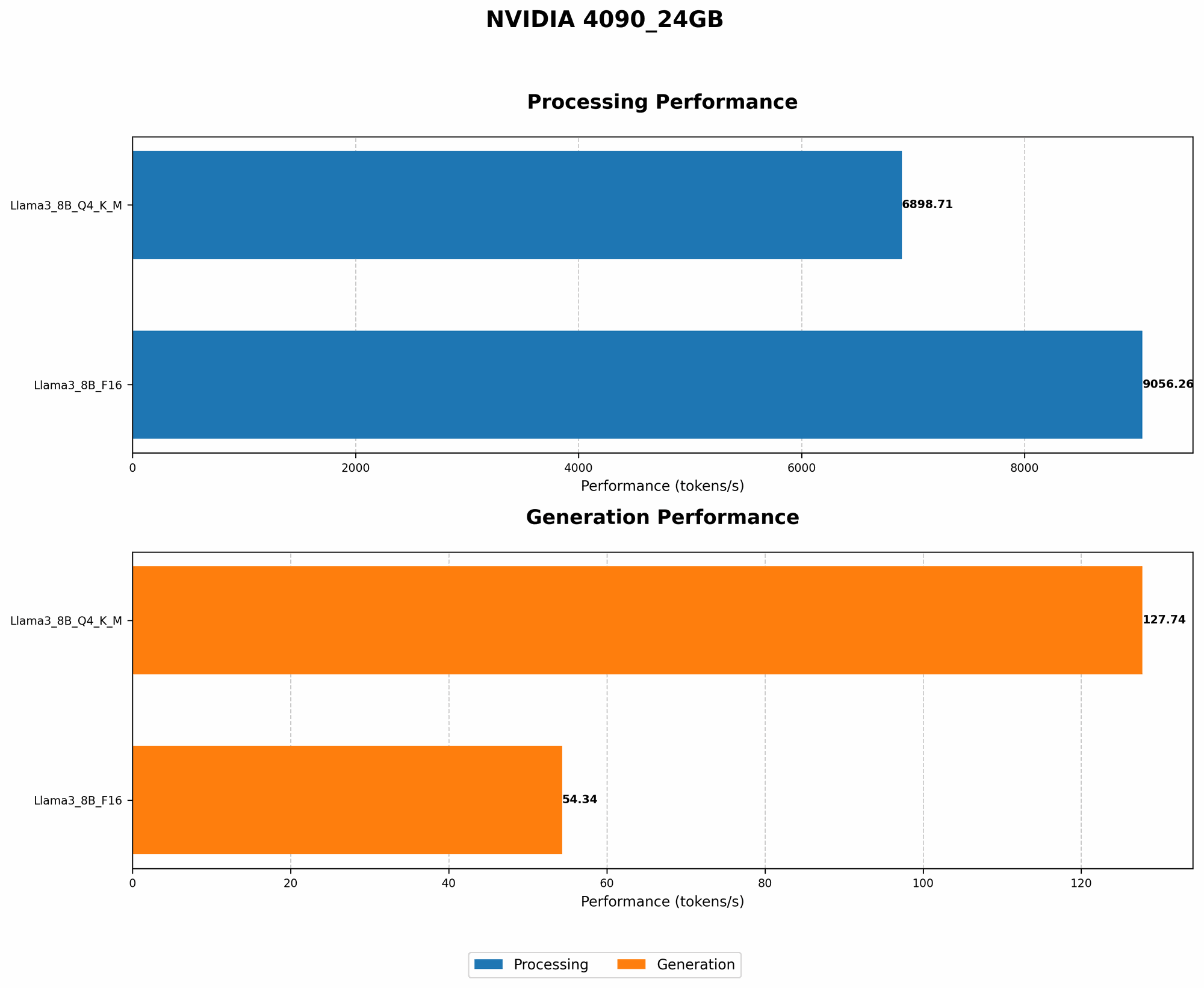
Token Speed Generation:
The 4090_24GB shines with the Llama 3 8B model, providing impressive token generation speeds.
| Model | Tokens/Second |
|---|---|
| Llama 3 8B Q4KM (Quantized with 4-bit precision) | 127.74 |
| Llama 3 8B F16 (Quantized with 16-bit precision) | 54.34 |
In plain English: The 4090_24GB can generate around 127 tokens per second when using 4-bit quantized Llama 3 8B, and around 54 tokens per second with 16-bit quantization.
What does this mean? This performance allows you to run your model locally, providing faster results and more control over your AI infrastructure.
Token Processing Speed:
| Model | Tokens/Second |
|---|---|
| Llama 3 8B Q4KM | 6898.71 |
| Llama 3 8B F16 | 9056.26 |
In simpler words: The 4090_24GB processes tokens very quickly, making it ideal for real-time applications.
Why is this important? Fast token processing is critical for smooth user experiences in AI applications like chatbots and interactive AI tools.
Llama 3 70B on the 4090_24GB: Still Powerful, but Consider the Cloud
Unfortunately, there's no data available for the performance of Llama 3 70B on the 409024GB. This lack of data suggests that the 409024GB might not be powerful enough to process this larger model effectively.
Remember: The 70B model is significantly larger and more complex than the 8B model. It requires a lot more computational power and memory to run smoothly.
Cloud vs. Local: Making the Right Choice
Local Processing with the 4090_24GB: Control and Cost Savings
- Control: You have complete control over your AI infrastructure, including hardware, software, and data. You can fine-tune parameters, customize your setup, and make changes as needed.
- Cost Savings: This is where the 4090_24GB shines. While the initial investment in hardware might be substantial, you'll save on cloud computing costs over the long term. Think of it like buying a car instead of renting one – you'll pay more upfront, but you'll save money in the long run.
Cloud Processing: Scalability and Ease of Use
- Scalability: Cloud providers offer flexible and scalable solutions. You can easily adjust your resources as your AI needs change. This is particularly useful if you're experiencing rapid growth or need to handle peak workloads.
- Ease of Use: Cloud platforms often provide simple and intuitive interfaces for managing your AI models and infrastructure. This can be a huge advantage for developers who don't want to deal with the complexities of setting up and maintaining local servers.
When to Choose the 4090_24GB for Your AI Infrastructure
Here's a breakdown of when the 4090_24GB is a good choice:
- You're working with smaller LLMs (like Llama 3 8B or smaller). The 4090_24GB provides excellent performance for these models.
- You need control over your AI infrastructure. You can fine-tune your setup and customize it to your liking.
- You're looking for cost savings over the long term. The initial investment in hardware is offset by lower cloud computing costs.
When to Consider Cloud Computing
- You're working with larger LLMs (like Llama 3 70B or larger). The 4090_24GB might not be powerful enough for these models.
- You need scalability and flexibility. You can easily adjust your resources as your AI needs change.
- You want a simple and easy-to-use solution. Cloud platforms provide a seamless and intuitive way to manage your AI infrastructure.
FAQs
What is the difference between token generation and token processing?
Token generation refers to the process of creating new text or code based on the LLM's understanding of language. Token processing is the behind-the-scenes work of handling these tokens, like analyzing their meaning and relationships with other tokens.
What are tokens?
Think of tokens as the building blocks of language. They are like words or parts of words that the AI model uses to process and understand text. They are like the individual pieces of Lego that your AI model uses to create a larger structure (text, code, translation).
Can I run a smaller version of the 70B LLM on the NVIDIA 4090_24GB?
It's possible to run a smaller version of the 70B model, but you'll need to consider the limitations of the 24GB GPU. This could mean using quantization techniques or reducing the model's size by removing some of its parameters. However, there are no guarantees about the performance or quality of the results.
Keywords
NVIDIA 4090_24GB, AI, LLM, Llama 3, 8B, 70B, Cloud, Local, Token Speed, Token Processing, Quantization, Inference, Training, Performance, Cost, Control, Scalability.