Cloud vs. Local: When to Choose NVIDIA 3080 Ti 12GB for Your AI Infrastructure
Introduction
The world of large language models (LLMs) is exploding, with new models emerging constantly. But what about actually running these beasts on your own hardware? If you want to break free from the limitations of cloud-based AI services and embrace the power of a local machine, the NVIDIA 3080 Ti 12GB is a compelling option.
Imagine having a powerful AI assistant at your fingertips, capable of generating text, translating languages, and even writing code—all without relying on a third-party cloud service. This is becoming a reality thanks to advancements in local AI infrastructure.
This article delves into the world of local LLM models and explores if the NVIDIA 3080 Ti 12GB is the right choice for your AI journey. We'll analyze its performance with popular LLM models like Llama 3, taking a deep dive into token speed generation and processing capabilities.
Understanding LLMs and Local Infrastructure
Think of LLMs as incredibly powerful computers that can understand and generate human language. Imagine their brains stored on your hard drive, ready to answer any question or write a captivating story.
Instead of relying solely on cloud-based solutions, you can now run these models locally. This approach offers greater control, privacy, and potentially lower costs.
But choosing the right hardware is crucial. The power of your CPU and GPU, along with RAM, all play a part in how smoothly your LLM runs.
The NVIDIA 3080 Ti 12GB: A Powerhouse for AI
The NVIDIA 3080 Ti 12GB is a high-end graphics card designed for gamers and professionals, equipped with the latest NVIDIA Ampere architecture. But it's also a beast when it comes to AI tasks.
Here's where it shines:
Enhanced Performance for Llama 3: Boosting Token Speed Generation
The NVIDIA 3080 Ti 12GB significantly accelerates the process of generating tokens, which are the building blocks of language. This is where you see the LLM "thinking" and producing results.
Here's how it stacks up:
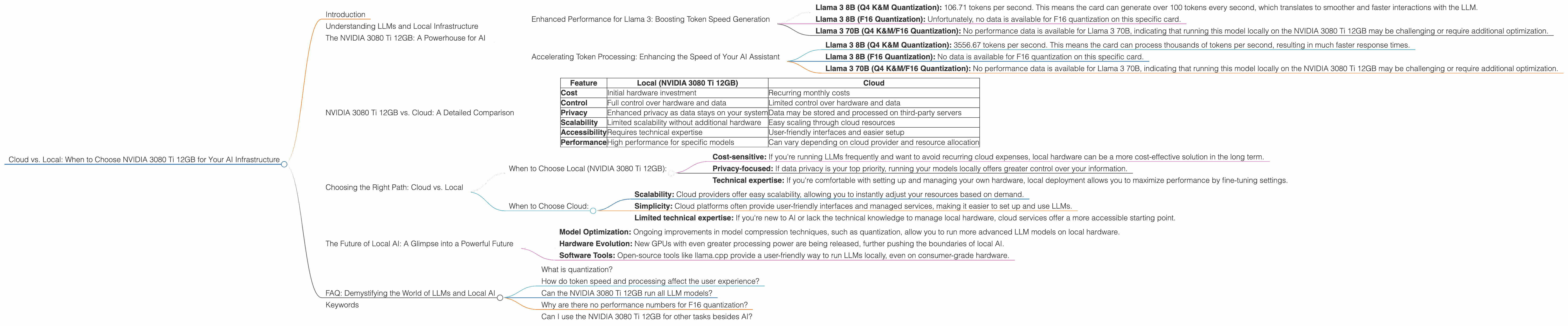
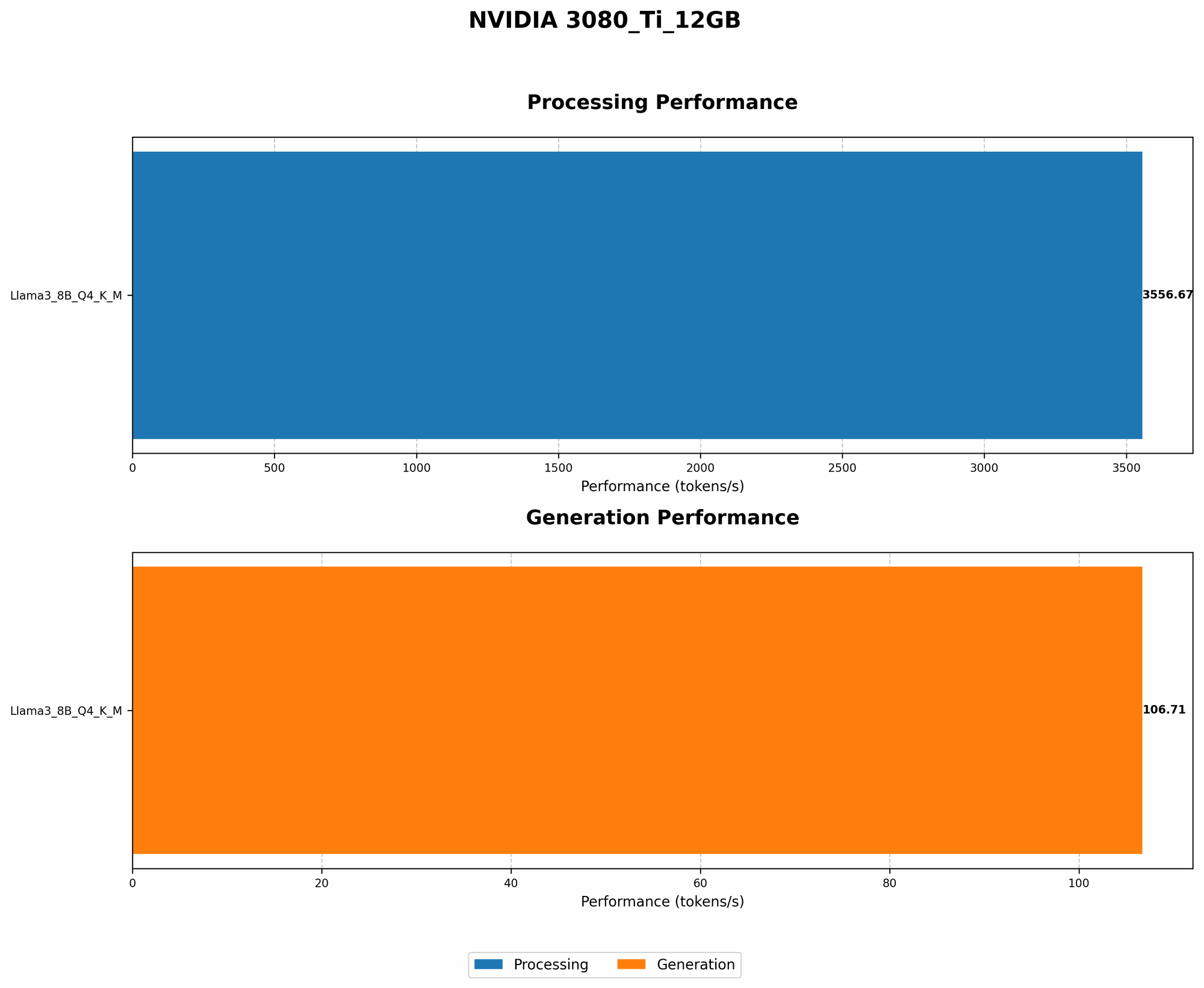
Llama 3 8B (Q4 K&M Quantization): 106.71 tokens per second. This means the card can generate over 100 tokens every second, which translates to smoother and faster interactions with the LLM.
Llama 3 8B (F16 Quantization): Unfortunately, no data is available for F16 quantization on this specific card.
Llama 3 70B (Q4 K&M/F16 Quantization): No performance data is available for Llama 3 70B, indicating that running this model locally on the NVIDIA 3080 Ti 12GB may be challenging or require additional optimization.
What does this mean for you?
Think of a chatbot: if you have a faster GPU, the chatbot will respond quicker to your questions.
Accelerating Token Processing: Enhancing the Speed of Your AI Assistant
The NVIDIA 3080 Ti 12GB can also significantly speed up the token processing stage of your AI models. This is the "behind-the-scenes" work of the LLM, understanding your input and preparing for its response.
Here's the breakdown:
Llama 3 8B (Q4 K&M Quantization): 3556.67 tokens per second. This means the card can process thousands of tokens per second, resulting in much faster response times.
Llama 3 8B (F16 Quantization): No data is available for F16 quantization on this specific card.
Llama 3 70B (Q4 K&M/F16 Quantization): No performance data is available for Llama 3 70B, indicating that running this model locally on the NVIDIA 3080 Ti 12GB may be challenging or require additional optimization.
What does this mean for you?
Faster processing speed means your AI assistant will be more responsive and efficient in handling your complex tasks. It's like having a turbocharged brain.
NVIDIA 3080 Ti 12GB vs. Cloud: A Detailed Comparison
Let's compare the NVIDIA 3080 Ti 12GB to running your LLMs in the cloud, using a simplified table to illustrate the differences:
| Feature | Local (NVIDIA 3080 Ti 12GB) | Cloud |
|---|---|---|
| Cost | Initial hardware investment | Recurring monthly costs |
| Control | Full control over hardware and data | Limited control over hardware and data |
| Privacy | Enhanced privacy as data stays on your system | Data may be stored and processed on third-party servers |
| Scalability | Limited scalability without additional hardware | Easy scaling through cloud resources |
| Accessibility | Requires technical expertise | User-friendly interfaces and easier setup |
| Performance | High performance for specific models | Can vary depending on cloud provider and resource allocation |
Choosing the Right Path: Cloud vs. Local
The choice between cloud and local LLM models boils down to your specific needs and priorities.
When to Choose Local (NVIDIA 3080 Ti 12GB):
Cost-sensitive: If you're running LLMs frequently and want to avoid recurring cloud expenses, local hardware can be a more cost-effective solution in the long term.
Privacy-focused: If data privacy is your top priority, running your models locally offers greater control over your information.
Technical expertise: If you're comfortable with setting up and managing your own hardware, local deployment allows you to maximize performance by fine-tuning settings.
When to Choose Cloud:
Scalability: Cloud providers offer easy scalability, allowing you to instantly adjust your resources based on demand.
Simplicity: Cloud platforms often provide user-friendly interfaces and managed services, making it easier to set up and use LLMs.
Limited technical expertise: If you're new to AI or lack the technical knowledge to manage local hardware, cloud services offer a more accessible starting point.
The Future of Local AI: A Glimpse into a Powerful Future
The landscape of local AI is continuously evolving, with new advancements making local models even more accessible and powerful.
Model Optimization: Ongoing improvements in model compression techniques, such as quantization, allow you to run more advanced LLM models on local hardware.
Hardware Evolution: New GPUs with even greater processing power are being released, further pushing the boundaries of local AI.
Software Tools: Open-source tools like llama.cpp provide a user-friendly way to run LLMs locally, even on consumer-grade hardware.
FAQ: Demystifying the World of LLMs and Local AI
What is quantization?
Think of quantization as a process of simplifying a complex AI model. It's like shrinking a large book down to a smaller, more manageable version. Quantization reduces the size of the models and allows them to run on devices with less memory and computing power.
How do token speed and processing affect the user experience?
Faster token speed means your AI assistant will respond quicker to your commands, making it feel more intuitive and responsive. Faster token processing allows for more seamless and efficient handling of complex tasks, resulting in a smoother user experience.
Can the NVIDIA 3080 Ti 12GB run all LLM models?
Not necessarily. The performance of the NVIDIA 3080 Ti 12GB depends on the model and the chosen quantization level. Larger models may require more powerful hardware or further optimization.
Why are there no performance numbers for F16 quantization?
This is an area of ongoing research. While F16 quantization offers potential benefits, the performance may vary depending on the specific model and hardware.
Can I use the NVIDIA 3080 Ti 12GB for other tasks besides AI?
Absolutely! The NVIDIA 3080 Ti 12GB excels at gaming, video editing, and other computationally demanding tasks.
Keywords
NVIDIA 3080 Ti, AI Infrastructure, LLM, Llama 3, Local AI, Cloud AI, Token Speed, Token Processing, Quantization, F16, Q4 K&M, GPU, Performance Comparison, Cost Comparison, Privacy Comparison, Scalability Comparison, Accessibility Comparison, Future of Local AI, Open-source Tools, Local Models