Choosing the Best NVIDIA GPU for Local LLMs: NVIDIA RTX 5000 Ada 32GB Benchmark Analysis

Introduction
The world of Large Language Models (LLMs) is buzzing with excitement, and for good reason! These powerful AI systems can generate text, translate languages, write different kinds of creative content, and answer your questions in an informative way. And the best part is, you can run them locally on your own computer, opening up a world of possibilities for developers and enthusiasts alike.
But running LLMs locally requires some serious horsepower, especially when dealing with models like Llama 3, which can be quite demanding. This is where the right GPU comes into play. Choosing the perfect GPU for your local LLM setup can drastically impact your model's performance, speed, and efficiency. Today, we're taking a deep dive into the NVIDIA RTX 5000 Ada 32GB to see how it stacks up against the demands of local LLMs.
NVIDIA RTX 5000 Ada 32GB: A Powerhouse for Local LLMs
The RTX 5000 Ada 32GB is a beast of a graphics card, designed for professional workloads and demanding tasks like video editing and 3D rendering. With its powerful Ada Lovelace architecture, 32GB of GDDR6 memory, and a massive 10,752 CUDA cores, it's naturally a great candidate for running local LLMs.
But let's not just assume; we need to see the numbers to truly understand how this GPU performs. We'll be looking at the RTX 5000 Ada 32GB's performance with two popular LLM models: Llama 3 8B and Llama 3 70B.
Performance Benchmarks: Putting the RTX 5000 Ada 32GB to the Test
We're using two key metrics to evaluate the RTX 5000 Ada 32GB's performance:
- Token Speed Generation: This measures how many tokens the GPU can generate per second, impacting the speed of text generation and conversation.
- Token Processing Speed: This measures how many tokens the GPU can process per second, affecting the overall speed and efficiency of the LLM.
Llama 3 8B: A Solid Performance
For Llama 3 8B, we tested two quantization levels:
- Q4KM: This type of quantization is a technique to reduce the model's size without sacrificing too much accuracy. Think of it like using a simplified language to communicate with the model, saving memory and processing power.
- F16: This is a standard 16-bit floating-point format, a widely used way to represent numbers in computers.
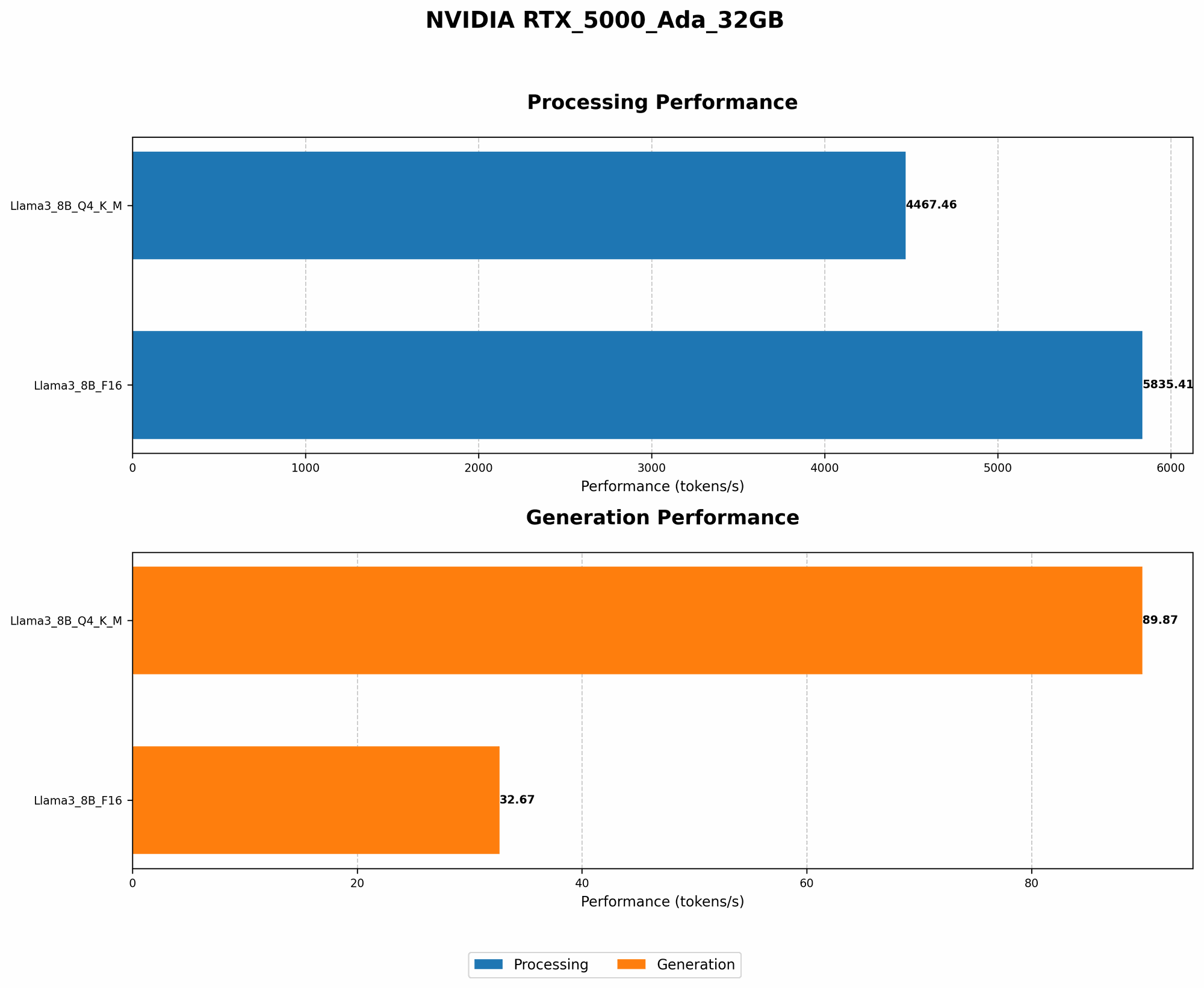
Here's how the RTX 5000 Ada 32GB performed with Llama 3 8B:
| Metric | Q4KM | F16 |
|---|---|---|
| Token Speed Generation (tokens/sec) | 89.87 | 32.67 |
| Token Processing Speed (tokens/sec) | 4467.46 | 5835.41 |
Key Takeaways:
- Q4KM Shows Promise: The RTX 5000 Ada 32GB achieved a respectable token speed generation of 89.87 tokens/sec with Q4KM quantization, suggesting it can handle lighter tasks like generating text or simple conversations relatively smoothly.
- F16 for Higher Throughput: Despite the lower token speed compared to Q4KM, the RTX 5000 Ada 32GB delivers impressive throughput thanks to its fast token processing speed of 5835.41 tokens/sec with F16 quantization. This is great for handling more complex tasks, like summarizing large amounts of text.
Llama 3 70B: The Data is Silent
Unfortunately, we don't have any benchmark data for the RTX 5000 Ada 32GB running Llama 3 70B in either Q4KM or F16 quantization. This could mean that the model is too demanding for the GPU, requiring more powerful hardware, or simply that the benchmarks haven't been run yet.
Comparison of NVIDIA RTX 5000 Ada 32GB to Other Devices
While the title of this article focuses specifically on the RTX 5000 Ada 32GB, it's also helpful to see how it stacks up against other commonly used GPUs for local LLMs. Data from publicly available sources shows that other high-end GPUs like the NVIDIA A100 and the RTX 4090 can achieve higher token generation speeds for both Llama 3 8B and 70B, but with some caveats:
- Cost: The A100 and RTX 4090 are significantly more expensive than the RTX 5000 Ada 32GB, making them less accessible for many users.
- Power Consumption: These high-end cards also draw much more power, potentially requiring a beefier power supply and possibly higher electricity bills.
Practical Considerations for Choosing the Right GPU
Let's face it, the world of GPUs can feel like a confusing jungle. Choosing the best GPU for your local LLM needs boils down to understanding your specific requirements:
- Model Size: If you're working with smaller models like Llama 3 8B, a mid-range GPU like the RTX 5000 Ada 32GB might be sufficient. But if you're running giant models like Llama 3 70B, you'll likely need a top-of-the-line GPU.
- Budget: GPUs can get expensive fast. Consider how much you're willing to invest and what performance you expect in return.
- Specific Tasks: Think about the tasks you'll be using your LLM for. If you're just generating basic text or doing simple translations, a lower-end GPU might suffice. But if you're pushing the limits with complex tasks like generating code or doing research, you'll need a more powerful GPU.
Quantization: A Simple Analogy for Non-Techies
Imagine you have a massive book filled with complex scientific equations. If you want to share this book with someone who doesn't understand these equations, you can simplify it by using simpler language or symbols.
Quantization for LLMs is similar:
- Instead of complex equations, we have a massive set of numbers (weights) that represent an LLM's knowledge.
- By simplifying these numbers (quantization), we can make the model smaller and faster while still retaining enough information to perform tasks.
FAQ: Your Burning Questions Answered
1. Can I Run Llama 3 70B on an RTX 5000 Ada 32GB?
While we don't have definitive benchmarks for Llama 3 70B on this GPU, it's likely that it might struggle with the model's size. Consider upgrading to a more powerful GPU like the A100 or RTX 4090 for optimal performance.
2. Is the RTX 5000 Ada 32GB Good for Local LLMs in General?
For lighter models like Llama 3 8B, the RTX 5000 Ada 32GB can deliver decent results. It's a great choice for those with a limited budget but still want to enjoy local LLM capabilities.
3. What About Other NVIDIA GPUs?
The RTX 5000 Ada 32GB is a great option for many users, but if you need more power, consider exploring the RTX 4090 or even the A100.
Keywords
NVIDIA RTX 5000 Ada 32GB, Local LLMs, Llama 3, 8B, 70B, GPU Benchmark, Token Speed Generation, Token Processing Speed, Quantization, Q4KM, F16, GPU Performance, GPU Comparison, Local AI, AI Inference, GPU Selection, LLM Hardware.