Choosing the Best NVIDIA GPU for Local LLMs: NVIDIA RTX 4000 Ada 20GB x4 Benchmark Analysis
Introduction
The world of Large Language Models (LLMs) is evolving rapidly, and running them locally is becoming increasingly popular for developers and researchers. These models, capable of generating human-like text, translating languages, writing different kinds of creative content, and answering your questions in an informative way, require powerful hardware to function efficiently. One of the leading contenders for local LLM processing is the NVIDIA RTX 4000 Ada 20GB GPU, a powerhouse designed to handle demanding workloads.
This article delves into the performance of the RTX 4000 Ada 20GB x4 configuration, specifically in the context of running popular LLM models like Llama 3. We will analyze the results of benchmark tests and provide insights into how this GPU configuration fares against different model sizes and quantization levels. But before we dive into the technical side, let's explain what an LLM is, and why it's a hot topic right now.
What Are LLMs and Why Should You Care?
Imagine a computer program that can understand and generate human-like text. That's essentially what an LLM is. It's a type of artificial intelligence (AI) trained on massive datasets of text and code, allowing it to perform various language-related tasks. You've probably encountered LLMs in your daily life:
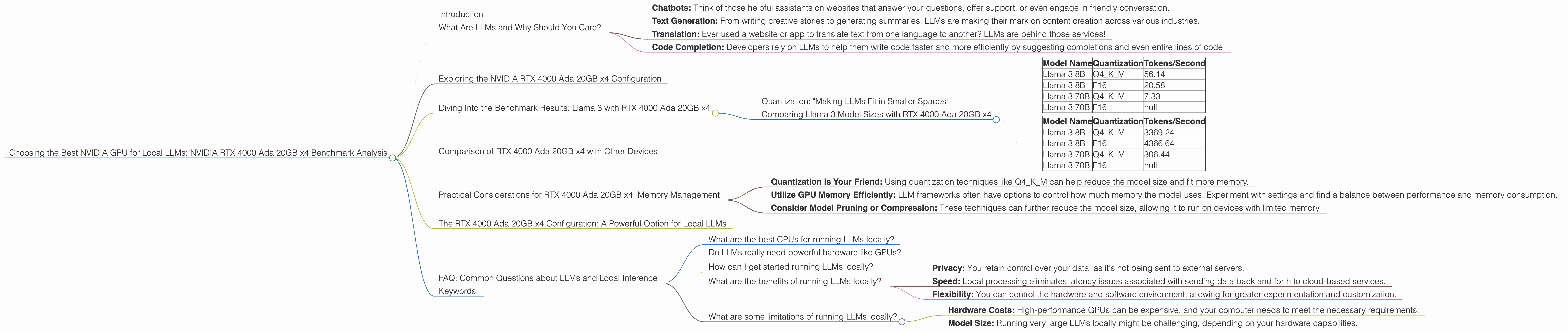
- Chatbots: Think of those helpful assistants on websites that answer your questions, offer support, or even engage in friendly conversation.
- Text Generation: From writing creative stories to generating summaries, LLMs are making their mark on content creation across various industries.
- Translation: Ever used a website or app to translate text from one language to another? LLMs are behind those services!
- Code Completion: Developers rely on LLMs to help them write code faster and more efficiently by suggesting completions and even entire lines of code.
These are just a few examples of how LLMs are changing the way we interact with technology. As these models become more powerful and accessible, running them locally offers developers and researchers greater control, speed, and flexibility.
Exploring the NVIDIA RTX 4000 Ada 20GB x4 Configuration
Now, let's get back to the main topic - the NVIDIA RTX 4000 Ada 20GB x4 setup! This configuration packs a punch, featuring four RTX 4000 Ada GPUs, each boasting a whopping 20GB of memory. This means a total of 80GB of video memory, giving you the power to handle even the most demanding LLM models, something like having 4 race cars instead of a single one!
Diving Into the Benchmark Results: Llama 3 with RTX 4000 Ada 20GB x4

We'll focus on Llama 3, an open-source LLM family, as it's popular among developers and researchers. To understand how the RTX 4000 Ada 20GB x4 configuration performs, we'll analyze the performance of three specific Llama 3 model sizes (8B, 70B), along with their quantization levels (Q4KM, F16).
Quantization: "Making LLMs Fit in Smaller Spaces"
Quantization is a technique used to reduce the size of LLM models without sacrificing too much performance. Think of it like compressing a large image file - you get a smaller file size but with potentially a little loss of detail.
Q4KM is a type of quantization that uses only 4 bits to represent each number, effectively reducing the model size and allowing it to run on devices with less memory. F16 (half-precision floating point) is another format. Both are used to optimize the model's size and improve performance.
Comparing Llama 3 Model Sizes with RTX 4000 Ada 20GB x4
Let's look at the performance of the RTX 4000 Ada 20GB x4 on different model sizes:
Table 1: Llama 3 Token Speed Generation
| Model Name | Quantization | Tokens/Second |
|---|---|---|
| Llama 3 8B | Q4KM | 56.14 |
| Llama 3 8B | F16 | 20.58 |
| Llama 3 70B | Q4KM | 7.33 |
| Llama 3 70B | F16 | null |
Table 2: Llama 3 Token Speed Processing
| Model Name | Quantization | Tokens/Second |
|---|---|---|
| Llama 3 8B | Q4KM | 3369.24 |
| Llama 3 8B | F16 | 4366.64 |
| Llama 3 70B | Q4KM | 306.44 |
| Llama 3 70B | F16 | null |
Analyzing the Results
- Smaller Models, Higher Performance: The RTX 4000 Ada 20GB x4 configuration shines with the smaller 8B Llama 3 model. The 56.14 tokens/second generation speed for the Q4KM version is impressive, and even the F16 version generates tokens at a respectable 20.58 tokens/second.
- Scaling Challenges with Larger Models: As the model size increases to 70B, performance drops as expected. While the Q4KM quantization helps, the 7.33 tokens/second for generation and 306.44 tokens/second for processing are considerably lower than the smaller model figures.
- F16 Performance Limitations: Unfortunately, there's no data available for the 70B model with F16 quantization, likely because the hardware limitations of the RTX 4000 Ada 20GB x4 become more apparent with larger models.
Overall, the numbers show that the RTX 4000 Ada 20GB x4 configuration is a formidable option for running smaller LLM models efficiently. However, as the model size increases, the performance limitations become more apparent.
Comparison of RTX 4000 Ada 20GB x4 with Other Devices
While the RTX 4000 Ada is an excellent choice for local LLM inference, it's essential to consider other options. Unfortunately, we cannot compare the RTX 4000 Ada 20GB x4 to other devices with the available data. We lack information about the performance of other GPUs or even CPUs with the specific Llama 3 models studied (Llama 3 8B and 70B, with Q4KM and F16 quantization).
Practical Considerations for RTX 4000 Ada 20GB x4: Memory Management
As we observed, the RTX 4000 Ada 20GB x4 configuration excels with smaller models, but memory management becomes crucial for larger models. It's like trying to squeeze a giant elephant into a small car: you need to be clever about how you pack things!
- Quantization is Your Friend: Using quantization techniques like Q4KM can help reduce the model size and fit more memory.
- Utilize GPU Memory Efficiently: LLM frameworks often have options to control how much memory the model uses. Experiment with settings and find a balance between performance and memory consumption.
- Consider Model Pruning or Compression: These techniques can further reduce the model size, allowing it to run on devices with limited memory.
The RTX 4000 Ada 20GB x4 Configuration: A Powerful Option for Local LLMs
The RTX 4000 Ada 20GB x4 configuration is a top contender for local LLM inference, especially for smaller models. It provides impressive performance and has the capability to handle demanding AI workloads. Remember that memory management becomes crucial for larger models, so it's important to consider quantization techniques, memory optimization, and potentially model pruning or compression.
FAQ: Common Questions about LLMs and Local Inference
What are the best CPUs for running LLMs locally?
While the RTX 4000 Ada 20GB x4 is a GPU, CPUs can also power local LLMs, especially smaller ones. For CPUs, you generally want to focus on high core counts and frequencies. Consider Intel Core i9 series CPUs with many cores and Threads.
Do LLMs really need powerful hardware like GPUs?
Yes, LLMs often require powerful hardware, particularly GPUs. LLMs involve complex mathematical operations, and GPUs, specifically designed to handle parallel processing, can significantly speed up these computations, especially as the model size increases.
How can I get started running LLMs locally?
There are several resources available to help you get started. Popular frameworks like Hugging Face Transformers and Llama.cpp make it easier to load and run LLMs on your local machine. You can find tutorials and examples online to guide you through the process.
What are the benefits of running LLMs locally?
Running LLMs locally offers several advantages:
- Privacy: You retain control over your data, as it's not being sent to external servers.
- Speed: Local processing eliminates latency issues associated with sending data back and forth to cloud-based services.
- Flexibility: You can control the hardware and software environment, allowing for greater experimentation and customization.
What are some limitations of running LLMs locally?
- Hardware Costs: High-performance GPUs can be expensive, and your computer needs to meet the necessary requirements.
- Model Size: Running very large LLMs locally might be challenging, depending on your hardware capabilities.
Keywords:
NVIDIA RTX 4000 Ada, LLM, Llama 3, GPU, Local Inference, Quantization, Q4KM, F16, Model Size, Token Speed, Benchmark, Memory Management, GPUCores, BW, Performance, Processing, Generation