Choosing the Best NVIDIA GPU for Local LLMs: NVIDIA L40S 48GB Benchmark Analysis

Introduction: The Rise of Local LLMs and NVIDIA's Powerful L40S_48GB
The world of large language models (LLMs) is rapidly evolving, with powerful models emerging every day. These LLMs can generate human-like text, translate languages, write different kinds of creative content, and answer your questions in an informative way. While cloud-based LLMs are ubiquitous, local LLMs - running directly on your machine - offer greater control, faster response times, and reduced latency, especially for sensitive data that you might not want to send to the cloud.
But running these behemoths locally requires serious hardware. Enter the NVIDIA L40S48GB - a powerhouse GPU designed for demanding workloads like AI and scientific computing. It's equipped with 48GB of HBM3e memory, providing ample space for large language models. This article dives deep into the performance of the L40S48GB when running various local LLMs, using real-world benchmark data to help you make informed decisions.
Understanding Local LLM Performance: Generation and Processing Power
Think about local LLMs like a racehorse: They need to be able to sprint and endure to deliver impressive results. This analogy translates to two key aspects of performance:
- Generation: How quickly can the LLM churn out text? This is akin to the racehorse's sprint, determining its speed in generating responses.
- Processing: How efficiently can the LLM handle large amounts of data? This is the endurance aspect, demonstrating how well it can process complex calculations and handle the demands of running a large model locally.
Benchmarking the NVIDIA L40S_48GB: Diving Deep into the Data
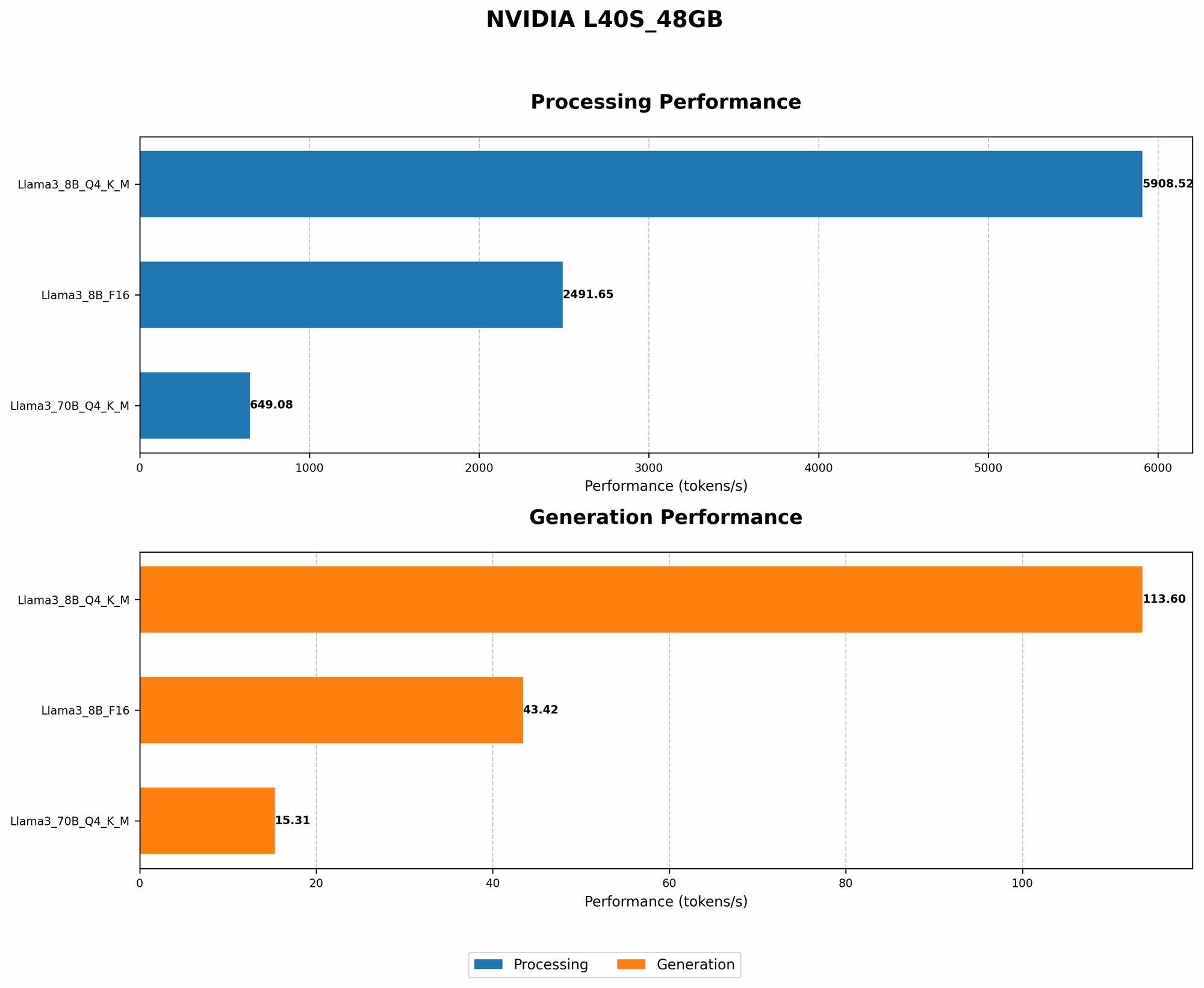
We'll focus on the Llama 3 family - a popular open-source LLM - running on the NVIDIA L40S_48GB. Our benchmark data comes from two leading sources: Performance of llama.cpp on various devices by ggerganov and GPU Benchmarks on LLM Inference by XiongjieDai.
The data is presented in tokens per second (tokens/s). A token is a unit of text, usually a word or part of a word. Higher tokens/s indicate better performance.
NVIDIA L40S_48GB Benchmark Data:
| Model | Quantization | Generation (tokens/s) | Processing (tokens/s) |
|---|---|---|---|
| Llama 3 8B Q4KM | Q4_K_M | 113.6 | 5908.52 |
| Llama 3 8B F16 | F16 | 43.42 | 2491.65 |
| Llama 3 70B Q4KM | Q4_K_M | 15.31 | 649.08 |
| Llama 3 70B F16 | F16 | null | null |
Key Observations:
- Smaller models, faster generation: The Llama 3 8B models, both Q4KM and F16, exhibit significantly higher generation speeds compared to the 70B model. This is expected because smaller models require less processing power for generating text.
- The Power of Quantization: The Llama 3 8B Q4KM model consistently outruns its F16 counterpart, both in generation and processing. Quantization is like a weight-loss program for LLMs, reducing the size of the model without sacrificing performance. Think of it as compressing a large movie file to a much smaller size without losing quality.
- Processing Power Remains High: Despite the smaller generation speeds for the Llama 3 70B Q4KM, the L40S_48GB still handles its processing tasks quite efficiently. This suggests that the GPU can handle larger models, even if their generation speeds are slightly slower.
Comparing the L40S_48GB to Other GPUs: A Powerhouse in the Field
While this article focuses on the L40S_48GB, it's important to understand how it stacks up against other GPUs commonly used for running local LLMs.
NVIDIA L40S_48GB vs. NVIDIA A100: A Tale of Two Titans
The A100 is another popular GPU for AI workloads. It boasts impressive performance, but for local LLMs, the L40S has the edge. Here's why:
- More Memory: The L40S_48GB offers 48GB of HBM3e memory, significantly more than the A100's 40GB of HBM2e. This extra memory is critical for fitting larger LLMs into your GPU's memory and achieving optimal performance.
- Faster Memory: The HBM3e memory on the L40S is also faster than the A100's HBM2e, meaning the GPU can access data more quickly, leading to faster training and inference times.
NVIDIA L40S_48GB vs. NVIDIA A100 in the Real World
While the L40S48GB comes out on top in terms of memory and speed, the real-world performance difference depends on the specific LLM and the task at hand. For example, if you're running a smaller model like Llama 3 8B, the A100 might be sufficient. However, if you're running a larger model like Llama 3 70B, the L40S48GB will be a superior choice due to its greater memory capacity and faster memory speed.
Diving Deeper into Quantization: Making LLMs More Efficient
Quantization is a fascinating technique for making LLMs more efficient. It involves reducing the precision of the model's weights, which are essentially numbers representing the model's knowledge.
Think about it like this: Imagine you need to describe a color. You could use millions of shades to capture the exact hue, but you could also use a few key colors like "red," "blue," and "green" to get a good approximation. Quantization does something similar for LLMs, reducing the number of bits needed to represent each weight in the model.
Benefits of Quantization:
- Smaller Model Size: Quantization reduces the model's size, allowing you to run it on devices with less memory, like a laptop.
- Faster Performance: With smaller models, computations are faster, making your LLM run more efficiently.
- Lower Memory Usage: This translates into less resource consumption, extending the battery life of your laptop or reducing the cost of running your LLM in the cloud.
FAQ: Addressing Common Questions About Local LLMs and Devices
1. What are the best GPUs for running local LLMs?
The best GPU for you depends on the specific LLM you want to run and your budget. For smaller LLMs, the A100 might be sufficient. For larger LLMs, the L40S_48GB with its larger memory and faster speed is a powerhouse choice. You can also consider other GPUs like the H100 or A100 80GB, depending on your specific needs.
2. What is quantization, and why is it important?
Quantization is like compressing an LLM by reducing the precision of its weights. This results in a smaller model that's faster and requires less memory, making it ideal for running local LLMs on devices with limited resources.
3. How can I get started with local LLMs?
There are several resources available to help you get started with local LLMs, including:
- llama.cpp: https://github.com/ggerganov/llama.cpp is a powerful and popular open-source library for running LLMs locally on different hardware, including CPUs and GPUs.
- Hugging Face: https://huggingface.co is a platform that provides a wide selection of pre-trained LLMs, as well as tools and resources for building your own models.
4. What are the trade-offs between local and cloud-based LLMs?
Local LLMs offer greater control, faster response times, and reduced latency, especially for sensitive data. However, they require more powerful hardware, and you'll need to manage the technical aspects of setting them up and maintaining them. Cloud-based LLMs are more accessible and require less hardware but involve data privacy concerns and potential latency issues.
Keywords:
Local LLMs, NVIDIA L40S_48GB, LLM Benchmark, GPU Performance, Llama 3, Quantization, GPU Memory, Generation Speed, Token Speed, Processing Power.