Choosing the Best NVIDIA GPU for Local LLMs: NVIDIA 3080 Ti 12GB Benchmark Analysis

Introduction
The world of Large Language Models (LLMs) is evolving rapidly, and running these models locally is becoming increasingly popular. For those seeking to harness the power of LLMs for personal use or research, choosing the right hardware is crucial. Among various GPU options, NVIDIA's offerings, particularly the 3080 Ti 12GB, are often a top choice. But how does this specific GPU perform with different LLMs and configurations? This article dives deep into the benchmark analysis of the NVIDIA 3080 Ti 12GB, focusing on its performance with Llama 3 models, giving you insights to make an informed decision.
Understanding LLMs and Local Inference
LLMs, like the infamous ChatGPT, are complex AI systems trained on massive datasets to understand and generate human-like text. They can perform various tasks, from writing creative content to translating languages and even generating code. While cloud-based services offer convenient access to LLMs, running them locally provides more control, privacy, and often, faster performance.
NVIDIA 3080 Ti 12GB: A Powerful Contender
The NVIDIA 3080 Ti 12GB packs a punch with its 12GB GDDR6X memory and high core count. This makes it a popular choice for gamers, but it also excels in demanding AI tasks like LLM inference. However, LLMs put different demands on GPUs, and the 3080 Ti's performance can vary depending on the model size, quantization settings, and the specific task.
Benchmarking the NVIDIA 3080 Ti 12GB for Llama 3 Models
We'll be focusing on Llama 3 models, a popular open-source LLM family, and analyzing the 3080 Ti 12GB performance with different combinations of model sizes and quantization techniques.
Llama 3 Model Sizes: 8B vs. 70B
LLMs come in various sizes, ranging from small models like Llama 3 8B (8 billion parameters) to much larger models like Llama 3 70B (70 billion parameters). While smaller models may require less computational power and run faster, larger ones offer more advanced capabilities and can perform more complex tasks.
Quantization: Optimizing for Performance
Quantization is a technique used to reduce the size of LLMs and make them more efficient. This is achieved by representing model weights using fewer bits, such as 4-bit quantization (Q4) or 16-bit floating-point (F16) instead of the full 32-bit precision. Think of it as reducing the number of colors in an image to make it occupy less space without sacrificing too much detail.
Benchmark Results: Performance Breakdown
For this benchmark, we'll focus on the 3080 Ti 12GB performance with Llama 3 models, assessing both token generation and processing speeds.
NVIDIA 3080 Ti 12GB Benchmark Results
Note: While we have data for the 3080 Ti 12GB with Llama 3 8B, there is no data available for 70B.
| Task & Model & Quantization & Tokens/Second |
|---|
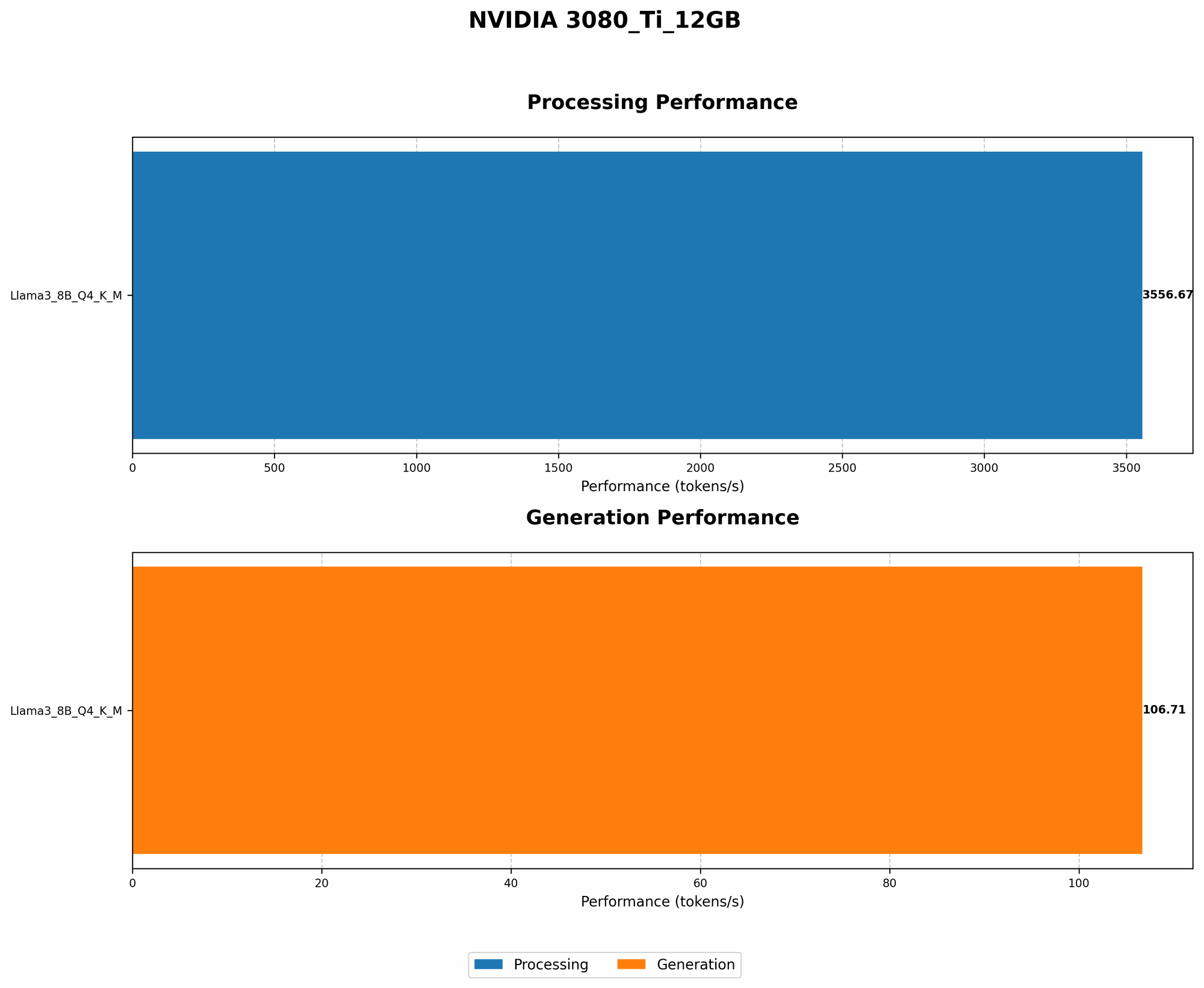
| Generation & Llama 3 8B & Q4 (K,M) & 106.71 |
| Generation & Llama 3 8B & F16 & N/A |
| Processing & Llama 3 8B & Q4 (K,M) & 3556.67 |
| Processing & Llama 3 8B & F16 & N/A |
Analyzing the Data
Token Generation: The NVIDIA 3080 Ti 12GB delivers impressive results with the Llama 3 8B model, achieving a respectable token generation speed of 106.71 tokens per second in Q4 (K,M) quantization. This translates to about 6400 words per minute, which is quite fast for a single GPU setup. However, it's important to note that this is just for the 8B model. The 70B model, while offering greater capability, poses a significantly greater challenge for a single 3080 Ti 12GB.
Token Processing: When it comes to processing tokens, the 3080 Ti 12GB shines with Llama 3 8B, clocking a speed of 3556.67 tokens/second in Q4 (K,M) quantization. This translates to roughly 213,000 words per minute, highlighting the GPU's performance advantage in processing tasks.
Key Takeaway: NVIDIA 3080 Ti 12GB for LLMs
The NVIDIA 3080 Ti 12GB demonstrates solid performance for Llama 3 8B models. This GPU can handle both token generation and processing efficiently in Q4 (K,M) quantization. For larger models like Llama 3 70B, the 3080 Ti 12GB might not be the ideal choice without additional strategies like multi-GPU setups or model optimization techniques.
FAQ: Addressing Your Questions
Can I run LLMs on my CPU?
Yes, you can run LLMs on CPUs, but GPUs offer significantly faster performance due to their parallel processing capabilities. Imagine a CPU as a single chef trying to cook multiple dishes simultaneously, while a GPU is like a team of many chefs working in parallel.
What is quantization, and how does it affect performance?
Quantization involves reducing the precision of model weights to reduce model size and improve inference speed. Think of it like using lower-resolution images to save space, but some detail might get lost. While Q4 can offer significant speed improvements, it might come at the cost of some accuracy. F16, on the other hand, strikes a better balance between performance and accuracy.
What are other factors to consider besides the GPU?
Besides the GPU, factors like RAM and storage capacity are equally important for local LLM inference. You'll need ample RAM to hold the model weights and other data, while fast storage will play a vital role in loading and saving models.
How can I optimize my setup for better performance?
Several techniques can optimize your LLM setup:
- Quantization: Experiment with different quantization methods. Q4 can offer speed advantages, but F16 might be a better choice for certain models and tasks.
- Multi-GPU: For larger models, using multiple GPUs can significantly boost performance by distributing the workload across different GPUs.
- Model Optimization: Tools and techniques like model pruning and sparsity can help reduce model size and increase efficiency.
Keywords
NVIDIA 3080 Ti 12GB, LLM inference, local LLMs, Llama 3, Llama 3 8B, Llama 3 70B, benchmark analysis, token generation, token processing, quantization, Q4, F16, GPU performance, GPU benchmarks, AI hardware, AI models.