Can You Do AI Development on a Apple M2?

Introduction
Are you a budding AI developer eager to dive into the world of large language models (LLMs)? Perhaps you're curious about the capabilities of the powerful Apple M2 chip and its potential for AI development. This article will delve into the fascinating realm of AI development on the Apple M2, exploring whether it can handle the demands of training and running LLMs effectively.
Think of AI development like a game of chess – you need a powerful "brain" (the CPU) and a "muscle" (the GPU) to make strategic moves. The Apple M2, with its impressive processing power and integrated graphics, is a formidable player in this game. But can it handle the complexities of large language models? Let's find out!
Apple M2 Performance for AI Development
The Apple M2 chip is a powerhouse, boasting a unified memory architecture that allows the CPU and GPU to seamlessly share data for faster processing speeds. This translates into impressive performance for tasks that require both computational and graphical muscle – perfect for AI development.
Llama 2 Performance on Apple M2
To understand the Apple M2's potential for AI development, we'll take a closer look at its performance with the popular Llama 2 LLM.
Llama 2: A Popular Choice
Llama 2 is a family of open-source LLMs developed by Meta. It's a popular choice for researchers and developers due to its impressive capabilities and accessibility.
Quantization: Shrinking the Model for Faster Performance
Imagine a complex AI model as a huge library filled with countless books. Quantization is like condensing those books into smaller, more manageable volumes – allowing faster access to information. This technique allows the model to run faster on more limited hardware.
Apple M2: Token Speed Generation
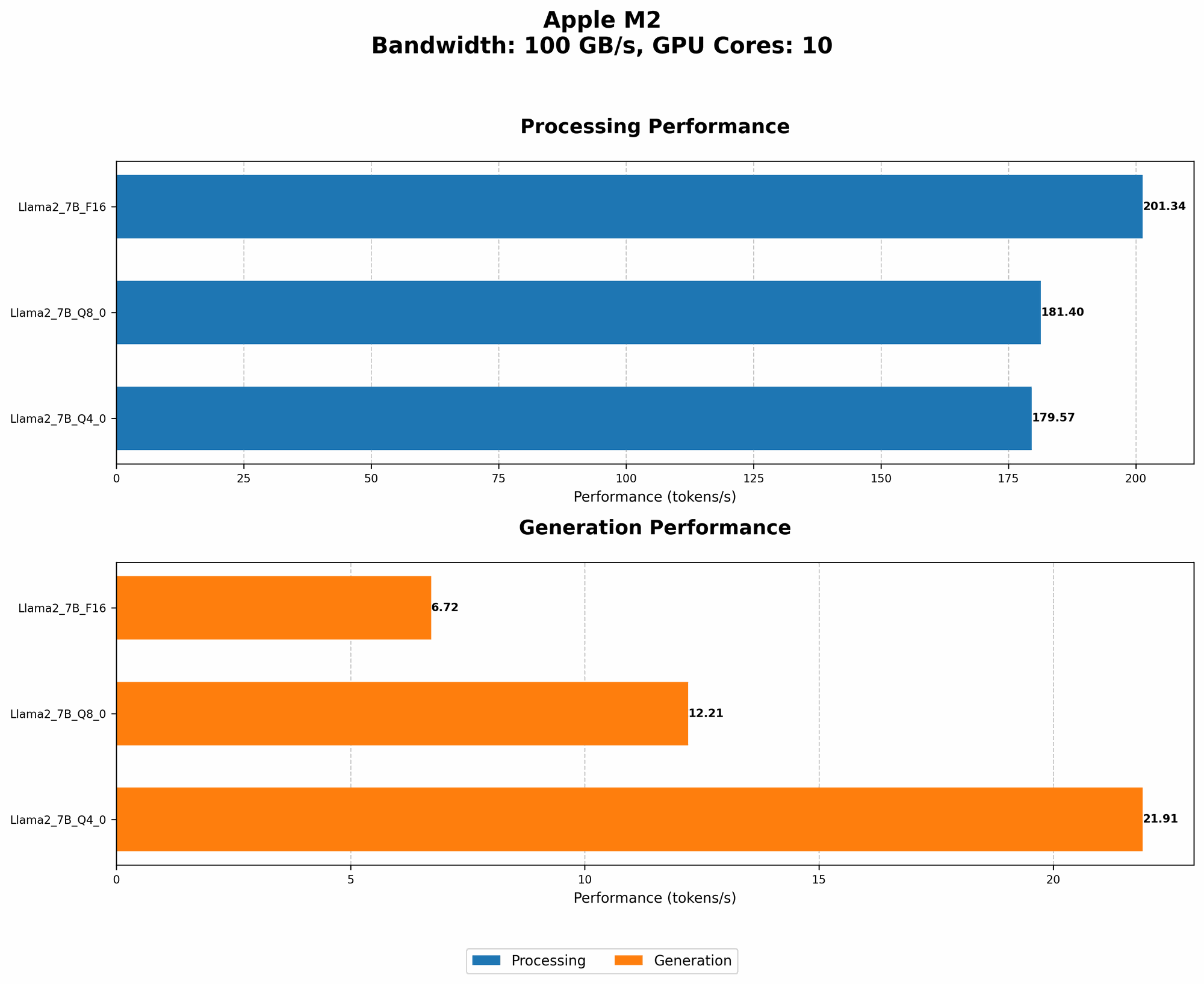
The Apple M2 chip can achieve impressive speeds for both processing and generating tokens with Llama 2.
Token Speed: Think of tokens as the words or characters that an LLM uses to understand and process text. The higher the token speed, the faster the model can process information.
| Model | Description | Tokens per Second (Processing) | Tokens per Second (Generation) |
|---|---|---|---|
| Llama 2 7B F16 | Half-precision (F16) | 201.34 | 6.72 |
| Llama 2 7B Q8_0 | 8-bit quantization | 181.4 | 12.21 |
| Llama 2 7B Q4_0 | 4-bit quantization | 179.57 | 21.91 |
- F16 (Half-precision): This is the default floating-point precision for Llama 2. While F16 offers a balance of performance and accuracy, it still requires a considerable amount of memory.
- Q8_0 (8-bit quantization): This reduces the memory footprint of the model by half, leading to a significant boost in speed.
- Q4_0 (4-bit quantization): This further reduces the memory footprint, resulting in even faster performance.
As you can see, the Apple M2 can handle Llama 2 with impressive speeds, even with different quantization levels. The M2 shines with its ability to process tokens quickly, indicating it's well-suited for running and experimenting with LLMs.
The Pros of Using an Apple M2 for AI Development
1. Energy Efficiency: A Green Machine
The Apple M2 is designed with energy efficiency in mind. Compared to traditional CPU-GPU setups, the M2's unified memory architecture and custom chip design contribute to a lower power consumption. This translates into a reduced carbon footprint and lower operating costs, making the M2 a more sustainable option for AI development.
2. Affordable Option for Beginners
The Apple M2's power comes at a more affordable price point compared to high-end GPUs commonly used for AI development. This makes it an attractive option for beginners and those with budget constraints, allowing them to experiment with LLMs without breaking the bank.
3. Sleek and Portable: Develop on the Go
Apple's commitment to design and portability means the M2 is available in devices like the MacBook Air and MacBook Pro. This means you can take your AI development on the go, working from anywhere with a sleek, powerful machine.
Challenges and Considerations
1. Limited GPU Power for Larger Models
While the Apple M2 demonstrates impressive performance, it may struggle with larger LLMs that demand more processing power. The M2's integrated GPU may not be sufficient for training extremely large models, especially when compared to dedicated high-end GPUs like the Nvidia A100 or H100.
2. Software Compatibility: Finding the Right Tools
While Apple's ecosystem is known for its user-friendly experience, software compatibility for AI development can be a hurdle. Make sure to research and ensure that your chosen LLM frameworks and libraries are compatible with the Apple M2.
3. Limited Customization Options for Hardware
Unlike building a custom PC with dedicated GPUs, the Apple M2's integrated components offer limited customization options. If you require more specific hardware configurations for your AI development workflow, consider other platforms that offer greater flexibility.
FAQ: Common Questions About AI Development and Apple M2
1. Is the Apple M2 suitable for training LLMs?
The Apple M2 can handle training smaller LLMs, but it's not ideal for training extremely large models. If you need to train massive LLMs, consider cloud-based solutions or powerful desktop setups with dedicated GPUs.
2. Can I run popular LLM frameworks like PyTorch on the Apple M2?
Yes, you can run popular LLM frameworks like PyTorch on the Apple M2. However, make sure to check for compatibility and performance benchmarks specific to your chosen frameworks and models.
3. What are the best Apple M2 devices for AI development?
The MacBook Air and MacBook Pro with the Apple M2 chip are great choices for AI development. Both offer good performance and portability, making them ideal for running smaller LLMs and experiments.
Keywords
Apple M2, AI Development, Large Language Models (LLMs), Llama 2, Token Speed, Quantization, F16, Q80, Q40, GPU, CPU, Energy Efficiency, Portable, Software Compatibility, PyTorch