Can You Do AI Development on a Apple M1 Pro?

Introduction
The world of artificial intelligence is exploding, with large language models (LLMs) like ChatGPT changing the game. But if you're not happy using cloud-based services like ChatGPT, you might be wondering, "Can I run these models locally on my machine?" The answer is a resounding yes, and the Apple M1 Pro chip is surprisingly capable.
This article dives into the performance of the Apple M1 Pro chip when running Llama 2, a popular open-source LLM. We'll explore the numbers, explain what quantization means, and help you decide if the M1 Pro is right for your local LLM development needs.
Apple M1 Pro Token Speed Generation: A Numbers Game
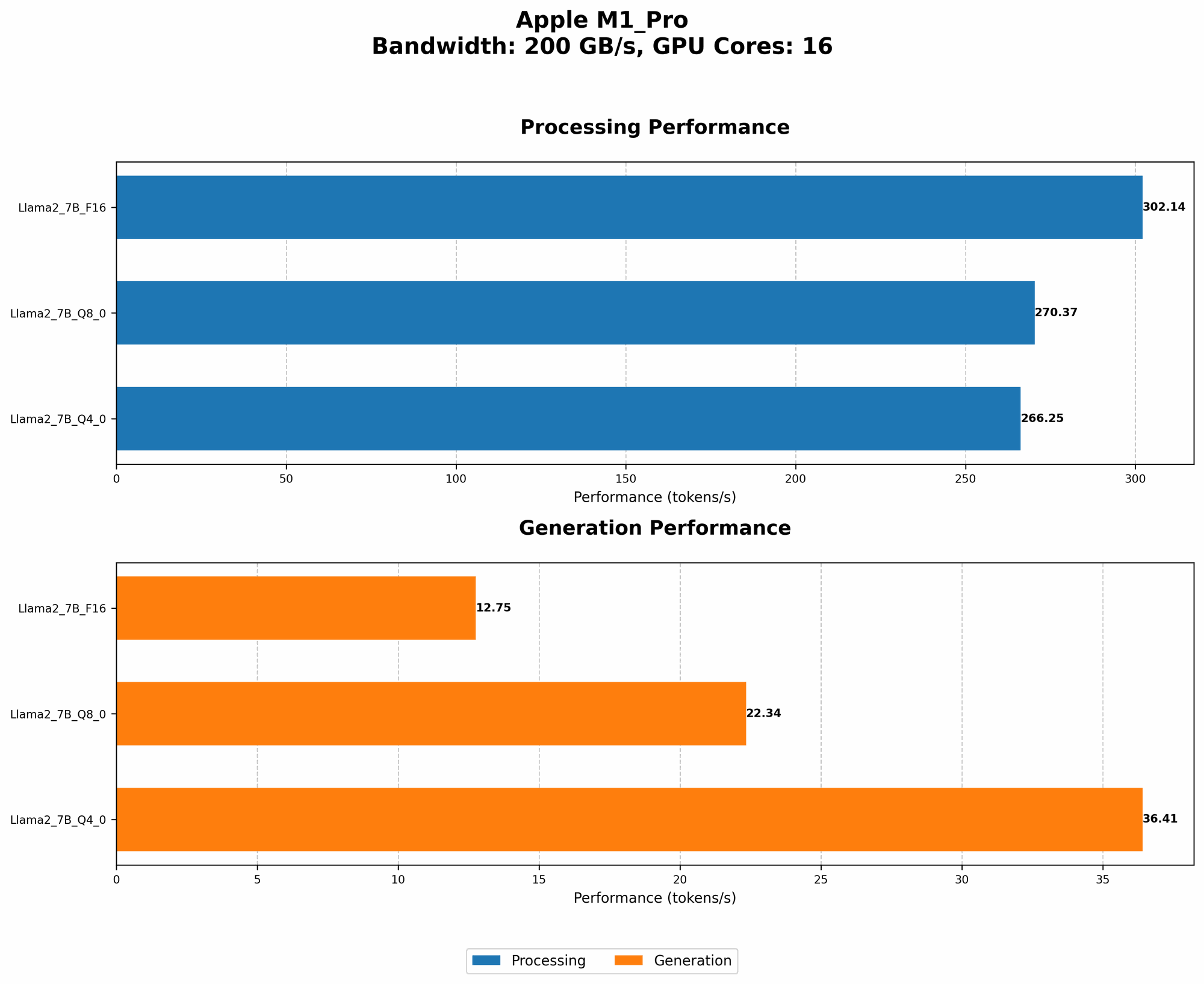
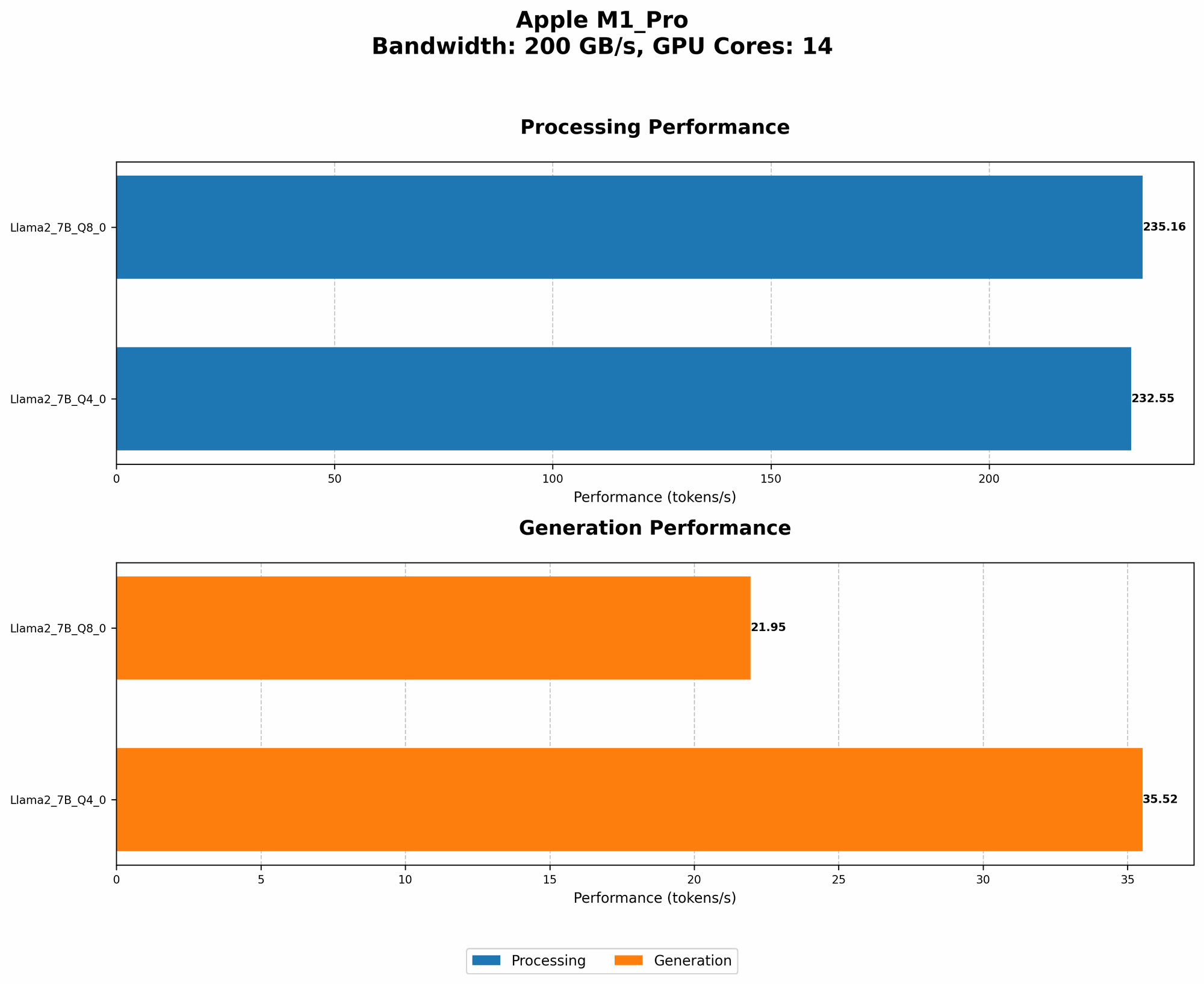
The Apple M1 Pro packs a punch with its powerful GPU. Let's see how it performs with Llama 2:
Llama 2 7B Token Speed: Quantization Matters
The M1 Pro demonstrates decent performance with Llama 2 7B, but depending on the quantization level, results vary considerably.
Here's what we found:
- Quantization: LLMs can be optimized for smaller storage and faster processing by using a technique called "quantization". It basically translates the values stored in a model from a larger number of bits (like floating-point numbers, F16) to a smaller number of bits (like Q4 or Q8). Think of it like compressing a picture - the lower the resolution the smaller the file size, but you might lose some detail in the process. The same is true for LLMs - you can achieve faster speeds with quantization, but the accuracy might be slightly lower.
| M1 Pro GPU Cores | BW | Llama 2 7B Q8_0 Processing (tokens/s) | Llama 2 7B Q4_0 Processing (tokens/s) | Llama 2 7B Q8_0 Generation (tokens/s) | Llama 2 7B Q4_0 Generation (tokens/s) |
|---|---|---|---|---|---|
| 14 | 200 | 235.16 | 232.55 | 21.95 | 35.52 |
| 16 | 200 | 270.37 | 266.25 | 22.34 | 36.41 |
Key Takeaways:
- Q80 vs. Q40: Q80 achieves faster processing speeds compared to Q40, but the difference in generation speeds is minimal.
- Processing vs. Generation: The M1 Pro handles processing (understanding and analyzing the input) much faster than generation (creating text). This means that even though the model can analyze the text quickly, it might take a while to generate a response.
Llama 2 7B Token Speed: The F16 Elephant in the Room
For Llama 2 7B with F16 quantization (no data available for M1 Pro), we don't have any numbers. This could mean two things:
- The M1 Pro might not be able to run Llama 2 7B in F16 mode. This is possible because F16 requires more memory and processing power than quantized versions.
- The performance might be so slow that it's not worth recording. If the model takes a long time to process and generate text, it wouldn't be very useful.
Apple M1 Pro and LLM Development: A Practical Perspective
The Apple M1 Pro can handle Llama 2 7B, but it's important to consider the limitations. Here's a more practical approach:
- For research and experimentation: The M1 Pro is a great starting point. You can explore LLM basics, build your own models, and test different functionalities. The performance with Q80 and Q40 offers a good learning experience.
- For production use: The M1 Pro might not be powerful enough for high-demand scenarios or larger models. Consider using a more powerful GPU or cloud-based services.
Comparison of Apple M1 Pro and Other Devices
While this article focuses on the Apple M1 Pro, it's worth noting that other devices might offer better performance for LLM development.
- Nvidia GPUs: Nvidia GPUs are often considered the gold standard for AI development. They offer superior performance, especially for larger models and more complex tasks.
Example: A recent benchmark shows that an Nvidia A100 GPU can process over 30,000 tokens per second for certain large models, a significant leap compared to the M1 Pro.
However, keep in mind that Nvidia GPUs can be expensive, require specialized software, and may not be as readily available as the Apple M1 Pro.
Conclusion
The Apple M1 Pro offers a decent starting point for local LLM development, especially for researching and experimenting with smaller models. However, if you need high-performance capabilities for production use, investing in a more powerful GPU or relying on cloud-based services might be necessary. Remember, the optimal choice depends on your specific needs and budget.
FAQ
What are the best LLMs for the Apple M1 Pro?
The Apple M1 Pro performs well with Llama 2 7B, especially with Q80 and Q40 quantization. However, the performance for other models might be limited.
What are the hardware requirements for running LLMs locally?
The hardware requirements vary depending on the size of the model and the desired performance. In general, you'll need a powerful CPU and GPU with sufficient memory.
How can I choose the right LLM for my project?
Consider your project's goals, resource limitations, and performance needs. Smaller models like Llama 2 7B might be suitable for simpler tasks, while larger models like GPT-3 might be necessary for more complex applications.
Keywords
Apple M1 Pro, LLM, Llama 2, quantization, token speed, AI development, GPU, performance, Nvidia, A100, cloud-based services, local AI, research and experimentation, production use