Can I Run Llama3 8B on NVIDIA RTX 6000 Ada 48GB? Token Generation Speed Benchmarks

Introduction
Have you been dreaming of running large language models (LLMs) locally on your own powerful workstation? The recent advancements in open-source LLMs like Llama 3 have opened up a world of possibilities for developers and hobbyists alike. But with these models getting bigger and more complex, the question arises: can your hardware handle the workload?
This article will delve into the performance of Llama3 8B on an NVIDIA RTX6000Ada_48GB, a popular choice for professionals and enthusiasts. We'll focus on token generation speed benchmarks, analyze the impact of quantization, and explore practical use cases. So buckle up, grab your favorite caffeinated beverage, and let's dive into the deep end of local LLM performance!
Performance Analysis: Token Generation Speed Benchmarks
Token Generation Speed Benchmarks: NVIDIA RTX6000Ada_48GB and Llama3 8B
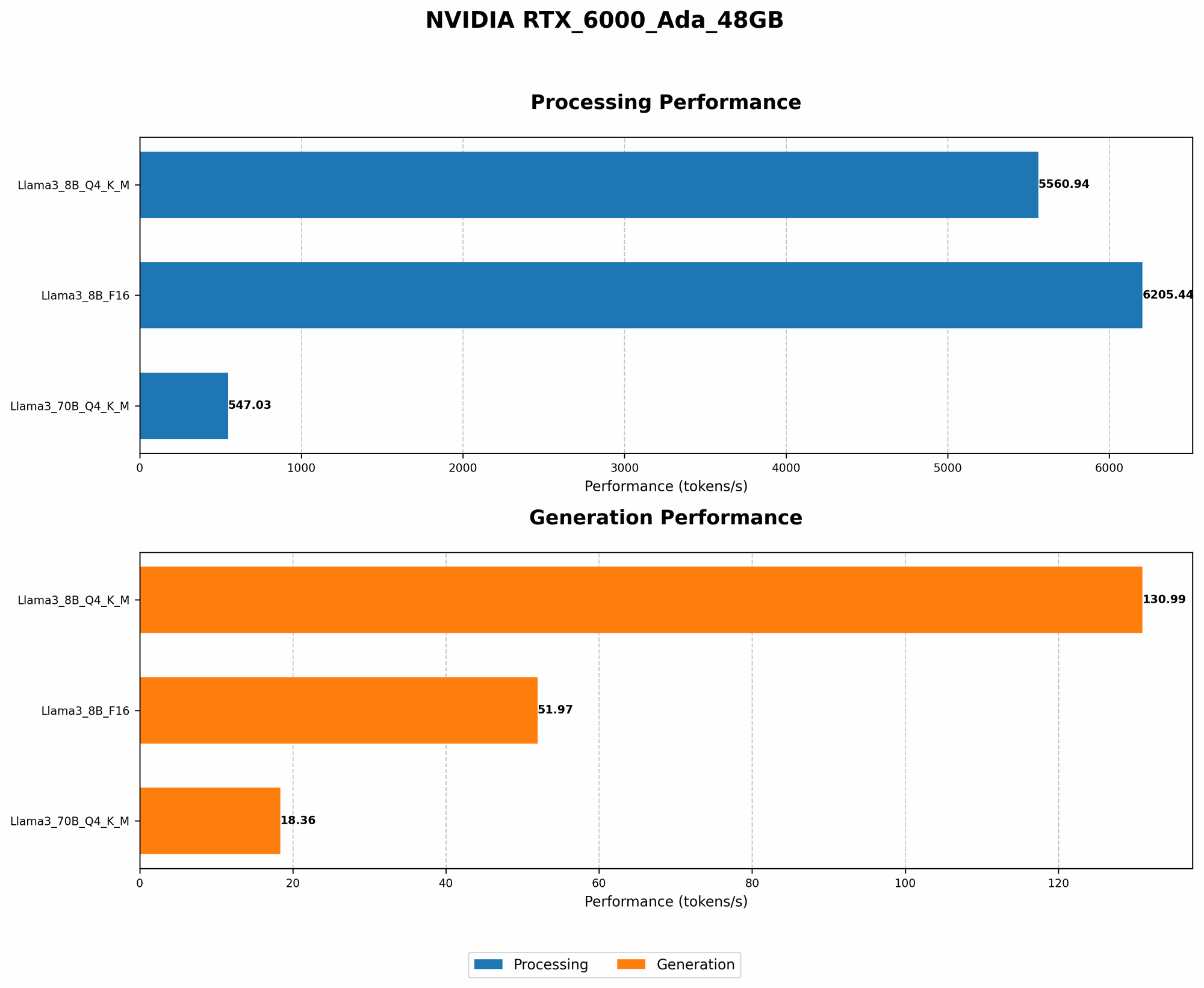
The following table showcases the token generation speed of Llama3 8B on the RTX6000Ada48GB with different quantization settings (Q4K_M and F16). Token generation speed is measured in tokens per second (tokens/s), which indicates how many tokens the model can process per second.
| Quantization | Llama3 8B | Tokens/s |
|---|---|---|
| Q4KM | Llama3 8B | 130.99 |
| F16 | Llama3 8B | 51.97 |
Observations:
- Q4KM quantization shows significantly better performance compared to F16, achieving more than 2.5 times faster token generation speeds. This is expected, as Q4KM uses a more compact representation of the model, resulting in faster processing and lower memory demands.
- F16 quantization, while slower than Q4KM, still delivers decent performance for a model of this size.
Performance Analysis: Model Size Comparison
Note: We lack data for Llama3 70B with F16 quantization on the RTX6000Ada48GB, so we can only compare the performance of Q4K_M for both 8B and 70B.
| Model | Quantization | Tokens/s |
|---|---|---|
| Llama3 8B | Q4KM | 130.99 |
| Llama3 70B | Q4KM | 18.36 |
Observations:
- Llama3 8B performs significantly better than Llama3 70B in terms of token generation speed.
- This difference can be attributed to the model's size. Larger models typically require more computational resources and memory to process, which can negatively impact performance.
- This finding highlights the trade-off between model size and speed.
Practical Recommendations: Use Cases and Workarounds
Use Cases:
Based on the performance benchmarks, here are some recommended use cases for Llama3 8B on the RTX6000Ada_48GB:
- Text generation and summarization: The model's fast token generation speed makes it ideal for tasks that involve generating or summarizing large amounts of text, like creating blog posts, writing articles, or summarizing long documents.
- Conversational AI: The combination of speed and size makes it suitable for building chatbots or other AI-powered conversational agents.
- Code generation and debugging: With Q4KM quantization, Llama3 8B can handle code generation and debugging tasks with reasonable speed.
- Lightweight research and prototyping: If you're exploring different LLM applications or experimenting with new ideas, this setup offers a good balance of speed and model size.
Workarounds:
If your applications require a faster response time or larger models, here are some workarounds to consider:
- Optimize your code: Ensure you're utilizing efficient libraries and techniques, such as batching and parallelism, to maximize the performance of your application.
- Exploit specialized hardware: If you need even more horsepower, consider using dedicated AI accelerators like NVIDIA's A100 or H100 GPUs.
- Quantization strategies: Experiment with different quantization methods (e.g., Q4KM, Q4_K, Q5) to find the sweet spot between performance and accuracy for your specific use case.
- Model pruning and distillation: These techniques can help reduce the size of the model without compromising its performance too much.
- Cloud-based solutions: If you're dealing with extremely large models or resource-intensive tasks, consider using cloud-based services that offer scalable infrastructure and dedicated AI hardware.
FAQ
What is Quantization?
Imagine you have a massive library filled with books, and you need to find a specific book. You could search through all the books one by one, which would take a long time. Alternatively, you could create a smaller library with just the titles of all the books, which would allow you to find the book you're looking for much faster.
Quantization is similar to creating a smaller library. It reduces the precision of the model's weights (the information that determines how the model works), which makes it smaller and faster but can slightly impact accuracy.
How do I choose the right quantization level?
The choice of quantization level depends on your priorities. If accuracy is paramount, using a higher precision level (like F16) is recommended. If speed is more important, lower precision levels like Q4KM can be a better option. You can experiment with different levels to find the best trade-off between accuracy and speed for your specific application.
Why is Llama3 8B so fast?
It's a combination of factors! Llama3 8B is well-optimized for speed due to its architecture, quantized weights (especially with Q4KM), and compatibility with efficient libraries like llama.cpp. These factors contribute to its impressive token generation speed.
Keywords:
Llama3 8B, NVIDIA RTX6000Ada48GB, token generation speed, quantization, Q4K_M, F16, LLM, local LLM, performance benchmarks, use cases, workarounds, practical recommendations, AI, developers, geeks, deep dive, text generation, summarization, conversational AI, code generation, debugging, research, prototyping