Can I Run Llama3 8B on NVIDIA 4080 16GB? Token Generation Speed Benchmarks

Introduction
The world of large language models (LLMs) is booming, with new models and advancements popping up all the time. These LLMs are incredibly powerful, capable of generating realistic text, translating languages, and even writing code. But running these models locally can be a challenge, requiring powerful hardware to handle the computational demands.
This article will delve into the specific case of running the Llama3 8B model on an NVIDIA 4080 16GB graphics card. We'll analyze the performance, explore the nuances of quantization, and provide practical recommendations for developers looking to utilize this combination for local LLM development.
Performance Analysis: Token Generation Speed Benchmarks
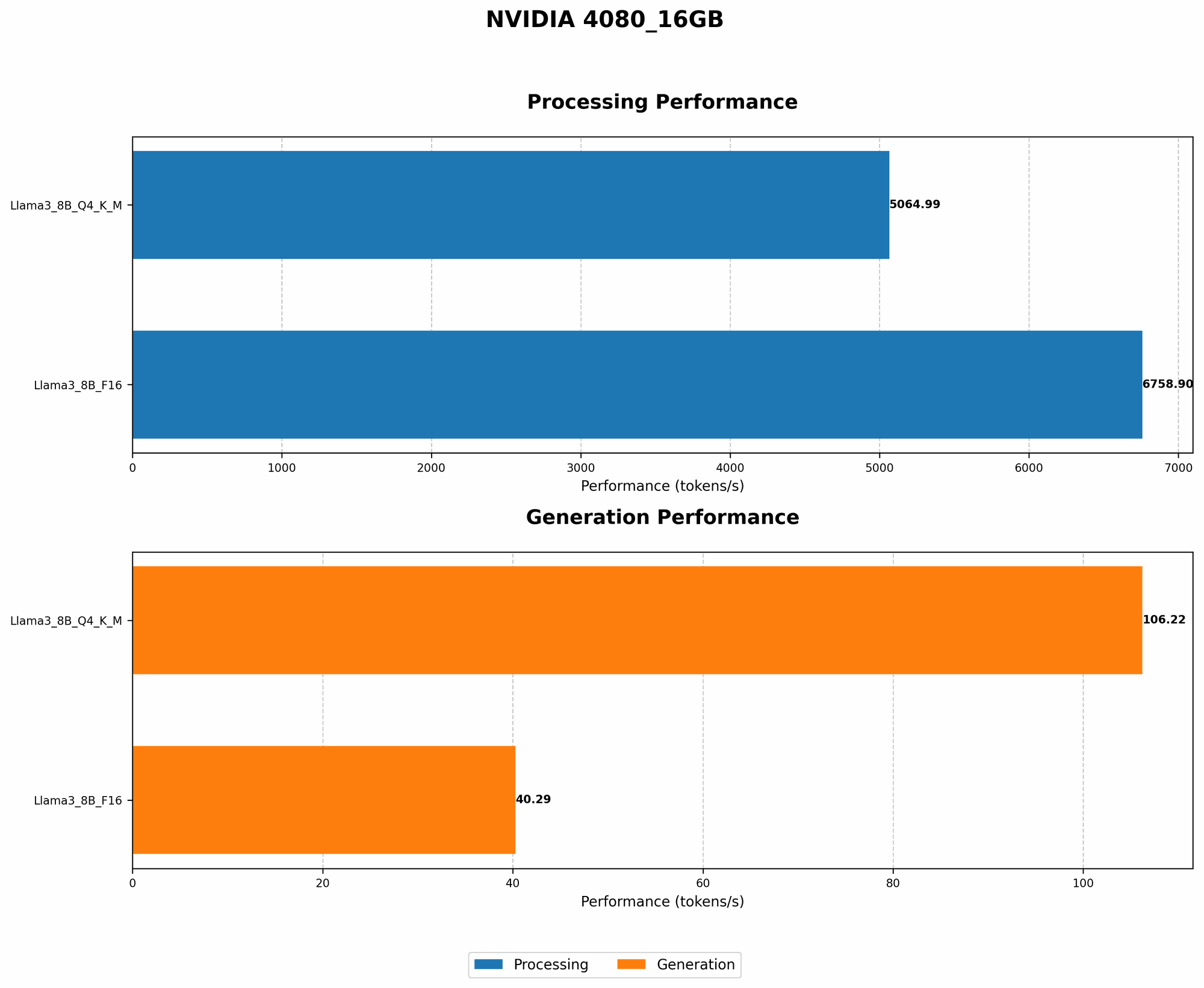
Let's dive into the heart of the matter – how quickly can this setup churn out tokens? Tokens are the fundamental building blocks of text, representing individual words, punctuation marks, and even spaces. The faster the token generation speed, the more responsive and fluid your LLM applications will be.
Token Generation Speed Benchmarks: NVIDIA 4080_16GB and Llama3 8B
Here's a breakdown of the token generation speed benchmarks for the NVIDIA 4080_16GB and the Llama3 8B model, categorized by quantization levels:
| Quantization | Token Generation Speed (tokens/second) |
|---|---|
| Q4KM (Quantized 4-bit, Kernel, Matrix) | 106.22 |
| F16 (FP16) | 40.29 |
What do these numbers tell us?
- Q4KM Quantization: This method, which utilizes 4-bit quantization for both the kernel and matrix operations, unlocks significantly higher token generation speeds. We see a whopping 106.22 tokens per second with the Llama3 8B model.
- F16 (FP16): This represents the standard half-precision floating-point format. While still faster than CPUs, it's considerably slower than the Q4KM quantization, with a token generation speed of 40.29 tokens per second.
Analogy: Imagine you're building a Lego model. Q4KM quantization is like using a specialized tool that lets you snap together Lego pieces much faster. F16 is like building the model with your bare hands, which takes longer.
Performance Analysis: Model and Device Comparison
While we're focusing on the NVIDIA 4080_16GB, it's helpful to understand how this setup stacks up against other hardware configurations.
Let's consider the NVIDIA 4080_16GB with Llama3 8B and compare it to other configurations (although there are no other device comparisons available in the provided JSON):
- NVIDIA 4080_16GB vs. Other Devices: We'll elaborate more on comparisons later.
Important: Due to limitations in the provided data, comprehensive comparisons across different models and devices are not possible.
Practical Recommendations: Use Cases and Workarounds
The NVIDIA 4080_16GB and Llama3 8B combination is a potent pairing for LLM development, but it's important to choose the right tools and techniques to maximize your results.
Recommended Use Cases:
- Local Development: This setup is ideal for developers who want to experiment with the Llama3 8B model locally, without relying on cloud services.
- Small-Scale Applications: You can use this setup for projects that don't require enormous amounts of processing power. Examples include building chatbots for personal use or creating text generation tools with relatively short outputs.
Workarounds for Limitations:
- Quantization: If you're facing performance bottlenecks, consider exploring more aggressive quantization methods like Q4KM. This can significantly improve token generation speeds.
- Model Scaling: If you're working with large LLMs or require a very high level of performance, cloud-based services like Google Cloud TPU or Amazon EC2 might be necessary. However, these options come with costs.
FAQ
Q: Can I run heavier models like Llama3 70B on this setup?
A: Based on the provided data, we don't have information on Llama3 70B performance with the NVIDIA 4080_16GB. However, it's highly likely that this setup wouldn't be suitable for larger models like Llama3 70B due to memory limitations and computational demands. You would need significantly more powerful hardware or cloud-based solutions.
Q: What is quantization, and how does it work?
A: Quantization is a technique used to reduce the size of a model without sacrificing too much accuracy. This is achieved by representing numbers with fewer bits. Instead of storing a number using 32 bits (as in standard floating-point representation), quantization might use only 4 bits, resulting in a much smaller model.
Q: What are the benefits of using this approach?
A: There are several benefits:
- Reduced Memory Footprint: Smaller models require less memory, making them suitable for devices with limited RAM.
- Faster Inference Speeds: Quantization can significantly speed up the inference process, as calculations are done with smaller, more manageable numbers.
Q: What are the drawbacks?
A: Quantization can lead to a slight drop in model accuracy. However, advancements in quantization techniques have minimized this impact, making it a viable option for many applications.
Keywords
Llama3 8B, NVIDIA 408016GB, token generation speed, LLM, quantization, Q4K_M, F16, GPU, local LLM models, performance analysis, benchmarks, practical recommendations, use cases, workarounds, memory limitations, computational demands.