Can I Run Llama3 8B on Apple M3 Max? Token Generation Speed Benchmarks

Introduction
Are you a developer or tech enthusiast looking to unleash the power of large language models (LLMs) on your own Apple M3_Max machine? Well, buckle up, because it's time to deep dive into the fascinating world of local LLM performance!
This article will explore the token generation speed benchmarks of the Llama3 8B model on the Apple M3_Max, a powerful processor known for its impressive performance. We'll analyze how different quantization levels and model sizes impact token generation speeds, providing you with the insights needed to make informed decisions about your LLM setup.
Whether you're building a chatbot, experimenting with text generation, or just curious about the capabilities of these powerful models, this article will equip you with the knowledge and tools to run Llama3 8B efficiently on your Apple M3_Max.
Performance Analysis: Token Generation Speed Benchmarks: Apple M1 and Llama2 7B
Llama2 7B: F16, Q80, and Q40 Quantization Levels
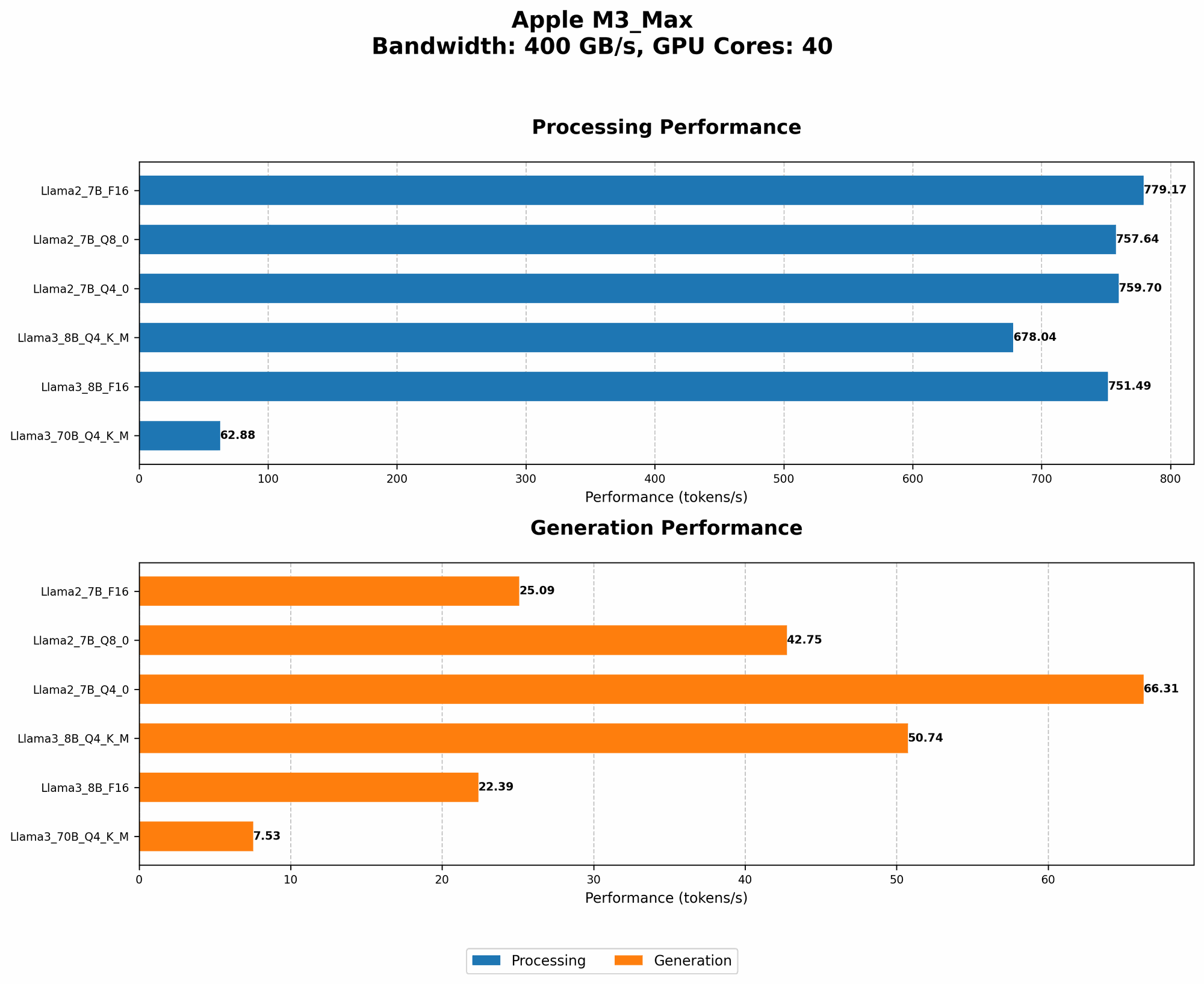
Let's start with the Llama2 7B model, a popular and versatile LLM. The table below showcases the token generation speeds for different quantization levels:
| Quantization Level | Token Generation Speed (tokens/second) |
|---|---|
| Llama2 7B F16 | 25.09 |
| Llama2 7B Q8_0 | 42.75 |
| Llama2 7B Q4_0 | 66.31 |
What does this tell us?
- Quantization Matters: As you move from F16 to Q80 and then Q40, the token generation speed increases significantly. This is because quantization reduces the precision of the model's weights, allowing for faster computations. Think of it like using a smaller ruler – you lose some accuracy, but you can measure things more quickly!
- F16: Quality Over Speed: F16 provides the highest accuracy, but at the cost of lower token generation speed. This is a good choice if you prioritize model performance over raw speed.
- Q40: The Sweet Spot? Q40 offers the most significant speed boost while maintaining reasonable accuracy, making it a good option for many use cases. It's like finding the perfect balance between speed and accuracy.
Performance Analysis: Model and Device Comparison: Llama3 8B vs Llama2 7B
Token Generation Speed: Llama3 8B on Apple M3_Max
The table below compares the token generation speeds of Llama3 8B and Llama2 7B on the Apple M3_Max, using different quantization levels:
| Model | Quantization Level | Token Generation Speed (tokens/second) |
|---|---|---|
| Llama3 8B | Q4KM | 50.74 |
| Llama3 8B | F16 | 22.39 |
| Llama2 7B | Q4_0 | 66.31 |
Key takeaways:
- Llama3 8B vs Llama2 7B: Llama3 8B's Q4KM quantization level outperforms Llama2 7B's Q4_0 in terms of token generation speed.
- F16 for Accuracy: Llama3 8B's F16 quantization level, while slower than Llama2 7B's Q4_0, still delivers faster results than Llama2 7B's F16.
Practical Recommendations: Use Cases and Workarounds
When to Choose Llama3 8B:
- Speed is Key: If your application requires real-time processing, Llama3 8B's Q4KM quantization level provides a significant speed boost.
- Large Language Tasks: For tasks like text generation, translation, and summarization, Llama3 8B's larger capacity can be beneficial.
When to Stick with Llama2 7B:
- Resource Constraints: If you have limited memory or processing power, Llama2 7B with Q4_0 quantization might be a more appropriate choice.
- Accuracy is Paramount: If you need the most accurate results, Llama2 7B's F16 quantization level is a better option.
Conclusion
Running Llama3 8B on the Apple M3_Max can be an excellent way to unlock the power of local LLMs without sacrificing performance. By leveraging different quantization levels, you can strike a balance between accuracy and speed, tailoring your setup to meet the specific needs of your application.
Remember, the choice between Llama3 8B and Llama2 7B ultimately depends on your priority: speed, accuracy, or a balance between the two.
FAQ
Q: What is quantization?
A: Quantization is a technique used to reduce the size of a model's weights by representing them with fewer bits. This results in faster computations and reduced memory usage. Imagine it like using a smaller number of colors to paint a picture – you lose some detail, but the overall picture remains recognizable.
Q: Can I run Llama3 70B on the Apple M3_Max?
A: Unfortunately, we don't have data for Llama3 70B on the Apple M3_Max. However, based on the data available, running such a large model locally might require significant resources and careful optimization.
Q: What about other devices?
A: This article specifically focuses on the Apple M3_Max. However, you can explore the performance of different LLM models on various devices using the resources mentioned in the introduction.
Q: Where can I learn more about LLMs?
A: There are numerous resources available online, including the Hugging Face website, the Stanford CS224N course on natural language processing, and the Distill blog.
Q: What are the potential downsides of running LLMs locally?
A: Running LLMs locally can be resource-intensive, requiring significant processing power and memory. Additionally, local LLMs may not be as up-to-date with the latest models and data as cloud-based services.
Keywords
Apple M3Max, Llama3 8B, Llama2 7B, quantization, token generation speed, F16, Q80, Q4_0, LLM, large language model, local models, performance, benchmarks