Can I Run Llama3 70B on NVIDIA RTX 6000 Ada 48GB? Token Generation Speed Benchmarks

Introduction: Deep Dive into Local LLM Power
The world of large language models (LLMs) is abuzz with excitement. These powerful AI models can generate text, translate languages, write different kinds of creative content, and answer your questions in an informative way. Imagine having this kind of computational power readily available on your local machine, no internet needed! This is where dedicated GPUs and specialized software come into play, enabling us to run LLMs locally and unleash their potential.
But can you really run a behemoth like the Llama3 70B model on a powerful GPU like the NVIDIA RTX 6000 Ada 48GB? Or is it a recipe for disaster? This article dives deep into the performance analysis of different Llama3 models, specifically the 70B variant, on the RTX 6000 Ada 48GB, providing you with the concrete numbers you need to make informed decisions about your LLM setup.
Performance Analysis: Token Generation Speed Benchmarks
Token Generation Speed Benchmarks: Apple M1 and Llama2 7B
One of the key metrics to assess LLM performance is token generation speed. A token is a fundamental building block of text, analogous to a word. The higher the tokens per second, the faster your model can process and generate text.
Let's break down the token generation speed benchmarks for the Llama3 70B model on the RTX 6000 Ada 48GB. This GPU boasts a high memory bandwidth of 960 GB/s and a significant number of CUDA cores, making it a prime contender for LLM workloads.
| Model | Quantization | Tokens per Second |
|---|---|---|
| Llama3 70B | Q4KM | 18.36 |
| Llama3 70B | F16 | N/A |
What do these numbers tell us?
The Llama3 70B model running with quantized weights in the Q4KM format achieves 18.36 tokens per second on the RTX 6000 Ada 48GB.
F16 quantization wasn't tested for the Llama3 70B model on this specific GPU. This might be due to the model's size and the GPU's memory limitations. F16 generally leads to faster token generation speeds but might require more memory.
Remember: This is just one data point. The actual performance can vary depending on factors like the prompt length, the specific task, and other software configurations.
Performance Analysis: Model and Device Comparison
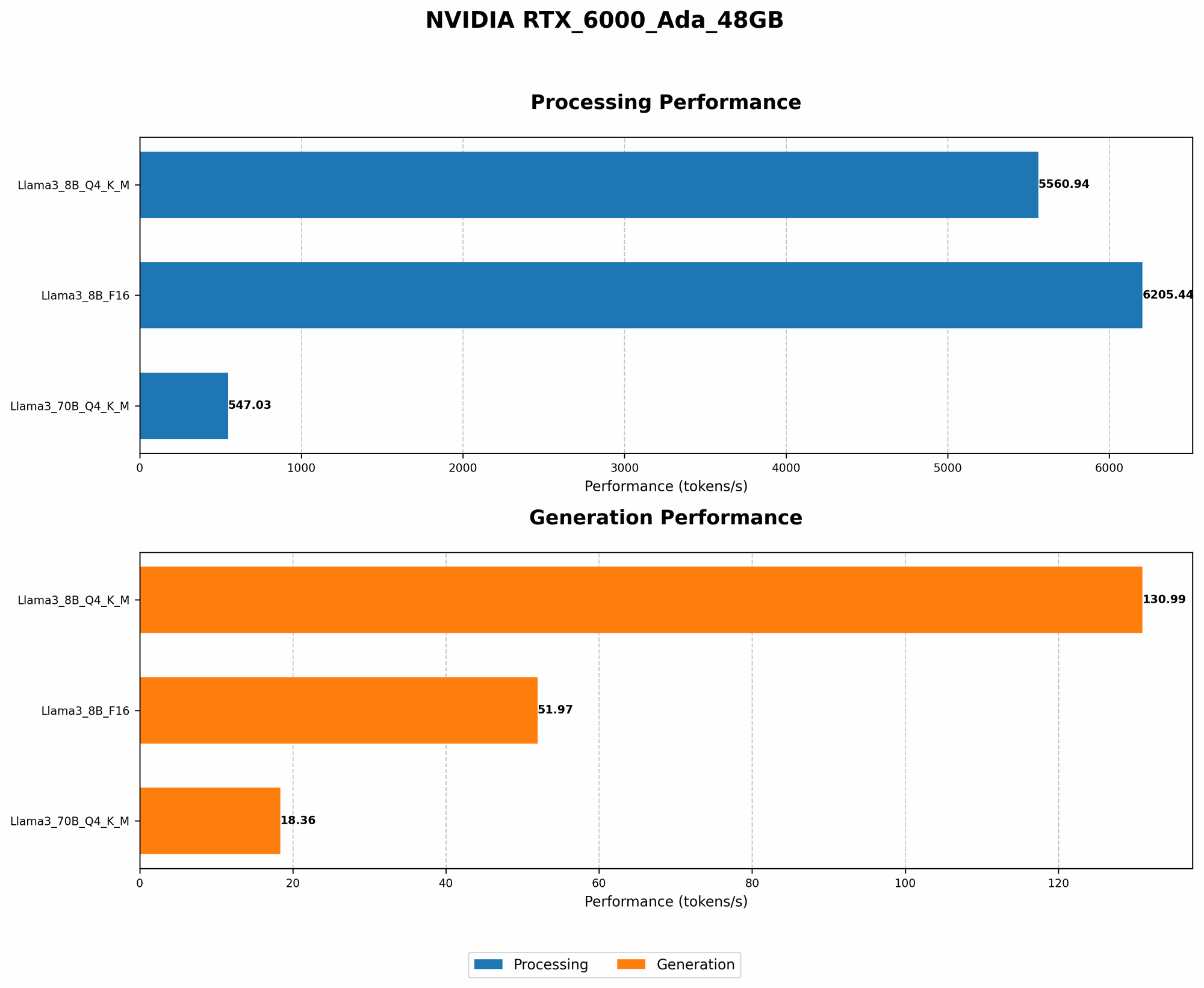
Model and Device Comparison: 8B and 70B Models
To better understand the performance of Llama3 70B on the RTX 6000 Ada 48GB, let's compare it with the Llama3 8B model, which is significantly smaller.
| Model | Quantization | Tokens per Second |
|---|---|---|
| Llama3 8B | Q4KM | 130.99 |
| Llama3 8B | F16 | 51.97 |
| * Llama3 70B* | Q4KM | 18.36 |
| * Llama3 70B* | F16 | N/A |
Key observations:
The Llama3 8B model achieves significantly higher token generation speeds compared to the 70B model, especially in the F16 quantization format. This is expected, as the smaller model requires less memory and computation.
The Llama3 70B model requires more resources and processing power, resulting in a noticeable performance difference.
While the 70B model delivers superior capabilities thanks to its size, it comes with a trade-off in speed.
Analogies:
Think of it like having a tiny but fast car versus a massive, powerful truck. The car might zip around town quickly, but the truck can handle heavier loads and haul more cargo. Similarly, the smaller 8B model is nimble and fast, while the larger 70B model packs more power and can handle more complex tasks.
Practical Recommendations: Use Cases and Workarounds
Use Cases and Workarounds: 70B Model and its Constraints
While the Llama3 70B model exhibits impressive capabilities, running it on a RTX 6000 Ada 48GB presents certain challenges. Its performance, although not particularly slow, is less than ideal for real-time applications requiring instant responses. Let's discuss some use cases and workarounds to optimize your experience:
Use cases for 70B model on RTX 6000 Ada 48GB:
Research and development: The 70B model's powerful capabilities are well-suited for research projects exploring the latest advancements in LLMs. You can use it to fine-tune models, experiment with different prompts, and analyze the results.
Offline tasks: If you need to generate text offline and don't require real-time responses, the 70B model on the RTX 6000 Ada 48GB can be a viable option. Consider tasks such as generating long-form content, summarizing documents, or translating large chunks of text.
Workarounds and optimizations:
Quantization: Explore using different quantization techniques to optimize memory usage and potentially improve speed. For example, using Q8KM quantization might offer a performance boost compared to Q4KM, although further experimentation might be required.
Lower precision: If real-time performance is paramount, consider using F16 quantization if supported by the hardware and software framework. However, keep in mind this may sacrifice some accuracy.
Prompt engineering: Optimize your prompts to reduce the computational load on the model. Shorter and more concise prompts can help improve token generation speed.
Caching: Implement caching mechanisms to store frequently used results, reducing the need for repetitive computations.
Frequently Asked Questions (FAQs)
What is quantization?
Quantization is a technique used to reduce the size of an LLM model without sacrificing too much accuracy. It involves converting the model's weights from high-precision floating-point numbers to lower-precision integers. This process leads to smaller model sizes, faster loading times, and improved memory efficiency.
What is F16 and Q4KM quantization?
F16 quantization uses 16-bit floating-point numbers for the model's weights, providing a reasonable trade-off between accuracy and speed. Q4KM quantization uses 4-bit integers for the model's weights, resulting in smaller model sizes and potentially faster processing times.
How can I improve the performance of my LLM?
Several factors influence LLM performance, including hardware, software, and model configuration. Here are some tips for optimization:
- Hardware: Ensure your GPU has sufficient memory bandwidth and CUDA cores to handle the LLM's workload.
- Software: Use optimized libraries and frameworks designed for LLM inference.
- Model: Experiment with different quantization techniques, model sizes, and prompt engineering to find the optimal balance between performance and accuracy.
What are other GPUs suitable for running LLMs?
Besides the RTX 6000 Ada 48GB, other powerful GPUs such as the NVIDIA A100 and H100 are well-suited for running LLMs locally.
Keywords
Llama3, RTX 6000 Ada 48GB, token generation speed, benchmarks, LLM, performance, optimization, quantization, F16, Q4KM, use cases, workarounds, local, hardware, software, prompt engineering, research, development, offline tasks, real-time, speed, accuracy, memory, bandwidth, CUDA cores, GPU, A100, H100.