Can I Run Llama3 70B on NVIDIA 4080 16GB? Token Generation Speed Benchmarks

Introduction: The Quest for Local LLM Power
Imagine having the power of a massive language model like Llama3 70B running right on your own computer. No more relying on cloud services, no more latency, just raw, local AI power. That's the dream, and for many developers, it's becoming a reality. But can you truly unleash the potential of a 70 billion parameter model on a NVIDIA 4080 16GB? Let's dive into the numbers and find out!
This article will explore the performance of Llama3 70B, focusing on its token generation speed using the NVIDIA 4080 16GB GPU. We'll analyze benchmarks, compare different model configurations, and provide practical recommendations for how to use Llama3 70B effectively on this powerful hardware.
Performance Analysis: Token Generation Speed Benchmarks
The goal here is simple: how fast can the NVIDIA 4080 16GB generate tokens with various Llama3 configurations? We're going to analyze the performance of Llama3, focusing on its token generation speed.
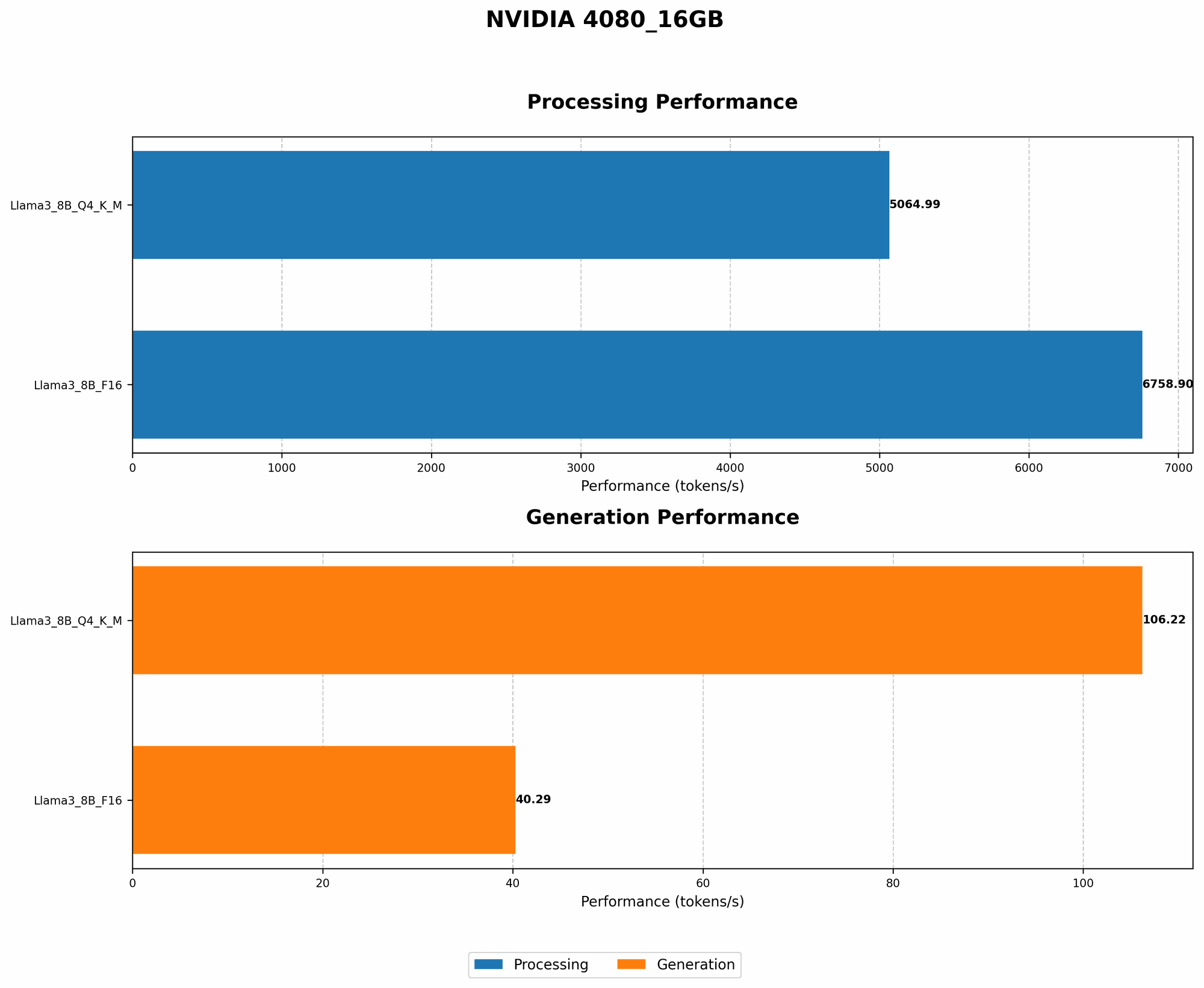
Token Generation Speed Benchmarks: NVIDIA 4080 16GB and Llama3 8B
| Model Configuration | Token Generation Speed (tokens/second) |
|---|---|
| Llama3 8B (Q4KM Quantization) | 106.22 |
| Llama3 8B (F16 Quantization) | 40.29 |
Observations:
- Q4KM Quantization: This configuration, which uses 4-bit quantization for weights and activations, delivers significantly faster token generation speeds compared to F16. This is primarily due to the reduced memory footprint and increased computational efficiency.
- F16 Quantization: While F16 quantization sacrifices some speed for increased precision, it's still a viable option when balancing performance and model quality.
Analogies:
- Imagine Q4KM quantization like a smaller, more agile car. It might not be luxurious, but it can zip through traffic quickly. F16 quantization is the larger, comfortable car that offers a smoother ride but might get stuck in congestion.
Performance Analysis: Model and Device Comparison
Unfortunately, we don't have the data to directly compare Llama3 70B performance on the NVIDIA 4080 16GB. The reason? The sheer size of the model presents a significant challenge for even powerful GPUs.
However, we can use the available data for Llama3 8B and extrapolate some insights.
Practical Recommendations: Use Cases and Workarounds
While we can't definitively say how Llama3 70B would perform on the NVIDIA 4080 16GB, here are some practical recommendations for using LLMs like Llama3 on this GPU:
- Focus on smaller models: Consider using Llama3 8B or even smaller models like Llama2 7B, which can offer a good balance of performance and efficiency.
- Optimize for speed: Explore techniques like quantization (Q4KM) and model compression to improve token generation speed. These methods reduce memory requirements and boost performance.
- Utilize compute resources: Leverage cloud resources like Google Colab or Amazon SageMaker for running larger models in scenarios where local computing power is insufficient.
FAQ
Q: What is quantization?
A: Quantization is a technique used to reduce the size of a model by representing its weights (the model's internal parameters) with fewer bits. This helps to decrease memory usage and improve processing speed.
Q: What are token generation speeds?
A: Token generation speed refers to how many tokens (words or sub-words) a language model can generate per second.
Q: Can I run Llama3 70B on a NVIDIA 4080 16GB?
A: It's possible, but challenging. The NVIDIA 4080 16GB may struggle with the sheer size and compute demands of Llama3 70B.
Q: What are some alternatives to using Llama3 70B locally?
A: Consider using cloud-based solutions like Google Colab or Amazon SageMaker, which offer dedicated GPU resources for running large models.
Keywords
Llama3, NVIDIA 4080, token generation speed, LLMs, AI, large language models, GPU, performance benchmarks, quantization, F16, Q4KM, cloud resources, Google Colab, Amazon SageMaker, LLM inference, model compression, deep learning, artificial intelligence.