Can I Run Llama3 70B on NVIDIA 3080 Ti 12GB? Token Generation Speed Benchmarks
Introduction
The world of large language models (LLMs) is booming! These powerful AI models are changing how we interact with computers, and they're pushing the boundaries of what's possible. But running LLMs locally, on your own hardware, can be a challenge – especially with the ever-growing size of these models.
Let's dive deep into the performance of the NVIDIA 3080 Ti 12GB GPU when it comes to running the Llama3 70B model. We'll dissect the crucial metrics of token generation speed and explore how various techniques like quantization can impact performance. If you're a developer or enthusiast eager to unleash the power of LLMs on your machine, buckle up – this is a journey into the heart of local LLM deployment!
Performance Analysis: Token Generation Speed Benchmarks
Token Generation Speed Benchmarks: NVIDIA 3080 Ti 12GB and Llama3 8B
The NVIDIA 3080 Ti 12GB, a powerhouse in its own right, demonstrates impressive performance when running the Llama3 8B model. Let's break down the key findings:
| Configuration | Token Generation Speed (Tokens/Second) |
|---|---|
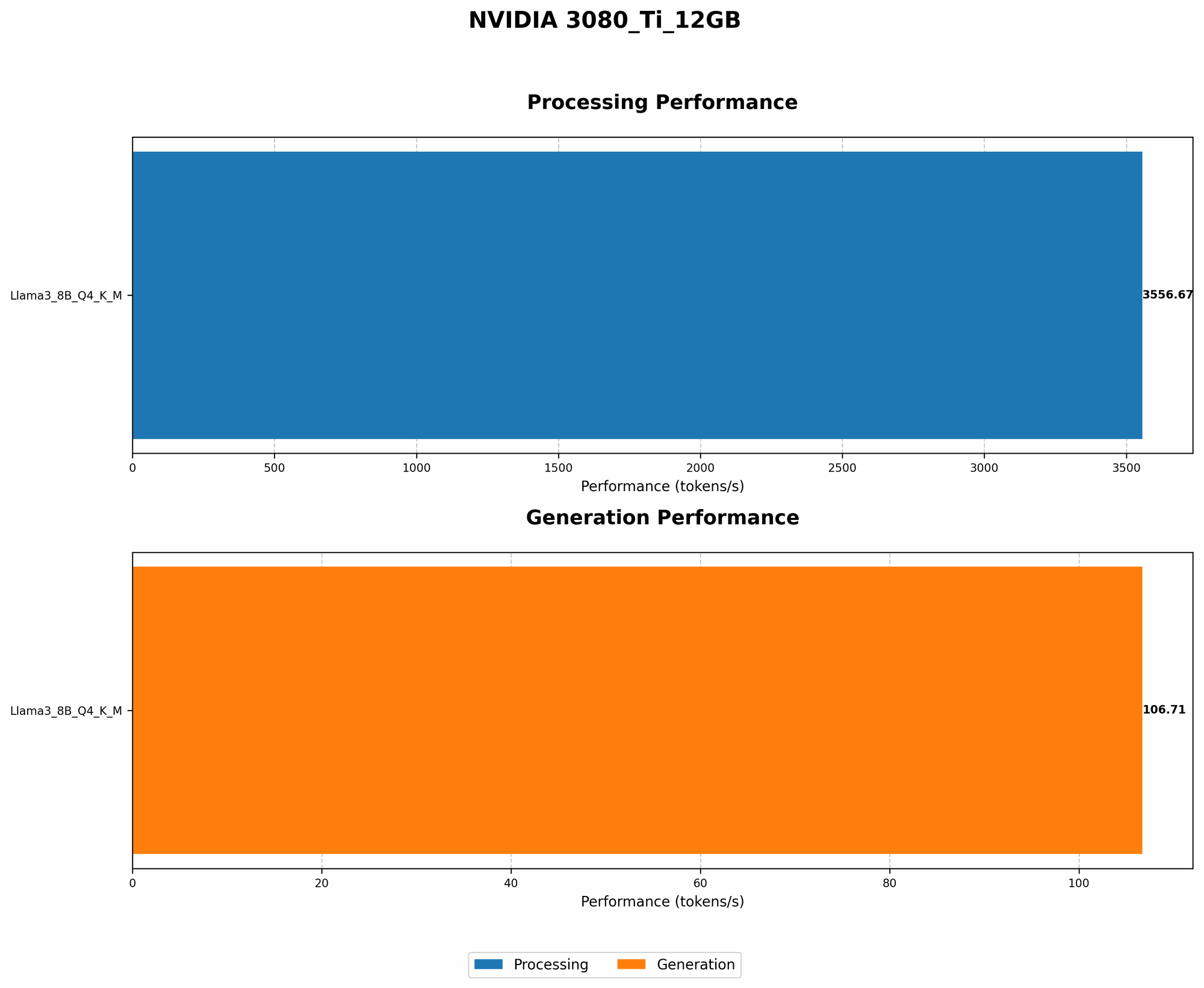
| Llama3 8B Q4KM | 106.71 |
| Llama3 8B F16 | N/A |
Llama3 8B Q4KM: This configuration utilizes quantization, a technique that reduces the size of the model by representing weights and activations with fewer bits. This significantly improves performance, as you can see with the impressive token generation speed of 106.71 tokens/second. Imagine this as squeezing the model into a smaller suitcase, making it faster to move around!
Llama3 8B F16: Unfortunately, for this configuration, we don't have data regarding token generation speed. This likely means that the data was not collected or is not yet available.
Why is Token Generation Speed Important?
Token generation speed is the rate at which your model can process and generate text – essentially how fast your LLM can "think" and respond. A higher speed means more responsive interactions, faster code generation, and a smoother overall experience when using your LLM.
Performance Analysis: Model and Device Comparison
Why Can't We Run Llama3 70B on NVIDIA 3080 Ti 12GB?
You might be wondering why we can't find data for the Llama3 70B on this specific GPU. The simple answer is that it's a memory constraint! The Llama3 70B model requires a substantial amount of memory to run effectively. While the NVIDIA 3080 Ti 12GB is a powerful card, its memory capacity might not be enough to accommodate the Llama3 70B model directly.
Think of it like trying to fit a large elephant into a small car – it just won't work! You'll need a bigger vehicle – in this case, a GPU with more memory – to fit the elephant-sized Llama3 70B model.
Practical Recommendations: Use Cases and Workarounds
Workaround 1: Model Quantization
One key strategy to overcome memory limitations and still run the Llama3 70B model is quantization. We discussed this earlier, but let's dive deeper:
Quantization is a technique used to reduce the size of a model by using fewer bits to represent weights and activations. Imagine converting an image from a high-resolution format like TIFF to a compressed JPEG – you reduce the file size without sacrificing too much quality.
Benefits: Quantization helps cram a larger model into a smaller "footprint" by reducing the memory requirement. This opens up the possibility of running larger models on devices with limited memory like the NVIDIA 3080 Ti 12GB.
Potential Challenges: While quantization improves performance for memory-constrained devices, it might slightly impact accuracy when using an LLM. However, the trade-off between memory efficiency and a minor accuracy drop can be worthwhile!
Workaround 2: Model Pruning
Another technique to boost performance and potentially run larger models on your NVIDIA 3080 Ti 12GB is model pruning. This involves removing unnecessary connections and weights within the model's architecture.
Benefits: Pruning essentially "streamlines" the model, reducing its complexity and the amount of memory required. It's like removing unnecessary furniture from a room to make it more spacious!
Potential Challenges: The process of pruning needs to be done carefully to avoid significant degradation in the model's performance. It's a delicate balancing act between pruning enough to improve memory efficiency and maintaining the desired accuracy.
Workaround 3: Gradient Accumulation
A handy technique for running larger models is gradient accumulation. This allows you to train or run your model with a larger batch size even if your device has limited memory.
Benefits: Gradient accumulation simulates training with a bigger batch size, leading to faster convergence during training and potentially better performance. It's like combining the strength of several smaller groups to achieve a goal that would be impossible for a single smaller group.
Potential Challenges: Gradient accumulation might require more time to process each step in the training process. However, the long-term gains in performance and accuracy can offset this initial delay.
Use Cases: Finding the Right Fit
The NVIDIA 3080 Ti 12GB is a solid GPU for running LLMs. It's a great choice for tasks like:
- Generating text: Creating content, writing blog posts, brainstorming ideas, etc.
- Translating languages: Converting text between different languages.
- Summarizing text: Extracting key insights and information from long articles or documents.
- Answering questions: Providing accurate and informative answers to questions.
However, it's important to understand the limitations of a GPU like the 3080 Ti 12GB when running larger models like the Llama3 70B.
FAQ: Frequently Asked Questions
1. What are the advantages of using a GPU for LLMs?
GPUs are designed for parallel processing, which is incredibly valuable when working with the vast amount of data and calculations involved in running LLMs. They can significantly speed up the inference process, enabling faster response times and a smoother user experience.
2. What are some of the most popular GPUs for running LLMs?
Some popular GPUs for running LLMs include:
- NVIDIA GeForce RTX 4090
- NVIDIA Tesla A100
- AMD Radeon RX 7900 XT
- Google Cloud TPU
3. How can I optimize the performance of my LLM?
- Quantization: Reduce the size of the model to fit into memory.
- Pruning: Remove unnecessary connections and weights.
- Gradient Accumulation: Simulate a larger batch size for faster training.
- Batching: Process multiple inputs together for efficiency.
4. What are some popular LLMs besides Llama3?
- GPT-3: Developed by OpenAI, known for its exceptional text generation capabilities.
- PaLM: Google's powerful language model, capable of complex reasoning and problem-solving.
- BLOOM: A large language model trained on 46 languages.
- Falcon: A family of LLM models with varying sizes, known for efficient performance.
5. Where can I find more information about LLMs and GPU performance?
- Hugging Face: A platform for sharing and collaborating on machine learning models, including LLMs.
- Papers with Code: A database of research papers and related code, featuring LLMs.
- NVIDIA Developer: Resources for developers working with NVIDIA GPUs and AI.
Keywords
Llama3, NVIDIA 3080 Ti 12GB, GPU, LLM, Token Generation Speed, Quantization, Pruning, Gradient Accumulation, Performance, Benchmarks, Model Size, Memory, Inference, Text Generation, Natural Language Processing, AI, Machine Learning, Developer, Geek, AI Enthusiast.