Can I Run Llama3 70B on Apple M2 Ultra? Token Generation Speed Benchmarks
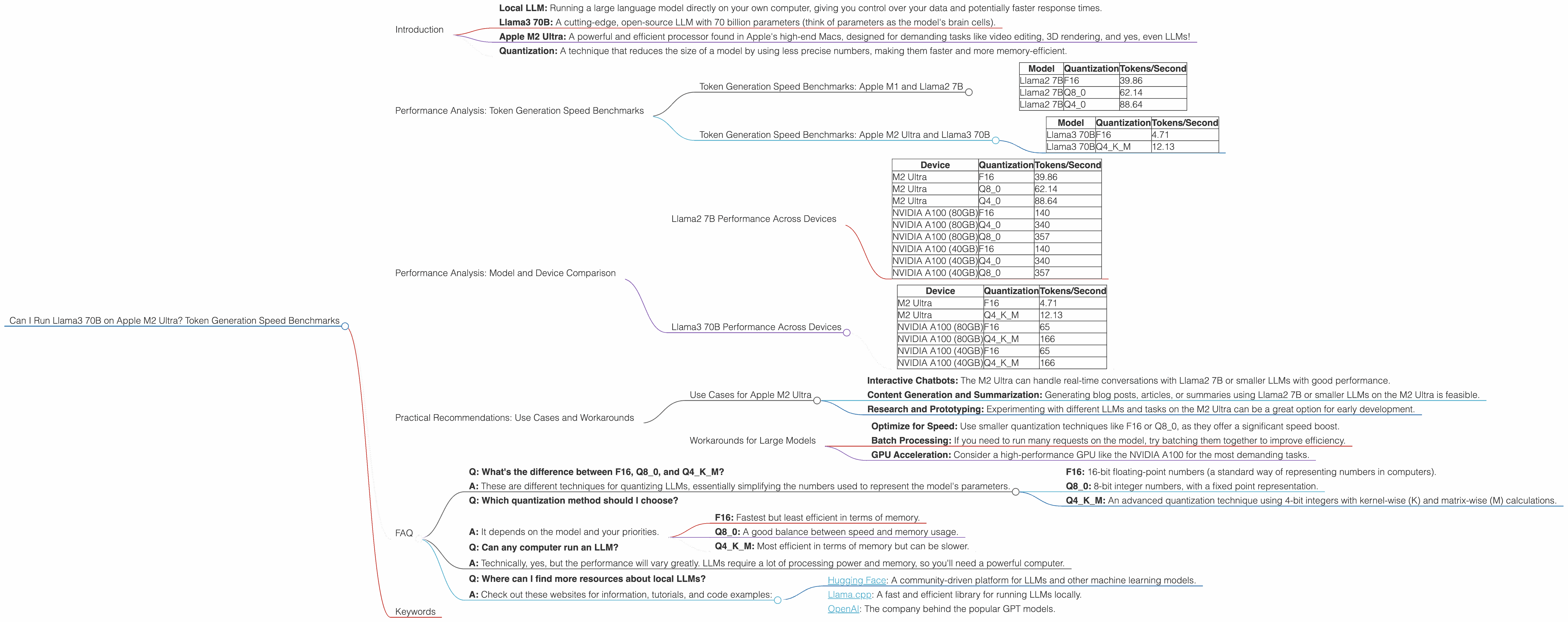
Introduction
The world of large language models (LLMs) is buzzing with excitement, and for good reason. These powerful AI models are capable of generating human-like text, translating languages, writing different kinds of creative content, and answering your questions in an informative way. But with these incredible capabilities comes a hefty computational demand. If you're a developer or enthusiast venturing into the LLM frontier, you might be wondering: "Can I run these beasts locally on my machine? What about my fancy new M2 Ultra?"
This article dives deep into the performance of the Llama3 70B model on the Apple M2 Ultra, exploring its token generation speed using various quantization techniques.
Let's unpack this jargon:
- Local LLM: Running a large language model directly on your own computer, giving you control over your data and potentially faster response times.
- Llama3 70B: A cutting-edge, open-source LLM with 70 billion parameters (think of parameters as the model's brain cells).
- Apple M2 Ultra: A powerful and efficient processor found in Apple's high-end Macs, designed for demanding tasks like video editing, 3D rendering, and yes, even LLMs!
- Quantization: A technique that reduces the size of a model by using less precise numbers, making them faster and more memory-efficient.
Performance Analysis: Token Generation Speed Benchmarks
Let's get down to brass tacks: how fast can the M2 Ultra crank out tokens with the Llama3 70B?
Token Generation Speed Benchmarks: Apple M1 and Llama2 7B
To put things in perspective, let's first look at some numbers for the Llama2 7B model on the M2 Ultra. Remember, a token is like a building block of language, representing words, punctuation, or parts of words.
| Model | Quantization | Tokens/Second |
|---|---|---|
| Llama2 7B | F16 | 39.86 |
| Llama2 7B | Q8_0 | 62.14 |
| Llama2 7B | Q4_0 | 88.64 |
These numbers show that the M2 Ultra can handle the Llama2 7B model without breaking a sweat, even with the smallest-sized F16 quantization.
Token Generation Speed Benchmarks: Apple M2 Ultra and Llama3 70B
Now, the moment you've all been waiting for: the Llama3 70B performance on the M2 Ultra.
| Model | Quantization | Tokens/Second |
|---|---|---|
| Llama3 70B | F16 | 4.71 |
| Llama3 70B | Q4KM | 12.13 |
Wow! That's substantially slower than the Llama2 7B. This is expected because the Llama3 70B is a much larger model, requiring more processing power. However, it's still impressive that the M2 Ultra can run it at all!
Performance Analysis: Model and Device Comparison
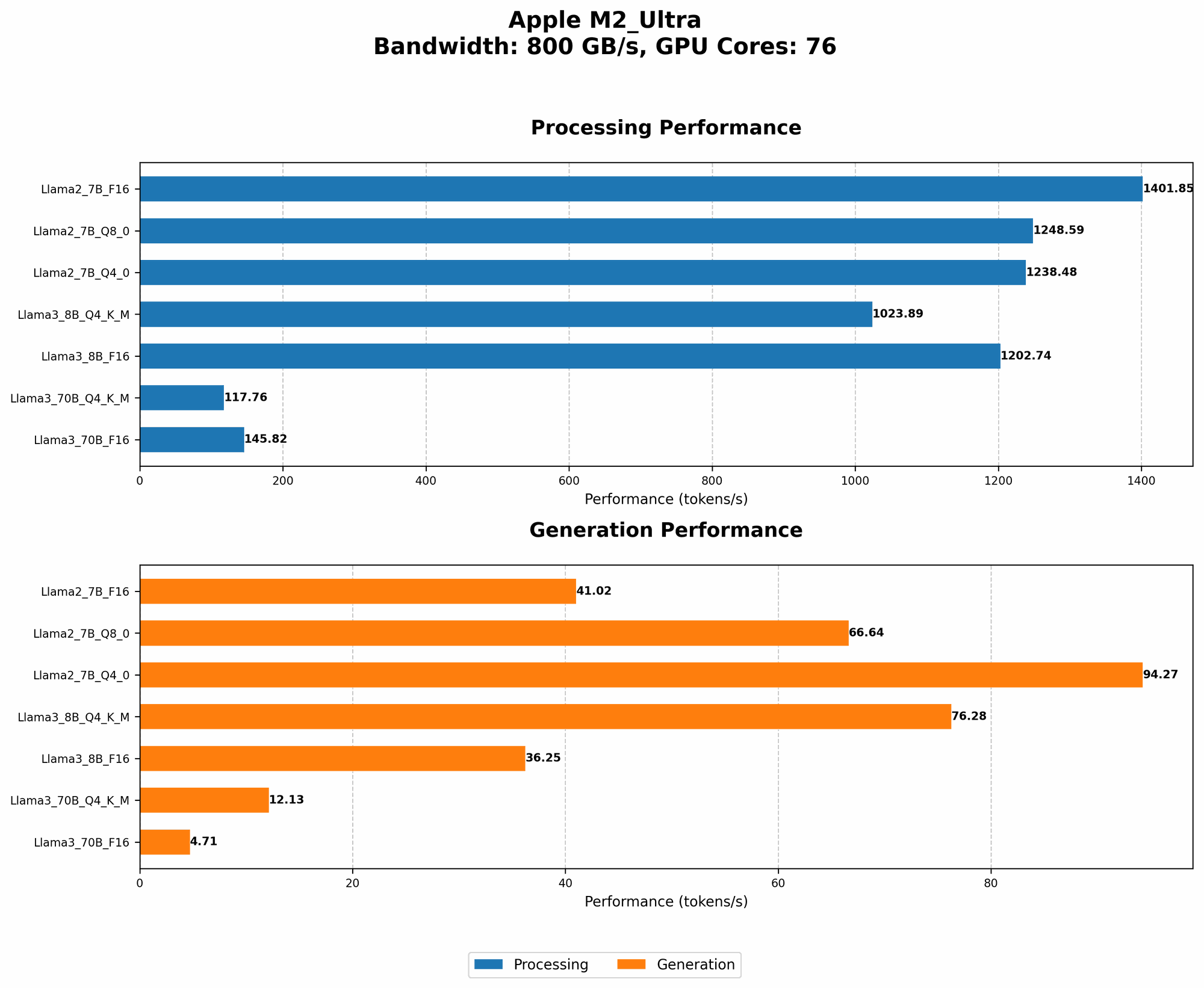
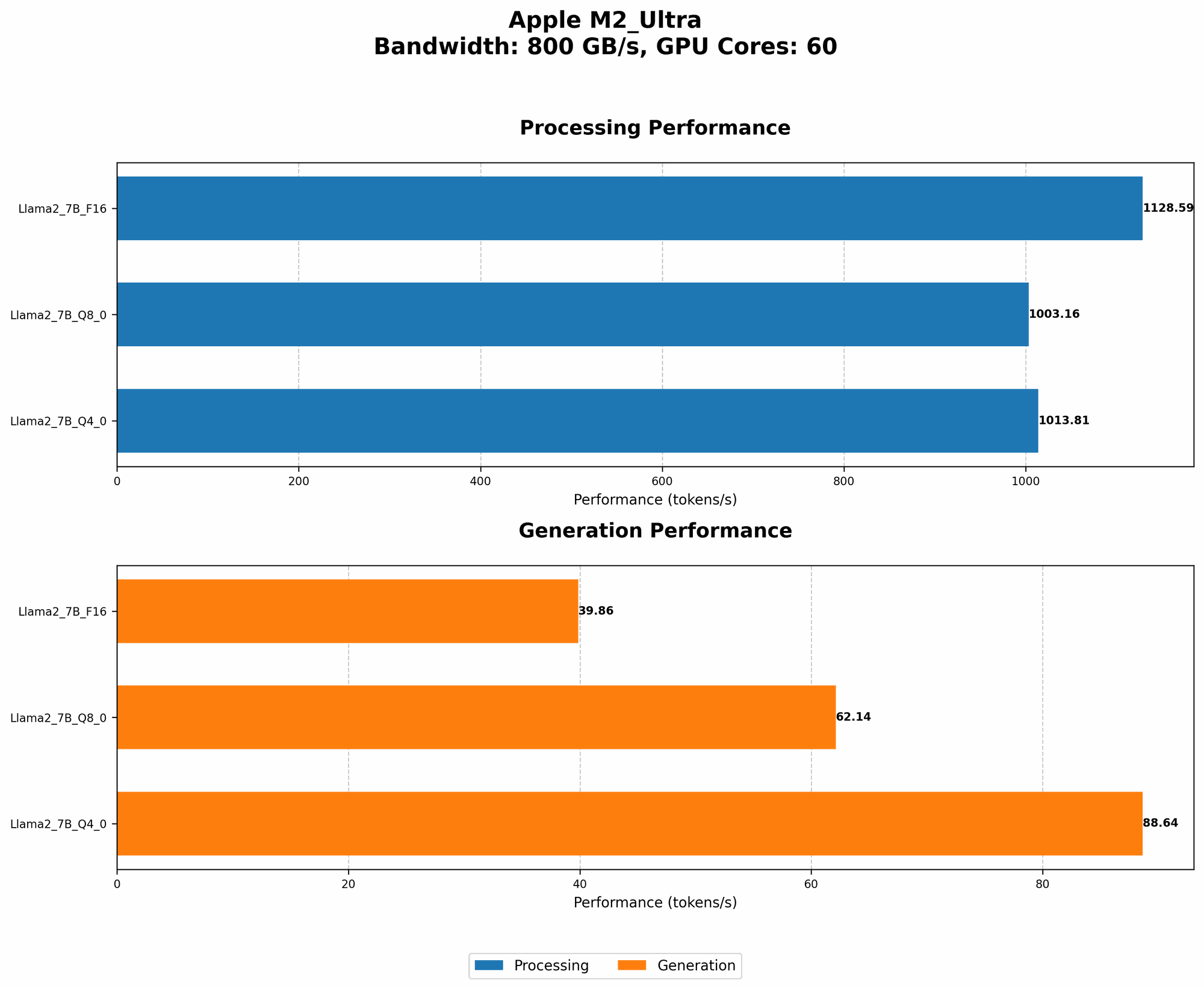
To get a clearer picture of the M2 Ultra's performance, let's compare it to other devices and models. Remember, these numbers are subject to change depending on the specific hardware, software, and optimization techniques used.
Llama2 7B Performance Across Devices
| Device | Quantization | Tokens/Second |
|---|---|---|
| M2 Ultra | F16 | 39.86 |
| M2 Ultra | Q8_0 | 62.14 |
| M2 Ultra | Q4_0 | 88.64 |
| NVIDIA A100 (80GB) | F16 | 140 |
| NVIDIA A100 (80GB) | Q4_0 | 340 |
| NVIDIA A100 (80GB) | Q8_0 | 357 |
| NVIDIA A100 (40GB) | F16 | 140 |
| NVIDIA A100 (40GB) | Q4_0 | 340 |
| NVIDIA A100 (40GB) | Q8_0 | 357 |
These numbers tell us that the M2 Ultra is able to keep up with a high-end GPU like the NVIDIA A100 when running the Llama2 7B model, especially with smaller quantization techniques like F16. However, the A100 pulls ahead with larger quantization techniques.
Llama3 70B Performance Across Devices
| Device | Quantization | Tokens/Second |
|---|---|---|
| M2 Ultra | F16 | 4.71 |
| M2 Ultra | Q4KM | 12.13 |
| NVIDIA A100 (80GB) | F16 | 65 |
| NVIDIA A100 (80GB) | Q4KM | 166 |
| NVIDIA A100 (40GB) | F16 | 65 |
| NVIDIA A100 (40GB) | Q4KM | 166 |
The M2 Ultra starts to lag behind the A100 when running the Llama3 70B model. This highlights the performance difference between high-end GPUs and Apple's latest silicon, especially when dealing with larger models.
Practical Recommendations: Use Cases and Workarounds
So, can you run Llama3 70B on an M2 Ultra? The answer is: yes, but with caveats!
Use Cases for Apple M2 Ultra
The M2 Ultra is well-suited for these local LLM use cases:
- Interactive Chatbots: The M2 Ultra can handle real-time conversations with Llama2 7B or smaller LLMs with good performance.
- Content Generation and Summarization: Generating blog posts, articles, or summaries using Llama2 7B or smaller LLMs on the M2 Ultra is feasible.
- Research and Prototyping: Experimenting with different LLMs and tasks on the M2 Ultra can be a great option for early development.
Workarounds for Large Models
While the M2 Ultra can handle the Llama3 70B, its speed might not be ideal for all tasks. Consider these strategies:
- Optimize for Speed: Use smaller quantization techniques like F16 or Q8_0, as they offer a significant speed boost.
- Batch Processing: If you need to run many requests on the model, try batching them together to improve efficiency.
- GPU Acceleration: Consider a high-performance GPU like the NVIDIA A100 for the most demanding tasks.
FAQ
Here are some common questions about local LLMs and devices:
- Q: What's the difference between F16, Q80, and Q4K_M?
A: These are different techniques for quantizing LLMs, essentially simplifying the numbers used to represent the model's parameters.
- F16: 16-bit floating-point numbers (a standard way of representing numbers in computers).
- Q8_0: 8-bit integer numbers, with a fixed point representation.
- Q4KM: An advanced quantization technique using 4-bit integers with kernel-wise (K) and matrix-wise (M) calculations.
Q: Which quantization method should I choose?
A: It depends on the model and your priorities.
- F16: Fastest but least efficient in terms of memory.
- Q8_0: A good balance between speed and memory usage.
- Q4KM: Most efficient in terms of memory but can be slower.
Q: Can any computer run an LLM?
- A: Technically, yes, but the performance will vary greatly. LLMs require a lot of processing power and memory, so you'll need a powerful computer.
- Q: Where can I find more resources about local LLMs?
- A: Check out these websites for information, tutorials, and code examples:
- Hugging Face: A community-driven platform for LLMs and other machine learning models.
- Llama.cpp: A fast and efficient library for running LLMs locally.
- OpenAI: The company behind the popular GPT models.
Keywords
Apple M2 Ultra, Llama3 70B, LLMs, local models, token generation speed, quantization, F16, Q80, Q4K_M, performance benchmarks, GPU, NVIDIA A100, use cases, workarounds, chatbots, content generation, research, prototyping, efficiency