Can I Run Llama2 7B on Apple M2? Token Generation Speed Benchmarks

Introduction
The world of Large Language Models (LLMs) is exploding, with new models and capabilities emerging all the time. These powerful AI systems can generate human-like text, translate languages, write different kinds of creative content, and answer your questions in an informative way. But running these LLMs locally on your computer can be a challenge, especially if you're working with a powerful model like Llama2 7B.
This article dives deep into the performance of Llama2 7B running on Apple M2, exploring token generation speeds and providing practical recommendations. We'll analyze the data, break down the results, and help you determine if your M2-powered Mac can handle the computational demands of Llama2 7B.
Performance Analysis: Token Generation Speed Benchmarks - Apple M2 and Llama2 7B
Token generation is the process of converting text into a sequence of numbers that the LLM can understand and process. The faster the token generation, the quicker your model can process prompts and generate responses.
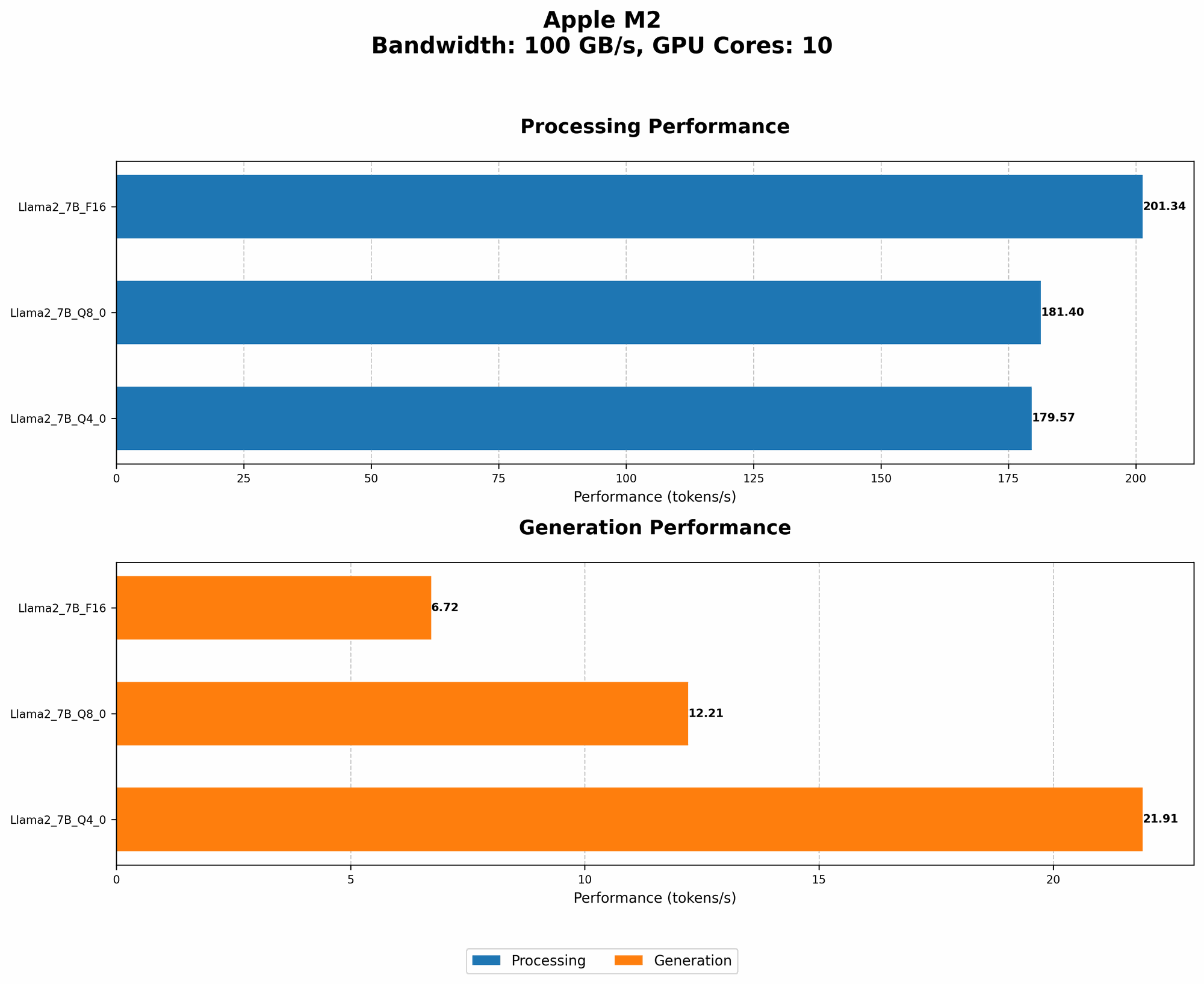
Let's examine the token generation speed benchmarks for Llama2 7B running on an Apple M2, using different quantization levels:
| Quantization Level | Processing (Tokens/Second) | Generation (Tokens/Second) |
|---|---|---|
| F16 (Half-precision) | 201.34 | 6.72 |
| Q8_0 (8-bit quantization) | 181.4 | 12.21 |
| Q4_0 (4-bit quantization) | 179.57 | 21.91 |
Understanding Quantization:
Think of quantization like compressing a video file to save space. It reduces the size of the model by using fewer bits to represent each number, which can lead to faster processing.
- F16 (Half-precision): The model is stored using 16 bits per number, offering a good balance between accuracy and speed.
- Q8_0 (8-bit quantization): This uses 8 bits per number, making the model smaller and potentially faster.
- Q4_0 (4-bit quantization): The model uses just 4 bits per number, resulting in a significantly smaller file size but potentially sacrificing accuracy.
Token Generation Speed Benchmarks: Apple M1 and Llama2 7B
A Note: Our benchmark data doesn't include results for Apple M1 and Llama2 7B. While the M1 is a powerful chip, it might not be ideal for running the large Llama2_7B model. You might experience slower performance compared to the M2.
Performance Analysis: Model and Device Comparison
Llama2 7B Compared to Other Models:
Llama2 7B is a smaller model compared to Llama2 13B and Llama2 70B. This smaller size translates to faster inference speeds and lower memory demands.
- Llama2 7B: Offers a good balance between performance and accuracy. It's a great choice for tasks like text generation, summarization, and translation.
- Llama2 13B: Offers slightly better performance in terms of accuracy and generation quality for certain tasks, but requires more computational resources.
- Llama2 70B: Provides the highest accuracy and performance but comes at a significant computational cost.
Comparison: Llama2 7B and Other Devices
While the current data focuses on the Apple M2 and Llama2 7B, it's helpful to consider other devices and their potential. Remember, this is a broad comparison and specific performance can vary:
- Powerful Desktop GPUs: High-end GPUs like RTX 4090 or AMD Radeon RX 7900 XT offer significantly faster inference speeds, especially for larger models like Llama2 70B.
- Cloud-based AI Platforms: Services like Google Colab or Amazon Sagemaker provide access to powerful GPUs and TPUs, enabling you to run even larger LLMs without the need for expensive hardware.
Practical Recommendations: Use Cases and Workarounds
Ideal Use Cases for Llama2 7B on Apple M2
- Text Generation: Create short stories, poems, or articles.
- Summarization: Summarize lengthy documents or articles concisely.
- Translation: Translate text between multiple languages.
- Question Answering: Get answers to your questions based on provided context.
Addressing Potential Challenges
- Limited Memory: Llama2 7B can be memory-intensive. Running it on your M2 Mac might require you to adjust the model's batch size to prevent memory exhaustion.
- Slower Generation Speeds: While the M2 is capable, you might notice slower generation speeds compared to more powerful hardware.
- Limited Hardware: The M2 might not be ideal for running larger models like Llama2 70B. Consider cloud-based AI platforms or dedicated AI hardware for those cases.
Workarounds: Boosting Performance
- Quantization: Explore different quantization levels (Q40, Q80) to reduce the model's memory footprint and potentially improve performance.
- Batch Size Adjustments: Experiment with different batch sizes to find the optimal balance between performance and memory usage.
- Optimized Libraries: Choose libraries like "llama.cpp" for efficient model loading and inference on your M2.
- GPU Acceleration: If your M2 supports GPU acceleration, enable it to speed up the processing.
Conclusion
Can you run Llama2 7B on your Apple M2? The answer is a qualified yes!
While the M2 might not be the ideal choice for running the largest language models, its processing power and performance make it a viable option for tasks involving smaller LLMs like Llama2 7B.
Remember, always experiment with different configurations and settings to optimize your model's performance and find the sweet spot for your specific needs.
Remember, the world of LLMs is constantly evolving, so keep up with the latest advancements and explore new tools and techniques to elevate your AI experience.
FAQ: Common Questions about LLMs and Devices
Q: What exactly are LLMs?
A: LLMs stand for Large Language Models. These are powerful AI systems trained on massive datasets of text and code, allowing them to generate human-quality text, translate languages, write different kinds of creative content, and answer your questions in an informative way.
Q: What is tokenization in LLMs?
A: Tokenization is the process of converting text into a sequence of numbers that the LLM can understand and process. Each word or punctuation mark is assigned a unique numerical representation called a "token." Think of it like converting text into a language that the LLM can "read."
Q: Why is token generation speed important?
A: The faster the token generation, the quicker your model can process prompts and generate responses. It directly impacts the speed of your LLM applications.
Q: What are the different types of quantization?
A: Quantization is a technique used to reduce the size of a model by representing numbers with fewer bits. This can improve performance and reduce memory requirements. There are different levels of quantization, such as F16, Q80, and Q40.
Q: Are cloud-based LLMs better than local ones?
A: It depends on your needs. Cloud-based LLMs offer access to powerful hardware and can handle larger models. However, local LLMs might be faster for simple tasks and provide more privacy.
Keywords:
Llama2 7B, Apple M2, Token Generation Speed, Quantization, F16, Q80, Q40, Performance Benchmarks, Large Language Models, LLM, AI, Machine Learning, Inference, Text Generation, Summarization, Translation, GPU, Cloud Computing, Google Colab, Amazon Sagemaker, Batch Size, Workarounds.