Can I Run Llama2 7B on Apple M1 Pro? Token Generation Speed Benchmarks

Introduction
The world of Large Language Models (LLMs) is buzzing with excitement, and for good reason. These powerful AI models can generate human-like text, translate languages, write different kinds of creative content, and answer your questions in an informative way. But running LLMs locally can be a challenge, especially on a device like the Apple M1 Pro, which is not traditionally known for its horsepower.
This article will take a deep dive into the performance of Llama2 7B, a popular open-source LLM, running on the Apple M1 Pro chip. We'll explore the token generation speeds, compare performance with different quantization levels (F16, Q80, Q40), and provide practical recommendations for use cases and workarounds. Buckle up, it's going to be a wild ride!
Performance Analysis: Token Generation Speed Benchmarks: Apple M1 Pro and Llama2 7B
Understanding Token Generation Speed
Imagine you're writing a novel. Each word you type is like a token in the world of LLMs. Token generation speed measures how quickly the model can process these tokens, which directly impacts the responsiveness and fluidity of the LLM experience.
Benchmark Results: Apple M1 Pro and Llama2 7B
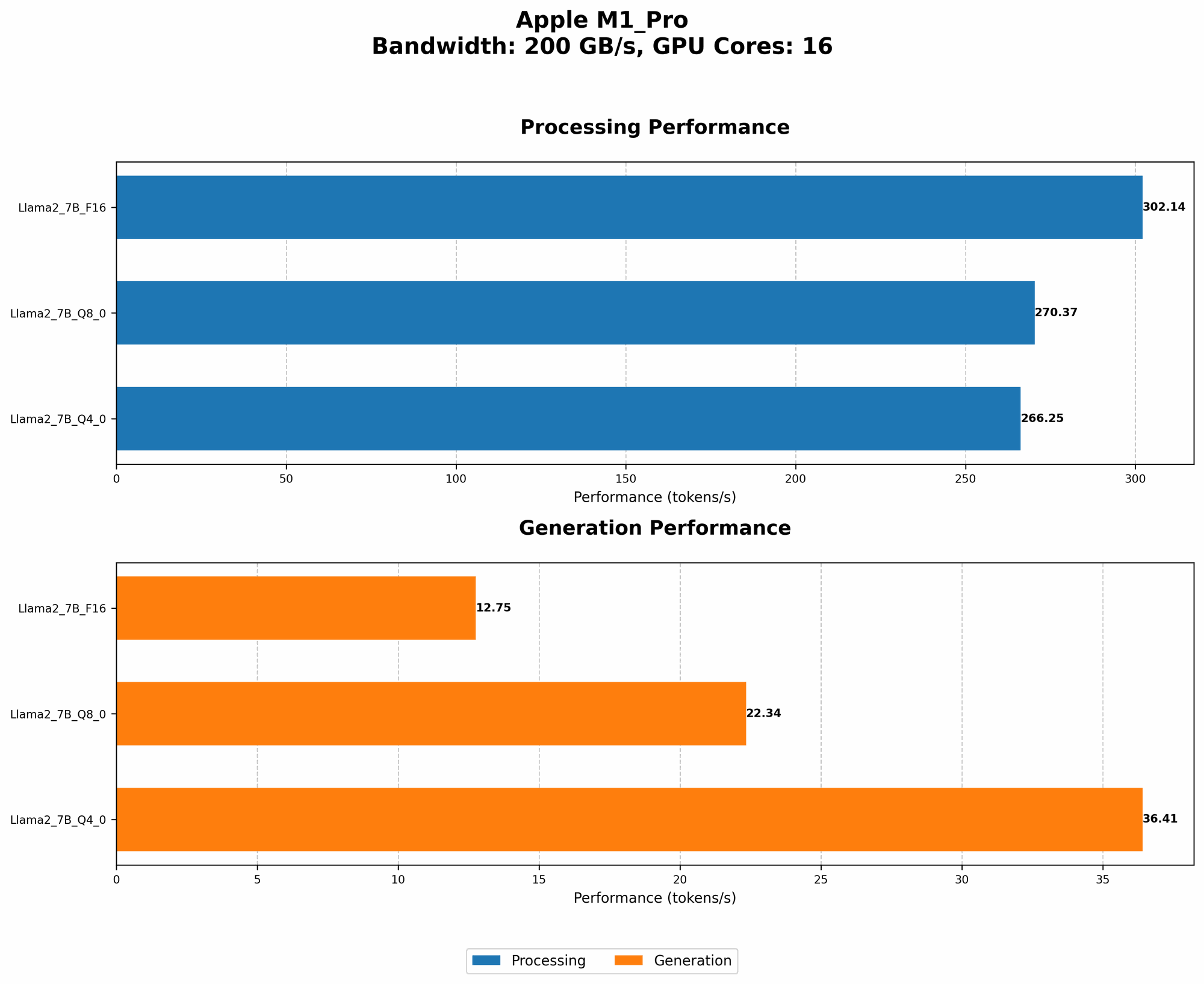
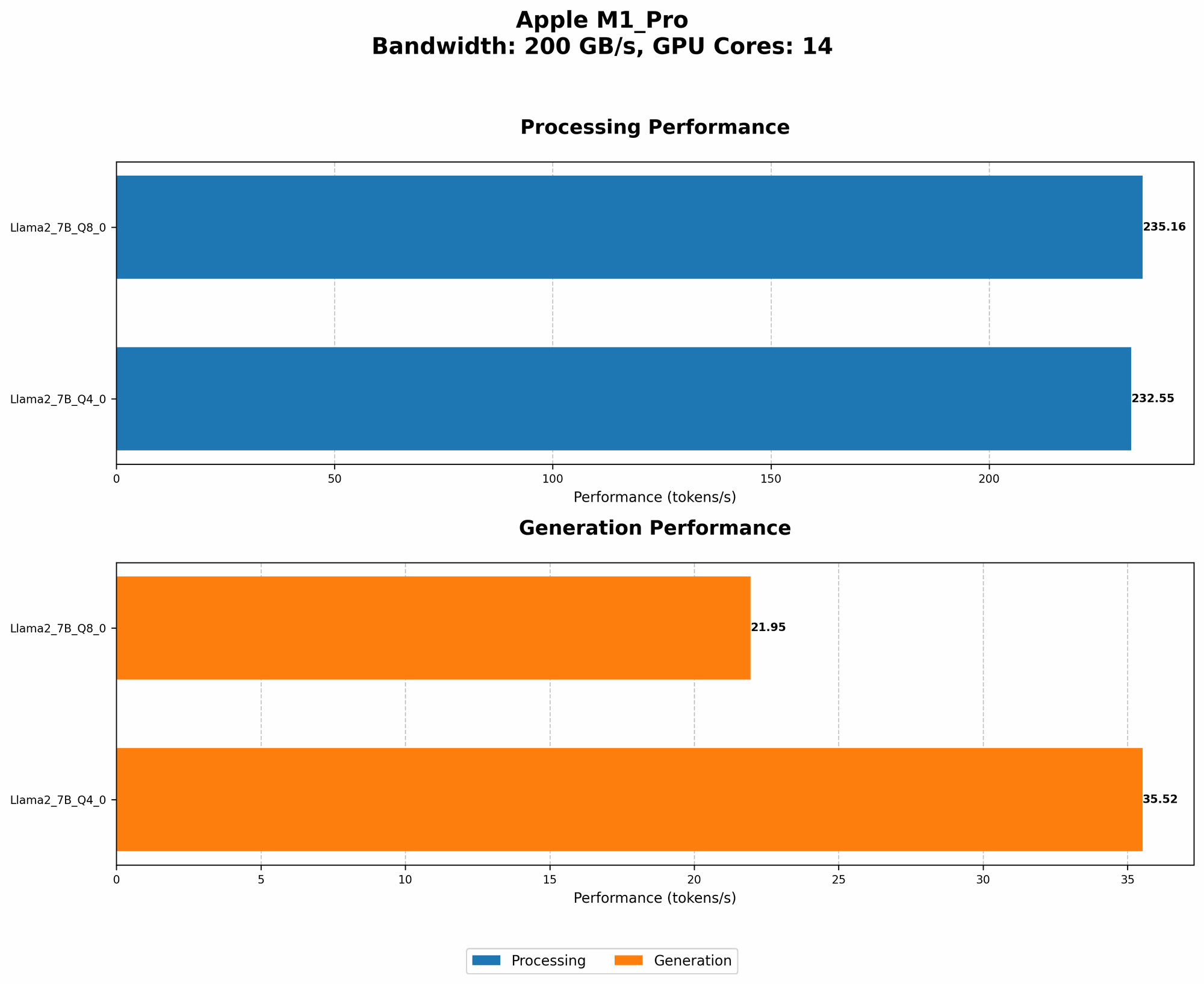
| M1 Pro Configuration | Bandwidth (BW) | GPU Cores | Llama2 7B F16 Processing (Tokens/s) | Llama2 7B F16 Generation (Tokens/s) | Llama2 7B Q8_0 Processing (Tokens/s) | Llama2 7B Q8_0 Generation (Tokens/s) | Llama2 7B Q4_0 Processing (Tokens/s) | Llama2 7B Q4_0 Generation (Tokens/s) |
|---|---|---|---|---|---|---|---|---|
| 14 Cores | 200 | 14 | Null | Null | 235.16 | 21.95 | 232.55 | 35.52 |
| 16 Cores | 200 | 16 | 302.14 | 12.75 | 270.37 | 22.34 | 266.25 | 36.41 |
Note: F16 represents a 16-bit floating-point format for representing numbers. Q80 and Q40 are quantization levels, which are techniques to compress the model and reduce memory usage for more efficient processing.
Data Missing: It's important to highlight that the data for Llama2 7B F16 processing and generation on the 14 core M1 Pro configuration is not available. This indicates potential incompatibility or limitations in that specific setup.
Performance Analysis: Model and Device Comparison
Quantization: Trading Precision for Speed
Quantization is like compressing a photo. You lose some detail, but the image is smaller and loads faster. With LLMs, quantization reduces the size of the model, meaning it takes up less space on your device. This allows for faster processing and generation speeds, especially on devices with limited memory or processing power like the Apple M1 Pro.
The benchmark results show a clear trade-off between precision and speed. F16, while potentially more accurate, struggles to keep up, especially for generation. Q80 and Q40, despite potential loss in accuracy, offer significant gains in token generation speed.
Comparing to Other Devices
While our focus is on the Apple M1 Pro, it's worth noting that other devices, like powerful GPUs, outperform the M1 Pro in terms of raw token generation speed. Think of it like comparing a bicycle to a sports car: the sports car might be faster, but the bicycle is still a good option for everyday use.
Practical Recommendations: Use Cases and Workarounds
Use Cases for Llama2 7B on Apple M1 Pro
- Rapid prototyping: If you're experimenting with different LLMs and exploring their capabilities, the M1 Pro can be a great starting point.
- Interactive chatbots: Building a conversational AI assistant that responds quickly is possible with the M1 Pro.
- Content creation: Generating simple text formats, like summaries or outlines, is a good use case.
Workarounds for Performance Limitations
- Optimize your prompts: Craft clear and concise prompts to reduce the computational load.
- Experiment with smaller models: Consider using lightweight Llama models, like Llama 2 1.3B or Llama 2 3B, for smoother performance.
- Utilize cloud-based solutions: For demanding tasks, leverage cloud platforms like Google Colab or Amazon SageMaker, which provide more powerful hardware.
FAQ
Q: What are LLMs?
A: Large Language Models are AI models trained on vast amounts of text data. They can understand and generate human-like text in various formats.
Q: What is quantization?
A: Quantization is a technique to compress the size of a model by reducing the precision of its weights (the parameters that determine the model's behavior). Think of it like using a smaller number of colors to paint a picture.
Q: How do I choose the right LLM for my needs?
*A: *Consider the size of the model (smaller models are faster), the task you want to accomplish (different LLMs are better suited for certain tasks), and the resources you have available.
Q: Can I run LLMs on other devices like Raspberry Pi?
A: Yes, but the performance will vary greatly depending on the model and device.
Q: Are LLMs going to take over the world?
A: Probably not, but they are evolving quickly and have the potential to revolutionize many industries.
Keywords
LLM, Llama2, Llama2 7B, Apple M1 Pro, token generation speed, performance benchmarks, quantization, F16, Q80, Q40, GPUCores, bandwidth, practical recommendations, use cases, workarounds, GPU, cloud computing, Google Colab, Amazon SageMaker, AI, artificial intelligence, natural language processing, NLP.