Can Apple M3 Pro Handle Large Local LLMs Without Crashing? Benchmark Analysis
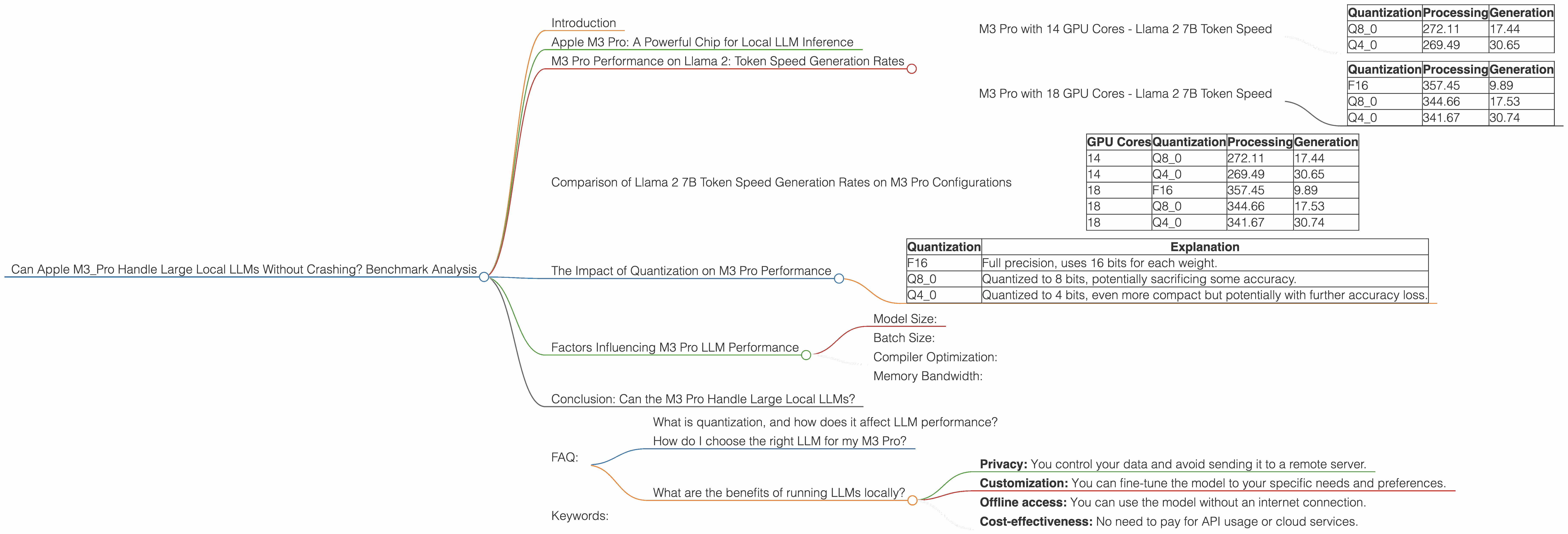
Introduction
The world of large language models (LLMs) is rapidly evolving, with models like ChatGPT and Bard becoming household names. While these cloud-based LLMs are powerful, they rely on internet access and often have limitations on what they can do. This is where local LLMs come in. Running LLMs locally on your own computer gives you more control, privacy, and the ability to customize and experiment without worrying about exceeding API limits.
But can your computer handle the processing power required to run these complex models? This article delves into the performance of Apple's M3 Pro chip, specifically focusing on its ability to run large local LLMs without crashing. We'll benchmark its token speed generation for different LLMs and discuss the factors influencing performance.
Apple M3 Pro: A Powerful Chip for Local LLM Inference
The Apple M3 Pro is a powerful chip designed to tackle demanding tasks like video editing, 3D rendering, and, you guessed it, running large language models. It boasts high bandwidth, a significant number of GPU cores, and specialized architecture optimized for AI workloads. However, the question remains: Can this powerful chip handle the computational demands of local LLMs without hitting a wall?
M3 Pro Performance on Llama 2: Token Speed Generation Rates
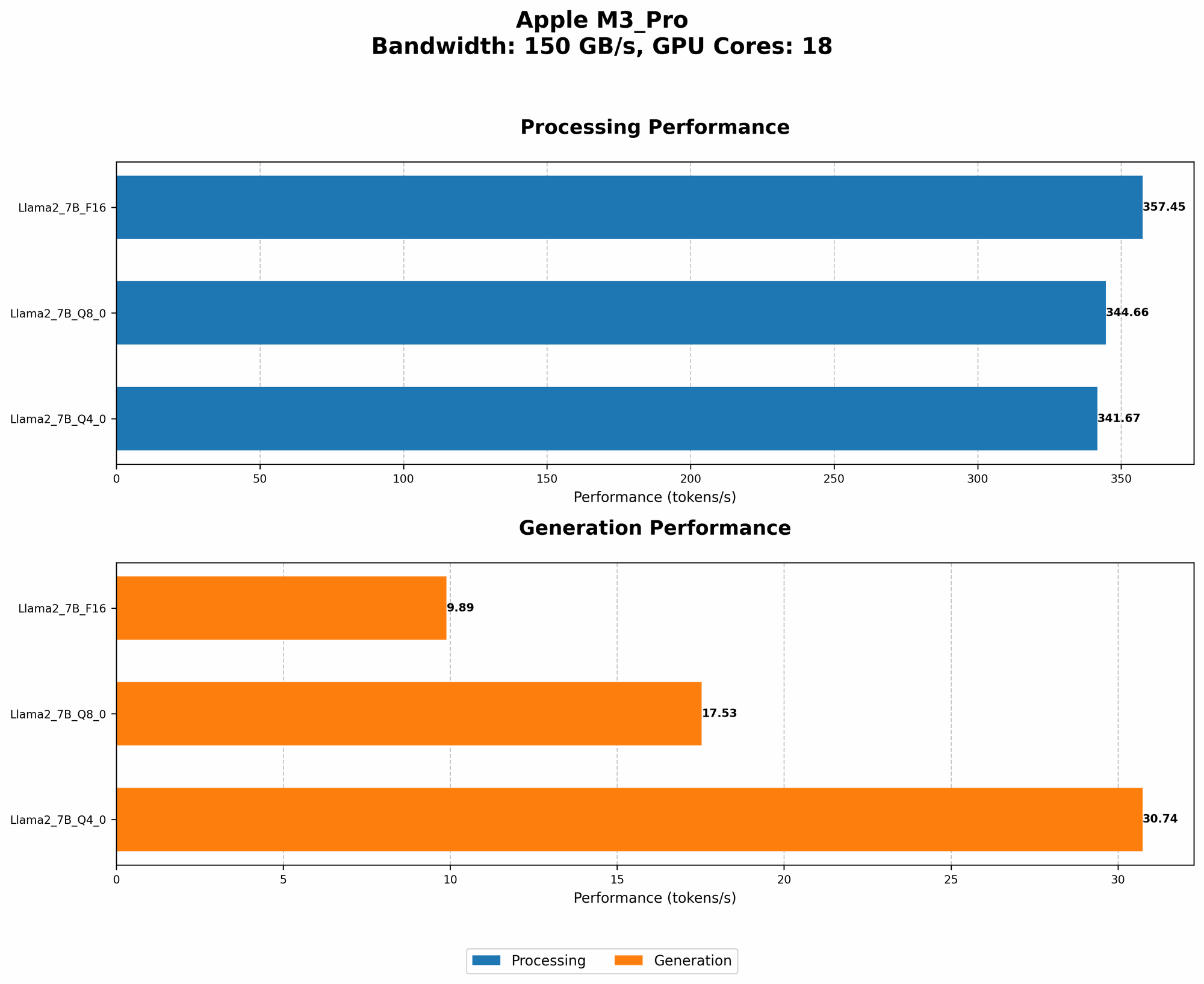
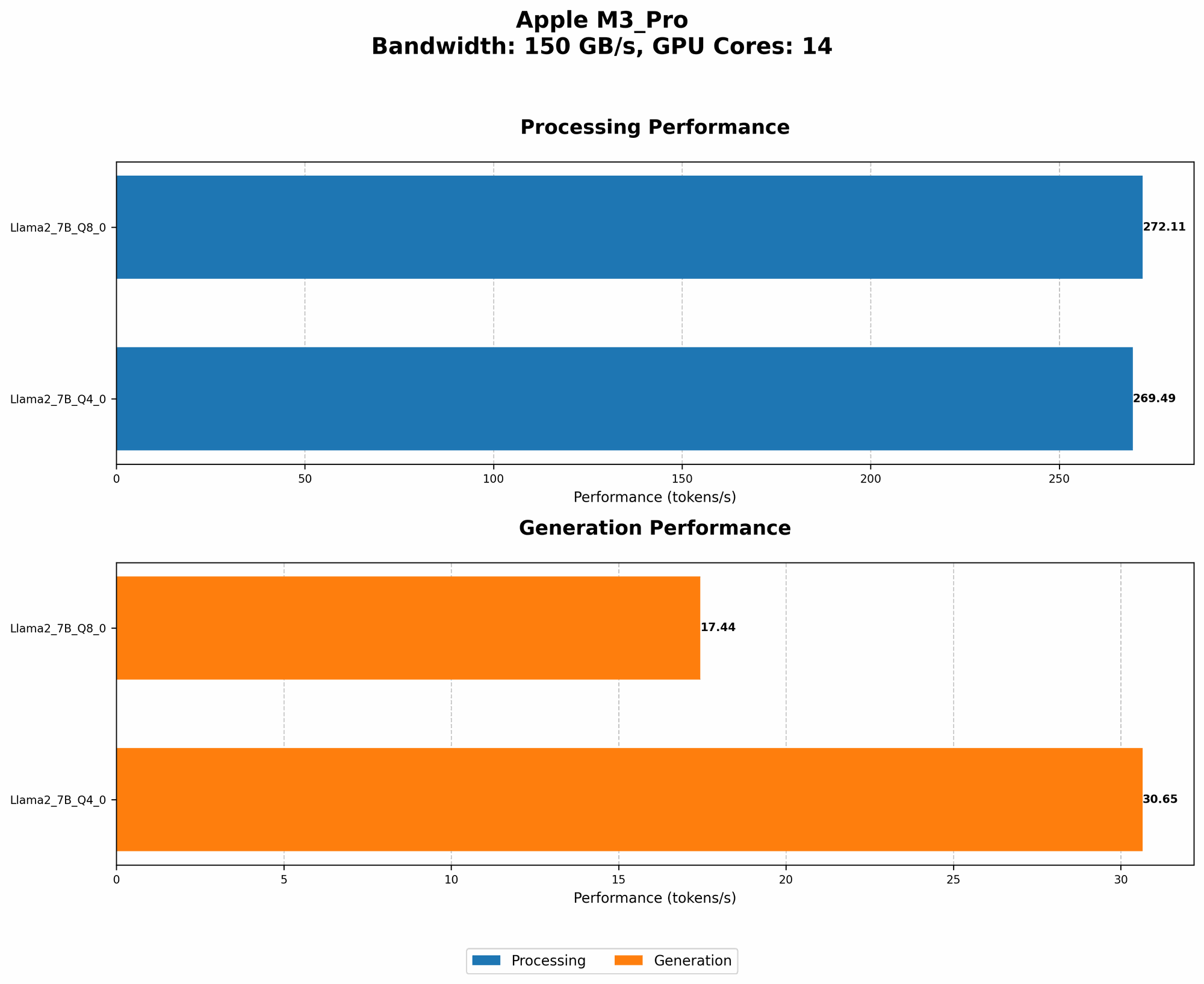
To understand the M3 Pro's performance on local LLMs, we'll focus on the Llama 2 family of models. Llama 2 is known for its impressive performance and is a popular choice for local LLM deployment. This analysis explores the token speed generation rates of Llama 2 models running on the M3 Pro, considering various quantization levels. Remember, the numbers represent tokens processed per second.
M3 Pro with 14 GPU Cores - Llama 2 7B Token Speed
| Quantization | Processing | Generation |
|---|---|---|
| Q8_0 | 272.11 | 17.44 |
| Q4_0 | 269.49 | 30.65 |
Interpretation: The M3 Pro with 14 GPU cores demonstrates impressive token speed generation rates when running Llama 2 7B. Notably, the Q8_0 quantization level shows a processing speed of 272.11 tokens per second, which is remarkably fast. However, the generation speed of 17.44 tokens per second is significantly lower, indicating that the model spends more time decoding its predictions.
M3 Pro with 18 GPU Cores - Llama 2 7B Token Speed
| Quantization | Processing | Generation |
|---|---|---|
| F16 | 357.45 | 9.89 |
| Q8_0 | 344.66 | 17.53 |
| Q4_0 | 341.67 | 30.74 |
Interpretation: Increasing the GPU cores to 18 significantly boosts the processing speed, especially for the F16 quantization level, which reaches 357.45 tokens per second. However, the generation speed remains relatively low across all quantization levels.
The generation speed bottleneck is a common issue when running LLMs locally. It's often slower than processing due to the complexity of translating the model's output into human-readable text.
Comparison of Llama 2 7B Token Speed Generation Rates on M3 Pro Configurations
Let's compare the performance of the M3 Pro with 14 and 18 GPU cores for Llama 2 7B.
| GPU Cores | Quantization | Processing | Generation |
|---|---|---|---|
| 14 | Q8_0 | 272.11 | 17.44 |
| 14 | Q4_0 | 269.49 | 30.65 |
| 18 | F16 | 357.45 | 9.89 |
| 18 | Q8_0 | 344.66 | 17.53 |
| 18 | Q4_0 | 341.67 | 30.74 |
Observations:
- The M3 Pro with 18 GPU cores consistently outperforms the 14 core model in terms of processing speed across various quantization levels.
- The F16 quantization level on the 18 core M3 Pro achieves the highest processing speed, but the generation speed is significantly lower than other quantization levels. This highlights the trade-off between speed and accuracy.
The Impact of Quantization on M3 Pro Performance
Quantization is a technique that reduces the size of the model and the amount of memory it requires by using fewer bits to represent the model's weights. This can significantly improve performance, especially on devices with limited memory.
The table below shows the impact of different quantization levels on the M3 Pro:
| Quantization | Explanation |
|---|---|
| F16 | Full precision, uses 16 bits for each weight. |
| Q8_0 | Quantized to 8 bits, potentially sacrificing some accuracy. |
| Q4_0 | Quantized to 4 bits, even more compact but potentially with further accuracy loss. |
Observations:
- F16 offers the best accuracy but requires more resources and may result in slower performance, particularly for generation.
- Q80 and Q40 trade off accuracy for speed and memory footprint.
Quantization impacts the balance between speed, accuracy, and memory usage. Choosing the right quantization level depends on your specific needs and the model being used.
Factors Influencing M3 Pro LLM Performance
Several factors contribute to the performance of LLMs on the M3 Pro besides quantization levels:
Model Size:
Larger models, like Llama 2 70B or larger, require more resources and may exceed the M3 Pro's capabilities, leading to slow performance or crashes.
Batch Size:
The number of tokens processed in one go affects performance. Larger batch sizes can potentially lead to faster processing but could strain the M3 Pro's memory.
Compiler Optimization:
The compiler used to build the LLM can significantly influence performance. Compilers like LLVM can optimize code for specific hardware, leading to faster execution.
Memory Bandwidth:
The M3 Pro has high bandwidth, which is essential for transferring large amounts of data quickly. However, the bandwidth can become a bottleneck if the model is too large or the batch size is too big.
Conclusion: Can the M3 Pro Handle Large Local LLMs?
The M3 Pro is a powerful chip capable of running local LLMs with impressive performance. It can handle smaller models like Llama 2 7B efficiently, especially with optimized quantization techniques. The M3 Pro with 18 GPU cores delivers the highest processing speed, achieving over 350 tokens per second for the Llama 2 7B model with F16 quantization. However, the M3 Pro's generation speed is significantly slower than its processing speed, which is a common limitation for local LLMs.
While the M3 Pro can handle smaller models effectively, it may struggle with larger LLM models due to memory constraints and the increased computational demand.
FAQ:
What is quantization, and how does it affect LLM performance?
Quantization is a technique used to reduce the size of an LLM model and its memory footprint by using fewer bits to represent the model's weights. This can significantly improve performance, especially on devices with limited memory. However, it may come at the cost of accuracy.
How do I choose the right LLM for my M3 Pro?
The best LLM for your M3 Pro depends on your specific needs and the tasks you want to perform. Smaller models like Llama 2 7B are generally more suitable for M3 Pro due to its memory limitations.
What are the benefits of running LLMs locally?
Running LLMs locally offers several benefits, including:
- Privacy: You control your data and avoid sending it to a remote server.
- Customization: You can fine-tune the model to your specific needs and preferences.
- Offline access: You can use the model without an internet connection.
- Cost-effectiveness: No need to pay for API usage or cloud services.
Keywords:
M3 Pro, Apple Silicon, LLM, Llama 2, Token Speed, Quantization, Local LLM, Inference, Performance, Benchmark, GPU Cores, Bandwidth, Memory, Generation, Processing, AI, Machine Learning, Large Language Models, Deep Learning, NLP, Natural Language Processing, AI Benchmarks, Hardware Acceleration, Cloud Computing, Offline, Privacy, Customization