Can Apple M2 Ultra Handle Large Local LLMs Without Crashing? Benchmark Analysis

Introduction
Large language models (LLMs) are revolutionizing the way we interact with computers. These powerful AI models can generate text, translate languages, write different kinds of creative content, and answer your questions in an informative way. Imagine having your own personal AI assistant who can help you with your work, your creative projects, or just answer your curious questions.
But running these LLMs often requires specialized hardware with massive amounts of processing power and memory. That's where dedicated GPUs like those found in the Apple M2 Ultra come into play.
This article dives deep into the performance of the Apple M2 Ultra when running popular LLMs locally. We'll analyze benchmarks for various models, including Llama 2 and Llama 3, exploring how well the M2 Ultra handles different model sizes and quantization levels. Get ready for a rollercoaster ride through a world of AI, GPUs, and tokens!
Benchmarking the Apple M2 Ultra: A Token Speed Showdown
M2 Ultra Token Speed: A Glimpse into the Speedster's Heart
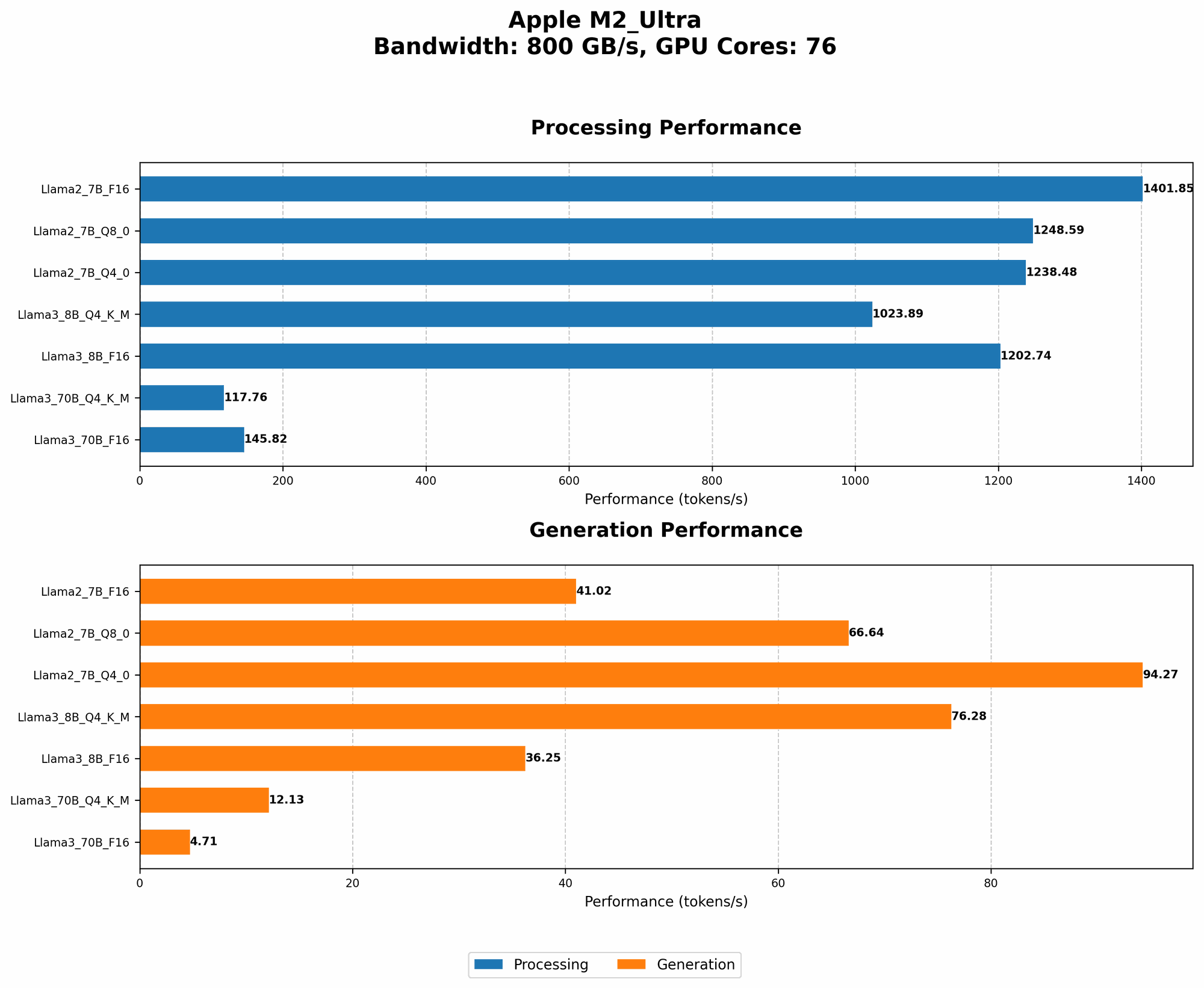
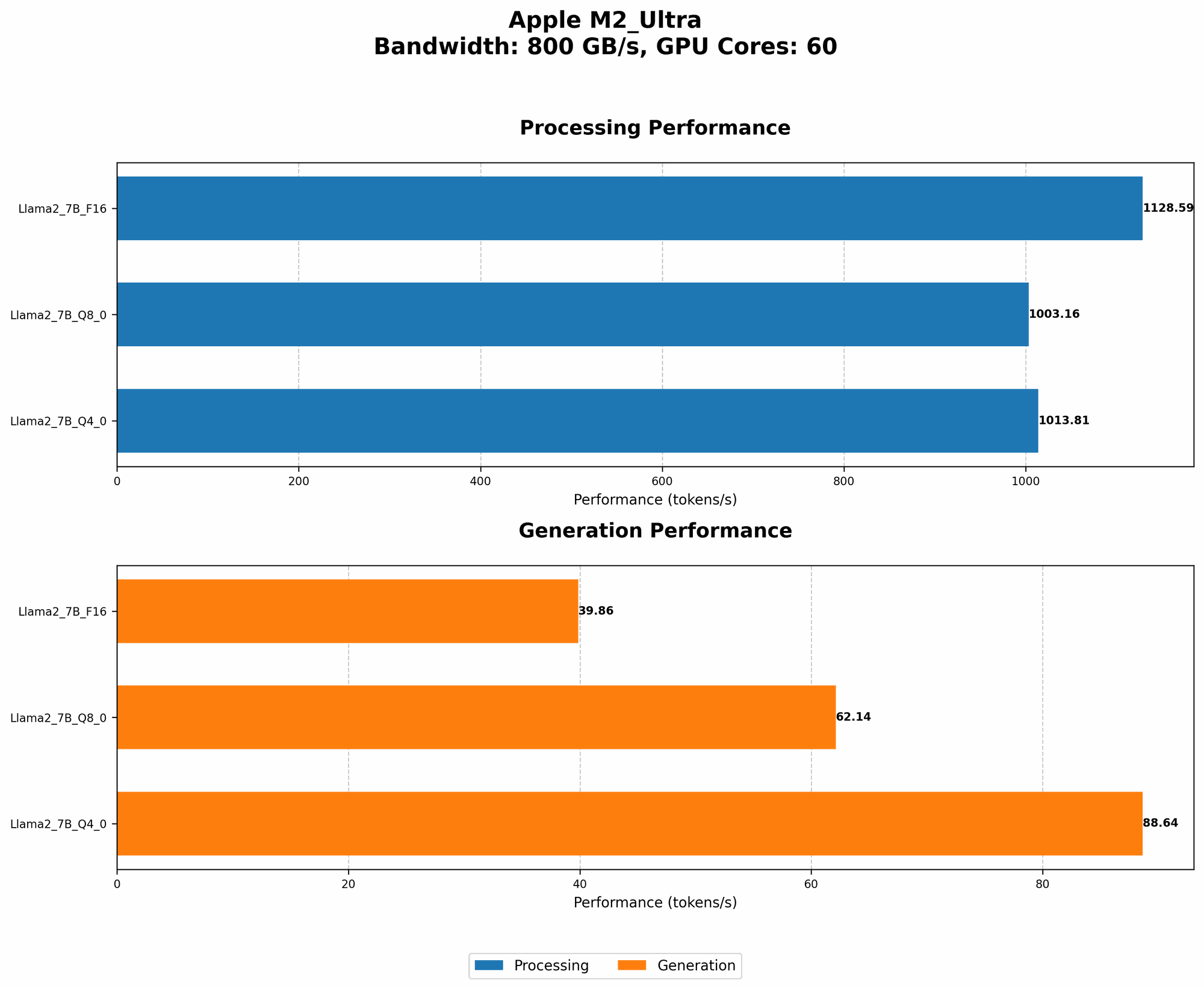
The Apple M2 Ultra is a powerful chip boasting a whopping 76 GPU cores and a massive bandwidth of 800 GB/s. This beast of a chip has the potential to accelerate the processing of LLMs considerably. But numbers don't lie, and we'll be looking at actual performance numbers to see how it performs in the real world.
Understanding Token Speed: The Language of LLMs
Token speed is a measure of how quickly a model can process the building blocks of language – tokens. Think of them as the individual words and punctuation marks that make up a sentence. Faster token speed means faster processing, which translates to quicker responses from your LLM.
Llama 2 and Llama 3 Benchmark Analysis: A Battle of the Titans
We'll be focusing on the performance of the M2 Ultra with two popular open-source LLMs: Llama 2 and Llama 3.
Llama 2:
- 7B model: This model strikes a balance between size and performance, making it suitable for a wide range of applications.
- Quantization levels: To decrease memory footprint and increase speed, Llama 2 can be run with different quantization levels. F16 (half-precision floating-point) is the default while Q8 (8-bit integer) and Q4 (4-bit integer) offer significant memory savings but might slightly impact accuracy.
Llama 3:
- 8B model: Offers more power than its 7B counterpart, but with a greater memory footprint.
- 70B model: A behemoth in the LLM world, capable of impressive performance but demanding significant resources.
- Quantization levels: Similar to Llama 2, Llama 3 can use F16, Q4KM (Q4 quantization for key, value, and matrix) and Q4 (quantization for all).
Comparing the M2 Ultra's Performance: From 7B to 70B
Llama2 7B:
| Configuration | Token Speed (Tokens/second) |
|---|---|
| F16 Processing | 1401.85 |
| F16 Generation | 41.02 |
| Q8_0 Processing | 1248.59 |
| Q8_0 Generation | 66.64 |
| Q4_0 Processing | 1238.48 |
| Q4_0 Generation | 94.27 |
Llama 3 8B:
| Configuration | Token Speed (Tokens/second) |
|---|---|
| F16 Processing | 1202.74 |
| F16 Generation | 36.25 |
| Q4KM Processing | 1023.89 |
| Q4KM Generation | 76.28 |
Llama 3 70B:
| Configuration | Token Speed (Tokens/second) |
|---|---|
| F16 Processing | 145.82 |
| F16 Generation | 4.71 |
| Q4KM Processing | 117.76 |
| Q4KM Generation | 12.13 |
Analysis:
- Llama 2 7B: The M2 Ultra excels in processing Llama 2 7B at various quantization levels. It achieves impressive token speeds, especially in F16 and Q8 configurations. The generation speeds are respectable, but they lag behind processing speeds. This aligns with the general trend where LLMs are more efficient at processing tokens than generating new ones.
- Llama 3 8B: The M2 Ultra shows strong performance with the Llama 3 8B model. You can see the benefits of quantization here, as the Q4KM configuration delivers competitive token speeds. However, it's interesting to note that F16 actually outperforms Q4KM in processing speed, potentially because of the overhead associated with Q4KM.
- Llama 3 70B: The M2 Ultra demonstrates its capabilities with the large Llama 3 70B model. As expected, the token speeds are significantly lower compared to the smaller models, showcasing the processing demands of larger LLMs.
Quantization: Making LLMs More Efficient
Quantization is a technique used to reduce the memory footprint and increase the speed of LLMs. Imagine it like a language translator for your computer where you convert large numbers (think F16, which uses 16 bits per number) into smaller ones (like Q4, which uses 4 bits per number). This makes the model more compact and allows it to process information faster.
The M2 Ultra allows for different quantization levels for Llama 2 and Llama 3, offering various trade-offs between speed, memory, and accuracy.
- Q8: This quantization level offers a significant reduction in memory footprint compared to F16 while still maintaining reasonable accuracy.
- Q4: This level provides further memory savings but may impact accuracy.
For many users, these quantization levels provide a practical balance between speed, memory, and accuracy, making LLMs more accessible for local deployment.
Implications for Local LLM Deployment
The M2 Ultra's performance with various LLMs suggests that it's a capable platform for running these powerful AI models locally. The high processing power and memory bandwidth enable the M2 Ultra to handle large models like Llama 3 70B with reasonable token speeds, making it a good candidate for tasks that require both speed and accuracy.
FAQs: Demystifying LLMs and the M2 Ultra
Q: What's the difference between processing and generation speed?
A: Processing speed refers to how quickly the model processes the input tokens, while generation speed refers to how quickly the model generates new tokens as output.
Q: How does the M2 Ultra compare to other GPUs for running LLMs?
A: The M2 Ultra is a powerful GPU, but it's important to note that there are other high-performance GPUs out there. It's best to choose the GPU that best suits your specific needs and budget.
Q: Does running LLMs locally consume a lot of power?
A: Yes, running LLMs locally can consume a significant amount of power. The energy consumption will depend on the model size, quantization level, and the device's power management settings.
Q: Is running LLMs locally better than using cloud-based services?
A: It depends! Local deployment provides lower latency and more control over your data. However, cloud-based services offer scalability and easier access to resources.
Q: What are some potential use cases for running LLMs locally on an M2 Ultra?
A: Local LLM deployment on the M2 Ultra can be used for various applications, including:
- Personalized AI assistants: Imagine having a custom assistant trained on your specific data, capable of understanding your unique needs and preferences.
- Custom content generation: Generate creative writing, code, or other types of content tailored to your specific requirements.
- Personalized learning experiences: Customize educational materials and learning paths based on individual needs and learning styles.
Keywords:
LLM, Large Language Model, Apple M2 Ultra, Token Speed, Llama 2, Llama 3, Quantization, F16, Q8, Q4, GPU, Local Deployment, AI, Machine Learning, Deep Learning, Natural Language Processing, NLP, Benchmarking, GPU Benchmark, Performance Analysis, AI Assistant, Content Generation, Personalized Learning.