Can Apple M2 Pro Handle Large Local LLMs Without Crashing? Benchmark Analysis

Introduction
Are you a developer or tech enthusiast who's been exploring the world of large language models (LLMs)? You might be excited about running these powerful models locally, but you might also be wondering: Can my Apple M2 Pro handle these large LLMs without turning into a digital smoking pile?
This article dives into the performance of the Apple M2 Pro, testing its ability to handle popular LLMs like Llama 2. Stay tuned as we explore the performance nuances, analyze benchmark data, and answer your burning questions about running large LLMs on your Mac!
Apple M2 Pro: A Powerhouse for LLMs?
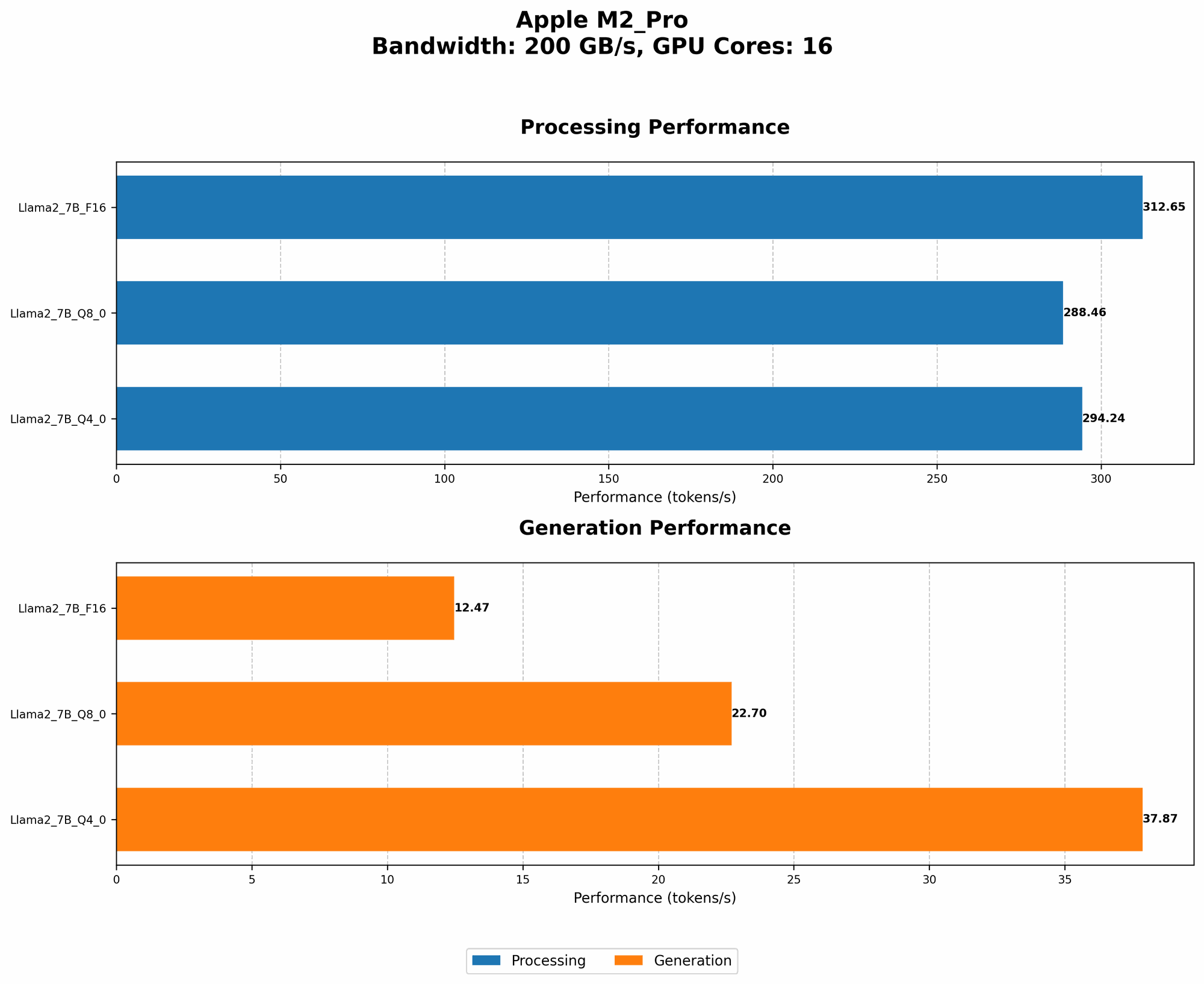
The Apple M2 Pro chip is the heart of many powerful Mac models. It boasts impressive specifications, including a powerful GPU and a dedicated Neural Engine. But is it powerful enough to handle the demands of large LLMs?
To answer this question, we'll focus on the M2 Pro's GPU, which is the primary engine responsible for processing the complex computations required by LLMs. We'll analyze the performance of the M2 Pro using benchmark data from llama.cpp.
The M2 Pro's GPU: What Makes It Tick?
Let's break down the M2 Pro's GPU. Think of it as the brain of the machine, processing the intricate details of LLMs:
- GPU Cores: The M2 Pro comes with 19 GPU cores. These cores are like little processors working together to handle the math-heavy processes involved in running LLMs.
- Bandwidth: The M2 Pro offers a memory bandwidth of 200 GB/s. Imagine this as a superhighway connecting the GPU to the rest of the system, allowing data to flow smoothly for fast processing.
Benchmarking the M2 Pro: Llama 2 Performance
Now let's dive into the heart of the article - the benchmark data!
We'll focus on Llama 2, a popular open-source LLM, and examine its performance on the M2 Pro.
Note: We don't have benchmark data for other LLMs like Stable Diffusion or GPT-3.
Quantization: Making LLMs More Efficient
Before we delve into the numbers, let's understand a crucial concept: quantization in LLMs. Think of this as a clever trick to make LLMs lighter and faster.
Here's the analogy: Imagine you are storing a recipe. You could store it with super precise measurements - like "exactly 2.583 ounces of flour" - which would take up a lot of space. But you could also use approximations - like "about 2.5 ounces of flour" - which saves space and is still useful.
Similarly in LLMs, quantization reduces the size of the model by using fewer bits to represent numbers. It's like shrinking the recipe file without losing much of the essential flavors.
M2 Pro Performance with Llama 2
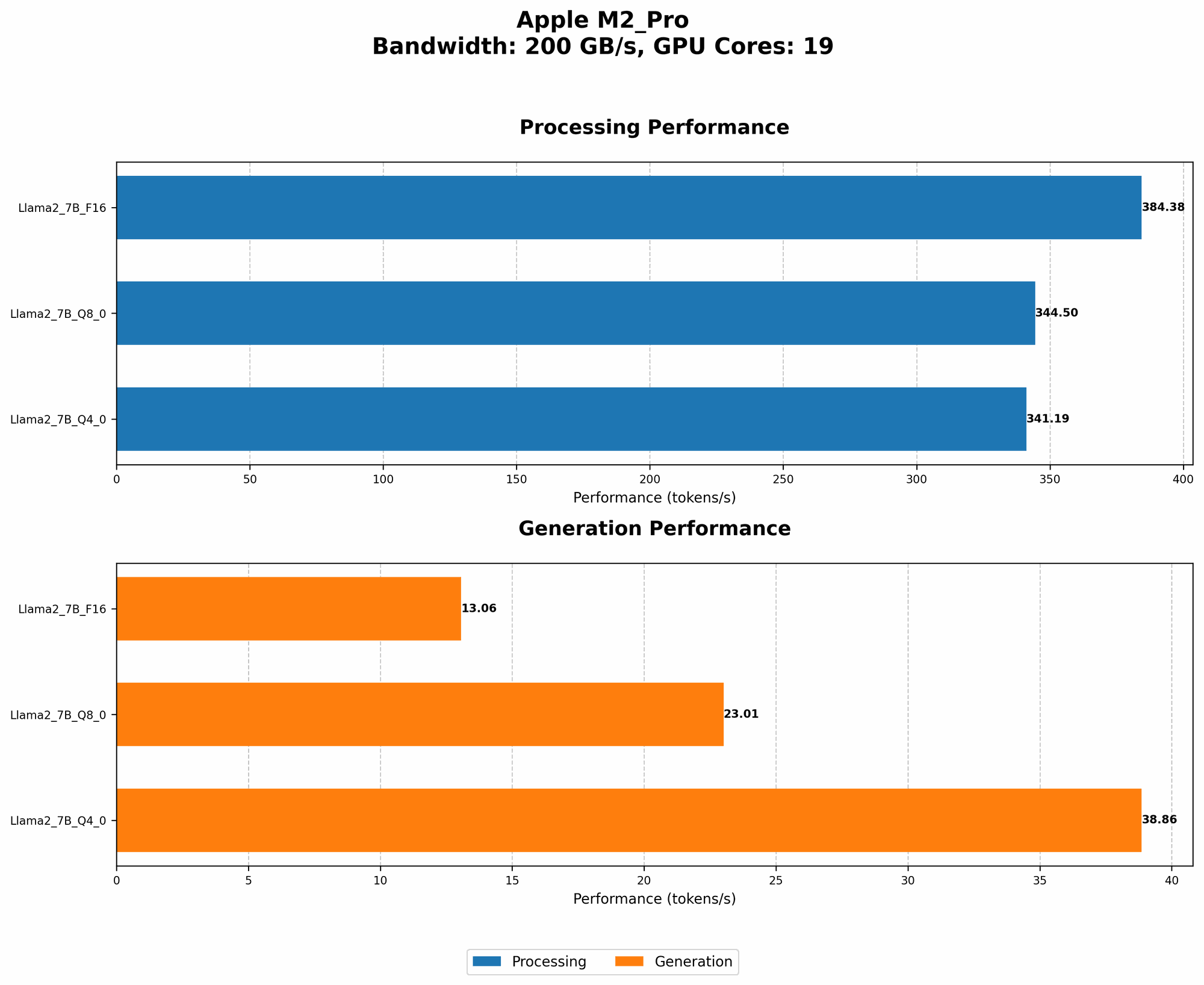
Here's a breakdown of Llama 2 performance on the M2 Pro, using different quantization levels:
| Configuration | Processing (tokens/second) | Generation (tokens/second) |
|---|---|---|
| Llama 2 7B F16 (FP16) | 384.38 | 13.06 |
| Llama 2 7B Q8_0 (Quantized 8-bit) | 344.5 | 23.01 |
| Llama 2 7B Q4_0 (Quantized 4-bit) | 341.19 | 38.86 |
Key Observations:
- M2 Pro handles Llama 2 quite well, achieving high token processing speeds, even for smaller models.
- F16 (FP16) mode: This mode leverages the M2 Pro's GPU to its full potential, achieving the highest processing speeds. However, it comes at the cost of lower generation speeds.
- Quantization: As expected, quantization reduces the size of the model, enabling better efficiency with lower processing speeds and an increase in generation speed. This can be a good trade-off, especially when you need to run LLMs on devices with limited memory.
Comparison of M2 Pro and Other Devices
We don't have data for other devices.
M2 Pro Limitations: Potential for Performance Bottlenecks
While the M2 Pro demonstrates solid performance with Llama 2, it's important to acknowledge potential limitations:
- Memory: Large models like LLMs can be memory-hungry. The M2 Pro's onboard memory might not be sufficient for very large models, especially when using higher-precision settings like F16.
- Cooling: Heavy workloads can make the M2 Pro run hot. Ensure proper cooling to avoid throttling, which can impact performance.
Conclusion: Is the M2 Pro a Good Choice for LLMs?
The Apple M2 Pro is a capable chip that can handle many LLMs efficiently, especially when using quantization strategies. However, it's crucial to consider your specific needs and the size of the LLM you wish to run. If you're working with large models that demand high precision, you might need a device with more memory or a more powerful GPU.
FAQ: LLMs, Devices, and More
1. What is quantization?
Quantization is a technique used to reduce the size of LLMs. It involves using fewer bits to represent numbers, which can make the model smaller and faster.
2. How do I run LLMs on my M2 Pro Mac?
Several tools are available for running LLMs locally. Popular options include:
- llama.cpp: An open-source library that allows you to run LLMs on your CPU or GPU.
- GPT-NeoX: A library designed for efficient inference of large LLMs.
- Hugging Face Transformers: A library for easily importing and running pre-trained models.
3. Can I run Stable Diffusion on my M2 Pro?
We don't have data for Stable Diffusion.
4. How does the M2 Pro compare to other chips for LLMs?
We don't have data for other devices.
Keywords
Large Language Models, LLM, Apple M2 Pro, Llama 2, GPU, Quantization, F16, Q8, Q4, Performance, Benchmark, Processing Speed, Generation Speed, Local Inference, Machine Learning, AI, Deep Learning, Token, CPU, Memory, Bandwidth, Cooling, Throttling.